CtrlOps 1.0: Audit, Manage, and Deploy Your Servers with AI

CtrlOps 1.0 is an all-in-one, locally-run server management hub for security auditing, access control, log search, and app deployment.
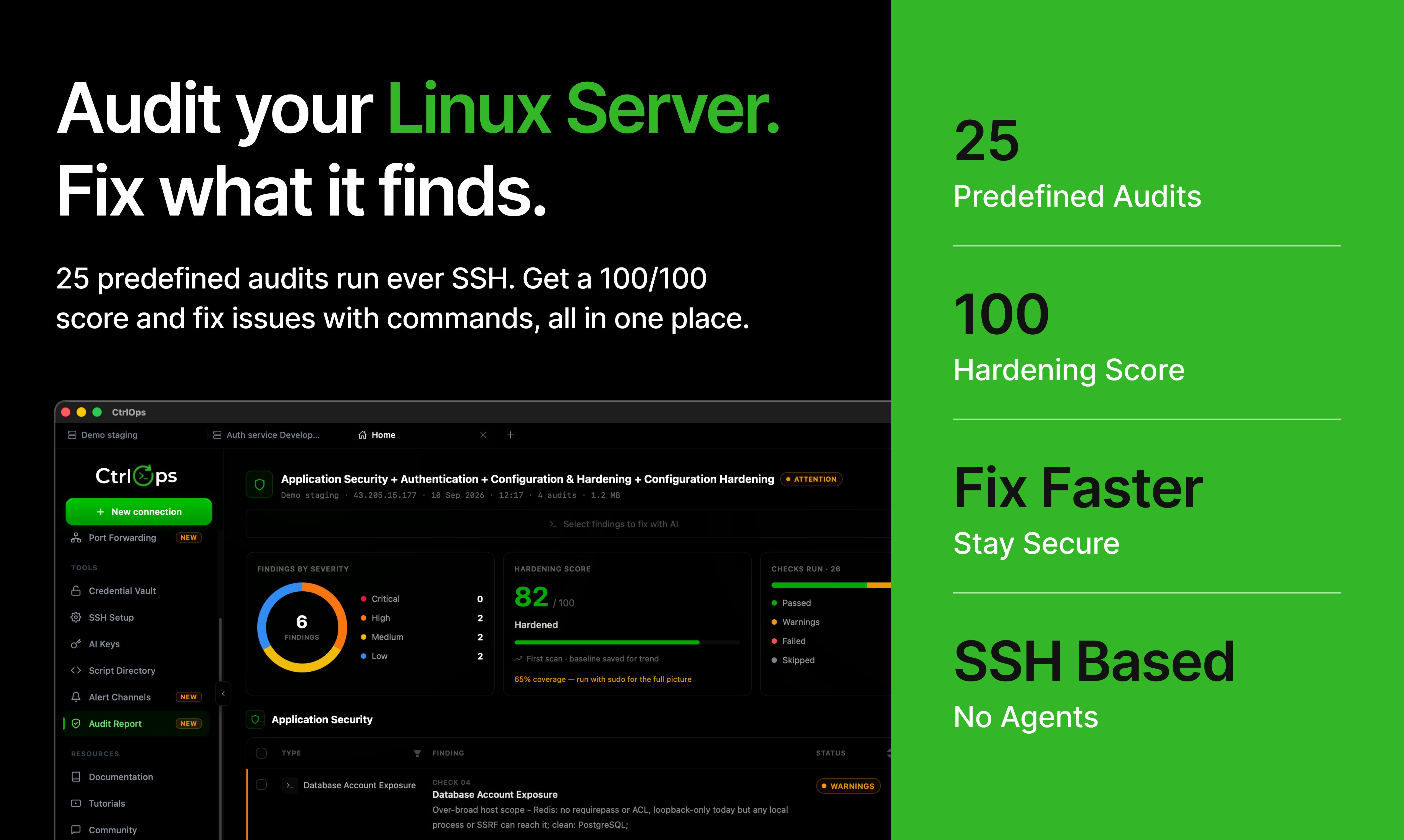
CtrlOps 1.0 targets the core pain points of small and mid-sized ops teams: sprawling permissions and fragmented tooling. It delivers a 25-check security hardening score with a PDF audit report, provides direct remediation commands for every issue found, and lets admins visualize server access and revoke a user's permissions across an entire cluster in one click. It also enables log searching without SSH and rapid app deployment from GitHub. Its key differentiator is a "100% local" security promise — SSH keys and sensitive credentials never leave the user's machine, eliminating the third-party trust risk of cloud SaaS platforms. Its value isn't in any single innovation, but in consolidating scattered ops workflows into one ready-to-use interface — a proposition validated by 139 upvotes and a #4 ranking on Product Hunt.
The Server Management Problem: Do You Really Know Who Has Access?
For many DevOps and engineering teams, there's an uncomfortable truth: as server infrastructure grows, access permissions become increasingly murky. Who received an SSH key, and when? Has a former employee's account been fully removed? These questions tend to surface only after a security incident has already occurred.
CtrlOps 1.0, which debuted at #4 on Product Hunt, is built specifically around this pain point. Its positioning is refreshingly direct — "Your servers, audited, managed, and deployed with AI." The tool aims to consolidate three tasks that typically require scattered utilities and extensive terminal work — security auditing, access management, and application deployment — into a single unified interface.
Core Features: 25 Security Checks and One-Click Access Revocation
CtrlOps's standout feature is its security hardening scoring system. According to the official description, it runs 25 checks to generate a hardening score, then produces a PDF audit report. More practically, for every issue it surfaces, it provides a direct remediation command — so users aren't left staring at a wall of alerts with no clear next step.
Access visualization is another highlight. Admins can clearly see who has login access to each server, and when needed, "revoke someone's access from an entire server cluster in one click." This kind of bulk operation capability significantly reduces the risk of human error and oversight for teams managing large-scale infrastructure.
Role Assignment Without Touching a Terminal
Traditionally, assigning user roles and access levels means manually editing config files, running commands, and restarting services. CtrlOps claims you can assign any role or permission level "without touching a terminal." This lowers the barrier considerably, allowing team members who aren't comfortable with the command line to participate in infrastructure management.
Log Search and Application Deployment
Beyond security and permissions, CtrlOps also covers two high-frequency scenarios in day-to-day operations.
On the logging side, it promises that "every log file can be found and searched, no SSH required." For engineers troubleshooting production issues, being able to search logs directly in a GUI — rather than SSHing into servers one by one to run grep — is a genuine productivity gain.
On the deployment side, it supports deploying any application from GitHub "in minutes." This brings some CI/CD capabilities directly into the tool itself, allowing small teams to ship applications quickly without setting up a full deployment pipeline.
The "search logs without SSH" feature raises an interesting implementation question: how does the tool retrieve remote file contents without an interactive SSH session? Common approaches include pulling log files to local storage via SFTP/SCP before searching, running a pre-installed agent on the target server to stream logs in real time, or executing non-interactive SSH commands (
ssh host 'grep ... /var/log/...') and returning the results. CtrlOps hasn't publicly disclosed its specific implementation, but "no SSH required" typically means users don't need to open a terminal — the underlying transport may still use the SSH protocol. For compliance-sensitive teams, understanding the actual data transmission path and whether logs are persisted locally remains important. As for GitHub-based deployment, it's fundamentally a wrapper aroundgit pullplus a build script — ideal for fast iteration in small teams, but limited in scenarios requiring canary releases or rollback strategies.
A Local-First Security Promise
For a tool centered on security auditing, the tool's own security posture is especially critical. CtrlOps emphasizes that it "runs 100% locally" and that "your credentials never leave your machine."
This deserves to be taken seriously. Many cloud-based ops platforms require users to upload server credentials to third-party servers, which itself creates a new attack surface. CtrlOps's local-first architecture means sensitive SSH keys and access credentials always remain in the user's hands — a trust model that's far easier for security-conscious teams to accept.
From a security architecture perspective, "local-first" means the tool's runtime process and data storage live entirely on the user's own machine or internal network, with no dependency on the vendor's cloud servers for relay or storage. Compare this to SaaS-based ops platforms (such as early cloud versions of Rundeck, or some cloud-hosted bastion hosts), which require uploading SSH private keys or cloud account access keys to a third party — meaning a vendor-side data breach would expose the user's entire server infrastructure. Local-first architecture shrinks the attack surface down to the user's own endpoint security perimeter, aligning with the Zero Trust principle of "never implicitly trust third parties." The tradeoff, of course, is that updates, collaboration, and cross-device access become more constrained — teams need to weigh convenience against security accordingly.
A Brief Assessment: Integration Value Over Single-Point Innovation
Every feature CtrlOps offers — security scanning, access management, log search, GitHub deployment — has been done before by dedicated tools. Its real value lies in consolidation: bringing these scattered operational workflows into a single interface, paired with a local-first security commitment, to give small and mid-sized teams a ready-to-use server management hub.
With 139 upvotes, 19 comments, and a #4 ranking on Product Hunt, it's clear there's genuine market demand for this kind of "all-in-one server management" solution. For teams that want audit and compliance capabilities without handing their credentials to a cloud platform, CtrlOps is worth a try. That said, the depth of those 25 checks, the specific role AI plays in the workflow, and real-world stability are all things that will need to be validated in a production environment.
Related articles

Running Claude Code and Codex in Parallel: A Practical git worktree Guide
A tested workflow for running Claude Code and Codex in parallel on one repo: git worktree allocation, common pitfalls, cross-agent diff review, multi-account switching for usage limits, plus a verification checklist.

GEO Tools Explained: Get Your Content Cited by AI Answer Engines
GEO tools audit and improve how content gets cited by AI answer engines. This guide covers the five-task GEO toolchain, citation patterns, a 20-minute audit, and the citation share vs. conversion trade-off.

How to Choose the Best Generative Engine Optimization Platform: A Full Breakdown of Answer Engine Citation Mechanics
A deep dive into GEO platform selection: how answer engines choose citation sources, a comparison of mainstream GEO tools, a real case of winning a first citation in three weeks, and why to measure share of citations rather than mentions.