Cursor 1.0 Released: BugBot Code Review Hands-On & Comparison of Three AI Review Tools

Cursor 1.0 launches with BugBot, compared against three leading AI code review tools
Cursor jumped from 0.51 to 1.0, introducing BugBot AI code review, memory features, one-click MCP setup, native Jupyter Notebook support, and Background Agent. This article breaks down BugBot's workflow (automatic GitHub PR review with one-click fix loop) and compares it against the completely free Gemini Code Assist that covers all PRs, and CodeRabbit which supports review without creating a PR, recommending developers combine tools based on their needs.
Cursor jumped straight from 0.51 to version 1.0, bringing major updates including BugBot AI code review, memory features, native Jupyter Notebook support, and more. This article focuses on dissecting BugBot's workflow and real-world performance, then puts it head-to-head with Gemini Code Assist and CodeRabbit to help you find the best AI code review solution for your needs.
Cursor 1.0 Key Updates Overview
Cursor 1.0's release was quite dramatic — the team skipped the conventional version number progression and jumped directly from 0.51 to 1.0, showing their confidence in this update. In software engineering, this kind of version jump typically follows Semantic Versioning conventions — 1.0 signifies that the software has officially reached production-ready status with stable APIs and core features. This practice isn't uncommon in the developer tools space; for example, the Rust language also released 1.0 directly after a long period of 0.x iterations to signal maturity. Here are the key features in this release:
- BugBot Code Review: Automatically reviews GitHub PRs and catches potential bugs
- Memory Feature: A context memory mechanism similar to Windsurf
- One-Click MCP Setup: Official pre-configured MCP toolsets
- Jupyter Notebook Support: Data analysis directly within the editor
- Background Agent General Availability: Async task processing similar to OpenAI Codex
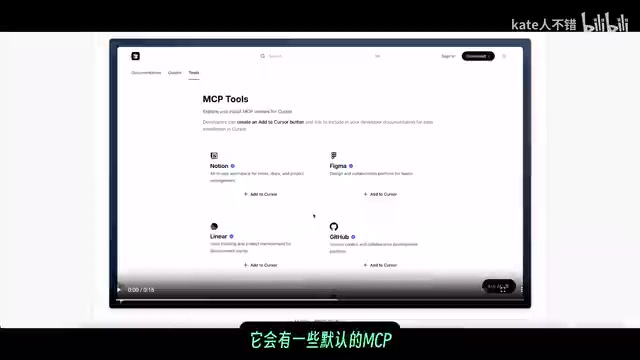
MCP (Model Context Protocol) is an open protocol introduced by Anthropic in late 2024, designed to standardize communication between AI models and external tools/data sources. It's like a USB-C port for the AI world, allowing different AI applications to connect to databases, APIs, file systems, and other resources through a unified protocol. Cursor's one-click MCP setup means developers can quickly integrate various external tools without manually writing configuration files.
Background Agent is a mechanism that allows AI to independently execute coding tasks in the background without requiring developers to wait for results in real-time. OpenAI's Codex is a representative product of this paradigm — it can autonomously complete multi-step tasks like code writing, test running, and bug fixing in a sandboxed environment. Cursor's general availability of Background Agent means users can initiate multiple coding tasks simultaneously, continuing other work while waiting for AI to complete complex refactoring, significantly boosting development efficiency.
On the UI front, Cursor 1.0 has noticeable changes compared to version 0.50. The new web Dashboard displays user activity details, and Cmd+E quickly opens the Background Agent control panel. Additionally, the Add Link and web search features now support parsing PDF document content, and parallel tool calls improve overall response speed.
Regarding models, Gemini 2.0 Flash now supports Max mode. Gemini 2.0 Flash is a lightweight multimodal model from Google DeepMind optimized for low-latency scenarios, significantly reducing response time and computational cost while maintaining high reasoning quality. Max mode in Cursor is an enhanced reasoning mode that allows the model to process larger context windows and perform deeper code analysis, but consumes more API quota. Gemini 2.0 Flash supporting Max mode means developers can access stronger reasoning capabilities when deep analysis is needed, while switching to standard mode for daily use to conserve quota. Cursor also offers several free models, including Gemini 2.0 Flash, DeepSeekAd V3, and Grok 3 Mini (in non-Max mode) — worth noting for budget-conscious developers.
BugBot: Cursor 1.0's AI Code Review Powerhouse
How BugBot Works and Configuration
BugBot is one of Cursor 1.0's most anticipated new features. Its workflow is straightforward: it automatically reviews your GitHub Pull Requests and leaves comments directly on the PR when potential bugs are found.
Pull Request (PR) code review is a core quality assurance step in modern software development. Traditional manual code reviews take an average of 4-8 hours of wait time, and review quality is highly dependent on the reviewer's experience and energy levels. Research shows that human reviewers' defect detection rates drop significantly after reviewing more than 400 lines of code continuously. AI code review tools emerged precisely to address this bottleneck — they can tirelessly scan code line by line, catching boundary conditions, null pointer references, and concurrency safety issues that humans easily overlook.
What makes BugBot even more thoughtful is that comments include a "Fix in Cursor" button — clicking it jumps back to the editor with pre-filled fix prompts, helping you quickly resolve issues. This closed-loop experience from problem discovery to problem resolution is BugBot's core competitive advantage over other review tools.
The configuration process is also simple: go to Cursor settings, find "Integrations" in the left sidebar, select Connect GitHub, and follow the installation flow to complete the app configuration. Once connected, you can customize the following settings:
- Budget Control: Set a usage cap for BugBot
- Trigger Method: Option for manual-only triggers (by commenting
@bugbot runon a PR) - Run Frequency: Run only once per PR even if new commits are added
- Silent Mode: Don't post comments when no issues are found

BugBot Pricing and Usage Limits
BugBot offers a 7-day free trial starting from the moment setup is complete. After that, it uses the same pricing as Max mode. An important note: BugBot currently only works on PRs you personally submit, which is a key distinction from other code review tools. This means in team collaboration scenarios, BugBot cannot review code changes submitted by other team members. For teams needing comprehensive code review coverage, additional tools may be needed. The Cursor team says they've been using BugBot internally for months and it has proven its value in catching subtle bugs.
Head-to-Head: Three AI Code Review Tools Compared
CodeRabbit: Review Code Without Creating a PR
CodeRabbit is currently one of the most popular code review plugins on the market, even featured on OpenAI's official website. It uses OpenAI's O3, O3-mini, and GPT-4.1 models. Key features include:
- Line-by-line code review and incremental temporal review
- Smart review skipping: Automatically identifies content that doesn't need review
- Codebase awareness: Understands overall project context
- Automatic report generation
Incremental Review is one of CodeRabbit's standout technical features. Instead of re-reviewing the entire PR with every code change, it only focuses on lines added or modified since the last review. This mechanism borrows from the differential scanning approach of traditional static analysis tools but combines it with LLM semantic understanding, precisely locating newly introduced issues while understanding context and avoiding redundant reports of known issues — significantly reducing review noise.
CodeRabbit's biggest advantage is that you don't need to create a PR first to perform code review directly in Cursor, which is extremely helpful for early-stage quality control in the development process. Traditional code review happens late in development (at the PR stage), while CodeRabbit shifts review earlier to the coding phase, aligning with the "Shift Left Testing" philosophy — the earlier a problem is found, the lower the cost to fix it. It offers a free trial and some free usage quota.
Gemini Code Assist: The Completely Free All-Rounder
While Gemini Code Assist's in-IDE performance wasn't previously outstanding, its GitHub integration capabilities are quite powerful.
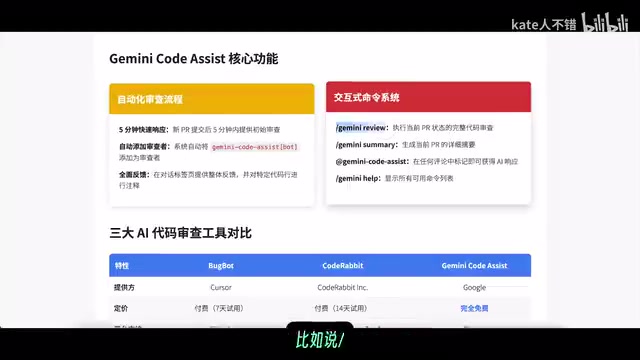
Gemini Code Assist's core advantages include:
- Fast response time: In testing, initial reviews arrive about two minutes after a new PR is submitted
- Interactive commands: Supports directives like
/gemini review,/gemini summary - Broad review scope: Reviews not only your own PRs but also all PRs submitted to you by others
- Completely free: Gemini Code Assist is currently an entirely free service
Unlike BugBot which only targets personal PRs, Gemini Code Assist reviews all PRs submitted to your repository, including those submitted via OpenAI Codex. It sends a summary email first, followed by a detailed review email, with all records preserved on GitHub. This full-coverage review strategy is particularly valuable for open-source project maintainers — when external contributors submit PRs, Gemini Code Assist can provide a first pass of automated quality screening before human review.
Claude Code: Now Available to PRO Entry-Level Users
Worth mentioning is that Claude Code's GitHub Actions can also achieve automated code review, PR management, and issue triage. GitHub Actions is GitHub's CI/CD (Continuous Integration/Continuous Deployment) automation platform that allows developers to define workflows triggered by events like code pushes or PR creation through YAML configuration files. Claude Code's GitHub Actions integration essentially embeds Anthropic's Claude model as an automated review node in the development pipeline. When new PRs or Issues are created, GitHub Actions automatically calls Claude Code for analysis and posts results as comments on the corresponding PR or Issue page, achieving a truly automated code review loop.
Starting with the latest update, $20/month PRO entry-level users can now use Claude Code (previously limited to higher-tier users). It supports the Sonnet 4 model but not Opus 4. Users can directly @claude in Issue comments to have it analyze problems and fix bugs, or request help in PR comments.
BugBot vs CodeRabbit vs Gemini Code Assist: Summary Comparison
| Feature | BugBot | CodeRabbit | Gemini Code Assist |
|---|---|---|---|
| Price | Same as Max mode | Free tier + paid | Completely free |
| Review Scope | Personal PRs only | In-project code | All PRs |
| Requires PR | Yes | No | Yes |
| Response Speed | Fairly fast | Fast | ~2 minutes |
| One-Click Fix | ✅ Fix in Cursor | ✅ In-IDE fix | ❌ |
Cursor Jupyter Notebook Integration in Practice
Cursor 1.0's native Jupyter Notebook support is an extremely practical update. Jupyter Notebook is the most widely used interactive computing environment in data science and machine learning, with over 10 million users worldwide. Its core advantage lies in integrating code, visualization output, and documentation in a single interface, supporting cell-by-cell code execution with immediate results. Previously, data scientists wanting to use Cursor's AI capabilities often needed to switch back and forth between Cursor and JupyterLab, or rely on VS Code's Notebook extension. Cursor 1.0's native support eliminates this friction, embedding AI-assisted coding capabilities directly into data analysis workflows. Currently, this feature initially supports only Sonnet models.
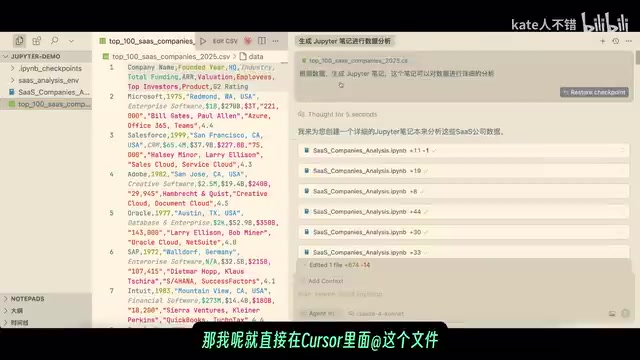
As a practical example: using a "Top 100 SaaS Companies" dataset from Kaggle, you can add the file directly in Cursor and request analysis notes. Cursor automatically completed the following work:
- Environment Setup: Automatically created a virtual environment and installed necessary dependencies (such as pandas, matplotlib, seaborn, and other common data analysis libraries)
- Data Loading & Cleaning: Imported libraries, loaded data, printed the first five rows, and performed data preprocessing (including missing value handling and data type conversion)
- Descriptive Statistics: Generated data overview and statistical summaries
- Visual Analysis: Industry distribution charts, geographic distribution analysis, founding year trends, etc.
- Analysis Summary: Automatically generated comprehensive analysis conclusions
Throughout the process, Cursor generated substantial code and rich charts — even though the raw data only had a hundred rows with few columns, the analysis was remarkably thorough. This end-to-end automated analysis capability is particularly valuable for scenarios requiring rapid Exploratory Data Analysis (EDA). However, there's currently a minor issue — some chart legends with Chinese characters display incompatibly, requiring manual font configuration adjustments (e.g., configuring SimHei or PingFang SC fonts in matplotlib).
Conclusion: How to Choose the Right AI Code Review Tool
Cursor 1.0's release marks a new phase for AI programming tools. While BugBot currently only supports personal PR reviews, the "Fix in Cursor" closed-loop experience is remarkably smooth. If you need more comprehensive code review coverage, the completely free Gemini Code Assist is currently the best value option. CodeRabbit stands out uniquely with its ability to review code without requiring a PR. Native Jupyter Notebook integration significantly boosts Cursor's competitiveness in data analysis scenarios.
Developers are advised to combine these tools based on their specific needs to build the AI-assisted development workflow that works best for them. For example, a viable combination would be: using CodeRabbit for real-time review during the coding phase, then enabling both BugBot and Gemini Code Assist during the PR phase for double coverage — gaining BugBot's one-click fix convenience while using Gemini Code Assist to cover all team members' submissions.
Related articles
 Product Reviews
The Programmer's Desk Setup Guide: Building a Workspace That Feels Like Home
Discover how programmers build productive, comfortable workspaces. From multi-monitor setups to ergonomic design, explore the desk philosophy that drives focus and flow.
 Product Reviews
Qoder vs Cursor Real-World Comparison: Which $20/Month AI IDE Is Better?
Hands-on comparison of Qoder vs Cursor AI IDEs: Agent autonomy, human interaction count, and architecture decisions. Qoder needed only 2 interactions vs Cursor's 8.
 Product Reviews
Cursor Cloud Agent Demo: Eliminating Bottlenecks Across the Entire Software Development Lifecycle
Deep analysis of Cursor's Cloud Agent demo showing how cloud VMs, automated test artifacts, and a full-chain control plane systematically eliminate human bottlenecks across the software development lifecycle.