Cursor AI Programming: A Step-by-Step Guide from Beginner to Advanced

A guide to Cursor's three-stage learning path and a cross-tool comparison of mainstream AI programming tools.
Based on a Bilibili creator's Cursor tutorial series, this article maps out a learning path from beginner to advanced. It reviews the evolution of AI programming, compares tools like GitHub Copilot, Cursor, Windsurf, Trae, and Tongyi Lingma, divides the course into three stages—quick start and configuration, advanced skills, and hands-on productivity scenarios—and offers judgments for beginners on tool choice and efficiency gains.
Cursor AI Programming: A Step-by-Step Guide from Beginner to Advanced
AI programming tools are reshaping how developers work, and Cursor, one of the most talked-about AI IDEs today, has become a top choice for many developers thanks to its code generation, natural-language editing, and multi-file collaboration capabilities. In a series of tutorials on Bilibili, a content creator lays out a systematic three-stage curriculum: quick start, advanced skills, and productivity scenarios. Drawing on that framework and adding a cross-tool comparison, this article maps out a practical learning path.
1. The Evolution of AI Programming and Cursor's Positioning
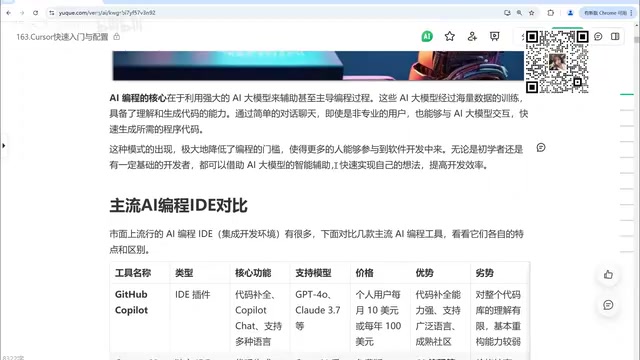
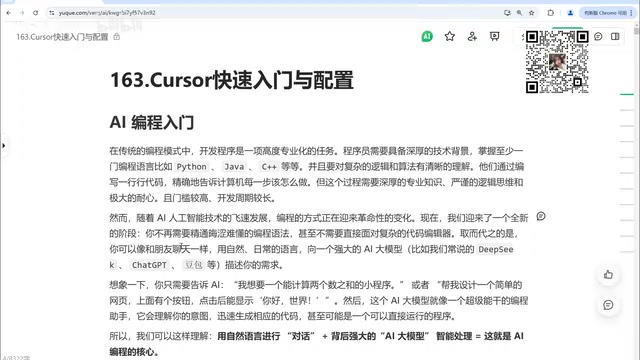
Traditional programming is a highly specialized task. Developers need to master at least one language such as Python, Java, or C++, and have a clear understanding of complex logic and algorithms. Writing line after line of code to precisely instruct a computer is rigorous, but it comes with a high barrier to entry and a long development cycle.
As large models have grown more capable, the way we code is undergoing a revolutionary change. Today, developers more or less turn to tools like DeepSeekAd, ChatGPT, and Doubao to ask questions, generate code snippets, or get solutions. According to the creator's observations, in the past, having AI generate a piece of program code was just simple Q&A; now users expect to use natural-language conversation, combined with powerful AI models and intelligent processing behind the scenes, to make AI a true programming assistant.
The core value of this model is efficiency: projects that once took one or two weeks—or even one or two months—can potentially be shortened to a week or less with the help of AI tools. More importantly, natural-language interaction dramatically lowers the barrier to programming, allowing non-professional users to participate in software development.
Large Models and Code Generation: Tools like DeepSeek and ChatGPT mentioned in the article are powered by large language models (LLMs). These models are pretrained on massive amounts of code and text, and can predict the next token based on context to generate code, explain logic, or fix errors. Code generation quality depends on model size, training data quality, and context window size—the larger the window, the more code the model can "see," and the stronger its cross-file understanding. Current mainstream models are quite reliable at completing a single line of code, but complex refactoring and long-range logical consistency still require human review.
2. A Cross-Tool Comparison of Mainstream AI Programming Tools
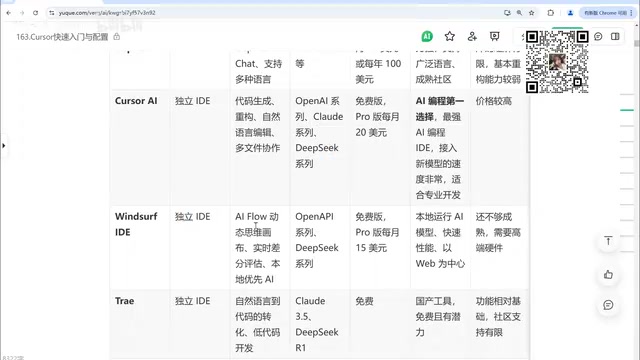
Before choosing Cursor, it's worth understanding how it differs from other tools. The creator compared several products in the tutorial; here are the key takeaways:
GitHub Copilot: The Veteran Plugin Player
Copilot exists as an IDE plugin and can be integrated into mainstream editors such as VS Code and the JetBrains suite. Its core features are code completion and chat-based code modification, supporting models like GPT-4 and Claude 3.5. Its strengths lie in strong code completion, broad language support, and a mature community; its limitations are limited understanding of the entire codebase, relatively weak refactoring capabilities, and a paid subscription requirement.
Cursor: The Preferred Choice, but Pricey
Cursor is currently a preferred choice in the AI programming space, performing well in code generation, refactoring, natural-language editing, multi-file collaboration, and knowledge bases. The creator also notes frankly that it is relatively expensive, making it suitable for users with high demands on development efficiency and sufficient budget.
Compose vs. Chat: Cursor's Chat mode is a sidebar conversation, suitable for asking questions, explaining code, and making local edits; Compose mode supports multi-file editing and task-level instructions—after the user describes a requirement, the AI can generate or modify code across files and show diffs. Compose is closer to "delegating a task," relies more heavily on codebase context, and is more likely to produce large-scale changes that need review. Understanding the boundary between the two is the foundation for "advanced conversation techniques" in the third stage of advanced skills.
Windsurf: A Differentiated Path as a Standalone IDE
Windsurf is a standalone IDE whose core selling points are the AI Flow workflow, a dynamic thinking canvas, and real-time differential evaluation, using a local-first approach to AI that makes it fast. However, its features are not yet fully mature, and it has high hardware requirements.
Domestic Tools: Entering with a Free Strategy
Trae recently released a new version with noticeably improved intelligence, supporting models like Claude 3.5 and DeepSeek R1, and is currently free. Tongyi Lingma is likewise free and easy to use. Domestic tools generally adopt a free strategy, and their core code-writing and code-modifying features are basically complete, but they are relatively limited in the completeness of supporting features and community support—for example, some of Cursor's advanced features may be missing from free versions.
In addition, plugin-style tools like Kodu can support mainstream IDEs such as VS Code, IDEA, and PyCharm. When choosing, weigh completion capability, refactoring capability, price, and ecosystem maturity.
3. A Three-Stage Learning Path
The creator divides the course into three chapters, covering the full journey from configuration to hands-on practice.
Stage 1: Quick Start and Configuration
This stage solves the problem of "getting it working." It covers: comparisons between Cursor and other AI programming tools, basic information and installation setup, interface configuration, model invocation settings, the coding workflow based on Cursor, common commands, and the use of Chat and Compose features. For beginners, getting model access and the interface logic straight first prevents snags later on.
Stage 2: Advanced Skills
Moving into the productivity stage, the focus shifts to intelligent completion and code generation, terminal command-line tool integration, the @ mention annotation feature, the use of Cursor Rules, and advanced conversation techniques and development approaches. These capabilities determine whether you can use Cursor as a "collaborative development partner" rather than just "an editor that can autocomplete."
@ Mentions and Cursor Rules: @ mentions let you reference specific files, folders, code symbols, or documents in a conversation, injecting precise context into the prompt and preventing the model from "guessing blindly" in a large codebase. Cursor Rules are project-level or user-level rule files (such as .cursorrules) used to fix code style, tech stack constraints, and review requirements, making AI output more compliant with team standards. Combined, the two can turn scattered conversational efficiency gains into reusable engineering configurations.
Stage 3: Hands-On Productivity Scenarios
The hands-on chapter covers configuring common productivity features (such as YOLO mode), code completion attempts, web page generation, keyboard shortcuts, and scenarios such as literature reading, video topic selection, and outline writing. The creator also mentions combining DeepSeek with Cursor for research and data analysis visualization, as well as rapid development of personal websites.
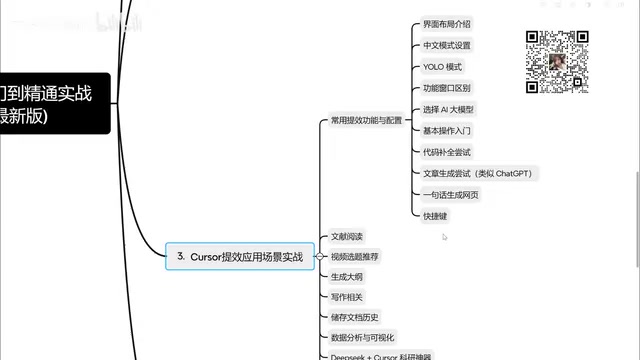
YOLO Mode: YOLO (You Only Live Once) mode is a toggle in Cursor that allows the AI to automatically execute terminal commands or apply changes without confirming each one. It's suitable for accelerating iteration in controlled environments (such as a local sandbox with changes already committed to version control), but it amplifies the risk of mistakes. It's recommended to enable it only when task boundaries are clear and code has been backed up, and to pair it with version control rollback—this is the concrete embodiment of the article's emphasis on "the habit of reviewing AI output."
4. A Few Judgments for Beginners
From the tool comparison and course planning, a few judgments are worth considering. Users who are budget-sensitive or new to AI programming can start with free domestic tools or Trae, get familiar with the rhythm of natural-language-driven development, and then decide whether to migrate to Cursor. If your daily workflow relies heavily on multi-file refactoring and codebase understanding, Cursor's paid cost may be more easily offset by efficiency gains. Beyond tool choice, prompt communication skills and the habit of reviewing AI output are what determine the ceiling on efficiency gains—the creator also emphasizes that efficiency gains are built on good communication with AI and continuous refinement of prompts.
The course itself will be continuously updated, with more scenarios to be added. For developers who want to systematically master Cursor, progressing in the order of "configuration—advanced—hands-on" is more effective than collecting tips piecemeal.
One-line Summary
A guide to Cursor's three-stage learning path and a cross-tool comparison of mainstream AI programming tools.
Paragraph Summary
Based on a Bilibili creator's Cursor tutorial series, this article maps out a learning path from beginner to advanced. It first reviews the evolution of AI programming, noting that natural-language interaction is dramatically lowering the development barrier; it then compares tools such as GitHub Copilot, Cursor, Windsurf, Trae, and Tongyi Lingma, analyzing their strengths and weaknesses in completion, refactoring, price, and ecosystem; it then divides the course into three stages—quick start and configuration, advanced skills, and hands-on productivity scenarios—and outlines the core content of each; finally, it offers judgments for beginners: budget-sensitive users should start with free tools, those who rely heavily on multi-file refactoring may consider paying for Cursor, and the ceiling on efficiency gains depends on prompt communication and output review skills.
Related articles

DeepCell: One-Click AI Generation of Documents, Spreadsheets, and Slides
DeepCell tops Product Hunt with one-click generation of documents, spreadsheets, and slides, using the .deepcell format for linked updates, designed for System 2 tasks like modeling and sales reviews.

Doneas: 15-Minute Daily Accountability Calls That Keep Indie Developers From Procrastinating
Doneas is a daily accountability tool for indie developers: plan tasks on Monday, join a 15-minute call with five builders each day, and log deliveries on a public progress page. This article analyzes its core mechanics, effectiveness, and potential issues around retention and matching.

Fastlane 2.0: Fully Automated AI Ad Campaigns, From Creative to Optimization
Fastlane 2.0 is an AI ad automation tool: enter your website and it learns your brand, generates video and image ads, and runs and optimizes them on Meta, TikTok, Instagram, and YouTube.