Cursor Getting Started Guide: How to Choose an AI Coding Tool and Build Your Workflow
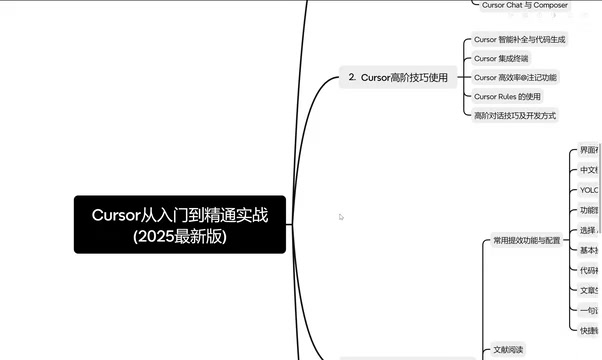
A full breakdown of AI coding tool options and a structured 3-phase Cursor learning roadmap.
This article maps out the AI coding tool landscape and a practical learning path for Cursor. It explains how AI programming shifts the core skill from "mastering languages and algorithms" to "communicating effectively with AI." It compares GitHub Copilot, Cursor, Windsurf, Trae, and domestic tools like Tongyi Lingma across capabilities and use cases, then outlines a three-phase Cursor curriculum: quick setup, advanced context management with @ mentions, and real-world productivity scenarios including YOLO mode and data visualization.
From Traditional Programming to AI Programming: A Revolution in Accessibility
In the traditional development model, programming is a highly specialized discipline. Developers need to master at least one language — Python, Java, or C++ — and have a clear understanding of complex logic and algorithms, writing code line by line to tell the computer exactly what to do. This process is rigorous, the learning curve is steep, and development cycles are long; a project can easily take one to two months from idea to launch.
With the rapid advancement of AI, the way we write code is undergoing a fundamental shift. Almost every developer now uses AI tools to some degree — even those who don't use Cursor will turn to DeepSeek, ChatGPT, or other assistants to ask questions, brainstorm, and generate code snippets. This has become a normalized part of daily work.
At its core, AI programming means using natural language conversation — backed by powerful large language models and intelligent processing — to make AI a genuine development partner, not just a "code snippet generator." The significance of this shift is profound: even non-professional users can now interact with LLMs and rapidly generate functional programs, dramatically lowering the barrier to entry and opening software development to a much wider audience.

From an efficiency standpoint, the ideal outcome is compressing a one-to-two-week project into a single week, or a month's work into a few days. But all of this hinges on one prerequisite: learning how to communicate effectively with AI. How you write prompts and how well you convey your intent are ultimately the variables that determine how much you actually gain.
A Side-by-Side Comparison of Leading AI Coding Tools
Beyond Cursor, there are several other AI coding tools worth knowing about, each with its own strengths in terms of form factor, capabilities, and pricing.
GitHub Copilot: The Veteran Plugin with Strong Code Completion
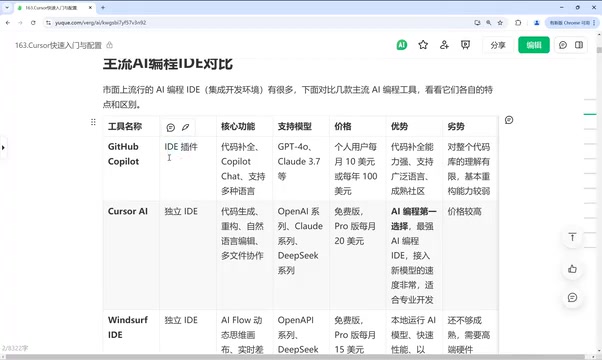
Copilot was one of the earliest tools in this space. It's an IDE plugin that works inside popular environments like IDEA and VS Code. Its core features are code completion and chat-based dialogue, and it can help with code edits while supporting models like GPT-4 and Claude 3.5. Backed by GitHub's mature open-source community, it has strong code comprehension and broad language support. Its main weakness is relatively limited understanding of the full codebase context, making it weaker at large-scale refactoring.
Copilot's completion power comes from its training data — billions of lines of open-source code from GitHub — making it exceptionally smooth at common patterns, standard library calls, and boilerplate generation. It uses an inline completion model: when you pause for a moment in your IDE, Copilot predicts what you're about to type, displayed as gray ghost text that you accept by pressing Tab. This interaction style is low-friction and unobtrusive for experienced developers. The 2023 upgrade to Copilot Chat added sidebar-based conversational support for explaining code, generating test cases, and fixing bugs — but its awareness is largely limited to currently open files, and cross-file global refactoring remains a clear weak point.
Cursor: Currently the Top Recommended Choice
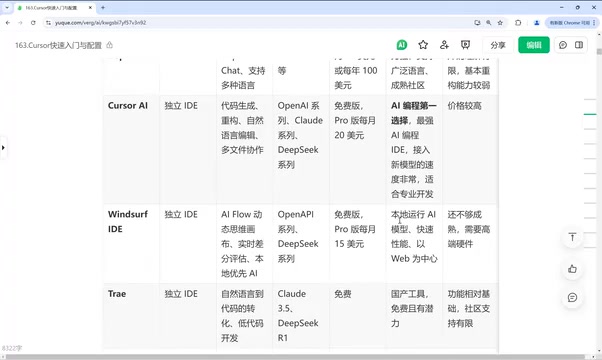
Cursor is currently the leading choice in AI programming. It excels at code generation, refactoring, natural language editing, and multi-file collaboration, delivering a well-rounded overall experience. The trade-off is that it's relatively expensive.
Windsurf: Local-First and Fast
Windsurf is a standalone IDE whose standout features include a dynamic AI workflow canvas, real-time diff evaluation, and a local-first model execution approach — making it notably fast and web-centric. However, its feature set is not yet fully mature, and it demands higher hardware specifications.
Trae and Domestic Chinese Tools: Free Is the Biggest Advantage
Trae recently released a new version that reportedly delivers meaningful improvements in intelligence and overall experience. It supports natural language-driven code transformation and is compatible with models like Claude 3.5 and DeepSeek R1 — and it's currently free to use.
If budget is your primary concern, domestic Chinese AI coding tools are worth prioritizing — tools like Tongyi Lingma, which is also free. These tools generally follow a free model, covering core functions like writing and modifying code, though they're less polished than paid alternatives. For instance, some advanced features that Cursor supports, such as MCP, are not yet available in certain free tools. There's also Codeium, an IDE plugin with support for virtually every major IDE, including VS Code, IDEA, and PyCharm.
How to Plan Your Cursor Learning Path
This curriculum is structured across three progressive phases, which can serve as a reference framework for systematically learning Cursor.
Phase 1: Quick Start and Configuration
This phase covers a comparison of Cursor with other AI coding tools, basic orientation, installation and setup, UI configuration, model invocation settings, and the core coding workflow along with commonly used commands. The key focus is mastering the Chat feature and the Composer feature.
Phase 2: Advanced Skills
This phase covers intelligent completion and code generation, integrated terminal and command-line tooling, effective use of @ mentions and annotations, and advanced conversation techniques and development methodologies. The goal here is enabling AI to understand project context with greater precision.
The @ mention system is a context injection mechanism unique to Cursor and deserves special attention. By typing @filename, @folder, or @codebase in the chat box, you can explicitly inject the contents of specific files or directories into the current conversation's context window. This allows the model to reference exactly what you've specified when answering questions or generating code, rather than relying on vague global search. This mechanism is especially valuable for large projects: when the number of files exceeds the model's per-session token limit, manually scoping the relevant files significantly reduces cases where the model gives off-target responses, while also lowering token consumption and controlling API costs.
Phase 3: Real-World Productivity Scenarios
This phase focuses on practical applications, including YOLO mode, code completion experimentation, webpage generation, and commonly used keyboard shortcuts for productivity. It also extends into content creation use cases like literature review, video topic selection, and outline drafting. Additional topics include combining DeepSeek with Cursor for research and data visualization, as well as rapid personal website development.
YOLO mode (You Only Live Once mode) is an aggressive automation option in Cursor. When enabled, the AI can continuously execute terminal commands, modify multiple files, and install dependencies without requiring confirmation at each step — working autonomously until the entire task goal is complete. This is highly efficient for repetitive work like scaffolding a new project or batch refactoring, but it also raises the risk of irreversible operations — the AI may overwrite files or execute commands with side effects without explicit confirmation. It's recommended to use this mode under version control protection (e.g., Git) and to enable it cautiously in unfamiliar codebases.
Summary
AI programming is transforming "writing code" from a purely technical craft into a high-efficiency collaboration between humans and models. On the tool side: Copilot wins on completion quality and community maturity; Cursor wins on overall experience and multi-file collaboration; Windsurf leads on local execution and speed; Trae and domestic Chinese tools win on being free and accessible. There's no universal right answer for tool selection: budget-conscious users should look at free domestic tools, while those chasing the best experience may find Cursor worth the cost. What truly makes the difference, in the end, isn't the tool itself — it's the user's ability to communicate effectively with AI.
Related articles

LynnReal-Omni: 32B Unified Video Diffusion Model Goes Open Source with Multi-Task Coverage in Four Steps
LynnReal-Omni is a 32B unified video diffusion model on MiniMax H3, covering text-to-video, pose guidance, style transfer, restoration in 4 steps. Flash version generates 540p video in 377ms on one H100.

Anthropic Co-Founder: AI 'Kill Switch' May Need to Be Mandatory by Law
Anthropic's co-founder tells the BBC that AI 'kill switches' may need to be legally mandated. We analyze the industry logic, technical challenges, and the tension between regulation and innovation.

The AI Data Center Boom Is Colliding With Cities Scarred by Heavy Industry
The AI data center boom is clashing with post-industrial communities. Philadelphia's case reveals structural conflicts between AI growth, energy use, water, and environmental justice.