Cursor In-Depth Review: Four Modes + Parallel Agents — Why It Remains the Best AI Coding Tool

Cursor leads AI coding tools with comprehensive features and polished details across all dimensions.
This article comprehensively breaks down Cursor's advantages across mode design, tool capabilities, context management, parallel processing, and detail experience. With four built-in modes (Agent, Plan, Ask, Debug) covering all scenarios, powerful terminal tools and built-in browser closing the development loop, parallel agents/conversations/forks multiplying efficiency, and excellent context management through rules, sub-agents, and conversation compression, Cursor's overall capabilities lead the competition.
After hands-on testing of mainstream AI coding tools including Claude Code, Windsurf, Trae, and OpenCode, Cursor still holds its position in the top tier of AI coding agents thanks to its comprehensive feature design and polished interaction details. This article breaks down exactly where Cursor excels across multiple dimensions including mode design, tool capabilities, and context management.
Four Modes Covering Every Scenario
Cursor comes with four built-in working modes, each corresponding to different development scenarios — one of its core design differentiators from most AI coding tools.
Agent Mode is the most frequently used mode in daily development. In this mode, Cursor can perform code searches, file edits, command execution, and other full-spectrum operations, making it a true agentic tool-calling mode. The core philosophy behind Agent Mode comes from the "Tool Use" paradigm in AI — traditional large language models can only generate text, but Agent Mode defines a set of callable tool functions (such as file read/write, terminal execution, code search, etc.) that enable AI to interact with the development environment like a human developer. This design follows the ReAct (Reasoning + Acting) framework: the model first reasons about what should be done, then selects the appropriate tool to execute the action, and continues reasoning about the next step based on execution results. This is fundamentally different from simple code completion, which merely predicts the next token — Agent Mode solves complete tasks.
Plan Mode resembles specification-driven development — the AI conducts in-depth research on the problem and generates a detailed, itemized implementation plan. Specification-Driven Development is a methodology that defines clear requirement specifications before implementation. In the AI coding context, this means the AI won't jump straight into writing code but instead generates a structured implementation plan including files to modify, specific operations for each step, and potential risk points. This approach is particularly suitable for complex refactoring tasks or multi-file feature development, as it allows developers to review the AI's reasoning before any code is modified, avoiding massive amounts of wasteful code generation and rollbacks. For unclear requirements, the AI will proactively ask questions to guide users in providing additional context. However, this mode isn't suitable for simple tasks — it would only overcomplicate things.
Ask Mode is an agent mode that doesn't perform edits — it can only perform read and search operations without actually modifying code, making it ideal for code comprehension and solution research scenarios.
Debug Mode is specifically designed for troubleshooting. The agent traces bugs step by step like a real developer and provides actionable steps, delivering extremely high efficiency when fixing production issues.
Terminal Tools: Powerful but Requiring Caution
Cursor's terminal tool capabilities cover scenarios including environment installation, project configuration, deployment, exception debugging, and common Linux/Unix commands. Its greatest advantage is that both the accuracy and speed of command execution far exceed manual operations.
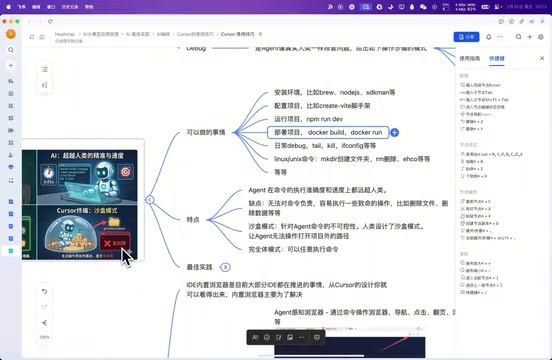
However, terminal tools also carry obvious risks — they cannot double-check commands and may execute fatal operations such as accidentally deleting files or wiping data. To address this, Cursor introduced Sandbox Mode, which restricts the agent to only operating on files within the project directory. The opposite Full Mode allows executing any command and operating on any directory, suitable for advanced users who have full control over risks.
In practice, terminal tools have many clever use cases. For example, you can have Cursor install SDKman via Homebrew, then install JDK through SDKman — it will even automatically check environment variable configurations and conflicts. Another example: when certain libraries don't have network proxy settings configured, you can have Cursor read the source code, analyze the proxy mechanism, and even write a script to launch the program as a subprocess to take over network proxying.
Browser Mode: Closing the Development Loop
Cursor's built-in browser primarily solves three core problems:
- Perceiving and controlling the browser: Performing navigation, clicking, pagination, scrolling, and other operations via commands
- Obtaining debug information: Capturing DOM information, network requests, error logs, performance data from specified web pages
- UI design assistance: Built-in design tools that transform the IDE from just a code editor into a page design tool as well
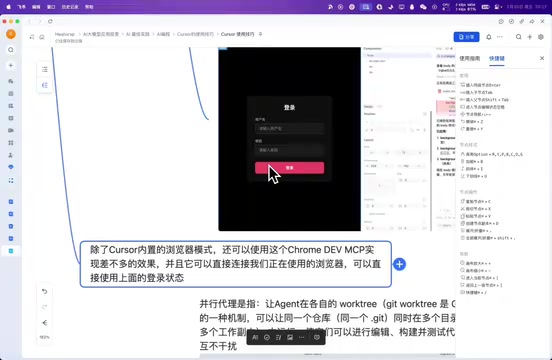
Beyond the built-in browser, you can achieve even more powerful results through Chrome DevTools' MCP protocol — directly connecting to your active browser and reusing existing login states. MCP (Model Context Protocol) is an open standard released by Anthropic in late 2024, designed to provide AI models with a unified way to access external tools and data sources. It adopts a client-server architecture where AI applications act as clients and various tools and services act as servers, communicating through standardized JSON-RPC protocols. In browser debugging scenarios, Chrome DevTools Protocol (CDP) can be wrapped as an MCP server, enabling AI to communicate directly with browser instances to perform page navigation, DOM queries, network monitoring, and other operations. The advantage of this design is decoupling — any AI tool supporting MCP can connect to the same set of browser control capabilities without developing separate plugins for each IDE. This is extremely convenient when debugging pages that require authentication, eliminating the hassle of repeated logins.
Parallel Capabilities: The Efficiency Multiplier
Cursor provides three levels of parallel processing capability, which is an important dimension where it pulls ahead of competitors.
Parallel Agents leverage the Git Worktree mechanism to create multiple working copies under the same repository, allowing different agents to run independently in their own workspaces. Git Worktree is a feature introduced in Git 2.5 that allows multiple working directories to be checked out simultaneously under the same Git repository, with each directory on a different branch. Traditionally, working on two branches simultaneously required cloning two complete copies of the repository, but Worktrees share the same .git directory, greatly saving disk space and clone time. In AI coding scenarios, this technology is cleverly utilized — each parallel agent works in an independent Worktree without interfering with others, and results can be integrated through Git's merge mechanism after completion. This is safer than simple file copying because all changes remain under version control. You can obtain multiple results from a single prompt, such as simultaneously evaluating outputs from different models. Currently, only Cursor and Windsurf natively support this feature; other AI coding tools require manually creating Worktrees.
Parallel Conversations allow running multiple tasks simultaneously — a feature many AI agents don't support. Cursor can execute multiple tool calls at once, such as checking file sizes across multiple directories simultaneously.
Fork Conversation lets you branch off another thread from an existing context conversation, essentially enabling parallel development of multiple features on the same information base, dramatically improving multi-task processing efficiency.
Context Management: The Key to Agent Performance
Context management directly determines the output quality of an AI agent. The Context Window is the maximum text length a large language model can process at once, typically measured in token count. A token is the basic unit of text processing for models — in English, each word corresponds to roughly 1-2 tokens, while each Chinese character is approximately 1-2 tokens. Current mainstream models have context windows ranging from 128K to 200K tokens (e.g., Claude 3.5 supports 200K). In AI coding scenarios, the context window must accommodate system prompts, rule definitions, code file contents, conversation history, and all other information, making efficient context management crucial. Cursor has built four core mechanisms in this area:
Rules
Predefined rules are prepended to the model's context, helping the AI gain clear guidance when understanding and reviewing code. However, note that excessive rules will severely impact agent response performance — it's recommended to keep them trimmed to only truly necessary entries.
Commands

Called "Workflows" in other IDEs, Cursor allows creating reusable workflows through custom commands triggered via slash commands. Commands can be simple prompt templates or complex operation chains, such as remote code reviews.
Sub-agents
Cursor's main agent can delegate auxiliary tasks to specialized AI assistants, with each sub-agent running in an independent context window without interference. This design pattern comes from Multi-Agent System thinking — the main agent acts as a coordinator responsible for task decomposition and result integration, while sub-agents serve as domain experts handling specific execution. Each sub-agent has its own independent context window, meaning it doesn't consume the main agent's context space nor gets disturbed by irrelevant information from the main conversation. Three sub-agents are built in: command execution, search, and browser. The latest version 2.5 also supports asynchronous sub-agents that can run in the background without blocking the main agent's execution flow. Asynchronous sub-agents work similarly to the async IO model in programming — the main agent initiates a subtask and can continue processing other work without waiting for completion; when the sub-agent finishes, it reports results back. This architecture is particularly suitable for time-consuming operations like large-scale code searches or complex terminal command execution.
Conversation Compression
Long conversations can be compressed into text with higher information density and fewer words — this can be triggered manually or automatically when the context window is nearly full. Conversation compression technology distills lengthy conversation history into key information summaries, freeing window space without losing important context, enabling the agent to continue processing longer task chains. Notably, Cursor's compression intelligence far surpasses other tools — in OpenCode, models with 200K context length often run in windows under 100K and compress immediately upon slight overflow, while Cursor's handling in this regard is clearly more reasonable and stable.
Rich Built-in Tool Ecosystem
Cursor also integrates various practical tools, further extending the boundaries of AI coding capabilities:
- MCP Support: By default, it doesn't bring all MCP information into conversations — it only lists available MCPs for invocation when the user specifies, effectively saving token consumption
- Skills: Common operations can be created as independent Skills for easy reuse, reducing repetitive configuration
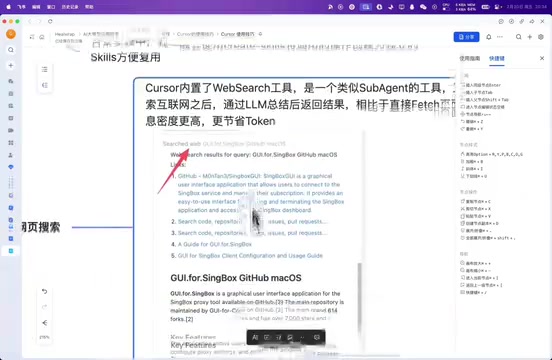
- Web Search: Built-in internet search tool that returns results through summary digests, providing higher information density than directly scraping web pages
- Image Generation: Starting from version 2.4, supports generating images on specific themes, suitable for quickly creating assets
- Document References: Introduces document context through the
@symbol, also supporting custom document sources
Unique Detail Advantages
Cursor's handling of certain details also reflects the maturity of this product:
Checkpoint Feature: Modifications created through built-in edit or delete tools can all be reverted with one click, but operations executed via terminal commands are excluded — use with awareness.
Usage Display: Both Cursor and Windsurf support visually displaying usage through a ring indicator, with Windsurf even showing context length explicitly. With usage displays, developers can judge in real-time when to switch to a new conversation or compress the current one, continuously optimizing model output quality.
Custom Model Integration: Pro subscription users can integrate custom models, such as domestic models like GLM, though API format requirements are strict and compatibility must be ensured.
Output Interruption Recovery: This may be a feature unique to Cursor — when AI encounters unexpected interruptions such as network fluctuations, it can continue execution directly from where it left off. Most IDEs require continuing the task in the next conversation turn, creating a noticeable experience gap.
Conclusion
The reason Cursor stands out among numerous AI coding tools including Claude Code, Windsurf, and Trae isn't a single killer feature — it's achieving industry-leading levels across every dimension including mode design, tool capabilities, context management, parallel processing, and detail experience. It's not merely an AI code editor but a full-scenario AI development platform covering environment configuration, troubleshooting, reverse engineering, browser operations, and more.
For programmers pursuing development efficiency, Cursor remains the most worthwhile AI coding agent tool to invest time learning and using. If you're still deciding which AI coding tool to choose, start with Cursor and experience what truly AI-driven development feels like.
Related articles
 Product Reviews
The Programmer's Desk Setup Guide: Building a Workspace That Feels Like Home
Discover how programmers build productive, comfortable workspaces. From multi-monitor setups to ergonomic design, explore the desk philosophy that drives focus and flow.
 Product Reviews
Qoder vs Cursor Real-World Comparison: Which $20/Month AI IDE Is Better?
Hands-on comparison of Qoder vs Cursor AI IDEs: Agent autonomy, human interaction count, and architecture decisions. Qoder needed only 2 interactions vs Cursor's 8.
 Product Reviews
Cursor Cloud Agent Demo: Eliminating Bottlenecks Across the Entire Software Development Lifecycle
Deep analysis of Cursor's Cloud Agent demo showing how cloud VMs, automated test artifacts, and a full-chain control plane systematically eliminate human bottlenecks across the software development lifecycle.