Cursor Launches iOS App: Remotely Control Your Desktop AI Agent from Your Phone

Cursor's iOS app supports remote control of desktop AI Agents, positioning the phone as a monitoring and scheduling center.
Cursor has launched an iOS remote control feature that lets users check Agent status, reply to requests, and start new tasks from their phone, forming a complete asynchronous coding workflow. The "Reply" function eliminates blocking points requiring manual confirmation, significantly improving the use of fragmented time. Cursor positions the phone as a monitoring and scheduling center rather than a full coding environment, betting that Agent autonomy is sufficient. The article analyzes the impact on developer workflows and psychological burden, notes the quality boundaries of mobile technical decisions, and examines this move in the context of AI coding tools shifting from code completion to complete workflow coverage.
From Phone to Desktop, the Control Boundary of AI Coding Agents Is Broken
Cursor announced on social media that its iOS app now supports remotely controlling AI Agents running on your computer. Users can check the Agent's status, reply to its questions, and even launch new coding tasks — all directly from their phone.
On the surface, this looks like just another mobile feature update, but it touches on the most critical question in today's AI coding tool competition: when Agents execute tasks with increasing autonomy, where should humans step in?
Cursor's answer is to put control in your pocket.
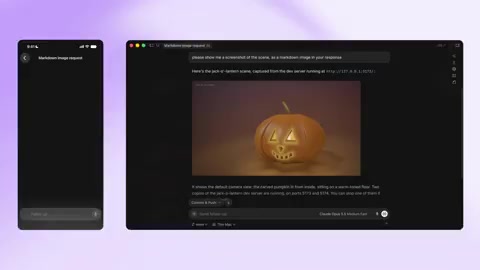

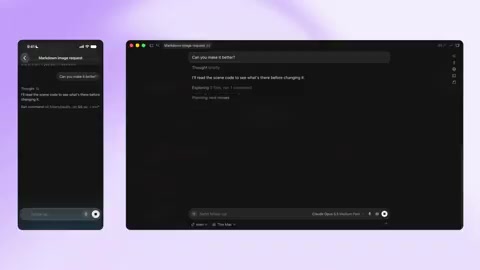
Feature Breakdown: More Than Just "Remote Viewing"
According to the official description, the Cursor iOS app currently offers three core actions:
- Check in: See what the Agent is currently doing and how far along it is
- Reply: When the Agent asks a question, give instructions directly from your phone
- Start new tasks: Initiate new coding tasks from your phone without returning to your computer
Together, these three capabilities form a complete "asynchronous coding workflow." Developers no longer need to sit by their computer waiting for an Agent to finish a task or request confirmation — they can make progress during commutes, between meetings, or even lying in bed.
Why the "Reply" Feature Matters Most
Among the three features, Reply's value is the easiest to underestimate. Current mainstream AI coding Agents (such as Cursor's own Composer, Devin, etc.) frequently require user confirmation when executing complex tasks: which implementation approach to choose, whether to overwrite a file, whether a certain dependency is allowed to install.
In the past, these confirmation requests would block the entire workflow until the user returned to their computer. The mobile reply feature eliminates this blocking point. For Agent tasks that often take tens of minutes or even longer, the reduction in waiting time is considerable.
The "Blocking Point" Mechanism of AI Coding Agents
Current mainstream AI coding Agents use a "Human-in-the-loop" interaction model. The workflow typically goes: the Agent receives a task and plans steps autonomously, pauses at each decision node to request confirmation, and continues after receiving a reply. This design stems from the inherent limitations of LLMs — they cannot reliably predict user intent, nor do they have complete awareness of the consequences of their actions.
The number and frequency of blocking points depend on task complexity and the Agent's level of autonomy. A simple function refactor might produce just one confirmation, while a cross-module architecture change could trigger dozens. Each blocking point means the task stalls until a human responds. Before mobile control existed, this meant developers either had to stay on guard the entire time or bear the time cost of a stalled task.
Is Mobile Agent Control a Trend or a Transitional Form?
Cursor isn't the first to move AI Agent control to phones. GitHub's mobile app has long supported viewing and replying to Copilot notifications, and some open-source Agent frameworks also offer remote control solutions based on chat tools.
But Cursor's approach is different. It's not rebuilding a complete coding environment on mobile — instead, it positions the phone as a "monitoring and scheduling center." Code editing remains primarily desktop-based, with the phone handling only key decision points.
Whether this positioning makes sense depends on one underlying assumption: that Agent autonomous execution is already strong enough that humans only need to intervene at a few critical nodes. If this assumption holds, mobile control is a natural and efficient complement. If Agents still make frequent errors and require substantial human correction, then handling complex technical decisions on a small screen would actually reduce efficiency.
Judging from Cursor's recent product direction, they're clearly betting on the former.
The Divergent Product Paths of Copilot and Cursor
GitHub Copilot and Cursor represent two different approaches to AI coding tools. Copilot started as an IDE plugin, with core capabilities in code completion and inline suggestions, gradually expanding to Chat and Agent modes. Its strength lies in deep integration with the GitHub ecosystem, including code hosting, Pull Requests, CI/CD, and more.
Cursor, from its inception, positioned itself as an AI-first code editor, making Agent capabilities a core experience rather than an add-on feature. This positioning difference determines their different mobile strategies: Copilot's mobile offering leans more toward "notifications and lightweight approvals," while Cursor attempts to build complete Agent scheduling capabilities on mobile. Understanding this difference helps assess the strategic significance of Cursor's update.
Practical Impact on Developers
For developers already using Cursor Agent in their daily work, this feature's significance is fairly straightforward:
Better use of fragmented time. Start a refactoring task, head to a meeting, receive the Agent's confirmation request during the meeting, reply from your phone, continue the meeting, and by the time you're back at your computer, the task is done. This level of workflow fluidity wasn't possible before mobile support.
Reduced psychological burden. Long-running Agent tasks create an anxiety of "having to watch." Mobile notifications and reply capabilities alleviate this to some extent — you know that even away from your computer, you won't miss critical nodes.
But boundaries matter too. Technical decisions made on a phone are typically lower quality than those made after reviewing full context at a computer. For high-risk decisions involving architecture choices or security-related configurations, returning to the desktop is still recommended.
Practical Prerequisites for Asynchronous Coding Workflows
The core assumption of asynchronous workflows is that tasks can continue progressing without real-time human oversight. This model has precedents in traditional development, such as CI/CD pipelines: developers submit code and the system automatically builds, tests, and deploys, with intervention only on failure.
AI Agent asynchronicity faces additional challenges: CI/CD execution paths are deterministic, while Agent decision-making is non-deterministic and may produce operations developers never anticipated. Therefore, asynchronous Agent workflows require more robust "safety nets" — including traceable operation logs, permission isolation for critical operations, and rapid rollback mechanisms when things go wrong. Whether Cursor's mobile features can deliver full value depends largely on whether these supporting capabilities are in place.
A Move in the Competitive Landscape
Competition among AI coding tools is shifting from "whose code completion is more accurate" to "whose workflow is more complete." Cursor's launch of iOS Agent control is essentially filling in the mobile scenario of its workflow.
Whether this direction can form a moat depends on future execution. If Cursor can continuously add valuable features on mobile (such as richer Agent execution logs, more granular permission controls, and integration with team collaboration), then mobile could become an organic part of its ecosystem rather than a dispensable add-on.
For developers, this feature is worth trying, but there's no need to rush into changing your work habits. Observe how it performs in real tasks first, then decide whether to incorporate it into your daily workflow.
One-line Summary
Cursor's iOS app supports remote control of desktop AI Agents, positioning the phone as a monitoring and scheduling center.
Paragraph Summary
Cursor has launched an iOS remote control feature that lets users check Agent status, reply to requests, and start new tasks from their phone, forming a complete asynchronous coding workflow. The "Reply" function eliminates blocking points that require manual confirmation during Agent execution, significantly improving the use of fragmented time. Cursor positions the phone as a monitoring and scheduling center rather than a full coding environment, betting that Agent autonomous execution is strong enough that humans only need to intervene at key nodes. The article analyzes the feature's practical impact on developer workflows and psychological burden, notes the quality boundaries of mobile technical decisions, and examines this move within the industry trend of AI coding tools shifting from code completion competition to complete workflow coverage.
Related articles

JobRunner MCP Server: AI Agents Can Now Fix Failed Java Jobs
JobRunner launches an open-source MCP server enabling AI agents to view cluster status, diagnose failures, and recover Java jobs—incident response from any cloud coding environment or existing agent.

MLAI Digital Launches 9 Security Agents: MCP Server Safeguards the Full Lifecycle of Agentic AI
MLAI Digital launches Security MCP Server with nine built-in specialized security agents covering vulnerability discovery, attack simulation, prompt injection detection, API and infrastructure assessment, and accelerated remediation—embedding security validation across the full Agentic AI lifecycle from development to production.

Running Isaac Lab on H100 GPUs: Exploring Better Approaches
Exploring optimization methods for running Isaac Lab on NVIDIA H100 GPUs, including MIG configuration, mixed precision, TensorRT acceleration, and community experience to improve robotics simulation and reinforcement learning efficiency.