Cursor SDK vs Claude Code vs Codex: Hands-On Comparison — Which Is the Best AI Coding Tool?

Cursor SDK, Claude Code, and Codex each excel differently — they're solving fundamentally different problems.
Testing all three AI coding tools on the same bug-fix task reveals clear differences: Cursor SDK enables full automation but offers no process control, ideal for CI/CD pipelines; Claude Code locates bugs in just 20 seconds with user approval required at each step for maximum control; OpenAI Codex takes a "fix first, confirm later" middle ground, running safely in a cloud sandbox. Rather than direct competitors, they serve three distinct use cases: automation, precision engineering, and quick delegation.
The competition among AI coding tools entered a new phase in 2025. Cursor quietly released its SDK two weeks ago with barely any discussion; Claude Code demonstrated stunning debugging speed in the terminal; and OpenAI Codex attracted beginners with the most user-friendly experience. When all three AI coding tools faced the same buggy project, the results were surprising — they're not even competing in the same arena.
Test Project and Bug Setup
The test used a simple ice cream shop ordering system with four core modules: Cart, Discount, Delivery, and Orders. The test file runs three scenarios, with the second one exposing a critical bug: when applying a 10% discount to a $24 order, the discount amount calculates to $41.60, causing the total to go negative.
The root cause lies in the percentage formula being inverted in the discount calculation. This type of bug is extremely common in real-world development — an operator order or formula direction error. In this example, the correct 10% discount calculation should be 24 × 0.10 = $2.40, but if the formula is inverted — for instance, writing (price / percentage) × 100 instead of (percentage / 100) × price or a similar reversal — it produces a value far exceeding expectations ($41.60). What makes this bug dangerous is that it doesn't crash the program or throw exceptions. The code is syntactically correct; only the business logic produces wrong results. Static type checking and compilers cannot catch such errors — traditionally, only unit tests and manual code reviews can detect them. This is precisely the scenario where AI coding tools deliver the most value.
This bug is simple enough to clearly compare how the three tools handle it, yet realistic enough to reflect common logic errors in everyday development.
Cursor SDK: A Developer Tool Built for Automation
What Is Cursor SDK?
Before the SDK release, Cursor was a manually operated editor — you opened the editor, typed a prompt, and waited for a response. The SDK fundamentally changes this model: instead of you triggering Cursor, your code triggers Cursor. It can run in the background, execute on a schedule, embed into CI/CD pipelines, and achieve full automation.
An SDK (Software Development Kit) is a collection of pre-built code libraries, API interfaces, and development documentation that allows developers to embed a platform's or service's capabilities into their own applications. Cursor releasing an SDK means it has transformed from an interactive desktop application into a programmable platform — developers can invoke Cursor's AI capabilities like calling a function and integrate them into any automated workflow. This shift from "product" to "platform" is a milestone in the tech industry, similar to how Stripe evolved from a payment page into a payment API, fundamentally changing how developers interact with tools.
CI/CD (Continuous Integration/Continuous Deployment) is a core practice in modern software engineering. Continuous Integration means developers frequently merge code into the main branch, with each merge triggering automated builds and tests; Continuous Deployment automatically releases tested code to production environments. Typical CI/CD tools include GitHub Actions, Jenkins, GitLab CI, and others. Embedding AI coding tools into CI/CD pipelines means code reviews, bug fixes, and even feature generation can be automatically triggered upon code commits without manual intervention — representing an entirely new level of software development automation.
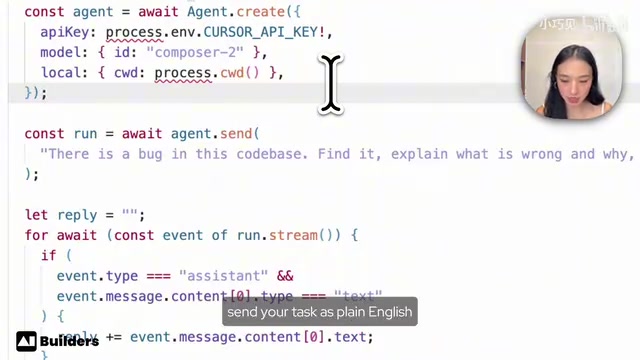
Cursor SDK is a TypeScript package called @cursor-sdk. You only need to provide three things: the model, the codebase path, and the task description.
Setup and Usage
The setup process requires some TypeScript knowledge. The core script involves four steps: import the Agent class, create an Agent instance with an API key, point it to the current project folder, describe the task in plain English, then chain the execution.
Cursor SDK Test Results
Cursor SDK successfully found the bug — the percentage formula was inverted — and accurately explained why it produced a $41 discount instead of $2.40. But the key is its behavioral pattern: throughout the entire process, there were no confirmation dialogs, no approval prompts. It simply ran, found the bug, explained the cause, and stopped.
You have zero visibility into its decision-making process — you only see the final output. This is the most developer-oriented of the three tools — you're not using a tool, you're building one. The advantage is full automation; the cost is requiring TypeScript skills and having no control over its behavior during execution.
Claude Code: Fastest Debugging, Strongest Control
Minimalist Startup
Claude Code offers a completely different experience. After navigating to the project directory in the terminal, you simply type instructions in English — no TypeScript scripts needed, no extra configuration.
The terminal (also called Command Line Interface, CLI) is a way to interact with computers through text commands, forming a stark contrast with Graphical User Interfaces (GUI). In the developer tools space, CLI tools typically offer greater flexibility and scriptability — they can be piped together, called by shell scripts, and integrated into various automated workflows. Claude Code's choice of terminal as its interaction interface both reduces the tool's own complexity and naturally fits developers' daily work environment. For developers accustomed to using git, npm, docker, and other tools in the terminal, Claude Code has virtually zero learning curve.

Claude Code Test Results
Claude Code found the same bug — the inverted discount formula. But the most impressive aspect was speed: it located the problem in just 20 seconds, far outpacing the other two AI coding tools.
More importantly, there's its interaction model. Claude Code displayed its complete reasoning process, then paused to ask: "Would you like me to apply this fix?" Without your explicit approval, it will never modify your code. You're in the decision loop at every step.
This high transparency and high control makes Claude Code particularly suitable for complex cross-file refactoring work. You can understand every change, then approve them one by one. This design embodies the "Human-in-the-Loop" AI collaboration philosophy — AI handles analysis and suggestions, humans handle decisions and approvals, forming an efficient collaborative loop. The trade-off, of course, is that it can't achieve unattended automation like Cursor SDK — it needs you to be present.
OpenAI Codex: The Friendliest Middle Ground
Zero-Barrier Experience
Codex can run as a standalone app or open in a browser — no terminal operations needed at all. After entering the same instructions as Claude Code, it confirmed the discount calculation problem.
Codex Test Results
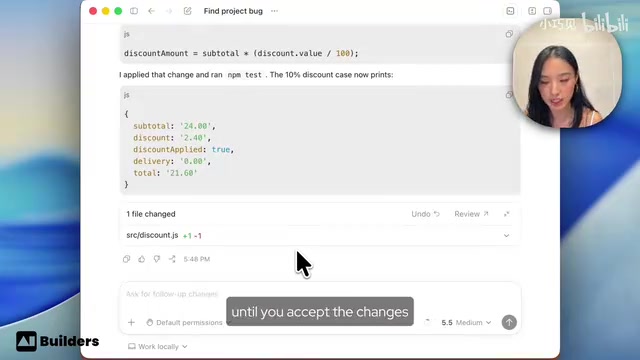
Codex took 1 minute and 15 seconds to complete its analysis. During the process, you could see its complete reasoning chain as it listed files, traced logic, and ran commands. It found the same inverted percentage bug, automatically applied the fix, and ran tests to confirm the fix worked.
The most interesting design choice comes after the fix is complete: Codex provides Review and Undo buttons. It acts first like Cursor SDK, but immediately hands control back to you. This is a very thoughtful middle ground — act first, but make it easy to undo.
Additionally, Codex runs in an isolated cloud sandbox, meaning your real files are never modified until you accept the changes. A sandbox is a security isolation mechanism that runs code in a restricted virtual environment, preventing it from accessing or modifying the host system's actual files and resources. Codex's cloud sandbox means all AI operations — reading files, modifying code, running tests — happen in a temporary isolated container on remote servers, not on the developer's local machine. Only after the developer explicitly accepts changes do modifications sync to the local codebase. This architecture borrows the isolation philosophy of containerization technologies (like Docker), fundamentally preventing AI errors from causing irreversible damage to real projects. It's currently the most conservative and safest execution strategy among AI coding tools. If you're already a ChatGPT Plus user, using Codex requires no additional payment.
AI Coding Tool Security Warning: Don't Let Your Guard Down
Before giving any AI tool full access to a real codebase, you must consider security. A startup previously had its entire production database deleted in 9 seconds because a Cursor Agent had excessive permissions and made incorrect assumptions without verification.
When AI Agents execute tasks, they essentially simulate a developer with full system permissions. If an Agent is granted database administrator privileges or SSH keys to production servers, it might execute destructive operations based on incorrect contextual inference — such as misapplying a test environment cleanup script to a production database. This isn't "malicious" AI behavior, but rather a reasonable yet incorrect inference made by a large language model lacking sufficient context. When such inferences combine with unrestricted system permissions, the consequences can be catastrophic.
Security recommendations:
- Always validate on test projects first
- Never give these tools access to production environments or real API keys
- Test thoroughly on safe code before expanding usage
- Follow the Principle of Least Privilege — create dedicated restricted accounts for AI tools
- Use environment variable isolation to ensure AI can never access production credentials
- Set up human approval gates (Human-in-the-Loop) before critical operations
The core principle behind these security measures is: The more capable the AI, the stricter the constraints on its permission boundaries should be.
Comprehensive Comparison of Three AI Coding Tools
Setup Difficulty Comparison
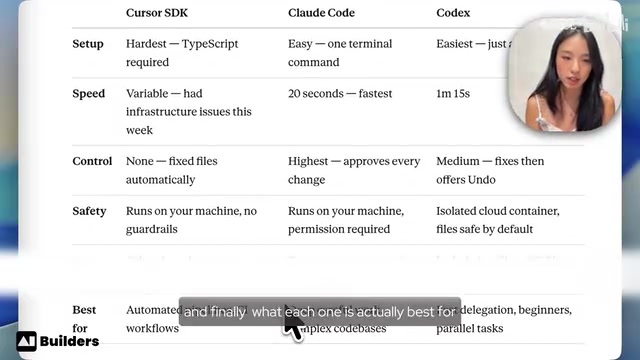
| Tool | Difficulty | Notes |
|---|---|---|
| Cursor SDK | Hardest | Requires writing TypeScript scripts |
| Claude Code | Easy | One terminal command is all you need |
| Codex | Easiest | Open the app, no terminal required |
Debugging Speed Comparison
Claude Code leads by a wide margin at 20 seconds, Codex took 1 minute 15 seconds, and Cursor SDK's performance was inconsistent (Cursor had infrastructure issues during testing that affected Agent sessions).
Code Control Comparison
This is the most critical differentiating dimension:
- Cursor SDK: Zero control — automatically modifies files without asking for consent
- Claude Code: Maximum control — displays diffs, waits for approval before making changes
- Codex: Middle ground — auto-fixes but immediately provides an Undo button
These three control models actually correspond to the classic trade-off in software engineering regarding automation levels. Full automation (Cursor SDK mode) is optimal for efficiency but carries the highest risk; full manual approval (Claude Code mode) is safest but sacrifices automation efficiency; Codex's "act first, confirm later" model attempts to find balance between the two. This design is known in user experience as "Optimistic UI" — the system assumes the action will be accepted and executes immediately while providing a convenient rollback path.
How to Choose the Right AI Coding Tool for You
Choose Cursor SDK: If you need to build unattended automated workflows — background automation, CI pipelines, scheduled tasks. You'll need TypeScript skills and must accept the current SDK's roughness.
Choose Claude Code: If you want the fastest debugging speed, the clearest reasoning process, and complete control over every change. Finding a bug in 20 seconds with full mathematical derivation is ideal for serious engineering work.
Choose Codex: If you want the most approachable experience, the safest sandbox environment, and you're already a ChatGPT Plus user. The Undo button design is a thoughtful touch the other tools lack.
The most honest answer is: They're not competing with each other — they're solving different problems. Cursor SDK is automation infrastructure, Claude Code is a precision scalpel, and Codex is a friendly intelligent assistant. Choosing the right tool for the specific scenario is the correct strategy.
Key Takeaways
- Cursor SDK enables fully automated coding but lacks process control, making it ideal for CI/CD pipelines and background automation tasks
- Claude Code locates bugs fastest at 20 seconds, offering maximum transparency and control with user approval required at each step
- OpenAI Codex takes a middle-ground approach, auto-fixing then providing Review and Undo buttons, running in a cloud sandbox for safety
- The three tools are fundamentally not in competition — they target automation pipelines, precision engineering, and quick delegation respectively
- Security is critical when using AI coding tools — avoid granting production environment access, as startups have already lost entire databases due to this oversight
Related articles
 Product Reviews
The Programmer's Desk Setup Guide: Building a Workspace That Feels Like Home
Discover how programmers build productive, comfortable workspaces. From multi-monitor setups to ergonomic design, explore the desk philosophy that drives focus and flow.
 Product Reviews
Qoder vs Cursor Real-World Comparison: Which $20/Month AI IDE Is Better?
Hands-on comparison of Qoder vs Cursor AI IDEs: Agent autonomy, human interaction count, and architecture decisions. Qoder needed only 2 interactions vs Cursor's 8.
 Product Reviews
Cursor Cloud Agent Demo: Eliminating Bottlenecks Across the Entire Software Development Lifecycle
Deep analysis of Cursor's Cloud Agent demo showing how cloud VMs, automated test artifacts, and a full-chain control plane systematically eliminate human bottlenecks across the software development lifecycle.