Cursor vs Cline: Which AI Coding Tool Should You Choose?

Cursor and Cline represent the commercial editor and open-source extension paths; choose by scenario, not by specs.
The article compares two opposite approaches to AI coding assistants, Cursor and Cline. Cursor is a standalone editor whose most popular tier is $30 per month, offering fixed costs, autocomplete, and cloud-based parallel agents, but with relatively locked-in model selection; Cline is a VS Code extension with a command-line version, free for individuals but requiring your own API key and pay-per-use billing, able to connect to any model provider and even run local models with Ollama so code never leaves your machine. In interaction, Cursor pursues fewer interruptions, while Cline asks for confirmation before every file change or command execution and provides checkpoint rollback. The author recommends choosing by scenario: Cursor for peace of mind, Cline for control and cost flexibility, or mixing them by task type.
AI coding assistants have evolved from "completing code" to "writing entire modules for you," but choosing the wrong tool comes with two kinds of costs: either paying monthly for features you don't use, or losing control over critical changes. Cursor and Cline represent two opposite approaches—one is a hassle-free commercial editor, the other is an open-source extension installed into VS Code.

Two Forms: Standalone Editor vs VS Code Extension
Cursor is a standalone application that needs to be downloaded and installed like regular software. This means it has its own interface, its own keyboard shortcut system, and it also means that switching tools requires readjusting to a new environment. According to the video's author, Cursor currently falls under a larger organization (the exact wording involves the owning party, which we won't elaborate on here).
Cline is much lighter in form—it's an extension installed into VS Code, and it also offers a command-line version. It has accumulated considerable attention in the open-source community (the video mentions its GitHub star count is in the "tens of thousands"). For developers who have already established a complete workflow in VS Code, this embedded approach has almost zero migration cost.
The difference in form directly determines the target audience: those who want an out-of-the-box experience without fiddling with configuration lean toward Cursor; those who already use VS Code as their primary IDE find Cline more natural.
Pricing Logic: Monthly Subscription vs Pay-As-You-Go
This is the most substantive point of divergence between the two.
Cursor offers a limited free tier, and its most popular paid plan is $30 per month. This price buys you fixed costs—no matter how much code you write in a month, your bill is predictable.

Cline itself is free for individual users, but you need to provide your own API key, and model invocation costs are settled based on actual usage. In other words, the tool is free, but tokens cost money. The advantage of this model is that costs are tied to usage intensity—light use may cost far less than $30, while heavy use may exceed it, and the bill fluctuates with usage.
The video author's summary is straightforward: if you want a fixed monthly fee and peace of mind, choose Cursor; if you want to optimize costs and pay as you go, choose Cline. However, "pay-as-you-go is cheaper" is not an absolute conclusion—it depends on your actual usage volume, and you need to estimate it yourself before deciding.
In the pay-as-you-go cost structure, what really determines the bill is token usage: input tokens (the code, files, and conversation history you paste into context) and output tokens (the code and explanations generated by the model) are priced separately, and output is usually several times more expensive. The context of an AI coding assistant often includes multiple files, and a complex task may consume hundreds of thousands of tokens, so "pay-as-you-go is cheaper" only holds for light to moderate use. The estimation method is to first look at the typical token volume per task, then multiply by the average number of daily tasks, and compare with the fixed monthly fee; at the same time, reserve extra for context expansion and retries.
Model Selection: Locked-In vs Fully Open
Cursor's $30 tier is tied to the newer models it uses (the video mentions specific models, which we won't elaborate on here). If you have model preferences or want to switch between different models for different tasks, your options are relatively limited; using other models may require additional billing at API prices.

Cline gives model selection entirely to the user: you can connect to various providers, or run local models with Ollama. The local model path isn't just about saving money—code never leaves your machine, which is a hard advantage for data-sensitive projects.
This has a big impact on team tool selection. If the project involves code that cannot be shared externally, local models are almost the only viable option; if it's just everyday development, cloud models' capability and speed remain the mainstream choice.
Ollama is an open-source local LLM runtime framework that packages model download, quantization, and inference serving into a process you can start with a single command, running open-source models like Llama, Qwen, and DeepSeekAd on a developer's machine. For tools like Cline that bring their own API key, configuring Ollama as an OpenAI-compatible local endpoint means model invocation completely bypasses the cloud. The trade-off is that local inference is limited by VRAM and compute, and model scale and throughput are usually weaker than cloud flagships, with degraded performance on long-context and complex refactoring tasks; the benefit is zero token costs, offline availability, and code never leaving your machine.
Control: Automatic Execution vs Step-by-Step Confirmation
Cursor's strength lies in automation and fluidity: code completion as you type, and agent tasks running in parallel in the cloud (the video says they can run continuously for hours). It pursues "fewer interruptions," letting AI push work forward in the background.
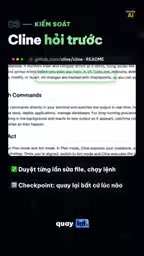
Cline goes in the opposite direction. It asks for your confirmation before every file modification or command execution, and provides checkpoints for rollback. This design is noticeably safer for bulk changes and production code—every step is within your view, and errors can be reverted.
The cost is a higher frequency of interaction, and the pace isn't as smooth as Cursor. There's no right or wrong here, only risk preference: those willing to trade a bit of efficiency for visibility and reversibility will like Cline; those who want AI to interrupt as little as possible while they focus on core logic will be more comfortable with Cursor.
A checkpoint is a state snapshot mechanism in AI coding tools: it records the workspace state before and after each AI-initiated file write or command execution, so you can roll back to a specific node with one click when something goes wrong, without relying on Git commit history. Its difference from version control is finer granularity and automatic triggering, specifically designed to catch the risks of AI bulk changes. For Cline's interaction mode, where every step requires user confirmation, checkpoints act as a second safeguard—even if you miss something during confirmation, you can still roll back. Note that it usually only covers workspace files and does not include side effects such as databases or external services.
How to Choose: By Scenario, Not by Specs
Putting the above dimensions together, the selection logic is actually simple:
- Want fixed costs and an out-of-the-box experience: Cursor. One app, one monthly fee, autocomplete and parallel agents all included.
- Already have a VS Code workflow and care about budget flexibility: Cline. Free to install, choose your own models, pay as you go.
- Code cannot leave your machine: Cline with Ollama local models.
- Changes are sensitive and need step-by-step oversight: Cline's confirmation mechanism and checkpoints are more suitable.
Worth noting: these tools iterate extremely fast, and pricing tiers, supported models, and feature boundaries may all change. The comparison in the video reflects the state at the time of recording, so it's best to check the official current information before making a decision.
The two approaches aren't mutually exclusive—many developers use a lightweight solution for everyday completion and switch to a tool with stronger control for complex refactoring, dividing work by task type rather than betting on just one.
One-line Summary
Cursor and Cline represent the commercial editor and open-source extension paths; choose by scenario, not by specs.
Paragraph Summary
The article compares two opposite approaches to AI coding assistants, Cursor and Cline. Cursor is a standalone editor whose most popular tier is $30 per month, offering fixed costs, autocomplete, and cloud-based parallel agents, but with relatively locked-in model selection; Cline is a VS Code extension with a command-line version, free for individuals but requiring your own API key and pay-per-use billing, able to connect to any model provider and even run local models with Ollama so code never leaves your machine. In interaction, Cursor pursues fewer interruptions, while Cline asks for confirmation before every file change or command execution and provides checkpoint rollback. The author recommends choosing by scenario: Cursor for peace of mind, Cline for control and cost flexibility, or mixing them by task type.
Related articles

Prompt Engineering for Beginners: From Writing Prompts to Engineering Thinking
Starting from the essence and four functions of prompts, this article systematically explains the six-step process, four success criteria, learning value, and practical limitations of prompt engineering to help you build a complete understanding.

Anthropic Launches Nasdaq IPO: AI Giant's Listing and Risk Disclosures
Anthropic officially launches its Nasdaq IPO under ticker ANT, with market valuation expected to potentially exceed SpaceX's record. The prospectus devotes nearly 100 pages to AI risks, while first-half revenue grew over 14x but net losses widened sharply, reigniting the AI bubble debate.

Rust cURL Clone Uses 4,832 unsafe Blocks—Is the Memory Safety Myth Broken?
A Rust cURL clone uses 4,832 unsafe keywords, challenging Rust's memory safety narrative. We analyze what unsafe really means, compare Fil-C, and examine rewrite motives.