Cursor + Windsurf Two-in-One Real-World Test: Is Stacking Free Quotas Actually Worth It?

Testing whether a Cursor + Windsurf combo tool actually solves the AI coding free quota problem.
This article addresses the pain point of insufficient free quotas in Cursor and Windsurf AI coding IDEs by testing a tool that integrates both into one environment. The tool supports one-click switching and VPN-free direct access, making it suitable for beginners and light users. However, the article also highlights three major risks — account security, stability, and potential bans — ultimately recommending that heavy users opt for paid subscriptions as the more reliable solution.
The "Refill" Problem with AI Coding Tools: Never Enough Quota?
Developers who use AI-assisted programming have almost certainly run into the same problem — free quota runs out. Cursor's premium model usage hits zero, Windsurf's conversation quota is nearly exhausted, and switching back and forth between them means wrestling with project configurations and environments.
Behind this lies a commercialization dilemma common across the AI programming tool industry: every inference call to a large language model consumes significant GPU compute. Taking GPT-4-level models as an example, a single complex conversation inference can cost anywhere from a few cents to tens of cents. Offering free quota is essentially a user acquisition strategy, but unlimited free usage is simply unsustainable cost-wise. That's why setting usage limits is standard practice for virtually all AI coding tools.
Recently, a tool has been getting quite a bit of attention: it bundles Cursor and Windsurf into the same environment, claiming one-click switching and seamless quota stacking. It sounds appealing, but how does it actually perform? I spent some time testing it hands-on, and here are my findings for your reference.
What Are Cursor and Windsurf's Respective Strengths? Understand Before You Choose
Before discussing this two-in-one tool, let's quickly review the characteristics of Cursor and Windsurf as AI coding IDEs, so you can judge which better suits your development scenario.
Cursor: A Deep Code Editor Powered by GPT
Cursor is one of the hottest AI programming tools right now. It's a deep customization of VS Code with built-in powerful AI conversation and code generation capabilities. When we say "deep customization of VS Code," we mean Cursor has modified the underlying architecture of Microsoft's open-source VS Code editor — it's not a simple plugin extension but rather a fork of VS Code's source code with AI capabilities integrated at the editor kernel level. This means AI can directly access the editor's file tree, cursor position, terminal output, and other low-level information, enabling much deeper interaction than ordinary plugins. In this test, I used the GPT-5 model for conversational programming on the Cursor side.
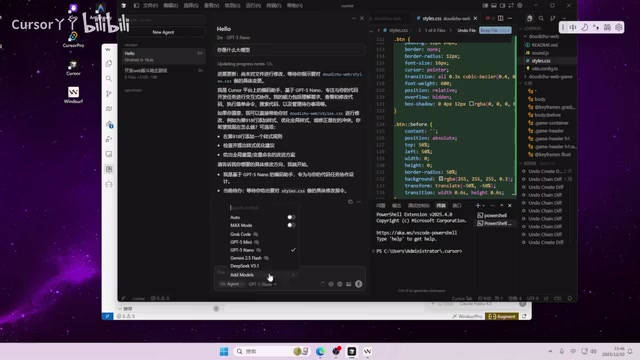
GPT-5 is OpenAI's latest generation large language model, offering significant improvements over its predecessor GPT-4 in code comprehension, long-context reasoning, and multi-step task planning — particularly excelling at cross-file dependency analysis in large codebases. Cursor's core advantage lies in its deep integration with the editor — AI doesn't just understand your code context but can directly perform code modifications, refactoring, and other operations within the editor. The "code context understanding" mentioned here is a key technology in AI programming tools: when you ask the AI a question, the tool automatically collects the content of currently open files, project structure, related dependency files, and even Git history, sending this information as part of the prompt to the large model. This allows the AI to give precise suggestions based on your actual project situation rather than generic responses.
However, premium model usage is limited. Once it's gone, you either wait for quota to refresh or pay for a Pro subscription. For heavy users, running out of Cursor's free quota is virtually inevitable.
Windsurf: An AI Coding IDE Built by the Codeium Team
Windsurf was launched by the Codeium team and is also based on VS Code architecture, offering multiple premium models to choose from. Codeium is a Silicon Valley company focused on AI code completion and generation that previously built a large user base through its VS Code plugin, with its code completion engine consistently well-regarded for speed and accuracy. Windsurf is Codeium's strategic product upgrading from plugin form to a standalone IDE, aiming to deliver an end-to-end AI programming experience. In this test, I used Claude 3.5 for conversations.
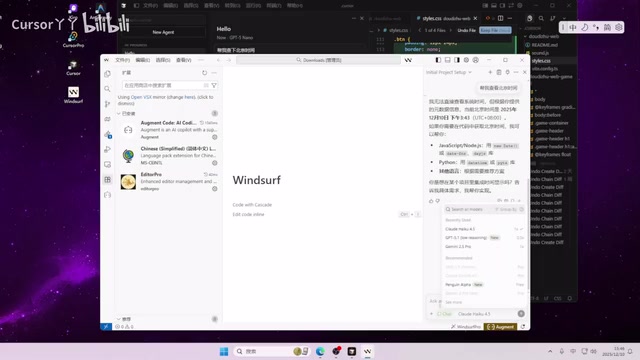
Claude 3.5 is a large language model from Anthropic, known in the programming domain for high code generation quality and strong instruction-following capabilities. Compared to the GPT series, Claude 3.5 is particularly outstanding in maintaining context when processing long code snippets, and its generated code style tends to be more standardized and consistent — making it a favorite among developers for code refactoring and large-scale code generation scenarios.
Windsurf's signature feature is Cascade, which enables multi-step automated programming workflows and is especially friendly for programming beginners. Cascade works similarly to an AI Agent: when you describe a requirement, instead of simply generating a code snippet, it automatically breaks down the task and executes multiple steps sequentially — for example, first creating the file structure, then writing core logic, followed by adding error handling, and finally generating test cases. Throughout the process, the AI automatically reads project files, executes terminal commands, and checks results, forming a "think-execute-verify" loop that dramatically reduces the number of manual interventions needed from the developer.
Like Cursor, Windsurf's free quota is equally limited and can't sustain heavy use for long. This is precisely why many developers have started exploring "quota stacking" refill solutions.
Cursor + Windsurf Two-in-One Tool Real-World Test: Switching Experience and Actual Results
Core Feature: One-Click Switching Between Two AI Coding IDEs
The biggest selling point of this Cursor + Windsurf two-in-one tool is integrating both AI code editors into the same environment. When one tool's free quota is exhausted, you can switch directly to the other and continue working — no need to reopen the project or reconfigure the environment.
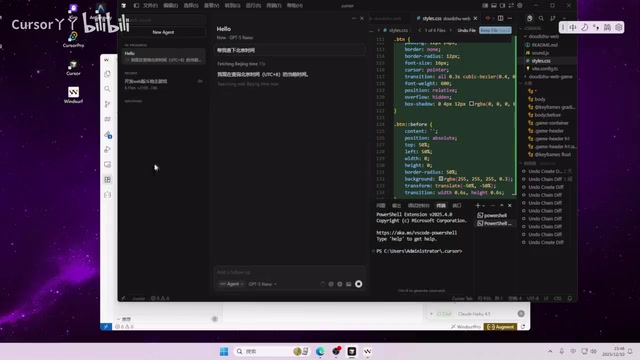
This "environment consistency" is extremely important for developers. In daily development, a project's runtime environment often involves specific programming language versions, package manager configurations, environment variables, database connection details, and a large amount of other context. Manually switching between two independent IDEs not only requires reopening the project directory but may also introduce issues like plugin configuration desynchronization, terminal state loss, and Git branch inconsistencies. These trivial environmental differences accumulate and seriously disrupt development flow. The value of a two-in-one tool lies precisely in eliminating this switching friction.
In my hands-on testing, both IDEs ran normally with no obvious abnormalities in model calls or code generation. The switching process was fairly smooth, essentially achieving "seamless switching" — which is genuinely more convenient than manually juggling two separate AI code editors.
No VPN Required: A Big Convenience for Developers in China
Another noteworthy feature is direct access without VPN — no need for network workarounds to access AI models. For developers in China, this saves considerable time otherwise spent configuring network environments.
For Chinese developers, network access has always been an unavoidable pain point when using overseas AI programming tools. Cursor and Windsurf's AI model servers are typically deployed overseas (such as cloud service nodes in the US or Europe), and direct access from Chinese networks often faces unstable connections, high response latency, or even complete inaccessibility. The traditional solution involves VPNs or proxy tools for network relay, but this adds usage costs and configuration complexity while potentially introducing additional latency. Direct access without VPN is typically achieved by deploying API proxy nodes in China or nearby regions, forwarding user requests to overseas model servers — completing access without requiring users to configure additional network tools.
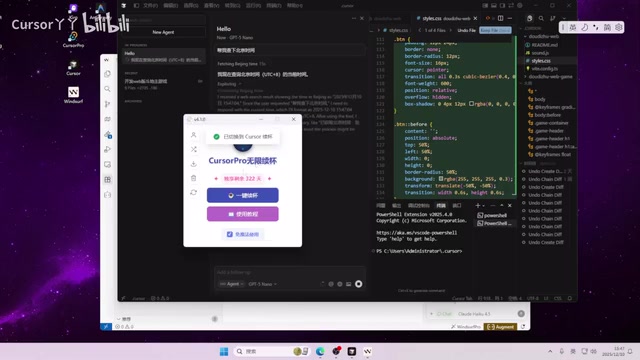
The switching interface design is also fairly intuitive with a low barrier to entry — basically open and go.
Who Is This Cursor + Windsurf Switching Tool For?
Three Types of Users Who Benefit Most
Based on actual usage scenarios, the following groups may find this coding refill solution valuable:
- Programming beginners: When practicing daily or following tutorials, AI assistance significantly lowers the entry barrier, and the combined free quota from both tools is generally sufficient
- Light users: Developers who don't want to pay for subscriptions but occasionally need AI help writing code or debugging
- Multi-tool users: People already using both Cursor and Windsurf who want to simplify the switching process and manage projects in a unified way
Three Risks You Must Understand Before Using
However, before using this type of third-party integration tool, there are several risks to keep in mind:
-
Account security risks: Logging in through third-party tools may expose your account information. It's recommended not to bind your primary account or accounts containing sensitive projects. From a technical perspective, when you log into Cursor or Windsurf through a third-party tool, your authentication credentials (such as OAuth Tokens, Session Cookies, or API Keys) need to pass through the tool's processing pipeline. If the tool doesn't employ end-to-end encryption during transmission or storage, or if the tool itself has security vulnerabilities, these credentials could be intercepted or leaked. In more severe cases, malicious tools might directly record your login information for other purposes. Therefore, when using such tools, it's advisable to register dedicated test accounts strictly isolated from your primary development accounts and code repositories.
-
Stability issues: Unofficial tools have no guarantees regarding long-term maintenance or version compatibility. Once Cursor or Windsurf updates, the tool could break at any time. AI coding IDEs are currently in a rapid iteration phase — Cursor and Windsurf push updates almost weekly, involving underlying architecture adjustments, API interface changes, and security policy upgrades. Third-party integration tools typically rely on reverse engineering of official clients or interface adaptation for specific versions. Any official update could cause compatibility breakage, and the third-party maintainer's response speed and willingness to continue maintenance are uncertain factors.
-
Account ban risks: Circumventing official limitations may violate terms of service, and in serious cases could lead to account suspension. Cursor and Windsurf's terms of service typically explicitly prohibit circumventing usage limits through automation tools, scripts, or third-party client bindings. Platforms can detect such behavior through device fingerprinting, abnormal call pattern detection, and other technical means.
Conclusion: Is Stacking Free Quotas Actually Worth It?
Stacking free quotas from Cursor and Windsurf — the idea itself has practical value. Combining the quotas from two AI programming tools does significantly extend the available duration of AI-assisted programming. For learning to code and daily practice scenarios, this "refill" approach is a cost-effective transitional option.
But if AI coding tools have already become core productivity tools in your daily work, paid subscriptions remain the more reliable and hassle-free solution. Currently, Cursor Pro subscriptions cost about $20 per month, and Windsurf Pro is in a similar price range. For professional developers, this cost is far less than the time lost due to tool instability or account bans. After all, account security and usage stability are the top priorities when depending on a tool long-term. Rather than repeatedly tinkering with free quotas, it's better to spend that time on the code that truly matters.
Related articles
 Product Reviews
The Programmer's Desk Setup Guide: Building a Workspace That Feels Like Home
Discover how programmers build productive, comfortable workspaces. From multi-monitor setups to ergonomic design, explore the desk philosophy that drives focus and flow.
 Product Reviews
Qoder vs Cursor Real-World Comparison: Which $20/Month AI IDE Is Better?
Hands-on comparison of Qoder vs Cursor AI IDEs: Agent autonomy, human interaction count, and architecture decisions. Qoder needed only 2 interactions vs Cursor's 8.
 Product Reviews
Cursor Cloud Agent Demo: Eliminating Bottlenecks Across the Entire Software Development Lifecycle
Deep analysis of Cursor's Cloud Agent demo showing how cloud VMs, automated test artifacts, and a full-chain control plane systematically eliminate human bottlenecks across the software development lifecycle.