Cyango MCP in Action: Generating XR Interactive Experiences with AI in Cursor

Through MCP, AI agents can directly control Cyango XR Studio to generate 3D interactive experiences from a single prompt.
This article demonstrates how to use MCP (Model Context Protocol) to connect AI coding assistants like Cursor with Cyango XR Studio, enabling AI agents to directly invoke XR Studio's capabilities for 3D interactive content creation. Setup takes just two steps—installing the MCP server and Cyango skills—and you can even let AI handle everything by simply sharing the documentation link. Using Grok's high-performance mode, a single prompt generates a working interactive quiz in about 10 minutes. Click bugs are fixed by reporting them to the AI, and the visual layer supports 360 panoramas or HDR environment maps. The full workflow takes about 20 minutes, showcasing AI's evolution from "writing code" to "operating professional tools."
When AI Coding Assistants Meet XR Studios
AI coding assistants can already write code and debug programs, but things get much more interesting when they can directly control a 3D interactive content creation platform. A YouTube creator demonstrated how to connect Cursor with Cyango XR Studio via MCP (Model Context Protocol), generating a complete 3D interactive quiz experience from a single natural language prompt.
MCP serves here as the communication protocol between the AI agent and the XR Studio. Simply put, it allows the AI in Cursor not only to write code, but also to directly invoke XR Studio's capabilities to create, modify, and preview interaction logic in 3D scenes.
MCP (Model Context Protocol) is a standardized protocol proposed and open-sourced by Anthropic in late 2024, designed to establish a unified communication interface between AI models and external tools and data sources. You can think of it as a "USB-C port for the AI world": previously, every AI application that wanted to integrate with a tool needed a custom private integration; MCP defines a universal request-response specification that allows any MCP-compatible AI client to connect with any tool that implements an MCP Server. MCP's core concepts include Tools (callable functions), Resources (readable data), and Prompts (preset prompt templates). Cyango XR Studio in this article implements an MCP Server, exposing capabilities like creating scenes, modifying objects, and previewing to Cursor, enabling the AI agent to control the 3D creation platform just like calling local functions.
Setup Process: Two Steps to Connect MCP
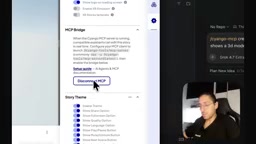
The entire setup process is simpler than you'd expect. In XR Studio's story settings, there's an "MCP Bridge" section that provides complete integration instructions and a link to the setup guide documentation. The creator points out that you don't even need to read the docs yourself—just throw the documentation page link at the AI agent and tell it to follow the installation steps.
The AI agent automatically handles two things: installing the MCP server, and installing Cyango's skills. These skills let the agent understand how to properly operate Cyango's various features, essentially giving the AI an operations manual.
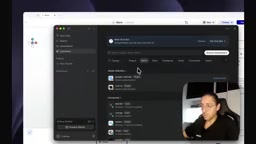
On the Cursor side, you can confirm whether MCP is connected by searching for Cyango in the customize panel. The creator specifically highlights an easily overlooked step: you must ensure you see the "MCP connected" status indicator. If the connection fails, you need to reload MCP or restart Cursor and try again. Only when the full tool list loads is the connection truly ready.
Skills are a capability description mechanism for AI agents, typically existing as structured documents or code, used to tell the agent "what this tool can do, how to invoke it, what parameters it takes, and what limitations exist." It differs from MCP's underlying protocol layer: MCP handles the communication pipeline, while skills handle semantic understanding. Without skills, even if the AI can connect to the MCP Server, it may not know which tool to call in which scenario, or how to combine multiple tools to accomplish more complex tasks (for example, "creating a quiz with 3D models" requires sequential operations of modeling, layout, interaction logic binding, and more). By installing the skills provided by Cyango, the agent in Cursor gains an "operations manual," enabling it to autonomously plan the call sequence and generate correct parameters, thereby translating natural language intent into a series of effective operations on XR Studio.
Model Selection and Prompt Design
The creator chose Grok's high-performance mode to drive the entire workflow, but also mentioned that users can choose any model as needed. His advice is to prioritize frontier models—Claude, ChatGPT, Grok, and the like—because they're more capable when handling complex interactive experiences.
In terms of operation, first activate the skill context via the /Cyango MCP skill, then describe the requirement in natural language. The creator's prompt was: "create periodic table quiz where it shows a 3D model of each molecule."
That's it—just one sentence, no additional configuration.
"Frontier models" refers to the most capable general-purpose large models currently available, such as Anthropic's Claude series, OpenAI's GPT series, and xAI's Grok series. These models perform more reliably in long-context understanding, multi-step tool use / function calling, and code generation—especially when they need to sequentially orchestrate multiple MCP tools and maintain task state, they're less prone to issues like "forgetting the goal" or "messing up parameters" compared to smaller models. The creator emphasizes prioritizing frontier models precisely because when operating complex tools like XR Studio, the model needs to simultaneously understand natural language intent, tool schemas, and scene state—requiring reasoning and planning capabilities far beyond single-turn Q&A. When model capability falls short, it often manifests as failed tool calls, incomplete generated interaction logic, or repeated retries.
Generation Results and Bug Fixing
The AI took about 10 minutes to complete the initial generation. The periodic table quiz interface appeared in the preview, but the creator noticed that clicking answers did nothing—a typical functional bug. Instead of manually fixing the code, he simply reported the issue to the AI agent and let it fix it. After saving and re-previewing, the interaction worked properly.
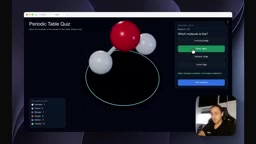
Interactive feedback for the quiz was also implemented: correct answers display the right answer, wrong answers show an error prompt, then move on to the next question. However, the creator noticed some text displayed as white squares, guessing it was a font compatibility issue, and suggested switching to a compatible table font to fix it.
He examined the underlying structure generated by the AI and found that the entire UI was built with custom JS code—all done by AI. The code complexity is not trivial, but the user doesn't need to worry about those details.
Advanced Customization: 360 Images and HDR Environments
After generating the base experience, you can continue customizing the visual layer. The creator demonstrated adding a 360 panoramic image as a fallback background, and also mentioned that you can delete the 360 image and switch to an HDR image to affect the lighting on 3D models.
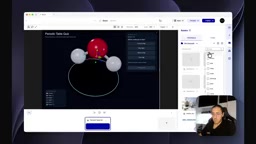
The entire process, from starting with a blank story to completing an interactive 3D quiz experience, took the creator about 20 minutes by his estimate. He also mentioned that you can continue letting the AI handle responsive UI adaptation—from the preview, the container does indeed scale with the window.
What This Workflow Means
The value of this demo isn't in how perfect a periodic table quiz it produced, but in demonstrating a new content creation paradigm: AI agents directly controlling professional creation tools through standardized protocols, where users only need to describe intent in natural language and the entire technical implementation is left to AI.
MCP's role here is worth noting. It upgrades "AI writing code" to "AI operating tools"—AI no longer just generates code snippets, but actually understands the tool's capability boundaries and directly invokes them. For fields with high technical barriers like XR content creation, this could significantly lower the entry cost. Of course, this workflow still requires some manual intervention (such as fixing click bugs and adjusting fonts), and AI output is far from perfect, but the direction is already clear.
One-line Summary
Through MCP, AI agents can directly control Cyango XR Studio, generating 3D interactive experiences from a single prompt.
Paragraph Summary
The article demonstrates how to use the MCP (Model Context Protocol) to connect an AI coding assistant like Cursor with Cyango XR Studio, allowing the AI agent to directly invoke XR Studio's capabilities to create 3D interactive content. Setup requires just two steps: installing the MCP server and Cyango skills—you can even just hand the documentation link to the AI and let it complete everything automatically. The creator chose Grok's high-performance mode and used a single natural language prompt—"create a periodic table quiz showing 3D models of each molecule"—to generate a working interactive experience in about 10 minutes. A click-not-responding bug was fixed by simply reporting it to the AI, and the visual layer can be further enhanced with 360 panoramic images or HDR environment maps. The whole process took about 20 minutes from blank slate to finished product, showcasing a new paradigm where AI evolves from "writing code" to "operating professional tools."
Related articles

Chain of Thought Isn't Just for AI: How Humans Can Use CoT to Improve Thinking Quality
Chain of Thought isn't just a prompt trick for large models. Starting from a Hacker News discussion, this article analyzes why CoT works for human thinking too, breaks down actionable ways to transfer it, and highlights the key differences between human CoT and machine CoT.
Cloudflare Teams Up with OpenAI: Closi…
Cloudflare Teams Up with OpenAI: Closing the Loop from Vulnerability Discovery to Defense with AI
Cloudflare uses OpenAI Daybreak to investigate security vulnerabilities and generate reviewable remediation plans, while developers use Codex to boost coding efficiency and quality.

Orca Multi-Agent Orchestration in Practice: A Guide to Parallel Collaboration with Claude and Codex
Orca is Stable AI's free open-source agent workbench supporting 34 agents like Claude Code and Codex in parallel. Learn its Git worktree isolation, multi-model orchestration, and mobile management.