de:volt: A Real-Physics Circuit Lab Bench in Your Browser

de:volt runs real circuit physics simulation in the browser, with breadboards, 105 components, and board programming for classrooms.
de:volt is a browser-based breadboard simulator with 73 upvotes on Product Hunt, emphasizing "real physics" over idealized models—an LED without a current-limiting resistor burns out just like in reality. It supports 400- and 830-point breadboards, 105 components, a built-in 4-channel oscilloscope and multimeter, and Arduino Uno/Nano, micro:bit, and RP2040 programming. Aimed at classrooms, it offers class management, assignment grading, and guided lessons judged on real measurements. The zero-install browser approach suits school labs, but accuracy, component list, and performance aren't public yet, so real classroom testing is still needed.
When a Breadboard Meets a Real Physics Engine
Ranking 14th on Product Hunt with 73 upvotes that day, de:volt sets out to solve a pain point that has long plagued electronics learners and makers: either repeatedly burn components on a real breadboard, or stare at distorted, idealized results in simulation software. de:volt's positioning is straightforward — run real circuit physics in the browser, including 400-point or 830-point breadboards, 105 component types, and real-time simulation that runs as you build.
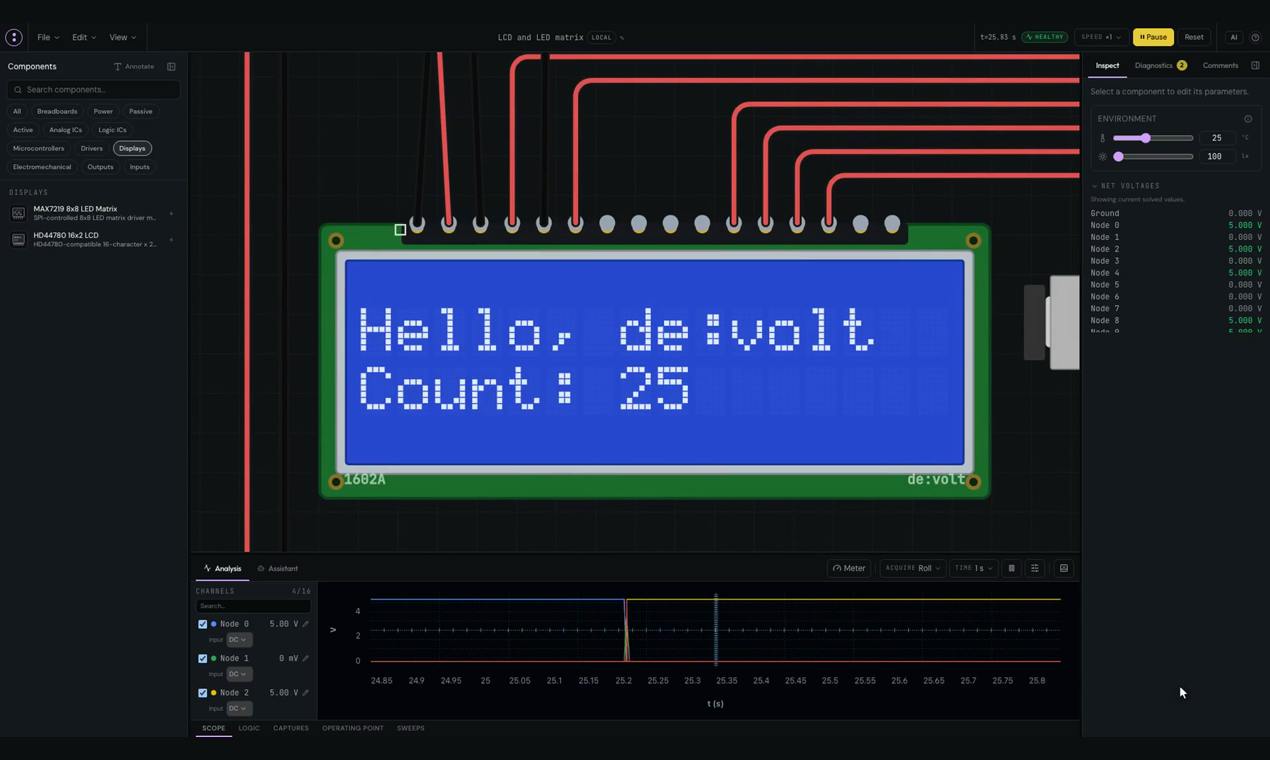
Unlike many educational simulation tools, de:volt emphasizes "real physics" rather than idealized models. This means that when you connect an LED into a circuit without a current-limiting resistor, it may burn out just like in reality — and this "mistakes happen" simulation environment is precisely the most valuable part of electronics education.
Breadboard is a prototyping board that lets you build circuits without soldering, with holes connected in columns internally via metal spring clips. A standard 400-point board suits small circuits, while the 830-point board offers more power rails and routing space, making it a common spec for teaching and prototype validation. Its advantages are quick plug-and-play and reusability; its drawbacks are contact resistance and parasitic capacitance that affect high-frequency circuit performance.
Real physics engine simulation differs from idealized SPICE-style simulation: the latter typically uses simplified linear models, ignoring component tolerances, thermal drift, and overload damage; whereas de:volt's claimed "real physics" means it simulates nonlinear behavior, such as LED burnout from overcurrent and resistor heating. This kind of simulation is more computationally intensive, but in teaching it lets students intuitively grasp engineering common sense like "why do you need a current-limiting resistor."
Core Features Breakdown
From 105 Components to 830-Point Boards
de:volt supports 105 component types and two mainstream breadboard specs (400-point and 830-point). For classroom teaching scenarios, this component library covers everything from basic passive devices to common active devices, enough to support circuit experiments from beginner to intermediate level. Users can directly plug wires and place components on the virtual breadboard, and the circuit runs in real time as it is being built.
Built-in Measurement Tools
The simulator includes a built-in 4-channel oscilloscope and multimeter, meaning users can observe signal waveforms and voltages/currents at key nodes without configuring separate instrument models. For circuit learners, putting "building" and "measuring" in the same interface significantly reduces the cognitive gap from theory to practice.
A 4-channel oscilloscope allows simultaneous observation of four signal waveforms, suited for analyzing timing relationships in multi-node circuits; a multimeter is used to measure static parameters such as voltage, current, and resistance. In traditional experiments, these two types of instruments must be purchased separately and are expensive; building them into the simulation environment lets students repeatedly practice measurement methods at no extra cost, understanding practical essentials like probe ground placement and range selection.
Support for Programming Multiple Development Boards
de:volt supports four types of development boards: Arduino Uno, Arduino Nano, micro:bit, and RP2040. This means it goes beyond analog circuit simulation to cover entry-level embedded programming scenarios — code runs on the virtual development board, with outputs connected to breadboard circuits, forming a complete input-processing-output chain.
Arduino Uno/Nano are based on the ATmega328P microcontroller and are the classic platform for embedded beginners; micro:bit targets educational scenarios, with built-in accelerometer, Bluetooth, and LED matrix; RP2040 is a dual-core Cortex-M0+ chip from the Raspberry Pi Foundation, commonly available as the Pico development board, suited for advanced learning. The simulator's support for these boards means users can write code in the browser, observe pin level changes, and link the virtual development board with breadboard circuits, forming a complete embedded system prototype validation chain.
Teaching Tools for the Classroom
The product explicitly mentions class management features: assignment distribution, grading, and live instruction. Guided lessons are judged based on real measurement results rather than simply checking "whether the wiring is correct." This is where de:volt sets itself apart from ordinary simulation software — it positions itself as teaching infrastructure, not just a personal toy.
Guided lessons typically include step-by-step tasks, hints, and automatic checks. de:volt's distinctive feature is that judgment is based on "real measurement results" rather than simple wiring topology — for example, it checks whether students measure the expected voltage at the correct node, not just whether components are plugged into the right positions. This is closer to debugging thinking in engineering practice and also prevents students from "guessing" the right answer through trial-and-error wiring.
Why It's Worth Watching
A classic contradiction in electronics education: real breadboards risk burning components, while idealized simulation creates false intuitions. de:volt chooses to reproduce physical behavior in the browser, letting mistakes happen in a virtual environment, greatly reducing the cost of learning.
Another notable point is zero installation. Ready to use right in the browser, it is far friendlier for deployment in school computer labs than desktop software requiring driver installation. Combined with class management and assignment grading features, de:volt is clearly moving toward a complete solution for electronics classrooms.
Judging from the 73 upvotes and 4 comments on Product Hunt, early interest in this product is moderate, but its three category tags — Hardware, Education, and Maker Tools — show a clear audience positioning. For electronics teachers, maker education practitioners, and self-learners, de:volt offers a new option worth trying.
Limitations and Observations
Public information currently does not disclose simulation accuracy, component model details, or browser performance. The computational overhead of real physics simulation in the browser is a real challenge, and smoothness when an 830-point board is fully loaded remains to be verified in practice. In addition, the specific list of 105 components, the depth of course content, and the pricing model are not yet clear.
As an independent product developed by Dev Kapadia, de:volt appears fairly complete, but its actual effectiveness in teaching scenarios still needs to be tested in real classrooms.
One-line Summary
de:volt runs real circuit physics simulation in the browser, supporting breadboards, 105 components, and development board programming, aimed at classroom teaching.
Paragraph Summary
de:volt is a browser-based breadboard simulator that earned 73 upvotes on Product Hunt, emphasizing "real physics" over idealized models — for example, an LED without a current-limiting resistor burns out just like in reality. It supports 400-point and 830-point breadboards, 105 component types, built-in 4-channel oscilloscope and multimeter, and is compatible with Arduino Uno/Nano, micro:bit, and RP2040 development board programming. The product targets classroom teaching, offering class management, assignment grading, and guided lessons judged on real measurements. The zero-install browser approach is friendly for school computer lab deployment, but simulation accuracy, component list, and performance are not yet public, and actual teaching effectiveness still needs classroom testing.
Related articles

Abnormal Error Rate Spike in Claude Mythos 5.2 and Fable 5.2
Claude Mythos 5.2 and Claude Fable 5.2 show an abnormal spike in request error rates, marked as investigating on the official status page. This article covers the incident overview, practical impact on developers, and recommended responses.

ReAct Runtime Context Trimming: Why Claude Code Acts at 70%
A deep dive into ReAct runtime context trimming: why Claude Code compresses at ~70% usage, why tool calls dominate, why messages must be dropped in pairs, and why codebases don't need RAG.

AI Agent vs LLM: How Cursor and Claude Code Actually Work
An in-depth analysis of the essential difference between AI Agents and LLMs: LLMs generate code suggestions, while Agents modify files and run tests via tool calls. Using a Spring Boot bug fix as an example, it breaks down the workflows, permission control, and verification mechanisms of Cursor and Claude Code.