Deconstructing DeepSeek Harness: How One Command Generates Five Products

DSH uses layered configuration to derive five products from one command; the four modes are just presets within the web layer.
The article starts from the discrepancy between the "four modes" described in Bilibili tutorials and the official "five Profiles," showing they belong to different layers. DSH, like Claude Code and Codex, sits in the Harness layer beyond the model, handling file reading, command execution, and conversation memory, and can even delegate subtasks via add-on packs. The five Profiles are configuration lists: web, headless, acp, and sdk stack a 97-entry base plus their own layer, while sdk minimal stands alone without base. The four modes are presets inside the web layer, not the same layer as Profiles. The article verifies this with dumpconfig and headless tests.
DeepSeek Harness (DSH) is often described as having "four modes" in Bilibili tutorials, but the official help information mentions "five Profiles." This isn't a typo—it's the key entry point for understanding its architecture. Based on a Bilibili creator's breakdown video, this article reconstructs at the code level how DSH uses layered configuration to derive five product forms from the same command, and clarifies the essential difference between modes and Profiles.
One Command, Five Products: DSH Is the Same Kind of Tool as Claude Code and Codex
Is DSH the same kind of tool as Claude Code and Codex? One piece of circumstantial evidence in the code confirms it: DSH has a category of officially maintained add-on packs that are installed on demand—an add-on pack is a packaged, separately installable configuration manifest. The manifest includes Claude Code and Codex—once installed, DSH can hand a subtask to a fresh Claude Code or Codex session, with login and setup installed alongside the add-on pack at runtime. The research files use the local machine, and being able to bring the other two in to delegate work shows at least that they do the same kind of work: beyond the model, they handle reading files, running commands, and remembering what was discussed.
The previous episode stopped at the install command npx—that's the first command, just without a version number, so it installs whatever the latest version was at the time. Press Enter, the terminal prints a local address, and opening a browser gives you the DSH web interface.
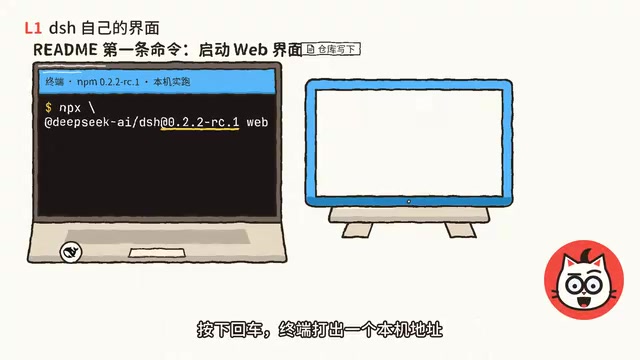
None of the five bundled Profiles includes a terminal interface. The command-line documentation does include one line about a TUI terminal interface example, with a note saying "assuming you've already installed this Profile." What you can use directly in the terminal is a headless mode that runs and exits—we'll get to that later.
ACP (Agent Client Protocol) is a protocol for program-to-program calls, used to let a host program (such as an editor, IDE, or automated workflow) start an agent session, pass tasks, and receive results in a standardized way. It defines no interface, only messages and lifecycle, so it's suited to being "called" by other software rather than operated directly by a human. In DSH, the ACP Profile consists of just 5 entries with a 23-line configuration file—a fitting embodiment of this lightweight protocol-layer positioning. The original text mentions that in July there was consideration of having ACP double as an editor interface, which was ultimately rejected because taking on both interface and automation roles would create two parallel-evolving interaction conventions, doubling maintenance costs.
How One Command Becomes Five Products: The Stacking Logic of Profiles
The first line of the help information says that DSH launches a Profile, which is a series of configurations stacked in order, with your own modifications pressed on top—top-down, divide and conquer. Breaking it down, the five Profiles are just five lists in the source code, each listing which layers it stacks: web, headless, sdk, and acp all first stack the DSH base, then stack their own layer; only sdk minimal has no base and is a single layer on its own.
The following entry counts are based on 0.2.2-rc on npm, while the code reading locked onto a different commit that is 811 commits later than the rc, so some numbers don't match between the two. An entry is an item in the configuration that carries an id, usually a plugin. The base is the foundation, with 97 entries; stack the web layer on top, and that layer alone has 119 entries—it's the interface you see in the browser.
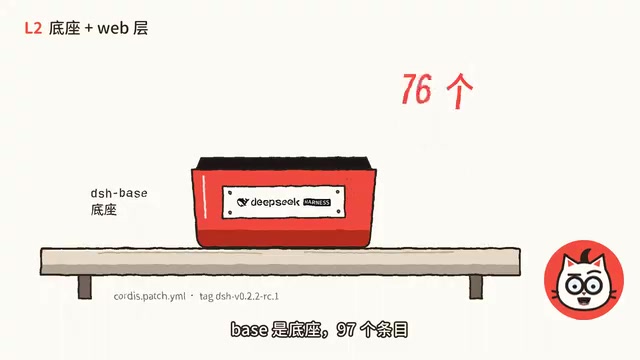
Remove web and swap in headless's 8 entries, and it becomes a command-line tool that runs and exits; swap in acp (Agent Client Protocol)'s 5 entries, and it becomes a protocol service for other programs to call—the entire acp layer's configuration file is only 23 lines; swap in sdk's 18 entries, and your own program can call it through standard input and output; sdk minimal is a separate layer with 37 entries, with no base underneath and only 3 tools by default. Four Profiles share one foundation—stack a different layer and you get a different product, while sdk minimal starts its own set.
Where Are the Four Modes: Presets and Profiles Are Not on the Same Layer
So where are the "four modes" mentioned in the tutorials? Inside the web layer. Breaking down one more level, the web layer also carries 4 presets: standard, ptc, minimal, and creative. Each preset governs what tools the agent has in that session and what prompts it uses. When creating a new session in the web layer and choosing a mode, these are the 4 listed: standard mode is described as suitable for most tasks, and minimal mode as suitable for testing and comparing the agent's basic performance.
Back up a level: the Profile determines which product is launched this time, while the preset only governs a single session—the two are not on the same layer. So the 4 modes in the tutorials are all inside the web layer; the 4 modes are presets, and the 5 Profiles are products. The out-of-the-box experience is "what the cat does best"—pop the lid and everything inside is visible.
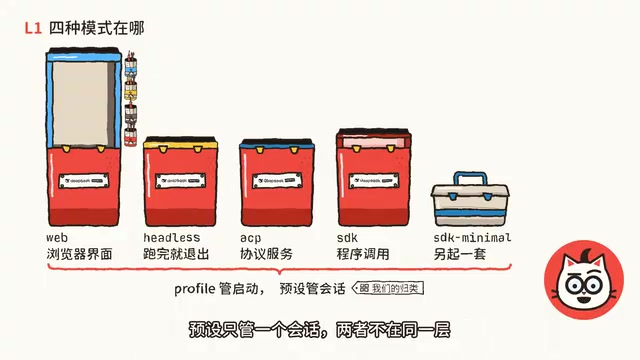
Presets and Profiles both present themselves as "a set of configurations," but their scope is completely different. A Profile determines which layers are loaded when the process starts and ultimately what product form gets assembled (Web, headless, ACP, SDK, etc.)—one launch corresponds to exactly one Profile. A preset is chosen inside the Web layer when creating a new session and only affects the tool set and system prompts available to the agent in that session; switching presets doesn't require restarting the process. DSH's four presets—standard, ptc, minimal, and creative—target routine tasks, specific tool combinations, basic capability testing and comparison, and more open-ended creation scenarios, respectively. Confusing the two leads to mistakenly thinking the "four modes" are four independent products, when in fact they're just configuration differences between sessions within the same product.
Terminal Verification: Switching from Web to Headless
Back in the terminal, stop web; it's still the same npx command, with two parameters appended: profile web and dumpconfig. It starts nothing—it just prints the entire assembled configuration and exits. The web set is 1243 lines, with a comment line before each section indicating which layer it came from: this section comes from dsh base, that section is base that was modified by the web layer, and scrolling down to line 398 gives you an agent loop entry.
Try a different layer: same dsh, switch to headless, and give it a task. When using the official API, session logs are uploaded with requests by default; before recording these segments we disabled this upload—how to disable it and why it's worth caring about will be covered in detail in episode eight. In a sample repository with only 5 files, we asked it to list the top-level directories and explain their purposes; the answer went to standard output in 8.5 seconds, the thinking process went to standard error, and the exit code was 0. Headless doesn't read the keys you saved in the web settings; API keys are only recognized from environment variables and .env files at startup.
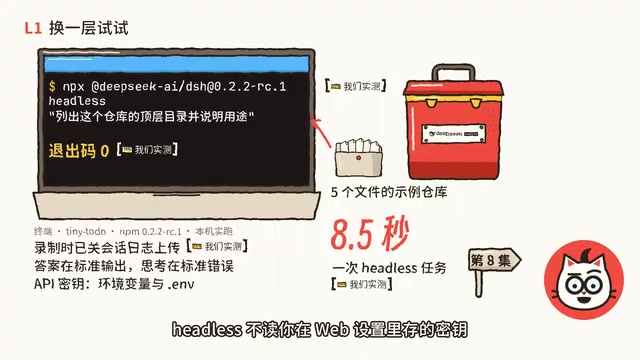
It can also take over when you feed it the stats from git diff and have it summarize the changes—9 seconds, exit code still 0. This usage suits scripts and CI.
Three Hidden Cards: The Rejected Option, the Cost, and Self-Verification
The first hidden card is a rejected approach. In July, ACP was still serving as an editor interface, and a design note from July 23 described a considered approach: continue using ACP as the editor interface until web reaches equivalent capability. The conclusion was not to adopt it, because it would leave two sets of interaction conventions that need to evolve. Since then, ACP only does automation protocols.
The second hidden card is the cost of the shared foundation. Headless itself has only 8 entries, but when assembled, all 97 entries of the base come with it—including the 7 that are turned off. Among the bundled Profiles, the only way to go without base is sdk minimal, which starts its own set.
The third hidden card is verifying it yourself. In the repository root, count the entries in the headless layer's configuration file—it's 8, the same number in both rc and the locked commit. Then take a look at the first line printed: DSH Base. Five months ago this repository had its first commit, already named DeepSeekAd Harness, yet the only product listed was called DeepSeek Code. Where did this foundation come from? The next episode starts from that commit. No complexity can't be reduced by peeling off a layer—and if there is, peel off another one.
dumpconfig is a diagnostic parameter provided by DSH: with it added, the command no longer starts any service but prints the complete configuration stacked in Profile order, section by section, then exits, with a comment before each section indicating its source layer (e.g., from dsh base, overridden by the web layer, etc.). Its value lies in turning the abstract mechanism of "layered stacking" into text you can verify with your own eyes—entry counts, override relationships, and final effective values are all clear at a glance. In the original text, the web set prints 1243 lines and line 398 is the agent loop entry, which was verified precisely with the help of dumpconfig. For users, this is the most direct means of confirming whether a configuration comes from the foundation or was rewritten by an upper layer, and it's the concrete tool behind the "verify it yourself" card.
Background Notes
Headless mode refers to an execution method that starts no graphical or interactive interface, runs as a one-off task, and exits: give it a task, the result goes to standard output, logs and thinking process go to standard error, and the process indicates success or failure through its exit code. This form is naturally suited to scripts, CI pipelines, and scheduled tasks because it has no session state, requires no manual clicking, and the exit code can be used by the calling program to judge the outcome. DSH's headless Profile carries 8 entries of its own but still inherits all 97 entries of the base foundation, so it has complete capabilities with zero interaction. Note that headless doesn't read keys saved in the Web settings; API keys are only read from environment variables and .env files at startup, ensuring that credentials sources are reproducible and auditable in a headless environment.
One-line Summary
DSH uses layered configuration to let one command derive five products; the four modes are just presets within the web layer.
Paragraph Summary
The article starts from the discrepancy between the "four modes" described in Bilibili tutorials and the official "five Profiles," pointing out that the two aren't contradictory but belong to different layers. DSH, like Claude Code and Codex, belongs to the Harness layer beyond the model, responsible for reading files, running commands, and remembering conversations—and it can even delegate subtasks to the latter two via add-on packs. The five Profiles are just five configuration lists in the source code: web, headless, acp, and sdk all first stack the 97-entry base foundation, then stack their own layer; sdk minimal has no base and is a separate layer. The four modes described in the tutorials—standard, minimal, creative, and ptc—live inside the web layer as presets that manage a single session's tools and prompts, and are not on the same layer as the Profile that determines the product form. The article also verifies this through dumpconfig and real headless testing, and reveals the cost of the shared foundation and the reason the ACP approach was rejected.
Related articles

Abnormal Error Rate Spike in Claude Mythos 5.2 and Fable 5.2
Claude Mythos 5.2 and Claude Fable 5.2 show an abnormal spike in request error rates, marked as investigating on the official status page. This article covers the incident overview, practical impact on developers, and recommended responses.

ReAct Runtime Context Trimming: Why Claude Code Acts at 70%
A deep dive into ReAct runtime context trimming: why Claude Code compresses at ~70% usage, why tool calls dominate, why messages must be dropped in pairs, and why codebases don't need RAG.

AI Agent vs LLM: How Cursor and Claude Code Actually Work
An in-depth analysis of the essential difference between AI Agents and LLMs: LLMs generate code suggestions, while Agents modify files and run tests via tool calls. Using a Spring Boot bug fix as an example, it breaks down the workflows, permission control, and verification mechanisms of Cursor and Claude Code.