Deep Dive into 14 AI Coding Agents Recommended by DeepSeek: A Complete Selection Guide

A complete guide to 14 AI coding agents and assistants officially recommended by DeepSeek.
DeepSeek maintains a verified Agent tools list on GitHub. Beyond well-known tools like Claude Code, 14 other tools deserve attention. The 10 coding agents are grouped into Terminal General-Purpose (Pi, Oh My Pi, Lancly, Crest), DeepSeek Native (Resonix, DeepCode, DeepSeek TY), and IDE Multi-Form (Kilo Code, Open Code, CodeBuddy), plus 4 personal AI assistants for daily productivity. The article analyzes each tool's positioning, features, and use cases by scenario and complexity level.
DeepSeek maintains a list called Awesome DeepSeek Agent under its GitHub organization, featuring 18 verified Agent and CLI tools that can reliably call DeepSeek models. Setting aside the well-known ones — Claude Code, Codex, GitHub Copilot, and its CLI version — the remaining 14 tools are equally worth your attention. This article breaks down the positioning and features of each AI coding agent and provides selection recommendations.
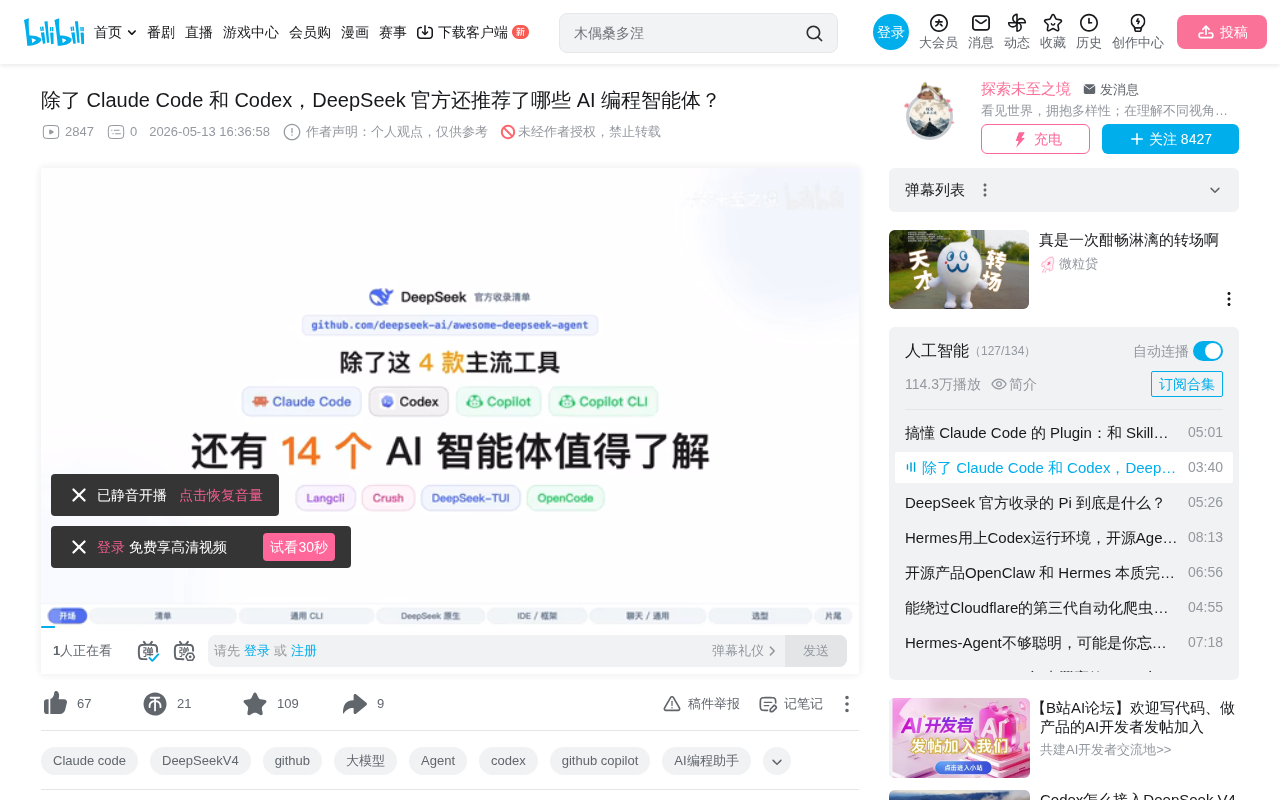
10 Coding Agents: Grouped by Scenario
These 10 coding agents can be divided into three groups based on use cases and design philosophy: "Terminal General-Purpose," "DeepSeekAd Native," and "IDE & Multi-Form." Within each group, they're arranged from lightweight to heavyweight.
Terminal General-Purpose Coding Agents (4 Tools)
All four tools in this group are direct competitors to Claude Code, targeting developers who do AI-assisted programming in terminal environments.
-
Pi: The most minimalist terminal coding scaffold, supporting vertical conversation sessions with the ability to connect any provider. Its core philosophy is "minimum viable" — doing nothing extra — making it ideal for geeks who like building workflows from scratch.
-
Oh My Pi: A fork of Pi that adds a full toolchain, model role system, MCP protocol support, plugin mechanism, and Agent workflows on top of the scaffold. Think of it as the "all-in-one" version of Pi.
About MCP Protocol: MCP (Model Context Protocol) is an open protocol standard proposed by Anthropic in late 2024, aiming to standardize interactions between AI models and external tools/data sources. Its core idea is similar to USB port standardization — regardless of the underlying model, tools and plugins can be plug-and-play as long as they follow the MCP protocol. MCP defines two roles: Client and Server. The client handles passing context and tool invocation requests to the model, while the server exposes specific tool capabilities (such as file read/write, code execution, database queries, etc.). MCP has gained support from major AI vendors including DeepSeek and OpenAI, and is becoming the infrastructure layer of the AI Agent ecosystem.
-
Lancly: Its biggest selling point is 100% compatibility with the Claude Code protocol — configuration files and prompts can be directly reused, requiring only a swap of the base model to any mainstream LLM. For teams already using Claude Code, the migration cost is virtually zero.
-
Crest (by the Charm community): Integrates multi-model support and LSP (Language Server Protocol), with the most polished interface design and the most complete feature set. If you care about aesthetics and interaction experience in terminal tools, Crest is the top pick in this group.
About LSP Protocol: LSP (Language Server Protocol) is an open protocol released by Microsoft alongside VS Code in 2016, designed to decouple programming language intelligence capabilities (code completion, go-to-definition, error diagnostics, refactoring, etc.) from editors. Before LSP, every editor needed to implement a separate language support plugin for each language, resulting in extremely high maintenance costs. LSP centralizes language analysis logic in an independent "Language Server" process, allowing any LSP-compatible editor to directly reuse it. Crest's integration of LSP into a terminal AI tool means it can understand the semantic structure of code (not just text), enabling more precise AI assistance — which is quite rare among pure terminal tools.
DeepSeek Native Coding Agents (3 Tools)
All three tools in this group are deeply optimized around DeepSeek models, ideal for power users of DeepSeek.
-
Resonix: The most focused of the bunch, featuring a Cache First loop and built-in MCP architecture, with the core goal of minimizing model invocation costs. Extremely practical for scenarios requiring frequent API calls with cost sensitivity.
About Cache First Architecture: Cache First is an engineering strategy that minimizes LLM API call costs by maximizing KV Cache utilization. LLM API pricing typically splits into "input tokens" and "output tokens," where input token costs are often overlooked. However, in multi-turn conversations or long-context scenarios, repeatedly sending the same system prompts, conversation history, and code context generates significant redundant computation costs. The KV Cache mechanism allows the model server to cache the intermediate states (Key-Value matrices) of previously computed tokens, significantly reducing computation when subsequent requests hit the cache — DeepSeek API offers substantial discounts for cache-hit tokens. Resonix's Cache First loop design carefully organizes prompt structures and fixes prefix content to maximize cache hit rates, compressing actual costs by several times in frequent-call scenarios.
-
DeepCode: More feature-rich, adding deep thinking mode, reasoning intensity adjustment, and an Agent Skills system on top of Resonix's foundation. Developers can flexibly adjust reasoning depth based on task complexity, finding the balance between effectiveness and cost.
-
DeepSeek TY: The heavyweight in this group, implemented in Rust with a Codex-style architecture. It serves as both MCP client and server simultaneously, with support for ultra-long context (EM long context), suitable for complex tasks on large codebases.
About the Engineering Significance of Rust Implementation: DeepSeek TY's choice of Rust carries clear engineering implications in the AI toolchain. Known for "memory safety without GC," Rust offers lower runtime overhead and more predictable latency compared to Python (the preferred language for most AI tools). For scenarios handling ultra-long contexts, memory management efficiency is critical — Python's garbage collection can introduce unpredictable pauses when processing large codebases. Additionally, Rust's concurrency model is naturally suited for the dual role of MCP client and server, efficiently handling concurrent tool invocation requests. In recent years, Rust's penetration in system-level AI tools (such as the Candle inference framework and Tokenizers library) has been steadily increasing, and DeepSeek TY's tech choice aligns with this trend.
IDE & Multi-Form Coding Agents (3 Tools)
Tools in this group aren't limited to the terminal, offering more diverse usage forms.
-
Kilo Code: Maintained by the Kilo team, available in both command-line and editor extension forms. Developers can seamlessly switch between terminal and IDE based on preference.
-
Open Code: From the Anomaly team with University of Waterloo (Canada) backgrounds, offering the richest variety of forms — supporting terminal and web. Notably, the project is backed by YC and Reid Hoffman investments, with promising commercialization prospects.
-
CodeBuddy: An enterprise-grade AI coding assistant from Tencent, integrating an Agent Skills system. It should be the most familiar to developers in China. As a major tech company product, it has natural advantages in enterprise compliance, Chinese language support, and ecosystem integration.
4 Personal AI Assistants: Daily Productivity Tools
These 4 tools aren't positioned for writing code — they target daily chat, note-taking, and office scenarios, arranged from lightweight to heavyweight.
- Nanobot: The lightest open-source Agent, with built-in memory and MCP support. Ideal for users who want a simple, controllable personal AI assistant.
Related articles
 Product Reviews
The Programmer's Desk Setup Guide: Building a Workspace That Feels Like Home
Discover how programmers build productive, comfortable workspaces. From multi-monitor setups to ergonomic design, explore the desk philosophy that drives focus and flow.
 Product Reviews
Qoder vs Cursor Real-World Comparison: Which $20/Month AI IDE Is Better?
Hands-on comparison of Qoder vs Cursor AI IDEs: Agent autonomy, human interaction count, and architecture decisions. Qoder needed only 2 interactions vs Cursor's 8.
 Product Reviews
Cursor Cloud Agent Demo: Eliminating Bottlenecks Across the Entire Software Development Lifecycle
Deep analysis of Cursor's Cloud Agent demo showing how cloud VMs, automated test artifacts, and a full-chain control plane systematically eliminate human bottlenecks across the software development lifecycle.