Deep Dive into AionUI: What Makes This 24.6k Stars AI Agent Workbench So Powerful

AionUI is an open-source AI Agent workbench that pushes AI from chat windows to a unified productivity platform.
AionUI (24.6k Stars) positions itself as an AI Agent workbench rather than a traditional chat client. It features out-of-the-box built-in Agents while integrating external CLI Agents like Claude Code and Codex into a unified interface, with MCP protocol support for centralized tool permission management. Its core differentiator is the ability to directly produce deliverable files like PPT, Word, and Excel, support remote access (Web/Lark/DingTalk, etc.) with continuous task execution, and provide multi-Agent collaboration via Team Mode — upgrading AI from a conversational tool to a true productivity workbench.
When most AI products are still stuck in the "you ask, I answer" chatbox paradigm, an open-source project with 24.6k Stars is attempting to redefine how we use AI. AionUI doesn't want to be yet another chat client — its goal is to become a true AI Agent workbench.
What is an AI Agent? An AI Agent is an AI system with autonomous planning, tool invocation, and multi-step execution capabilities, distinct from single-turn Q&A chat models. Agents can decompose complex tasks, call external tools (such as file systems, browsers, and code execution environments), and dynamically adjust execution paths based on intermediate results. This paradigm emerged from breakthroughs in large language models (LLMs) with reasoning frameworks like ReAct and Chain-of-Thought, giving models the ability to loop through "think-act-observe" cycles, enabling them to truly participate in multi-step real-world workflows.
Why is this direction worth paying attention to? Because the core pain point of current AI experiences isn't that "answers aren't good enough" — it's that "workflows can't run end-to-end." When you want AI to handle file operations, multi-step execution, document delivery, and remote task progression, a single chat window simply isn't enough. Constantly switching between terminals, chat interfaces, and office tools severely fragments your efficiency.
Built-in Agents: Low-Barrier, Out-of-the-Box Design
When many people first encounter AI Agent products, what turns them off isn't insufficient capability — it's the prohibitively high configuration cost. Installing tools, setting up environments, connecting models, troubleshooting permissions — by the time you're done with that whole process, your enthusiasm is already half spent.
AionUI makes a clear trade-off here: built-in Agents work out of the box. You can log in directly or enter your own API Key, then start working immediately. It supports switching between different models and lets Agents read files, write files, research information, and invoke tools directly.
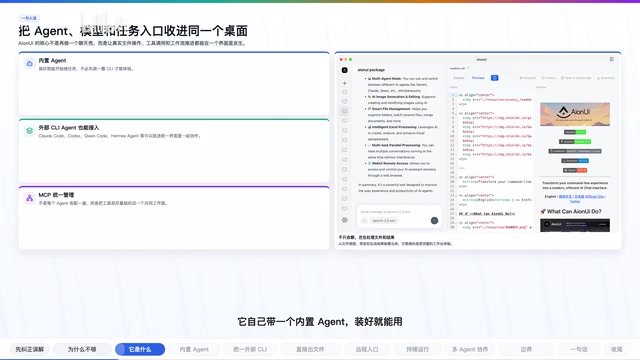
This means AionUI isn't just serving mid-to-senior developers — it's trying to make Agent capabilities into a more accessible desktop product. For users who don't want to wrestle with CLI configurations, this design philosophy is extremely friendly.
Unified Workbench: Bringing External CLI Agents Into One Interface
Built-in Agents are just the first layer. AionUI's more ambitious play is that it doesn't require you to use only its own built-in assistant.
In the project documentation, it explicitly lists support for external tools including Claude Code, Codex, Cline Code, Hermes Agent, Snow CLI, Cursor Agent, and more.
CLI Agent Ecosystem Background Claude Code, Codex CLI, Cline, and similar tools represent a category of AI coding Agents that use the command line as their primary interaction interface. They run directly in the developer's terminal environment, capable of reading/writing local files, executing Shell commands, and performing Git operations — with extremely powerful system-level capabilities. However, the CLI form factor inherently suffers from insufficient visualization, difficulty managing parallel multi-task workflows, and high barriers for non-technical users — which is precisely the layer that workbench products like AionUI aim to fill: not replacing these tools' underlying capabilities, but adding a unified visual management interface on top.
What it wants to do isn't replace these CLI Agents, but bring them into a unified interface.
If you already have your own familiar Agent toolchain, AionUI acts more like a workbench layer on top:
- Unified entry point: No more switching back and forth between terminal and chat interface
- Unified session view: All Agent conversations and task statuses visible at a glance
- Unified MCP management: Tools, permissions, and configurations centrally managed
- Parallel multi-Agent sessions: Run multiple Agents simultaneously, each executing their own tasks
What is the MCP Protocol? MCP (Model Context Protocol) is an open protocol proposed by Anthropic in late 2024, designed to standardize communication between AI models and external tools/data sources. Similar to how USB unified hardware connection standards, MCP aims to solve the fragmented integration problem between different Agent frameworks and tools. Through MCP, developers can package file systems, databases, API services, and more as standardized "tool servers" that any MCP-compatible Agent can call, dramatically reducing toolchain integration costs. AionUI's unified MCP management means you only need to configure tool permissions once, and all connected Agents can share access according to the rules.
This "don't replace, integrate" approach is a very pragmatic positioning given the current fragmentation of the Agent tool landscape.
Deliverable Outputs: AI Doesn't Just Answer Questions — It Produces Files
This is where the gap between AionUI and ordinary chat products is most pronounced. Its repository documentation doesn't just talk about chat — it repeatedly mentions PPT, Word, Excel, Pitch Decks, Dashboards, Academic Papers, Financial Models, and other office deliverables.
The reasoning behind this is very practical: many people don't want a text answer — they want a file they can continue editing and actually hand off to someone. If AI can directly produce results as .pptx, .docx, .xlsx, its position in real work becomes entirely different.
From "conversational AI" to "deliverable AI" — this shift may seem like just a change in output format, but it actually means AI upgrades from a "reference tool" to a "productivity tool." This is also one of the core battlegrounds in the current AI application layer competition — whoever can make AI output directly embed into real work deliverables will secure a more solid position in enterprise user scenarios.
Remote Access & Continuous Operation: The Workbench Extends Beyond the Desktop
AionUI also considered remote access. The project documentation explicitly mentions Web UI, along with support for entry points via Telegram, Lark (Feishu), DingTalk, WeChat, and more.
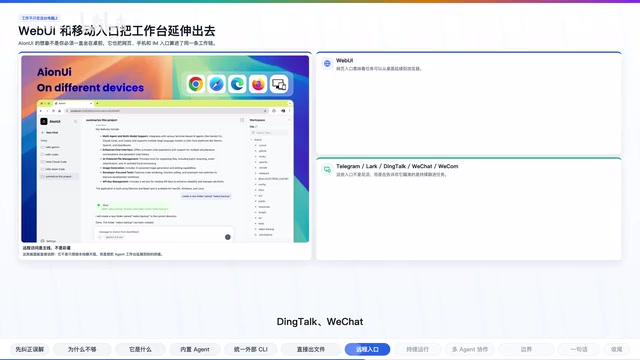
This means AionUI's positioning isn't "you must sit in front of your computer staring at a chat window." It's more like extending the AI workbench outward, letting you monitor tasks, give instructions, and retrieve results from web and mobile interfaces.
Combined with its mentioned Chrome extension and 24x7 automation capabilities, the positioning becomes even clearer: It's not an AI app that ends when the conversation is over — it's a workbench that can stay running, continuously execute tasks, and continuously produce results.
Of course, we need to be realistic here — supporting scheduled and automated modes doesn't mean all tasks are suitable for completely unattended operation. A more accurate understanding is that it provides a runtime environment closer to real workflows, rather than "one sentence, fully automatic" magic.
Team Mode: The Beginnings of Multi-Agent Collaboration
Another design worth noting is Team Mode. This isn't simply opening multiple windows — it has a Leader and Teammate division of labor mechanism: one Agent receives the task, breaks it into subtasks, then distributes them to other Agents for parallel execution.
Technical Background on Multi-Agent Collaboration Multi-Agent Collaboration is a cutting-edge direction in current AI engineering, with representative frameworks including AutoGen, CrewAI, LangGraph, and others. The core idea is to decompose complex tasks and assign them to specialized Agents for parallel processing, with an Orchestrator coordinating each Agent's inputs, outputs, and execution order. This paradigm shows clear advantages when handling tasks requiring cross-domain knowledge and long processes — for example, one Agent handles research, one handles writing, one handles verification, and all three running in parallel can significantly compress total time. However, this model also faces engineering challenges like inter-Agent communication latency, error propagation, and context consistency — the entire industry is still in early deployment stages. AionUI's Team Mode is a concrete exploration of this direction at the interface and architecture level.
This design itself demonstrates that AionUI wants to be more than a chat shell — it wants to be a multi-Agent collaboration interface. What it cares more about is:
- How to put different Agents onto the same work surface
- How to make tasks flow between Agents
- How to let humans see, catch, and control the process
While multi-Agent collaboration is still in early exploration across the entire industry, AionUI has at least prepared for this direction at the interface and architecture level.
Boundaries & Positioning: What It Is and What It Isn't
Finally, the boundaries need to be made clear:
- It's not a model itself — it's a desktop workbench that hosts models and Agents
- It's not just a GUI shell for a single Agent — it aims to cover a broader Agent ecosystem and office workflows
- Don't expect one-click full automation for all scenarios — many capabilities still depend on the models you connect, external CLI configurations, and specific task types
Its core value lies in organizing these scattered capabilities into something that looks more like a workbench, rather than promising to magically automate everything.
Summary
What's most noteworthy about AionUI isn't how many more models it supports — it's that it's pushing AI from the chat window toward a workbench paradigm. Built-in Agents, external CLI Agent integration, office deliverable generation, remote access, multi-Agent collaboration — once these capabilities are placed into a single desktop environment, the way you use AI begins to undergo a qualitative change.
If you're already using Claude Code, Codex, or other CLI Agents and want to truly pull AI into scenarios involving files, documents, remote collaboration, and continuous tasks, AionUI is worth experiencing firsthand.
Related articles
 Product Reviews
The Programmer's Desk Setup Guide: Building a Workspace That Feels Like Home
Discover how programmers build productive, comfortable workspaces. From multi-monitor setups to ergonomic design, explore the desk philosophy that drives focus and flow.
 Product Reviews
Qoder vs Cursor Real-World Comparison: Which $20/Month AI IDE Is Better?
Hands-on comparison of Qoder vs Cursor AI IDEs: Agent autonomy, human interaction count, and architecture decisions. Qoder needed only 2 interactions vs Cursor's 8.
 Product Reviews
Cursor Cloud Agent Demo: Eliminating Bottlenecks Across the Entire Software Development Lifecycle
Deep analysis of Cursor's Cloud Agent demo showing how cloud VMs, automated test artifacts, and a full-chain control plane systematically eliminate human bottlenecks across the software development lifecycle.