Deep Dive into Mocha AI App Builder: Deploy a Full-Stack Website with a Single Prompt

Mocha solves AI app builders' configuration hell by embedding full-stack infrastructure into one platform
While AI app builders can generate code, configuring databases, authentication, email, and deployment still requires developers to juggle multiple platforms—creating "configuration hell." Mocha embeds all production-grade features directly into the platform, enabling complete app deployment with a single prompt. It offers automatic dev/prod database separation, zero-configuration email, one-click domain binding, built-in analytics, and version control, dramatically reducing friction from prototype to production.
The Pain Point of AI App Builders: Configuration Hell
If you've used AI app building tools like Replit, v0, Lovable, or Bolt, you're probably familiar with this scenario: the AI generates a beautiful interface for you, but when you actually want to make it "work," you need to manually connect Supabase for the database, link Vercel for deployment, configure Clerk for authentication, integrate SendGrid for emails… Most of your time ends up spent on debugging and configuration rather than the product itself.
AI App Builders are a category of development tools that have emerged in recent years as large language models have grown more capable. Their core function is transforming natural language instructions into runnable code, typically relying on the code generation capabilities of models like GPT-4 and Claude. However, code generation is just the tip of the iceberg for full-stack applications—data persistence, identity authentication, email notifications, CDN deployment, and other infrastructure services are equally indispensable. This "last mile" of integration work often requires developers to jump back and forth between a dozen different platforms, registering accounts, applying for API keys, reading documentation, and debugging errors. This is the common weakness of early AI builders and the root cause of so-called "configuration hell."
Recently, an AI app building platform called Mocha has caught the attention of many developers. Its core value proposition is crystal clear: embed all production-grade features—database, authentication, email, domains, analytics—into a single platform, allowing you to deploy a complete live application with a single prompt, without any additional configuration.
Hands-On Demo: Building a Customer Feedback System with One Prompt
To verify Mocha's real-world capabilities, we built a customer feedback collection system called Pulseboard using a single prompt. The application includes the following features:
- Google account login (built-in, no OAuth configuration needed)
- Project management: Create projects, generate feedback links
- Public feedback page: Anyone can submit ratings and comments via a link
- Email notifications: Automatically sends beautifully styled emails when feedback is received
- Data dashboard: Displays statistics like feedback count and average ratings
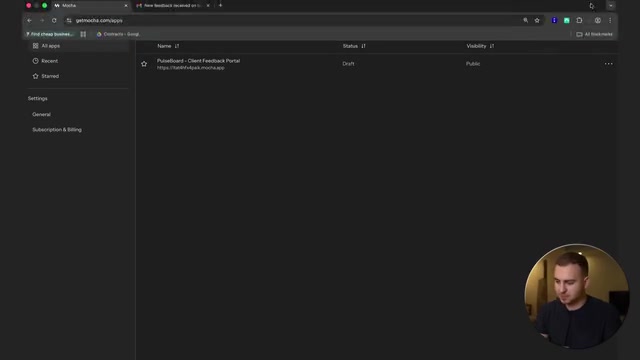
The entire build process started with inputting a prompt. The prompt content was roughly: "Build a customer feedback portal called Pulseboard where freelancers and agencies can collect client feedback on active projects. Users sign up via Gmail, each project can generate a feedback link, the dashboard displays all feedback, use dark mode with green accent colors, deploy to pulseboard.mocha.app."
Deep Dive into Mocha's Core Features
Step-by-Step Guided Intelligent Build Process
Mocha's build process uses a step-by-step guided approach. After completing each step, the AI proactively asks "What should we build next?" and offers options like "Set up the database," "Add project creation functionality," or "Build the public feedback submission page." Users simply select or input instructions, and the AI continues iterating.

The platform offers two modes: Max mode uses a more powerful AI Agent that generates higher-quality output but consumes more credits; Standard mode is more economical. Additionally, you can upload reference images, choose templates, and set projects as public or private.
This step-by-step guided interaction design essentially breaks down complex software engineering tasks into a series of manageable subtasks (Task Decomposition), aligning with mainstream practices in the AI Agent domain—the more focused the instructions processed within a single context window, the higher the accuracy and consistency of model output. Compared to the "big bang" approach of generating an entire application at once, step-by-step iteration makes it easier for users to course-correct along the way, reducing the risk of large-scale rework caused by imprecise requirement descriptions.
Automatic Separation of Development and Production Databases
This is one of Mocha's most commendable design decisions. The platform automatically creates two independent instances for each application: a development database and a production database. Test data generated during development won't pollute the production environment, and a fresh production database is used after deployment.
The isolation of development and production environments is a fundamental principle in software engineering, originating from modern cloud-native development standards like "The Twelve-Factor App." In traditional development workflows, teams typically maintain at least three environments: Development, Staging, and Production, each using independent database instances to prevent test data, dirty data, or accidental operations from affecting real users. For developers using external database services like Supabase or PlanetScale, manually maintaining multiple database instances and managing connection strings for different environments is itself a tedious and error-prone task. Mocha's automation of this best practice means that even users without an engineering background can enjoy professional-grade environment isolation without even being aware of it.
This is almost unheard of in traditional AI builders, but for anyone with real development experience, it's the most basic engineering practice. Mocha automates this workflow, making it especially friendly for non-technical users.
Zero-Configuration Built-in Email System
Email functionality is a weak point for many AI builders. Typically, you need to register for SendGrid or Twilio accounts, configure API keys, and debug templates. In Mocha, you simply describe your email requirements in the prompt—for example, "When new feedback is submitted, send an email notification to the project owner containing the rating and a comment preview"—and the AI implements it automatically, including the email styling.
Sending transactional emails involves multiple complex technical layers: SMTP protocol configuration, SPF/DKIM/DMARC domain verification records, sender IP reputation management, and unsubscribe mechanisms compliant with regulations like CAN-SPAM and GDPR. These tasks present an extremely high barrier for non-technical users, and even experienced developers need several hours to configure a reliable email sending system from scratch. By embedding email infrastructure, Mocha completely abstracts these complexities at the platform level—users only need to focus on "what content to send" rather than "how to send it."
You can also customize the sender name and email address in settings, and after connecting a custom domain, you can even send emails using your own branded domain.
One-Click Domain Binding and Rapid Deployment

Mocha supports custom domain binding. If you use mainstream DNS providers like Cloudflare, the platform can even automatically detect and configure DNS records with one click—no need to manually add CNAME or A records. In the demo, the application was bound to a custom domain, and the entire process took just a few clicks.
DNS (Domain Name System) configuration has long been a nightmare for non-technical users. CNAME, A records, TTL values, DNS propagation delays… these concepts are nearly insurmountable hurdles for first-time website builders. Cloudflare, as one of the world's largest DNS providers, offers comprehensive API interfaces that allow third-party platforms to directly read and write users' DNS records through authorization. Mocha leverages this capability to compress what would normally require manual DNS configuration steps into a single authorization click—a quintessential example of the "trade integration for experience" design philosophy.
Deployment is equally simple: click the Publish button, select a domain, and the application goes live within a minute.
Built-in Website Analytics and Version Control
Mocha also integrates website analytics, allowing you to view unique visitors, traffic sources, geographic regions, UTM parameters, and more. Additionally, the platform performs automatic version control—you can view the history of each build and roll back to any previous state at any time.
The built-in website analytics feature is also noteworthy from a privacy compliance perspective. With the enforcement of GDPR (EU General Data Protection Regulation) and CCPA (California Consumer Privacy Act), traditional Google Analytics faces increasingly strict compliance pressure in European markets. If Mocha's built-in analytics system adopts a privacy-first design approach—meaning no cross-site tracking cookies and no collection of personally identifiable information—it can legally operate without requiring cookie consent banners, which is particularly important for applications targeting European users.
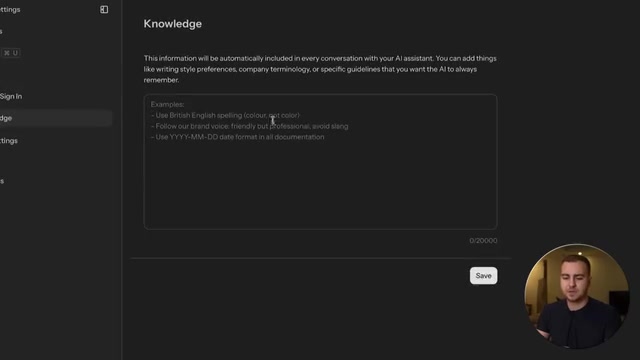
Another practical feature is the Knowledge Base. You can define persistent rules within it, such as "only use British spelling," "use a specific date format," or "follow the brand color scheme"—and the AI will consistently adhere to these conventions in subsequent builds. The Knowledge Base is essentially a persistence mechanism for system-level prompts (System Prompts), solving the inherent limitation of large language models "forgetting" earlier conventions during multi-turn conversations, keeping the AI's behavior consistent throughout the entire project lifecycle.
Head-to-Head Comparison with Lovable, Bolt, and Other AI Builders
| Feature | Lovable/Bolt | Mocha |
|---|---|---|
| UI Generation | ✅ | ✅ |
| Database | Requires Supabase connection | Built-in (dev/prod separation) |
| User Authentication | Requires Clerk, etc. | Built-in Google login |
| Email Sending | Requires SendGrid | Built-in |
| Domain Binding | Manual configuration required | One-click auto-configuration |
| Website Analytics | None | Built-in |
| Version Control | Limited | Complete version history |
As the comparison shows, Mocha's core advantage lies in integration depth. It doesn't surpass competitors on any single dimension, but by bundling all production-essential features into one platform, it dramatically reduces the friction cost from "prototype" to "going live." This "All-in-One Platform" competitive strategy is quite similar to what Shopify did for e-commerce or Notion did for knowledge management—sacrificing extreme depth in individual features in exchange for overall user experience fluidity, thereby capturing users who value efficiency over customization.
Related articles
 Product Reviews
The Programmer's Desk Setup Guide: Building a Workspace That Feels Like Home
Discover how programmers build productive, comfortable workspaces. From multi-monitor setups to ergonomic design, explore the desk philosophy that drives focus and flow.
 Product Reviews
Qoder vs Cursor Real-World Comparison: Which $20/Month AI IDE Is Better?
Hands-on comparison of Qoder vs Cursor AI IDEs: Agent autonomy, human interaction count, and architecture decisions. Qoder needed only 2 interactions vs Cursor's 8.
 Product Reviews
Cursor Cloud Agent Demo: Eliminating Bottlenecks Across the Entire Software Development Lifecycle
Deep analysis of Cursor's Cloud Agent demo showing how cloud VMs, automated test artifacts, and a full-chain control plane systematically eliminate human bottlenecks across the software development lifecycle.