DeepSeek Harness Beginner's Guide: Understanding Agents and Harness

Demystifying Agents and Harness through the lens of DeepSeek Harness's plugin-based architecture.
This article uses DeepSeek Harness as a starting point to unpack two commonly confused concepts. An Agent consists of an LLM (thinking), context (perception and memory), and tools (real-world execution), connected by an Agent Loop. Harness is the software layer that assembles these three pieces and makes them run — Codex, Claude Code, and similar tools all qualify. DeepSeek Harness stands out for its thorough plugin-based architecture (powered by the Codis system) and its unique Creation Mode, which lets Agents hot-swap their own plugins, integrate custom models, and even build multi-Agent collaboration systems.
If you've been hearing terms like "Agent" and "Harness" but can never quite make sense of them, this article will break everything down in plain language. Using DeepSeek Harness — a newly released piece of software — we'll demystify the underlying logic of Agents and clarify exactly what Harness means.
What Is an Agent: LLM + Context + Tools
An Agent isn't some mysterious black-box technology. It's made up of three components: an LLM (large language model), context, and tools.
Think of the LLM as a brain. If you just pluck a brain out and set it on a table, it can't actually do anything — it can only hold a conversation with you in natural language, one message at a time. The LLM handles the "thinking" part of an Agent, but thinking alone can't affect the real world.
The next step is giving that brain "senses" — that's Context. Context is responsible for passing environmental and identity information to the model: who you are, what your role is, what time zone you're in, where the users you serve are located. More importantly, LLMs have no memory by default — once a message is sent, it's forgotten. All memory lives inside the context.
But even with senses, the LLM still can't act on the physical world. That's where Tools come in — the AI's hands and feet. At the most basic level, there are four fundamental tools: read (retrieve document content), write (create a document and write to it), edit (modify a specific section of a document), and bash (execute arbitrary commands). With tools, AI can break free from the limits of conversation and do far more.
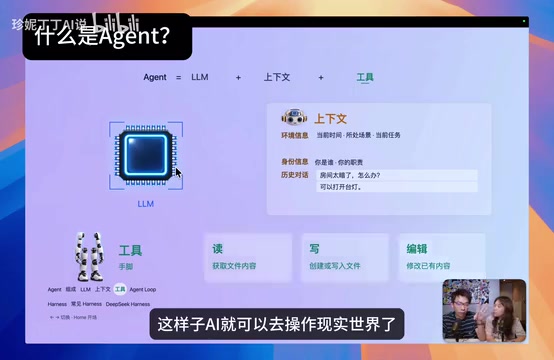
The Agent Loop: The Core of the Whole Process
One thing worth highlighting is how tools return results. When an Agent performs an action — say, editing a note — the tool returns "operation successful," and that result gets fed back into the LLM as new context. Similarly, real-world information like today's news or tomorrow's weather is fetched via tools and then added to the context.
This creates a cycle: the LLM reasons based on context → calls a tool to act → the tool returns new context → the LLM reasons again to decide the next step. This cycle is called the Agent Loop. Three components plus one loop — that's the complete Agent workflow.
The design of the Agent Loop directly determines how complex a task an Agent can complete. Simple tasks might only need one or two iterations, while complex ones — like writing and debugging code automatically — can require dozens. In each iteration, the LLM must decide "is the task done?" — a judgment that itself depends on context. If a tool returns an error, the model can choose to retry, try a different approach, or proactively report the issue to the user. This capacity for autonomous decision-making is what separates an Agent from a regular chatbot: it doesn't just answer questions — it keeps driving toward a goal until it's achieved. The Loop typically ends in one of three ways: the task is successfully completed, an unresolvable error is encountered, or a preset maximum number of steps is reached (to prevent infinite loops that drain resources).
What Is Harness: Turning the Abstract Into Running Software
If "Agent = LLM + Context + Tools" is an abstract formula, then Harness is the software layer that actually assembles these three pieces and makes them run.
Context is fragmented information; tools are scripts or API interfaces — both are virtual, intangible concepts. But how do you actually send that information to the LLM? How do you let the LLM call a tool? The answer is Harness — software that assembles and manages context, and packages tools so the LLM can use them.

A vivid analogy: context is like the information "I see a flower" — it's virtual, it has no physical form. But your eyes and fingertips, those physical organs, are what carry information into your brain. Those physical transmission mechanisms are the Harness. Applied to an AI, the Harness is the mechanical pipeline; context is the information flowing through it; and the LLM uses that pipeline to operate its hands and feet.
Why the Same Software Can Produce Different Agents
Common Harness software includes Codex, Claude Code, Doubao, Cursor, and others — any software that lets an LLM direct actions and do work on your behalf qualifies as a Harness.
The key insight: by organizing different context and providing different tools, the same Harness can implement completely different Agents. Even within the same Codex, writing different rules and prompts produces different Agents. This explains why different Agents can vary so dramatically in capability.
The Codex mentioned here is OpenAI's coding Agent product; Claude Code is Anthropic's equivalent — both are Harness tools focused primarily on writing and modifying code. Doubao is ByteDance's AI assistant product. These products use different underlying models (GPT series, Claude series, etc.) and differ in their tool sets and context organization, so even on the same task, their real-world performance can vary considerably. It's worth noting that Harness isn't tied to a specific LLM — in theory, the same Harness can swap in different "brains," as illustrated by the DeepSeekAd Harness integration with the Codex model described later.
What Makes DeepSeek Harness Special: Plugin-Based Architecture
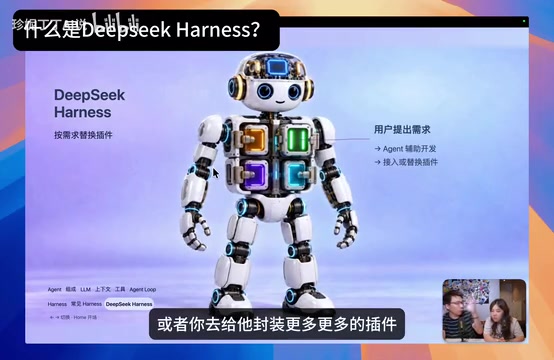
DeepSeek Harness is, first and foremost, a Harness tool. Its standout feature is a plugin-based design — built on a plugin system called Codis.
Strip away all its plugins and you're left with an empty skeleton — like a bare bookshelf that does nothing. Only by adding plugins that provide capabilities to the AI do you get a usable Agent application. This hot-swappable design means you can remove any plugin, swap in your own, or keep layering in new capabilities as needed.
Installation and Basic Interface
DeepSeek Harness is squarely aimed at developers. You need to find the npm installation command on its GitHub page and run it in your terminal to launch the interface. Once you're up and running, it looks much like any other Harness app: a chat window, support for creating projects, and sessions within projects. It looks almost identical to Codex.
Four Modes and "Creation Mode"
Its real highlights are in the mode design:
- Standard Mode: Works like any typical Harness tool — executes tasks for you.
- PTC Mode: Executes via generated scripts — better suited for developers.
- Minimal Mode: Strips away all extra tools, keeping only the four basics: read, write, edit, and bash.
- Creation Mode: The most distinctive of all — the Agent can modify itself. In this mode, it can hot-swap its own plugins, install more plugins, and self-upgrade.
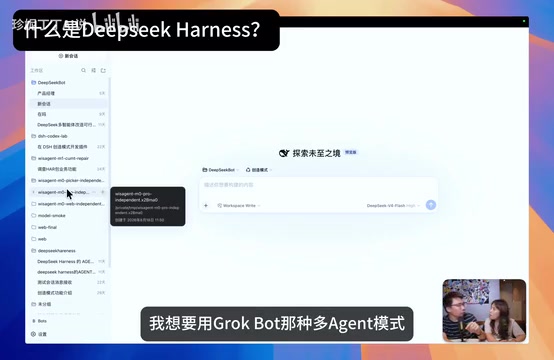
The author showed off their own customizations: the default model list didn't include Codex, so they wrote their own integration to call the Codex model through a Codex subscription inside DeepSeek Harness. They also didn't like the default workspace logic, so they drew inspiration from a multi-Agent architecture and wrote their own mode built around Agents as the unit — creating multiple Bots (Agents), organizing them into a dev team, letting them discover each other, pass messages, and even join group chats.
This means anyone looking to build a vertical-industry Agent can use DeepSeek Harness as a direct foundation for customization.
The Codis plugin system is DeepSeek Harness's core infrastructure — analogous to browser extensions or VSCode's plugin ecosystem. Each plugin can independently encapsulate a category of capability — such as "web search," "local file read/write," or "external API calls" — and register with the main framework through a unified interface. The benefit of this architecture is separation of concerns: the core framework only handles Agent Loop scheduling; all specific capabilities are outsourced to plugins. For developers, you don't need to understand the entire system to build a single plugin. For users, you only load the plugins you need, reducing resource usage and security risk. Plugin-based design is also the technical prerequisite for Creation Mode — the ability for an Agent to dynamically load new plugins at runtime is essentially the framework allowing its own tool set to be modified mid-Loop.
Plugin Marketplace and Comparisons
Once you've built an Agent, how do you share it with others? Since everything is modular, what you've really built is a plugin. DeepSeek Harness comes with a built-in plugin marketplace where you can upload your plugins to your own GitHub and then share them through the platform.
It's worth noting that the concept of extensible, build-your-own-Agent software isn't new to DeepSeek Harness — tools like Pи have offered similar capabilities before. As a result, DeepSeek Harness is often compared to Pи right out of the gate. Both are extensible Agent platforms; the difference lies in how that extensibility is presented. You can choose based on your own needs. That said, in the Harness software space, this level of thorough plugin-based modularity is genuinely uncommon.
Summary
This is a lot to absorb if you're new to the space, but the core idea can be condensed into two sentences: an Agent is an "LLM + Context + Tools" loop; Harness is the concrete software layer that makes those three things actually run. Once you understand these two layers, DeepSeek Harness's plugin architecture and Creation Mode make immediate sense — and you'll see exactly why it's a great platform for building your own custom Agents.
Related articles

Python 3.15 New Feature: Is the sentinel Type Better Than None?
Python 3.15 adds the sentinel type, using named unique sentinel objects to replace None and bare object(), resolving confusion among missing values, explicit emptiness, and invalid input while avoiding type hint failures.

Deep Learning's Three Architectures and the Universal Approximation Theorem: A Complete Guide to MLPs, CNNs, and Transformers
Explaining the inductive bias differences among MLP, CNN, and Transformer, the existence meaning of the Universal Approximation Theorem (UAT), and the role of Taylor expansion in approximation analysis, while clearing up common misconceptions.

GitLab Emergency Patch Release: Analysis of Critical Security Fixes
GitLab releases critical patch 19.5.1, sparking 355 points of discussion on Hacker News. This article analyzes the background, upgrade steps for self-hosted instances, and verification points to help DevOps teams respond quickly to security updates.