DeepSeek Harness Deep Dive: Agent Runtime & Plugin Development Guide

DeepSeek Harness is an open-source agent runtime built on a Cordis plugin tree, with Electron desktop support in v0.1.7-rc.2.
DeepSeek Harness defines agents as model + harness, decomposing tools, sessions, permissions, scheduling, and execution into a hot-swappable plugin tree. The Cordis framework uses fiber state machines and effect cleanup to enable dependency-aware hot reload without losing session context. Web, headless, SDK, ACP, and Electron Desktop all share one runtime. The new Electron Desktop v0.1.7-rc.2 integrates local service and credential management into the app lifecycle with visual plugin and task management. The project remains in developer preview without a completed security audit — use isolated directories with minimal permissions.
What Is DeepSeek Harness
DeepSeekAd Harness is an open-source agent runtime developed by DeepSeek AI. The official definition is straightforward: agent = model + harness. The model handles task understanding and next-step generation, while the harness connects the environment, tools, sessions, permissions, and execution pipeline. According to community verification, the latest public release candidate is DSH v0.1.7-rc.2, and the project is still officially positioned as a developer preview — functional, but with compatibility and security boundaries still in flux.
Opening the web workbench, you'll find workspace file read/write, code editing, terminal, task scheduling, approval, and execution tracing all wired together. The agent can read files, modify code, and execute commands within a project directory, logging every tool call and file change to the session. This means the workspace is more than just a file tree on the left — it determines what the agent can see and modify, and whether you can replay a failed run. Sessions are persistent, and background tasks and scheduled tasks each have their own records, so you're never left with only the last message in a chat window.
Multiple Entry Points, One Shared Runtime
DSH provides multiple profiles and command modes: web, headless, sdk, sdk-minimal, and plugin. Headless mode receives tasks from stdin, chains them via session IDs, and outputs the process as JSONL for automation scripts. The sdk and ACP modes are for integrating other clients. The plugin mode handles installing, removing, and updating capability packages for a given profile.
The core value of this design is that browsers, scripts, editors, and desktop apps can all share the same runtime — switching entry points doesn't require rewriting the agent. Capabilities are also plugin-based: MCP connects external tools and resources, SSH turns remote directories into workspaces, browser backends and computer use handle web and visual interaction, agent-team enables sub-agent collaboration, and PTC runtime organizes multiple tool calls in a controlled environment. There are also packages for file preview (covering Markdown, PDF, and Office), skills, workflows, LSP, Webhooks, and voice transcription.
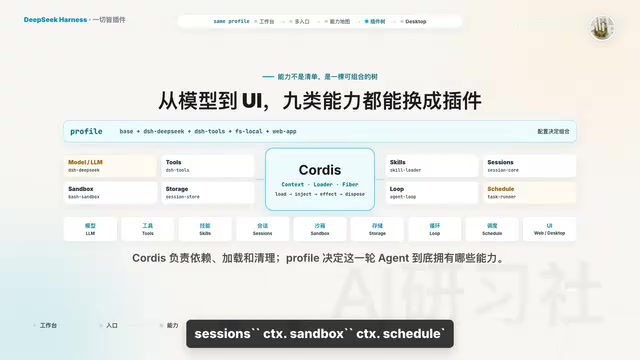
The repository repeatedly emphasizes the philosophy of "everything is a plugin": LLM adapters, shells, file systems, storage backends, agent loops, approval policies, schedulers, and even client modules are all replaceable. The ctx.llm, ctx.tools, ctx.agents, ctx.sessions, and ctx.schedule shown in the official capability diagram are all services that can be provided or consumed by plugins.
MCP (Model Context Protocol) is an open protocol proposed by Anthropic to standardize communication between LLMs and external tools or data sources. It defines three roles: host (the application running the LLM, such as Harness), server (an external service exposing tools and resources), and client (which runs inside the host and communicates with servers). Through MCP, any external service implemented to spec — database queries, API calls, file system access, etc. — can be invoked by an LLM in a unified way, without needing separate adapters for each LLM framework. DeepSeek Harness adopts MCP as the standard plugin for integrating external tools, meaning the entire MCP tool server ecosystem can be plugged in directly, significantly reducing integration overhead. ACP (Agent Communication Protocol) is a protocol layer for inter-agent communication, used to orchestrate multi-agent collaboration scenarios.
Cordis Lifecycle & Hot Reload
Under the hood, Harness uses Cordis to manage dependency loading, lifecycle management, and resource cleanup, while specific agent capabilities are contributed by mounted plugins. Each plugin receives a ctx object and uses it to register services, tools, events, and sub-plugins. The loader then assembles these plugins from a configuration file into a runtime tree.
Each loaded instance has a fiber state that transitions between pending, loading, active, unloading, and disposed, and may also enter failed. Importantly, pending doesn't mean something quietly broke — it typically means a service declared in inject hasn't appeared yet. Once the service becomes available, the plugin continues loading. When a service provider disappears, plugins depending on it are unloaded first and then reloaded once the service is restored. This is exactly why capabilities can be swapped while maintaining consistency.
Combined with the effect mechanism, listeners, tool registrations, timers, connections, and sub-plugins are all automatically cleaned up on unload. Hot reload isn't simply re-importing a file — it means tearing down the old instance first and then reassembling the new one according to dependency relationships.
Cordis is a general-purpose dependency injection and plugin container framework that matured within the Koishi (chatbot framework) ecosystem before being adopted by DeepSeek Harness as its underlying runtime. Its core idea is to decompose an application into independent plugin units whose dependencies and lifecycles are managed centrally by the framework, rather than having plugins reference each other directly. This is fundamentally different from Node.js's traditional require/import model — in the traditional approach, a module stays in the process once loaded, whereas Cordis maintains a state machine for each plugin and can dynamically unload, replace, or reload a plugin at runtime without affecting others. This architecture is especially valuable for long-running services: developers can hot-update a single tool plugin or swap an LLM adapter without restarting the entire agent process or losing session context.
Writing Your First Plugin
The official Cordis tutorial starts from the simplest possible example: create a hello.ts file in a temp directory — no CLI required, no need to scaffold a full agent. The code just imports context, optionally exports a name, and exports an apply function. Inside apply, print "hello from my first plugin". Then mount it in cordis.yml with - name: hello.ts. The loader creates a context, reads the YAML, mounts sub-plugins, and calls your apply. The plugin file isn't responsible for starting the framework — it only describes what it contributes.
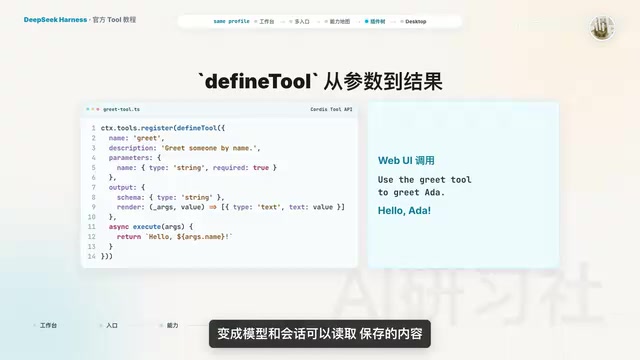
A more realistic example is a tool plugin: import context from @deepseek-ai/cordis, import defineTool from dsh-tools, and declare inject: ['tools']. Inside apply, call ctx.tools.register(defineTool(...)): the tool is named greet, takes a required string parameter name, uses description to tell the model when to invoke it, uses parameters to generate input constraints, execute returns a normalized value, output.schema describes the shape of that value, and output.render turns it into content that is both readable by the model and storable in the session.
The separation of concerns here is critical — parameter validation, execution logic, result normalization, and presentation are not arbitrary strings jammed into one function. Once running, type "use the greet tool to greet Ada" in the web interface and the model will invoke the tool. The tutorial also shows how to trigger the real execution pipeline without going through the model: provide a callid for the call, invoke ctx.tools.execute directly, and listen for tools.result.
Services, Events, and Configuration
Services are named capabilities mounted on ctx — for example, ctx.llm, ctx.tools, ctx.agents. Providers register a name using service; consumers declare inject. Cordis waits for the service to be ready before executing apply, so consumers don't need to import a specific implementation. Swap out the shell or LLM provider in the config and consumers will restart automatically.
Events allow plugins to communicate without knowing who is listening. Common examples include tools.result and session.event. Listeners are themselves effects and are removed automatically when the plugin unloads, so stale callbacks are never left attached to invalidated sessions.
On the configuration side, plugins export a config type and schema, with default values and constraints for fields like greetingTimeout or retry counts. Users pass configuration in cordis.yml, which is validated at load time. When config changes, HMR unloads the old instance and mounts the new config.
Pitfalls and Tips for Publishing Plugins
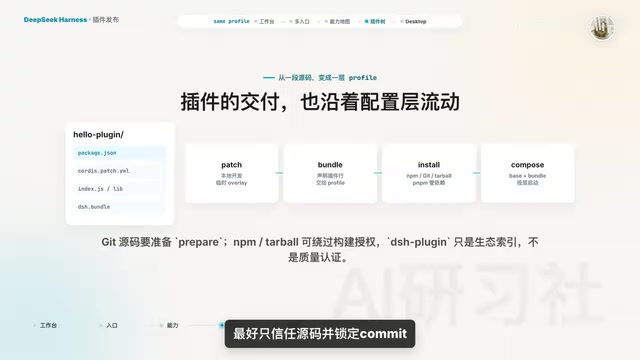
For publishing, local source files can be temporarily mounted using a patch overlay; for formal delivery, package them as a bundle. The bundle's package.json declares dsh.bundle, and cordis.patch.yml injects the bundled plugins into a profile. Users can install it with the dsh plugin command, and the profile records installed bundles.
Startup order follows cascading expansion: base bundle → installed bundles → profile's own patch → home and patches → finally command-line overlay. Later-applied layers override earlier ones, and patch overrides apply to entire config lines, not deep merges.
Installing from GitHub has a time-sensitive gotcha: you get source code, and the build won't run automatically. Packages need a prepare script to generate a loadable entry point, and pnpm may require users to explicitly authorize the package in allow-builds — which effectively grants permission for third-party code to execute on the host machine during installation. The safest approach is to trust only source code and lock the commit. If you don't want users dealing with build permissions, publish an npm package with the lang field, or deliver via Turbo.
The behavior of "patch overrides entire config lines rather than deep merging" stems from a deliberate trade-off in layered config design. Deep merging feels more intuitive for nested objects, but it creates a fundamental problem: you can never remove a key set by a lower layer through an upper-layer config — you can only add or override, but not express "remove" semantics. Whole-line overrides require the upper layer to write out all fields under a given node, but the semantics are unambiguous and avoid implicit behavior caused by merge ordering. In practice, when writing bundles, this means that if your cordis.patch.yml overrides a config node for an existing plugin, you need to write out all fields under that node — otherwise, unspecified fields will be cleared rather than preserved. When debugging layered config issues, start by using dsh config or the Web workbench's config panel to inspect the final expanded config, then compare against each patch file to trace the override source.
What's New in the Electron Desktop Build
Before a desktop client existed, the typical workflow was to run npx @deepseek-ai/dsh web in the terminal, wait for the local server to start, and then open the web page at port 3080. That approach is transparent and great for development, but you had to manually track the port, process, workspace, plugins, and configuration yourself.
Electron Desktop packages the complete dsh web application into a desktop shell. On first launch, it provides a guided flow for login, API key setup, plugins, and task management — all visual. You no longer need to figure out which host is running or manually locate the profile directory. Plugin lists, start/stop controls, config status, and running tasks are all visible in the UI — this is the most immediate change in this update.
Architecturally, it doesn't rewrite the agent: the Electron main process spawns an independent dsh Desktop host child process, which runs the shared dsh web profile. The renderer loads the bundled entry point via the dsh-app:// protocol, HTTP is forwarded to an authenticated local web host, real-time streaming goes over WebSocket, and startup/shutdown is handled via node-ipc. The web default port is 3080; the Desktop host default port is 19387. The desktop build simply brings the local service and credential handoff into the application lifecycle — Electron handles windows, menus, the tray, and updates, while the agent's model, tools, sessions, and plugins still come from the same profile tree.
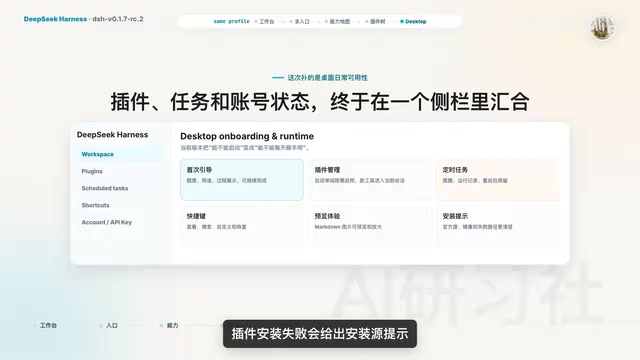
rc.2 focuses mostly on day-to-day usability improvements: the onboarding flow now explains quotas, use cases, and the process; account login and API key entry are separated; quota warnings are more specific; auto-review can be enabled on demand; the Inspector is no longer injected into every install by default; newly enabled tools can serve the current session immediately; scheduled tasks support creating reminders, viewing run history, surviving restarts, and setting repeat intervals in minutes; keyboard shortcuts now have a browsable, searchable, customizable, and resettable settings page; local Markdown images can be previewed and zoomed; plugin installation failures show an error message; closing the main window defaults to hiding it, leaving the host, sessions, and running tasks in the background — on Windows, you can restore the window from the system tray. Before actually quitting, the desktop app checks for active tasks and enabled scheduled reminders and asks for confirmation before interrupting your work.
Security Boundaries and Usage Recommendations
The fundamental difference between Harness and ordinary chat-based AI assistants lies in the execution boundary. Conventional chat products handle one round of Q&A at a time; Harness also manages sequential steps, tool results, session recovery, background tasks, approval flows, sandboxing, and plugin lifecycles.
The official security notice explicitly states: the project has not yet undergone a security audit, and the sandbox and approval mechanisms reduce risk but do not provide absolute isolation. Model-generated code, third-party plugins, and the local host can all touch files, processes, network resources, and credentials — don't point this at a workspace containing production secrets. The safer approach: use an isolated directory, apply least-privilege permissions, back up regularly, and read a plugin's source code before authorizing its build script.
The conclusion is clear: the real subject of DeepSeek Harness isn't yet another chat window — it's an observable, unloadable, and replaceable agent plugin tree. The Electron desktop build packages this tree into a more accessible application, while web, CLI, SDK, and ACP all continue to share the same foundation. Developers studying agent engineering should work through the repository's profiles, Cordis tutorial, tool definitions, and capability layering in order, then build a greet plugin hands-on. If you just want to try it out, spin up an isolated workspace with no sensitive data and verify that desktop tasks, scheduled tasks, and plugin unloading all behave as expected before going further.
Related articles

From Prompt to Harness: Deconstructing the Four Layers of Agent Engineering
Agent engineering isn't just about writing prompts: from Prompt, Context, and Harness to AgentOS, this four-layer breakdown shows how complex tasks can be checkable, recoverable, and resumable — solving the three core engineering problems of capacity, precision, and continuity.

AI Daily: Google Gemini 4 Delayed, GPT-6.1 Ultra-Fast Edition Released
Google Gemini 4 Argon was delayed at Gemini At Work 2026, limited to internal security testing; OpenAI released GPT-6.1 ultra-fast edition with 8x speed; Anthropic launched Claude Dashboard and Motion. AI agent capabilities are being rapidly rewritten.

Datalab Open-Sources OmniParseBench: 16,288 OCR Tests to Audit Document Parsers
Datalab releases open-source OCR benchmark OmniParseBench with 16,288 test items across 2,937 pages and 92 languages. Pass rates are sliceable by tag, script, or language, making document parser evaluation auditable and reproducible.