DeepSeek Harness Deep Dive: Everything Is a Plugin

Breaking down DSH's Cordis-based "everything is a plugin" architecture and custom plugin development.
This article analyzes DeepSeek Harness (DSH), a general-purpose agent harness offering web, Electron desktop, and three SDKs, with Standard, PTC, Minimal, and Creator modes. Its foundation is the Cordis plugin system, where the agent loop, tools, execution layer, model providers, and UI are all replaceable, collaborating via shared context, dependency injection, and four event modes. It also demonstrates custom plugin development and layered YAML configuration.
DeepSeek Harness (DSH) recently released a desktop application. As an Electron-based wrapper, it gives this open-source agent framework—built on the design philosophy that "everything is a plugin"—a more intuitive entry point. This article is based on a complete technical breakdown video from a Bilibili creator, unpacking DSH's architectural design, how the Cordis plugin system works, and how to write and load custom plugins from scratch.
What DSH Is: More Than a Coding Agent
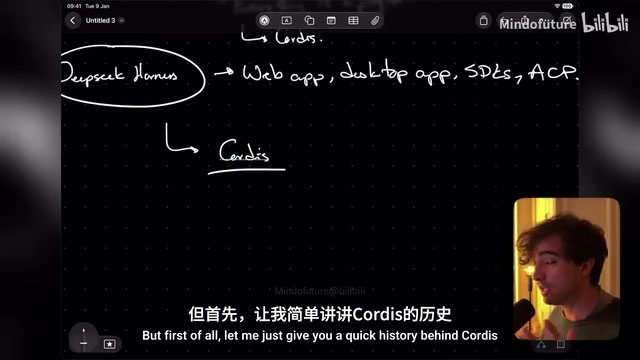
DeepSeekAd Harness is essentially a general-purpose agent harness. Although officially positioned as a coding agent, it ships with a complete agent loop, toolset, system prompt, session file management, and user interface, so it can equally host other types of agentic applications.
It comes in several forms: a self-hostable web application, an Electron desktop app (a wrapper around the web version), and three SDKs—TypeScript, Python, and ACP. The desktop version is the recently released new entry point, but the two behave identically at the core.
A key design element of DSH is its "mode" mechanism. Standard mode runs a conventional coding agent; PTC mode doesn't follow the usual flow when calling tools but instead writes tool calls as scripts to execute, enabling tool parallelization or combining multiple tools in a single call—according to the creator, this is how small agents originally operated. Minimal mode injects as little context as possible, while Creator mode additionally loads skills and context about DSH's own architecture.
The significance of Creator mode is that, because "everything is a plugin," the agent can modify itself. In the video, the creator directly asks Creator mode to "create a plugin that registers a hello world tool," and DSH promptly generates a plugin directory containing package.json and index.js, then successfully calls that tool in a new session to greet a specified user.
Cordis: The Underlying Engine of the Plugin System
A Project Independent of DeepSeek
Cordis is the plugin system underpinning DSH's architecture, but it is not equivalent to DeepSeek, nor was it developed from scratch by DeepSeek. The creator points out that Cordis's first commit predates the founding of DeepSeek by about a year; its creator later joined DeepSeek and integrated Cordis as DSH's foundational architecture. Although the Cordis repository does not belong to DeepSeek, it lists the DSH website as an official project page, its paper was published by DeepSeek, and DeepSeek employees are among the project's main contributors.
Cordis was not designed specifically for coding agents—it can drive any application—but its composability is most valuable in agent scenarios.
What "Everything Is a Plugin" Really Means
In DSH, "everything is a plugin" is meant literally: the agent loop itself is a plugin, and in theory could be replaced by a loop that merely echoes user input and never calls an LLM or tools; the tool registry, bash tool, filesystem, MCP client, system prompt, tool execution layer, model providers, skills, session logging and storage, and even the user interface are all plugins.
The tool execution layer being a plugin means the execution environment can be swapped—DSH ships with bash sandbox, filesystem sandbox, and subprocess execution plugins out of the box, and developers can write execution plugins that forward tool calls to remote machines. The same applies to model providers: third-party models such as GLM and Hugging Face are integrated by adding new providers.
One detail worth noting: DSH actually contains two Cordis applications—the backend and the frontend (the Electron interface itself is also a Cordis application)—which cooperate through communication.
MCP (Model Context Protocol) is an open protocol that lets models access external tools and data sources in a standardized way, and DSH implements the MCP client itself as a plugin. This means integrating with the external tool ecosystem requires no changes to core code; instead, a plugin registers the capabilities exposed by an MCP server into the tool registry, where they enjoy the same invocation, permission, and event mechanisms as built-in tools. For developers, this lowers the cost of extending the agent's capability boundary: you can either write native plugins that register tools directly, or bridge existing tool services via MCP—both paths ultimately converge on the same tools service and unified execution layer.
Shared Context and Dependency Injection
All plugins share an application-level context (ctx) exposed by Cordis. Plugins provide services by declaring a name, and other plugins declare dependencies via an inject array, based on which Cordis guarantees dependencies are mounted before their consumers. This is the core mechanism that makes the whole ecosystem work: dependency injection plus service registration.
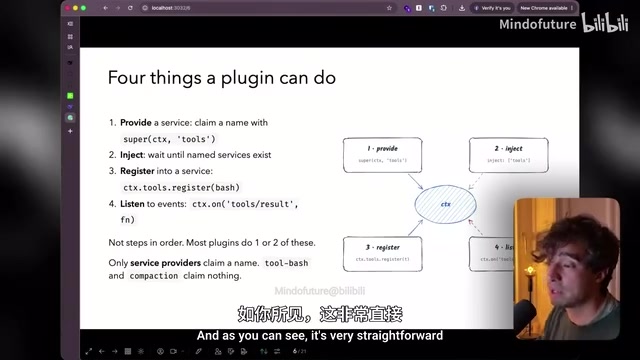
Plugins can also listen for events in the context. For example, a logging plugin only needs to listen for the tool result event and output to the console. Cordis records everything a plugin defines and cleans it up in the correct order when the plugin is disabled, avoiding removal of dependencies still in use by other plugins; developers can also add their own cleanup logic, which the creator recommends as a best practice for writing plugins.
Four Ways to Emit Events
Plugins can emit events in four modes: regular emit (fire-and-forget, e.g., tool results), waterfall (e.g., LLM streaming generation, multi-tool execution), serial (must wait for preceding events, e.g., agent turn stopping), and parallel. Plugins can also declare brand-new events for other plugins to listen to; the compaction plugin creates its own compaction event.
Events are emitted by context scope. Plugins can be nested; nested plugins share the parent context, and events bubble upward. However, the creator advises against nesting all plugins—a better approach is to connect plugins to the same context and establish relationships through dependency injection.
Dependency Injection is the core paradigm behind how Cordis operates, and understanding it helps make sense of the plugin collaboration mechanisms described later. Simply put, dependency injection means a component does not create or look up the objects it depends on itself; instead, an external container "injects" these dependencies at runtime. In Cordis, plugins declare which services they need via the inject array, and the framework resolves and passes them in before mounting. The benefits: plugins have no hardcoded references to each other and can be developed, replaced, and disabled independently; the framework can also determine load order from the dependency graph and safely clean up on unload. It forms a complementary pair with "service registration"—one side declares what it provides, the other declares what it needs, and the container does the matchmaking.
Waterfall events are key to understanding DSH's interception and pass-through logic. Unlike regular fire-and-forget emit, waterfall events chain listeners together: each listener receives the previous one's return value and decides whether to pass it on to the next (by calling next) or return a result directly to terminate the chain (e.g., returning a deny object to block). This enables middleware-style cross-cutting logic—the security guard plugin uses exactly this feature to uniformly review bash commands before tool execution, returning next for normal pass-through and short-circuiting with a rejection when a dangerous pattern matches. By contrast, serial mode emphasizes waiting for preceding events to complete in order, while parallel mode triggers multiple listeners simultaneously, each handling independently.
Writing a DSH Plugin by Hand
Minimal Plugin: A Single apply Function
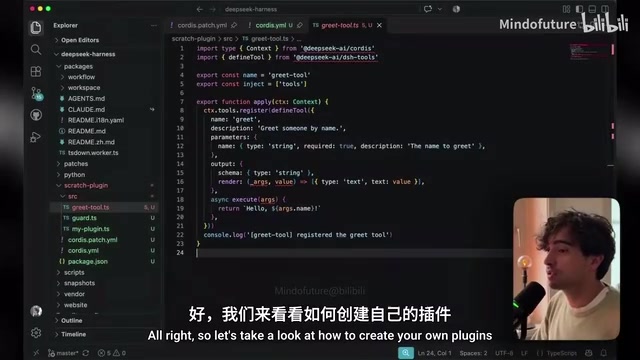
The creator created a scratch-plugin directory in the DSH repository and placed three example plugins there. The simplest plugin only needs to export an apply function that receives Cordis's context parameter and prints a line of log inside.
A more practical example is the greet tool plugin: it exports name, an inject array (declaring a dependency on the tools plugin), and an apply function. Inside apply, it registers a new tool through the tools service, using the defineTool method imported from the same package to define the tool's name, parameters, and behavior.
The third example is the security guard plugin: it likewise depends on the tools plugin, listens for the tool result event and logs it; at the same time it intercepts the tools pre-execution event—if the model calls bash with a command containing rm -rf, it refuses execution and prompts the model to have the user run it themselves. Because this event uses waterfall mode, normal pass-through requires returning next, while interception returns a deny object.
Configuration File Loading Mechanism
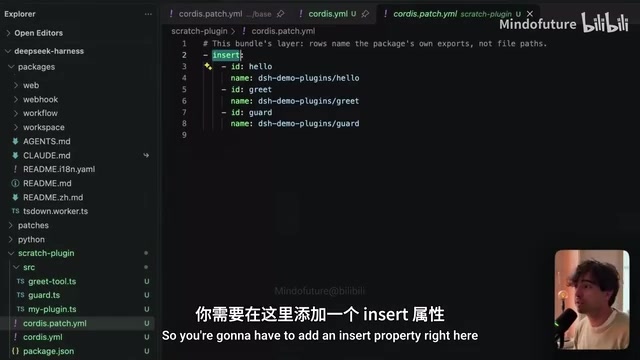
In Cordis, plugins are loaded via configuration rather than code. Developers write a YAML file listing plugin IDs and names under the insert property: if the plugin is published as an npm package, fill in the package name; otherwise fill in the absolute path to the plugin file.
By specifying a patch file with dsh web --patch, plugins can be appended on top of the web configuration. These configurations stack in layers: the base bundle's cordis.patch.yaml defines pre-installed plugins, the patch file appends on top, and finally user-level configuration overrides everything—cordis.patch.yaml located in profiles under the user directory. Desktop users' actual configuration also lives here, where model providers and various parameters can be set.
The creator actually tested patch loading on the web version: the registered greet tool successfully greeted the specified user, and the rm -rf command was intercepted by the guard plugin, proving the plugins were mounted correctly. For the desktop version, plugins must be packaged as npm packages and added through DSH's services, without manually editing configuration files.
Why This Architecture Is Worth Attention
DSH's core innovation is not any specific tool but the abstraction of every layer of the agent into replaceable plugins: the agent loop, tools, prompts, execution layer, and UI all connect to the same context and are composed through dependency injection. This means developers can replace just the execution layer to add security, replace just the agent loop to change behavior patterns, or extend the capability boundary without touching the core. Creator mode then hands this extensibility to the agent itself—you don't need to write code by hand; just describe the requirement, and DSH can generate and load the plugin. Understanding this mechanism is understanding the fundamental difference in design philosophy between DSH and traditional CLI coding agents.
One-line Summary
Breaking down DSH's Cordis-based "everything is a plugin" architecture and custom plugin development.
Paragraph Summary
This article systematically analyzes the architecture and plugin development practices of DeepSeek Harness (DSH). DSH is a general-purpose agent harness offering a web version, an Electron desktop app, and three SDKs, with Standard, PTC, Minimal, and Creator modes for different scenarios. At its foundation is the Cordis plugin system, whose origins are independent of DeepSeek; "everything is a plugin" is literal: the agent loop, tool registry, execution layer, model providers, and even the UI are all replaceable, and plugins collaborate through shared context, dependency injection, and four event emission modes. The article also demonstrates how to write plugins ranging from a minimal apply function to a guard plugin with security interception, explains the layered loading mechanism of YAML configuration, and concludes that the core value lies in every layer being replaceable and composable.
Related articles

Abnormal Error Rate Spike in Claude Mythos 5.2 and Fable 5.2
Claude Mythos 5.2 and Claude Fable 5.2 show an abnormal spike in request error rates, marked as investigating on the official status page. This article covers the incident overview, practical impact on developers, and recommended responses.

ReAct Runtime Context Trimming: Why Claude Code Acts at 70%
A deep dive into ReAct runtime context trimming: why Claude Code compresses at ~70% usage, why tool calls dominate, why messages must be dropped in pairs, and why codebases don't need RAG.

AI Agent vs LLM: How Cursor and Claude Code Actually Work
An in-depth analysis of the essential difference between AI Agents and LLMs: LLMs generate code suggestions, while Agents modify files and run tests via tool calls. Using a Spring Boot bug fix as an example, it breaks down the workflows, permission control, and verification mechanisms of Cursor and Claude Code.