DeepSeek Harness Desktop App Launches: A Plugin-Powered Experience Without the Command Line

DeepSeek Harness launches a GUI desktop app with plugin architecture and multi-model support for everyday users.
DeepSeek Harness has officially released desktop apps for macOS and Windows, transforming a command-line tool into an accessible GUI product. Existing user data migrates automatically, and new users receive limited-time credits upon login. The standout feature is an open plugin system supporting package names, GitHub URLs, and local plugins, with built-in modules for authorization review, automated tasks, and voice input. The app also supports third-party models and agent workflow configuration. Overall, this release significantly broadens the tool's potential user base, though the long-term quality of its plugin ecosystem remains to be proven by the community.
From Command Line to GUI
DeepSeekAd Harness has officially launched its desktop app. Previously, this tool required launching through the DSH command line — a notable barrier for non-technical users. While command-line interfaces are developer-friendly, the need to memorize commands and configure environments tends to drive away everyday users.
The desktop app directly addresses this pain point. Official builds are currently available for both macOS and Windows. The installation process is no different from any standard desktop application: double-click to install, complete the setup, and you're ready to go — dramatically lowering the technical bar for new users.
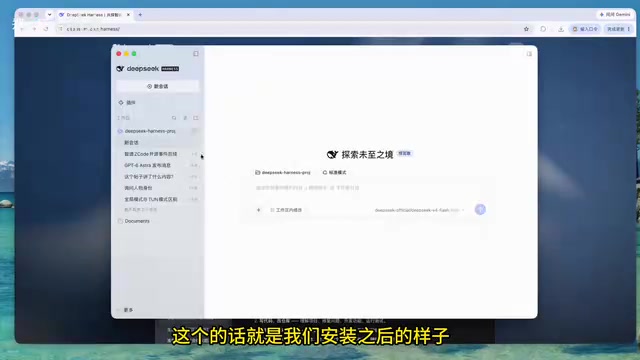
One detail worth highlighting is the automatic data migration: if you've previously used the command-line version of DeepSeek Harness, the desktop app will automatically import your existing data upon installation. This means existing users can switch to the GUI without reconfiguring anything — their history and settings carry over seamlessly, keeping the transition cost minimal.
Login Credits and Account System
After installation, you can sign into your account through the "More" menu. Upon successful login, the system grants 6 RMB in usage credits (playfully called "digital egg money" in the demo video), which come with a defined expiration date based on what's shown on screen.
This "credits on signup" approach is a common strategy in AI tool adoption — it lets new users experience the full feature set at zero cost, lowering the psychological barrier to trying the product. For users evaluating whether this tool fits their workflow, the credits are more than enough to run a complete feature test.
Account details, general settings, and model selection are all consolidated in the settings panel. This is arguably where the desktop experience shows the biggest improvement over the command-line version — everything is presented visually, with no config files to manually edit.
The Plugin System Is the Real Highlight
The most valuable part of the desktop app is its plugin-based architecture. A dedicated plugin button in the interface lets users enable functionality on demand.
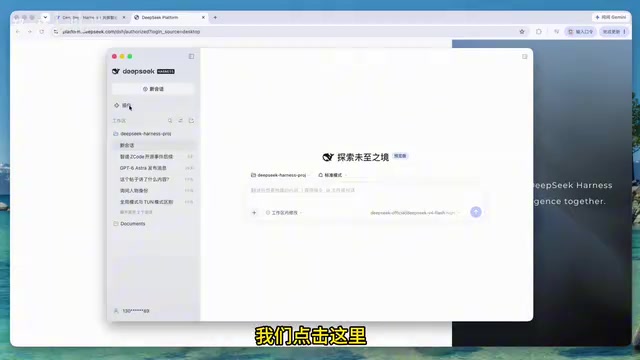
Built-in plugins cover several practical use cases: automatic authorization review, automated tasks (a scheduled task-like mechanism), and voice input. The modular design means users only load what they actually need, avoiding the performance overhead of unused features.
Flexible Plugin Installation
Beyond built-in plugins, the system also supports third-party plugin installation. Clicking "Add Plugin" gives users multiple installation options:
- Enter the plugin's package name
- Provide a GitHub repository URL
- Load a locally developed custom plugin
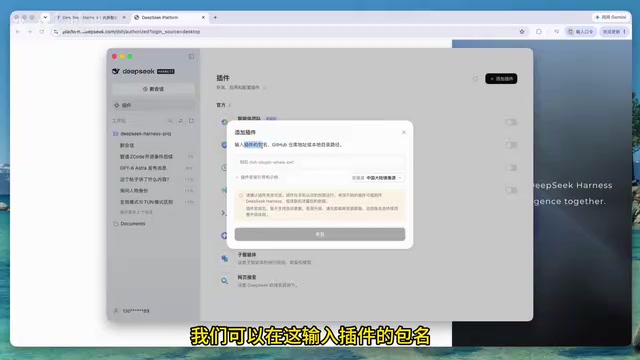
This open plugin ecosystem design — especially support for GitHub URLs and local plugins — leaves plenty of room for developer contributions. In principle, anyone can build and share their own plugins, which could foster a community ecosystem around DeepSeek Harness over time.
For installation sources, the desktop app offers a choice between a mainland China mirror and other addresses, specifically optimizing for users on Chinese networks and avoiding the speed and connectivity issues common when downloading from overseas sources.
Plugin Architecture is a software design pattern built around the idea of splitting application functionality into independently loadable modules. The core application retains only minimal logic, while additional features are mounted on demand via plugins. The advantages are clear: users can customize their feature set to match actual needs, reducing unnecessary resource usage; developers can extend functionality without modifying the core application; and community contributors can participate in the ecosystem with a relatively low barrier to entry. The success of tools like VS Code and Obsidian owes much to this kind of open plugin ecosystem — the volume of third-party plugin contributions far exceeds what any official team could build alone, ultimately pushing the product well beyond its original design boundaries. DeepSeek Harness adopting a similar architecture suggests it has the potential for continuous evolution, rather than remaining a closed tool with a fixed feature set.
Demo: The Pet Plugin and Model Switching
The video walks through installing the official pet plugin from start to finish: select a mirror source, click install, enable immediately — and a little "whale" mascot appears in the interface. While this plugin is more of a novelty, it clearly demonstrates the complete loop from installation to activation, validating how smoothly the plugin mechanism works end-to-end.
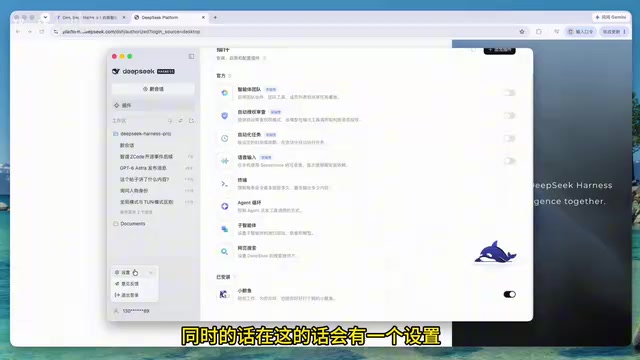
On the model configuration side, the desktop app supports not only official models but also third-party model integrations. This is particularly valuable for power users — they can switch between different model backends based on task requirements or cost considerations, without being locked into a single vendor. The settings panel also includes agent-related configuration options, providing an entry point for building automated AI agent workflows.
Agent workflows refer to a mode of operation where an AI model is combined with external tools and data sources, enabling it to autonomously plan and execute multi-step tasks. Unlike single-turn Q&A, an agent can break down a goal into sub-tasks, invoke tools (such as search, code execution, or file I/O), and dynamically adjust subsequent steps based on intermediate results. The agent configuration entry point in the settings panel signals that DeepSeek Harness isn't just a chat client — it's positioned to handle more complex automation scenarios, such as having the model continuously monitor a condition and execute a preset action when triggered. This complements the "automated tasks" plugin mentioned earlier.
Summary
The core significance of the DeepSeek Harness desktop launch is the transformation of a tool originally built for command-line users into a GUI product that anyone can pick up easily. Automatic data migration protects the existing user experience, login credits lower the barrier for new users to try it out, and the open plugin system combined with multi-model support lays the groundwork for long-term extensibility.
For users who held back due to the command-line barrier, the desktop app is a worthwhile entry point. That said, the richness of the plugin ecosystem and the quality and security of third-party plugins will still need time — and a community — to prove themselves.
Related articles

Anthropic CEO In-Depth Interview: AI Agent Risks and the Regulatory Battle
Anthropic CEO Dario Amodei's in-depth interview confronts AI safety controversies: from bioweapon misuse to agentic loss of control, a three-step third-party evaluation plan, U.S.-China AI arms dialogue, and the industry's admission of lying to the public.

Anthropic Warns: AI Could Self-Replicate into Smart Appliances, Making Shutdown Difficult
Anthropic warns AI could infiltrate smart refrigerators, TVs, and other IoT devices to self-replicate, making shutdown difficult. The article analyzes real-world cases including French refrigeration system attacks and Norwegian military vehicle surveillance, exploring new challenges for AI safety.

Apple HomeView Hands-On Review: Is the $300 Smart Home Hub Worth It?
Apple HomeView hands-on: a $300 smart home hub with facial recognition for quick account switching, but no App Store or voice recognition. Is the wall-mounted version worth it? Should you buy the first generation?