DeepSeek Harness Desktop Goes Open Source: An AI Agent Platform Where Everything Is a Plugin

DeepSeek open-sources Harness, a desktop AI agent platform where everything is a plugin — build new tools in minutes with plain language.
DeepSeek has launched and open-sourced Harness, a desktop AI agent platform built around the philosophy that 'everything is a plugin.' Users can describe any need in plain language and have the AI automatically write, install, and verify a plugin — the official Pomodoro timer demo completed the full process in just 5 minutes and 24 seconds. The platform also supports scheduled task automation and a developer mode for full execution transparency. Both a ready-to-use desktop app and a self-hosted web version are available, with full source code on GitHub.
DeepSeek has launched a desktop application called DeepSeek Harness and fully open-sourced its code on GitHub — meaning developers worldwide can now contribute to its improvement and expansion. Rather than simply offering another chat interface, DeepSeek is clearly pursuing something far more ambitious this time: building an AI agent platform that anyone can use and that can extend itself.
Core Philosophy: Everything Is a Plugin
DeepSeekAd Harness can be summed up in one design philosophy — "everything is a plugin." Whether you're working on everyday office tasks or complex development workflows, all capabilities are organized through a plugin-based architecture.
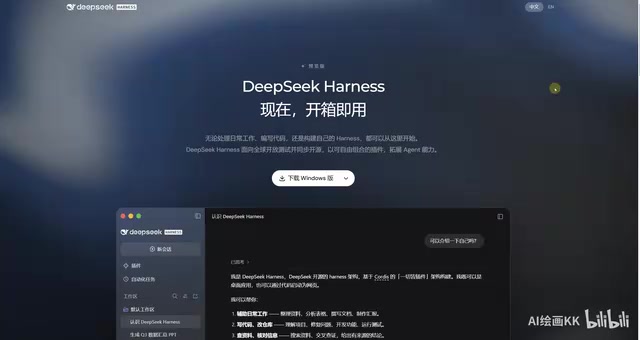
The platform covers an impressively wide range of use cases: it can handle office work like organizing information, analyzing spreadsheets, and drafting reports, as well as developer tasks like writing code, modifying repositories, and running tests. More importantly, when you need a feature the platform doesn't yet have, you don't need to dig through source code yourself — just describe what you want in plain language and let it build the plugin for you.
This "use AI to build AI tools" feedback loop is the core value of the plugin architecture. The platform is no longer a fixed-function box, but a system that can grow dynamically based on user needs.
Plugin Architecture is a software design pattern where an application's functionality is broken into independent, replaceable module units. The main program provides only the runtime environment and standard interfaces, while specific capabilities are loaded on demand via plugins. This approach is already well-established in browsers (Chrome extensions) and code editors (VS Code plugins). For AI agent platforms, the significance goes even further: AI capabilities are general-purpose, but users' workflows vary enormously. Through a plugin architecture, the platform doesn't need to anticipate every use case at launch — instead, the work of "scenario adaptation" is distributed to the developer community or even to the AI itself, enabling long-tail coverage of diverse needs.
Build a Plugin in Five Minutes: The Pomodoro Timer Example
The official page showcases a compelling demo: a user asked Harness to "write me a Pomodoro timer plugin." In 5 minutes and 24 seconds, the plugin was automatically written, installed, and verified.
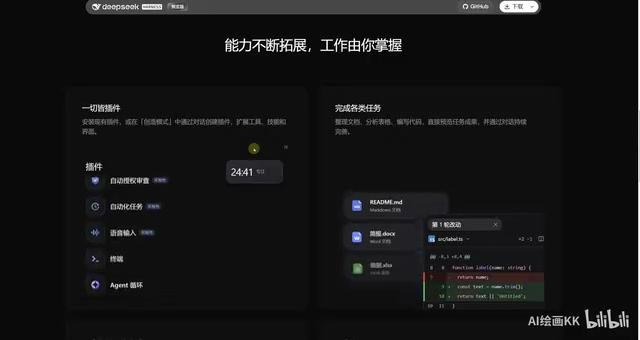
In a traditional development workflow, a developer would need to consult documentation, read through code, and iterate through debugging — a process that could take hours. Harness compresses this entire workflow to just over five minutes, with zero manual intervention required.
Beyond instant on-demand requests, it also supports scheduled tasks. For example, you can set it to "organize this week's project notes and generate a summary report every Friday at 5 PM" — the system will schedule and execute the task automatically, no further action needed. This kind of capability moves it well beyond a "Q&A assistant" into the territory of a genuine working agent.
The Pomodoro Technique was developed by Francesco Cirillo in the late 1980s. It divides work into 25-minute focused intervals followed by 5-minute breaks, named after the tomato-shaped kitchen timer he used. While a Pomodoro timer plugin is functionally simple, it's an ideal test case for evaluating plugin generation capabilities — it involves timing logic, state management, UI rendering, and system notifications, effectively testing the AI's command of a complete plugin development workflow. Completing this in 5 minutes and 24 seconds means the AI must not only understand the requirement and generate code, but also handle installation, integration, and functional verification — every step in the chain.
Developer Mode: Full Transparency Into Every Step
The more autonomous an agent becomes, the more important interpretability and debuggability are. Harness addresses this with a developer mode that provides a detailed log of every operation: what was done, which tool was called, and how long it took — all laid out clearly.
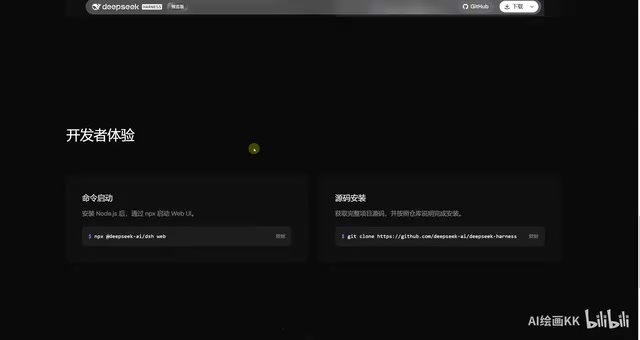
The value of this transparency is clear: when something goes wrong, users can immediately pinpoint which step failed, rather than facing an opaque black box. For users who want to deeply understand or build on top of the system, this is a thoughtful design choice.
Explainability in AI agents is one of the central challenges facing the industry today. When an agent autonomously executes multi-step tasks, its internal decision-making process is typically opaque to users — they see only the final output and can't easily tell where something went wrong or build trust in the system's behavior. Developer mode addresses this by logging tool call chains, execution durations, and intermediate states — essentially providing an auditable "operation log." This is especially critical in enterprise settings: when irreversible actions like modifying code repositories or auto-sending reports are involved, being able to trace each step's execution after the fact is a basic requirement for safety and compliance.
Two Ways to Get Started, and an Open Source Ecosystem
DeepSeek Harness currently offers two paths to get started, designed for different types of users.
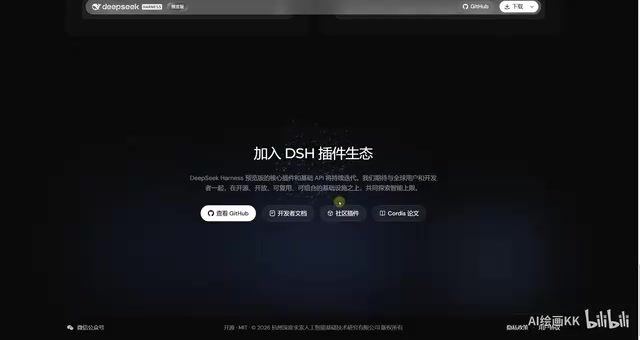
Casual users can download the desktop app and use it right out of the box — no configuration required. Developers who want more control can set up the runtime environment and spin up the web version with a single command. The full source code is publicly available on GitHub.
The decision to open-source is a strategically significant move. It means the community can collectively contribute plugins, fix bugs, and extend capabilities — forming an ecosystem around Harness. For a platform built on plugins, open source and an active community are nearly inseparable: more plugins increase the platform's value, and a more open platform attracts more developers to build plugins.
A Few Observations
The core of DeepSeek's product strategy this time is eliminating barriers to entry. Whether you're a non-technical office worker or a professional developer, the platform is designed to have something for you. Everyday users can handle routine work tasks, while developers can run code, manage repositories, and even have the platform build custom tools tailored to their needs.
This positioning reflects a broader trend in AI agent products: moving from general-purpose conversation toward extensible, customizable work platforms that can actually execute real tasks. As the path from "describe a need in plain language → automatically generate a usable tool" becomes validated, the very nature of how we use software may be up for redefinition.
That said, a single-source demo isn't quite enough to fully evaluate stability in complex, real-world scenarios. If you're curious, the best approach is to download it yourself and test it against your actual needs to see where its limits lie.
Related articles

Felix Rieseberg Personal Homepage
Felix Rieseberg's personal homepage sparks attention on Hacker News. This article covers the Slack engineer's technical background, the rise and fall of nativefier, and the value of a developer homepage as a tech calling card.

@ai-sdk/vue 3.0.306 Patch Release Syncs with [email protected] Update
@ai-sdk/vue 3.0.306 released, synced with [email protected]. A routine patch release for the Vercel AI SDK ecosystem with no public API changes; the Vue adapter layer stays version-aligned with the core package.

Gemini 4 Argon API Launches: The Era of Million-Token Output Begins
Google launches Gemini 4 Argon with sparse MoE architecture, up to 1M output tokens, and a 68.90% Vals Index score, available across API, AI Studio, and the Gemini app.