DeepSeek Harness Hands-On Review: A Detailed Guide to the Agent Scaffolding Tool for Developers

DeepSeek Harness is a developer-focused Agent scaffolding tool for building custom AI agents with plugin architecture.
DeepSeek Harness (DSH) is an Agent development scaffolding tool targeting developers rather than end-users. It features private model integration, a plugin-based architecture ("everything is a plugin"), four distinct conversation modes (Standard, PTC, Minimal, Creative), and full execution trace visibility for debugging. Unlike desktop agents like WorkBody or Codex, DSH provides the foundational Harness engineering layer for building custom business Agents.
What Exactly Is DeepSeek Harness
With the release of the DeepSeekAd V4 Pro model, the official team promptly launched the long-anticipated DeepSeek Harness (DSH). To understand this product, you first need to grasp the concept of "Harness Engineering" — it's essentially the "wrapper system" that sits around a large language model.
The concept of Harness Engineering originates from the "Test Harness" philosophy in software engineering, referring to the peripheral system that provides a runtime environment, input/output management, and lifecycle control for core components. In the LLM domain, the Harness layer handles responsibilities such as prompt management, context window scheduling, tool-calling protocols (like Function Calling), error retries, and token budget control. Without this layer, an LLM is merely a stateless text generator — unable to maintain multi-turn conversation state or interact with external systems.
All Agent systems today are essentially a combination of LLM + Harness. Without Harness engineering, relying solely on a model's capabilities, there's no way to orchestrate tool calls, Skills, session scheduling, and other workflows. DeepSeek's official definition is spot-on: The model is the soul of an Agent; the Harness gives the Agent the ability to understand its environment, use tools, and work continuously in real-world scenarios.
In simple terms, DSH is an Agent development tool. From a capability perspective, it's similar to products like WorkBody and Codex. However, as the rest of this article will demonstrate, its positioning is fundamentally different from these desktop-based agents.
Installation Experience: A Minimalist Process for Technical Users
Installing DSH is quite straightforward. On the official website, you'll find two options: "One-Click Use" and "Source Code Installation" — typically you just need to copy a command and run it in your terminal. The process is identical for Mac and Windows users in their respective command-line tools.
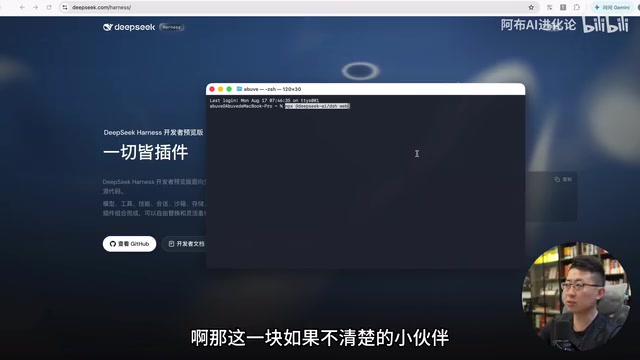
Note that installing via NPX requires a pre-configured Node.js environment locally. NPX is a package execution tool bundled with Node.js that allows users to run commands from npm packages directly without installing them globally. This approach ensures users always run the latest version while avoiding global dependency pollution. If you're unfamiliar with the command line, you can also hand the installation commands to desktop agents like WorkBody or Codex to execute. After installation, a local listener starts on port 3080, and you can access the web-based chat interface through that address.
When entering the interface for the first time, there's one critical prerequisite: you must configure an API Key. You need to create a Key in the DeepSeek dashboard under API settings, and your account must have a few yuan in balance — calls will fail if the balance is zero. Once configured, the basic conversation experience (like checking weather or executing tasks) is no different from other agents.
Four Key Features Explained
Private Model Integration
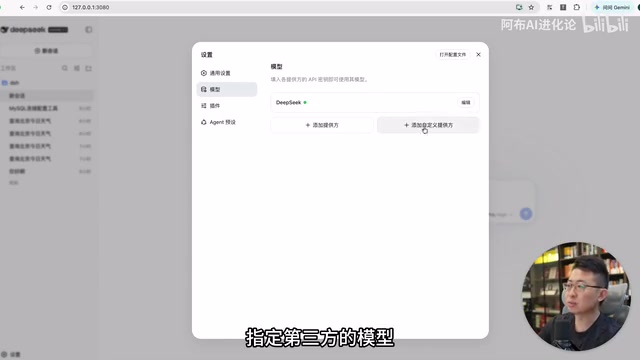
The most important capability in DSH's settings is custom model integration. It supports not only specifying third-party models but also providing call addresses for private models. This means if an enterprise has deployed local agents in an intranet environment — with data security requirements preventing cloud usage — they simply need to configure the call address within their private network space, enabling flexible model integration and deployment.
This design follows the mainstream architecture for enterprise AI deployment — through a unified interface specification compatible with the OpenAI API format, regardless of whether the underlying model is DeepSeek, Llama, Qwen, or another open-source model, DSH can seamlessly connect as long as a compliant API endpoint is provided. This dramatically reduces migration costs when switching between models and lays the foundation for a "model-agnostic" Agent architecture.
The Core Philosophy: Everything Is a Plugin
DSH's core component (Cordis) advocates the philosophy of "everything is a plugin." Cordis is a plugin-based framework built on dependency injection and event-driven architecture, with a design philosophy similar to VSCode's Extension system or Webpack's Plugin mechanism. Under this architecture, every functional module (such as file system access, network requests, database connections) is encapsulated as an independent plugin that interacts with the main system through unified lifecycle hooks (like activate, deactivate). Plugins communicate through a service registry in a loosely coupled manner, allowing developers to extend or replace any functional module without modifying core code.
The settings interface integrates various plugins — some disabled, some enabled — which users can activate based on different needs. Under normal circumstances, no extensive adjustments are needed, but this plugin-based mechanism lays a solid foundation for future capability extensions.
Four Conversation Modes Explained
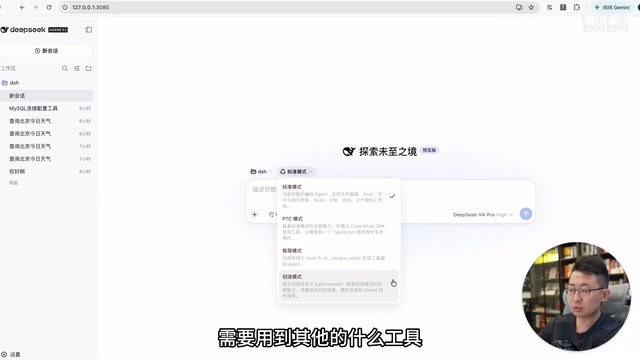
DSH offers several distinctly different working modes:
- Standard Mode: The most complete Harness engineering framework, supporting Shell, file retrieval, internet access, Skills, and more, with plugins in full working state. In this mode, the Agent follows the complete "Perceive-Reason-Act-Observe" loop paradigm — in each cycle, the Agent receives environmental feedback, decides the next action (calling a tool or responding directly) after LLM reasoning, then injects tool execution results back into the context for continued reasoning. Implementing this Agent loop mechanism involves engineering details such as state machine management, maximum iteration control, and exception interrupt handling — it's the most critical orchestration logic in the Harness layer;
- PTC Mode: PTC (Packed Tool Calls) mode draws design inspiration from the "instruction packing" concept in compiler optimization. Traditional Agents require a full LLM reasoning cycle for each tool call, while PTC mode combines multiple atomic operations into a single batch execution through predefined tool call combinations. This approach significantly reduces LLM inference rounds and context token consumption. In scenarios requiring repeated execution of standardized workflows (such as batch file processing or multi-data-source aggregation), it both reduces latency and saves API call costs;
- Minimal Mode: Carries almost no plugin capabilities, providing only a basic command environment — the lightest version. Suitable for quickly testing the model's reasoning capabilities themselves, or running in resource-constrained environments;
- Creative Mode: When an Agent is executing a task and discovers it needs a tool or capability that doesn't yet exist, it will encapsulate and create a new plugin on its own to accomplish the goal. To put it figuratively: "needing to drive a nail but finding no hammer in hand, it builds a hammer itself." This capability is academically known as "Tool Making" — it evolves the Agent from a tool user to a tool creator, vastly expanding the Agent's boundaries for handling open-domain tasks.
Visual Execution Traces
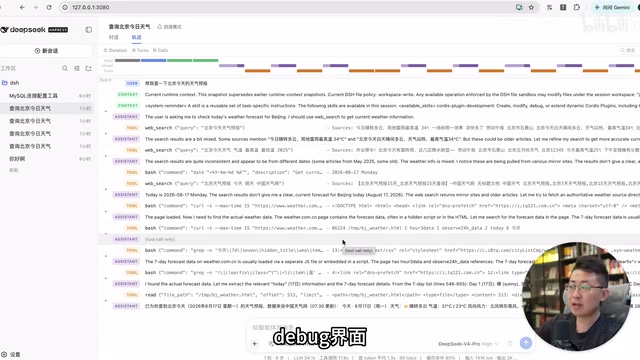
In every conversation window, DSH allows you to view the complete execution "trace." Unlike other desktop agents that only show the thinking process and focus more on final results, DSH stores all log information and detailed records. This effectively serves as a Debug interface for LLM interactions, greatly facilitating the process of debugging Agents and refining details.
This full-chain observability design is crucial in production-grade Agent development. Developers can pinpoint exactly where Agent reasoning went wrong through trace replay — which tool call returned abnormal results, or at which stage token consumption spiked. This aligns with the APM (Application Performance Monitoring) philosophy in traditional software development, except the monitoring target shifts from deterministic code execution to non-deterministic LLM reasoning chains.
Who Is DeepSeek Harness For
This is where the fundamental difference between DSH and desktop agents like WorkBody and Codex lies. On the surface, DSH's features might seem rough and lacking standout highlights, but that's precisely because it targets developers — it's an Agent development product that lets you freely encapsulate and flexibly define.
Consider a concrete scenario: suppose you need to build a custom data analysis Agent for a client, with security restrictions prohibiting cloud-based LLMs. If developing from scratch, you'd need to implement session management, sandbox isolation, full-chain storage, Agent loop mechanisms, and a host of other underlying capabilities in the Harness engineering layer. Among these, sandboxing is a key component of Agent security architecture — when an Agent executes Shell commands or code, the sandbox isolates the execution environment from the host system through containerization (like Docker), virtualization, or OS-level namespace isolation, preventing malicious or erroneous Agent behavior from affecting the host file system, network, or other processes. In enterprise deployments, sandboxes also need to implement resource quota limits (CPU, memory, disk IO) and network Access Control Lists (ACLs) to ensure Agents operate within controllable boundaries.
What DSH provides is precisely a foundational Harness engineering scaffolding, allowing you to rapidly build your own Agent on top of the framework and focus your energy on business functionality itself.
For example, you could develop a "database connection configuration" plugin based on DSH — in a blank state the Agent has no connection tools, but through DSH's plugin mechanism you can develop one and integrate it into the settings interface as an option (involving host, username, database address configurations). This demonstrates that using Agents has long gone beyond basic functionality — it's about customizing plugins and tools that fit business scenarios based on the Harness framework.
Selection Advice: Regular User or Developer
Overall, DSH's positioning is crystal clear — the official team even calls the current version a "Developer Preview," which speaks for itself.
If you don't have Agent development needs and primarily want an Agent to enter your workspace and handle daily tasks, desktop agents like WorkBody and Codex will serve you well — with better experience and more out-of-the-box usability.
But if you need to work with Agent's underlying core capabilities, encapsulate an Agent for specific business needs, or build products for particular scenarios, DeepSeek Harness is absolutely worth your time to study. This product form may well become the starting point for custom Agent development across industries — it lowers the Agent development threshold from "building wheels from scratch" to "focusing on business itself." From an industry trend perspective, the emergence of DSH signals that Agent development is undergoing a paradigm shift similar to web development's transition from "hand-writing CGI" to "using Rails/Django frameworks": underlying infrastructure is gradually becoming standardized, allowing developers to truly focus their attention on business logic and user experience.
Key Takeaways
Related articles

ChatGPT Space Launches: Team Collaboration and New Pages Features Explained
ChatGPT Space is OpenAI's new team collaboration feature with Pages, real-time collaboration, and Slack/Google Drive sync. We break down its privacy design, multi-platform integration, and the full workflow from conversation to document.

Migrating Apache Spark UDFs to GPU Acceleration with AI Agents
NVIDIA developer blog explains how AI Agents rewrite Apache Spark UDFs for GPU acceleration, covering migration criteria, agent rewriting and verification workflows, plus pitfalls like result consistency and CPU-GPU transfer overhead.

Zed Editor v0.40.4-rc2 Released: Usage Credits Now Available Without Upgrading
Zed editor releases v0.40.4-rc2, allowing users to use usage credits for AI features without upgrading to a paid plan, lowering the trial barrier.