DeepSeek Harness Hands-On Review: A Homegrown Codex Rival Matching Claude's Coding Abilities
DeepSeek Harness open-source review: plugin-based AI coding agent rivaling Claude Code and Codex.
DeepSeek's newly open-sourced Harness is a configurable AI coding agent built on an "Everything is a Plugin" architecture, rivaling Claude Code and Codex. Hands-on tests across four tasks — code analysis, interactive websites, 3D gesture-controlled games, and a full-stack PPT generator — show V4 Pro + Harness matching Claude's coding ability with 99% cache hit rates and costs under $1. Its four operating modes and extensible plugin system make it a powerful, transparent, and highly customizable AI development tool.
DeepSeek Completes the Puzzle: What Exactly Is Harness?
DeepSeekAd dropped two major announcements yesterday — the official launch of V4 Pro, followed immediately by the much-anticipated open-source release of DeepSeek Harness. The GitHub repo surged past 80,000 stars within a day of going live, a testament to AI's top player and its massive pull.
So what exactly is Harness? The word means "to control and direct." If you think of an AI model as a horse, Harness is the complete set of gear you need to ride it: the project rule files you write, the tools you configure, the task decomposition and execution order you arrange, the testing and validation workflows you design — all of that is Harness.
There's an elegant formula here: Agent = Model + Harness. The model handles thinking and generation; Harness handles connecting those capabilities to the file system, terminal, web, and toolchain, enabling AI to actually get work done in real-world environments. This formula originates from the core design paradigm in the AI Agent field — in both academia and industry, an AI Agent capable of autonomously completing tasks typically consists of three layers: a perception layer (receiving input), a decision layer (model reasoning), and an execution layer (tool invocation and environment interaction). The Model handles reasoning and generation at the decision layer, while Harness encompasses the perception and execution layers, including file system access, terminal command execution, API calls, task orchestration, and other infrastructure. Previously, the common industry approach was to hardcode these capabilities into Agent frameworks (like LangChain, AutoGPT), but DeepSeek has abstracted them into a pluggable Harness layer, representing a more modular Agent architecture philosophy. Until now, DeepSeek had only open-sourced the model half — Harness had been conspicuously absent. This release finally completes the picture.
You can think of DeepSeek Harness as a highly customizable AI coding tool, positioned against Claude Code and Codex. But its ambitions go further — it's not just a coding Agent, but a configurable, composable Agent runtime environment, with the official tagline "Everything is a Plugin."
DeepSeek Harness Installation Guide: Up and Running in One Minute
Installation is incredibly straightforward. First, make sure Node.js is installed on your machine (if not, just download the installer from the Node.js official website). Node.js is a JavaScript runtime built on Chrome's V8 engine that enables JavaScript to run on the server side, outside the browser — it's foundational infrastructure for modern frontend toolchains and full-stack development. Then head to the DeepSeek Harness official website, copy the installation command, and run it in your terminal.
After a brief wait, the terminal will output a URL. Open it to access the Harness web interface. On first use, you'll need to enter your DeepSeek API Key — just create one on the open platform and paste it in. An API Key is a credential used by LLM service providers for identity verification and usage billing; every AI call sends a request to DeepSeek's cloud API via this key and is billed per token. At this point, installation is complete.
Once inside the interface, select a project folder you want the AI to work on and you're ready to go. You can choose the model and reasoning level in the chat box, and configure the Agent's permissions for file system and terminal operations. The default is Standard Mode, which includes every capability an AI coding tool should have and is sufficient for most use cases.
The interface is highly similar to Codex — think of it as a "homegrown Codex" for AI coding, office automation, and more.
Four Real-World Tasks: Hands-On Testing of DeepSeek Harness's Coding Abilities
Code Comprehension and Architecture Diagram Generation
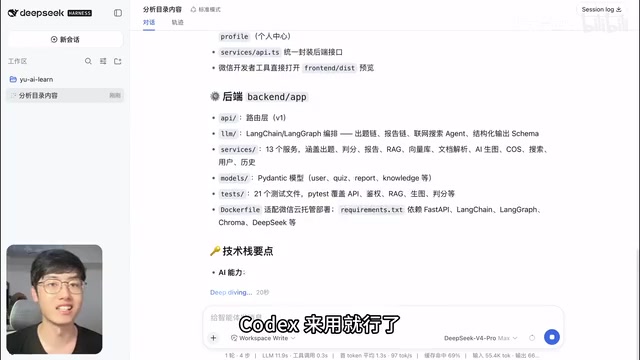
The first task was to have Harness analyze its own code repository and generate an architecture diagram. The repo is sizable with many modules — a solid test of code comprehension. The AI automatically read files and analyzed the structure with impressive speed, clearly displaying each step on the interface. The final output was Mermaid diagram syntax, which rendered into a fairly comprehensive architecture diagram.
Mermaid is a text-based diagramming tool that lets developers define flowcharts, sequence diagrams, class diagrams, and other chart types using concise Markdown-like syntax. Its core advantage is "code as diagram" — no need for graphical tools like Visio or Draw.io. You simply describe nodes and connections in text, and the rendering engine automatically generates visual diagrams. Mermaid is natively supported by GitHub, GitLab, Notion, and other major platforms. The fact that AI generates Mermaid syntax rather than image formats means the output can be version-controlled, easily modified, and re-edited.
Worth highlighting is the trajectory panel — you can clearly review every tool invocation record throughout the entire conversation, making every run fully traceable. This is a standout feature of Harness.
Interactive Animation Website Development
The second task was developing a website that explains concepts through interactive animations. It took about 20 minutes to complete, with most time spent on the AI's self-checking process. The pleasant surprise was that this task achieved a cache hit rate of 99%, resulting in extremely low actual costs.
The "cache hit rate" here is a key metric for measuring LLM API call costs. When users send requests to an LLM, the input prompt often contains large amounts of repeated content (such as system prompts, project context, and previous conversation history). LLM API providers cache these repeated prefixes using KV Cache — if the current request's prefix matches a previous request, the already-computed intermediate results can be reused rather than recalculated. Cached tokens are typically billed at 1/10 or even less of the original price. When DeepSeek Harness executes multi-step tasks, each conversation round carries the complete project context and history, which is highly repetitive. This is why cache hit rates can exceed 99%, dramatically reducing actual usage costs.
The finished product featured vivid animations, accurate connecting lines, and even included summary and quiz features. The results were noticeably better than previous versions produced with V4 Pro + Codex.
3D Game with Gesture Control
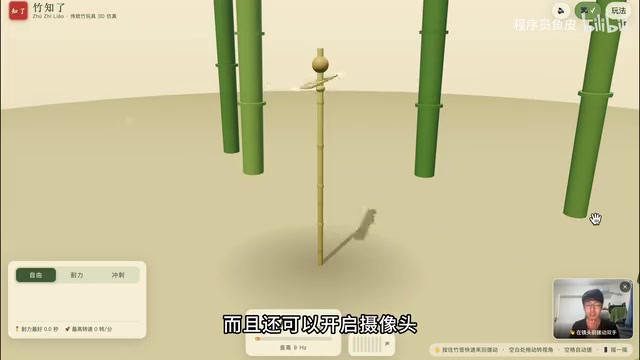
The third task ramped up the difficulty: develop a 3D web-based mini-game with webcam gesture recognition control. This type of project typically involves WebGL/Three.js for 3D rendering and MediaPipe or TensorFlow.js for gesture recognition — a wide tech stack with high integration complexity, making it an ideal scenario for testing AI full-stack coding capabilities. This run took nearly 40 minutes with a cache hit rate approaching 100%. The finished product supports mouse drag-to-rotate and even webcam-based "hand rubbing" to control rotation. Even shadow details were well-executed, and the interactive experience was rated "top-tier."
Full-Stack AI Web PPT Generator
The fourth task was developing a full-stack AI web-based PPT generator with built-in LLM capabilities: users paste long-form text, the backend calls DeepSeek to break it into multiple PPT slides, and the frontend renders them as a fullscreen-ready web presentation. During execution, the AI proactively asked the user for permission confirmations — solid security practices. This "Human-in-the-Loop" interaction design is a best practice in AI safety — ensuring that critical operations (such as file deletion, system command execution, network requests, etc.) only execute after explicit user authorization, effectively preventing irreversible consequences from autonomous AI behavior. It completed in about half an hour, with the finished product supporting custom styles, reasoning mode toggle, and theme color switching, with clear visual hierarchy. This version's performance "rivals Claude."
Regarding costs: These tasks cost less than 5 RMB in total, thanks to the 99%+ cache hit rate. However, it's worth noting that DeepSeek has announced a significant price increase, though it's still much cheaper compared to Claude.
Four Operating Modes of DeepSeek Harness Explained
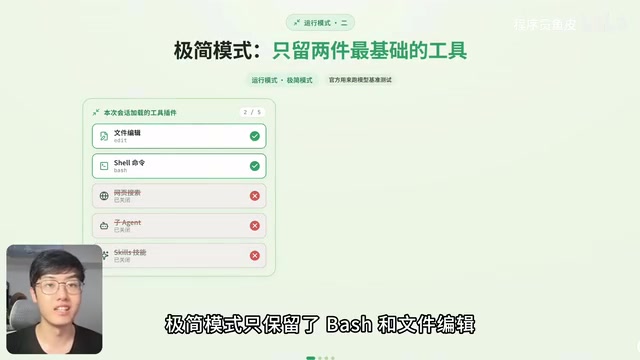
Harness offers 4 operating modes for different scenarios. The fundamental difference between them is which tool plugins are loaded in the current session:
- Standard Mode: Fully loaded with the complete capability set, including file editing, command execution, web search, sub-Agents, Skills, and more. It covers all daily development needs and is the right choice for the vast majority of situations. Sub-Agents refer to delegating specific subtasks to independent Agent instances during the main Agent's task execution — similar to function calls in programming. The main Agent handles task decomposition and result aggregation, while sub-Agents focus on executing work in specialized domains. This divide-and-conquer strategy significantly improves completion quality for complex tasks.
- Minimal Mode: Retains only Bash and file editing — the two most basic tools. Primarily used by the official team for running model benchmarks (such as SWE-bench, HumanEval, and other industry-standard coding evaluations), testing the model's pure coding ability in a minimal environment and eliminating the confounding effects of toolchain enhancements.
- PTC (Programmatic Tool Calling) Mode: In normal mode, the AI calls tools step by step. In PTC mode, the model directly generates a TypeScript script that chains multiple tool calls together for single-pass execution. TypeScript is a superset of JavaScript with an added static type system, widely adopted in modern development. In PTC mode, the AI no longer issues individual tool call instructions and waits for results sequentially. Instead, it writes a complete script that orchestrates the execution order and logic branches of multiple operations — similar to upgrading from "sending commands one by one" to "writing and executing a batch script." This approach suits tasks with many steps and clear logic, such as batch file renaming or running automation workflows, because it reduces the multi-round interaction latency between model and tools.
- Creative Mode: Inherits all Standard Mode capabilities, plus enables the AI to inspect which plugins are available in the current runtime, experiment with new plugin combinations in memory, and even create entirely new mode presets. This "AI self-evolving runtime environment" capability is known as Self-Adaptive ability in AI Agent research, and represents an important step toward more advanced autonomous agents.
The Killer Feature: An Everything-Is-a-Plugin Architecture
The biggest differentiator between Harness and Codex or Claude Code is its plugin system. Here, models, tools, skills, sessions, sandboxes, UI — even the Agent's core runtime loop itself — are all plugins.
"Everything is a Plugin" is a design philosophy rooted in extreme microkernel architecture, tracing back to the Microkernel concept in operating systems — where the system core retains only minimal scheduling and communication mechanisms, and all functional modules exist as pluggable services. In software engineering, successful products like Eclipse IDE, VS Code, and WordPress have adopted similar philosophies. DeepSeek Harness pushes this architecture to its extreme in the AI Agent domain — not only are tools and UI plugins, but the Agent's core runtime loop (how the model iteratively calls tools, how it decides when to stop) is itself a plugin. This means users can fundamentally redefine the AI Agent's behavioral logic, not merely extend its peripheral capabilities.
In other words, anything you're not satisfied with can be swapped out or extended with plugins at any time, without touching the framework's source code.
Community Plugins: Installation and Recommendations
On the official website, click "Community Plugins" to see all projects tagged with dsh-plugin on GitHub. Installation is dead simple — just give the AI the plugin's open-source URL and let it handle the installation. The community offers various fun skin plugins (whale mascot themes, Excel spreadsheet skins, terminal skins, etc.), as well as genuinely useful functional plugins.
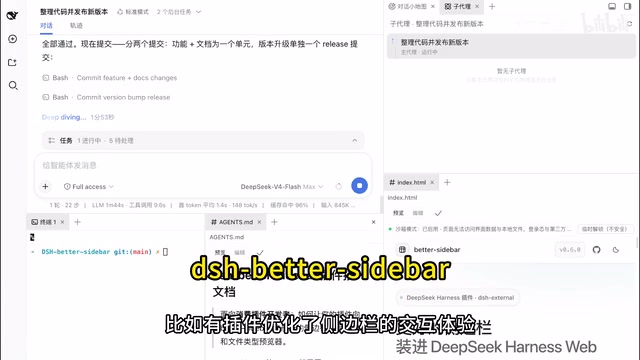
The most noteworthy is the Modelance vision plugin, which helps text models understand image content. This plugin is significant because DeepSeek's text model doesn't natively have multimodal vision capabilities. Modelance works by calling external vision models (like GPT-4o or other vision APIs) to analyze images, then passing the description results as text to DeepSeek — effectively achieving "image understanding" through a workaround. These plugins fill gaps in Harness's interaction details and capabilities, further validating the flexibility of the "Everything is a Plugin" architecture.
How to Develop Your Own Harness Plugins
Writing your own plugins is easy too — just have the AI write them for you. Switch to Creative Mode and describe your requirements to the AI — for example, porting a desktop pet plugin you used on Codex. After the AI finishes development, it will ask for your manual approval before formally installing it. This mechanism embodies the Sandbox security isolation design philosophy — sandboxes restrict program execution to a controlled environment, preventing unintended or malicious impacts on the host system. This is especially important in AI Agent scenarios, where Agents can autonomously execute code, modify files, and run terminal commands. Without proper isolation and approval workflows, erroneous operations could cause irreversible system damage. You can also get creative and build plugins like hydration reminders, floating widgets showing real-time model account balance, and share them with others by pushing to GitHub.
Verdict: Is DeepSeek Harness Worth Using?
After several rounds of testing, the overall impression of DeepSeek Harness is: decent speed, extremely high cache hit rates, and a clear, transparent execution process — you can see exactly what the AI is doing at every step, which tools it's calling, which files it's reading. Unlike some tools that operate as black boxes, this transparency is highly valued in AI safety and Explainability — it allows users to audit the AI's decision-making process, catch and correct errors promptly, and build trust in AI systems.
Based on hands-on testing, DeepSeek V4 Pro paired with its native Harness can genuinely match Claude's coding capabilities. This also demonstrates that behind those benchmark scores that differ by just 0.1, Harness tooling adaptation is crucial — to get the most out of DeepSeek's models, you really should use their own Harness. This phenomenon is not unusual in the AI field: a model's benchmark scores largely depend on the system prompts, tool configurations, and execution strategies used during evaluation — the "engineering wrapper" — rather than the model's raw naked ability. As the official runtime environment deeply optimized for its own models, Harness has been precisely tuned in areas like prompt engineering, tool calling formats, and context management, allowing it to fully unleash the model's potential.
There are plenty of more advanced use cases: batch-processing tasks via command-line mode, connecting and switching to other LLMs, customizing Agent presets, deploying to servers for team sharing, and more. But what's truly exciting is the ultimate openness that "open source + everything is a plugin" brings — perhaps before long, everyone's AI coding tool will look different, because everyone can freely assemble their own according to their needs. That's a pretty cool thing.
Related articles

DeepSeek Harness: A Beginner's Installation and Testing Guide
A DeepSeek Harness tutorial for test engineers: set up Node.js, launch with one NPX command, configure official and third-party models, and explore web search, file I/O, and trace-view agent observability.
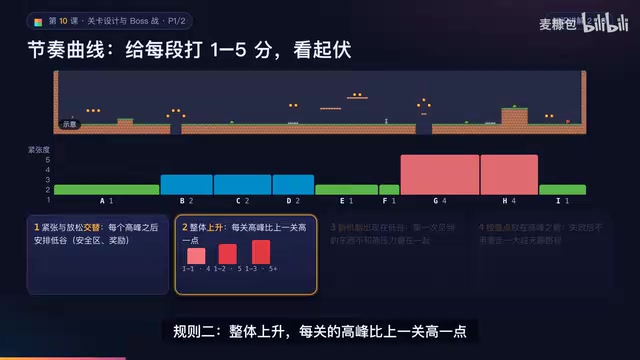
AI Game Development in Practice: Designing Levels with the Four-Step Method and Pacing Curves
AI game development lesson 10: design levels with the four-step method (teach, practice, combine, test) and a 1-5 pacing curve, plus sightline guidance and safety zones—implement Animatable Body 2D moving platforms and generate ASCII sketches for 1-2 Underground Cavern and 1-3 Guard Hall.

AI Game Development in Practice: Two-Phase Boss State Machines and Death Heatmap Tuning
AI game development lesson 10: implement a two-phase Boss with a state machine, guarantee fairness with color signals and a 0.4-second warning floor, locate difficulty cliffs with a death heatmap, and apply lightest-to-heaviest fixes one at a time, with an acceptance checklist and common pitfalls.