DeepSeek Harness Hands-On Review: Deep Dive into the "Everything is a Plugin" AI Agent Framework

DeepSeek Harness is a fully plugin-based AI Agent framework where every component is replaceable.
DeepSeek Harness (DSH) is an open-source AI Agent framework from DeepSeek built on a radical "everything is a plugin" philosophy. Unlike Codex's fixed-tool approach, DSH allows users to replace any component—UI, tools, or workflows—with community plugins. It ships with 159 built-in plugins, supports custom plugin creation via natural language, and enables diverse use cases from game development to research agents.
Recently, He Jing, a post-90s associate professor at Beihang University, published a comprehensive tutorial on DeepSeek Harness (DSH) on Bilibili, covering everything from installation to plugin development. As an open-source AI Agent framework officially released by DeepSeek, DSH's most striking design philosophy is — everything is a plugin. This article combines insights from that hands-on video to provide a deep analysis of DSH's architecture, installation process, and plugin ecosystem.
What is DeepSeek Harness
DeepSeekAd Harness is an open-source Agent tool officially released by DeepSeek. You can access its website by simply appending harness to the DeepSeek official URL. Compared to OpenAI's Codex, the biggest difference lies in their architectural philosophy.
Codex is a relatively fixed tool — while it supports installing Skills and configuring MCP Servers to extend its capabilities, the tool itself has a largely predetermined form. DSH, on the other hand, adopts a fully plugin-based architecture — every part, every component can be replaced.
In the hands-on test, the video author installed a plugin called DSH Web UI that completely replaced DSH's original UI interface. This means: if you don't like the UI, swap it out; if you think the built-in Web Search, OCR, or other tools aren't good enough, replace them with other plugins. This extreme replaceability is DSH's core competitive advantage over Codex.
"It can be transformed into entirely different software — unlike Codex, which is a fixed tool. Right now it's more flexible than Codex, though also more cumbersome."
DSH Plugin Ecosystem: From Productivity Tools to Gaming Platforms
DSH's plugin ecosystem is already taking shape. In the Awesome DSH repository, the official team and community have compiled a large collection of popular plugins, sorted by popularity and star ratings. The official team encourages developers to add the DSH topic tag to their plugin repositories for better discoverability.
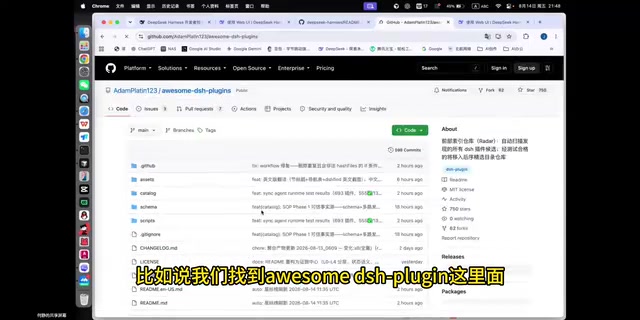
Notably, not all plugins are productivity tools. The video author discovered that a significant portion of the plugin list consists of entertainment and lifestyle applications: human-vs-AI battles, dual-AI auto-chess plugins, 4399-style mini-games, and even a "play Gomoku with AI in DSH" plugin. This means you can turn DSH into a gaming platform with AI participation, not just a utility tool.
Conversely, you can also integrate all learning and research-related plugins, customize the UI, and transform it into a dedicated "research agent" or "learning agent." This high degree of malleability makes DSH's application scenarios virtually limitless.
However, the author also noted that the current plugin installation experience isn't convenient enough. Unlike Cursor, where you can search and one-click install from the extension panel, DSH plugin installation still requires manual operations. The author predicts that DSH will likely launch a "plugin store" in the future to make plugin swapping more convenient.
DeepSeek Harness Installation and Configuration Walkthrough
DSH's installation process is relatively standardized. First, clone the project from GitHub to your local machine, then open a terminal and run a few initialization commands to complete the installation. In the hands-on test, the author launched the web interface using the dsh web command, after which the browser automatically opens a local URL.
On first entry, the system displays a beta disclaimer. After clicking continue, you'll need to enter an API key. DSH supports multiple model configurations — beyond DeepSeek's own models, you can also connect GPT, Zhipu, and other models, or even use third-party proxy endpoints.

After configuration, you need to select a workspace. DSH comes with as many as 159 built-in plugins, covering timers, LLM interactions, Agent sandbox environments, and other common tools. However, the author pointed out an obvious shortcoming: these default plugins currently lack feature descriptions, forcing users to guess their purpose based on plugin names alone. This has already been raised as an improvement suggestion by developers on GitHub.
Differences in Agent Preset Modes
DSH offers multiple Agent preset modes, including Standard, Minimal, Creative, and more. Different modes come with different plugin combinations. For example, Standard mode includes a PTC (which may perform better for code writing). Users can also customize preset modes with unique plugin combinations to create their own tailored DSH work environment.
Hands-On Test: Developing a Web Game with DSH
To verify DSH's real-world capabilities, the author tasked it with developing a third-person shooter web game.
During execution, DSH showcased visualization features different from Codex — it displays the complete execution trace: the duration of each execution step, whether it's a model input or tool call, all color-coded for clarity.

In terms of task planning, DSH's logic was clear: first download the Swift.js module locally for offline use, then create tps游戏.html, then set up control logic, etc. Although the entire development process went through several rounds of debugging — the first version had issues like failing to start and inverted directional controls — through multiple rounds of conversational feedback with the AI, it ultimately successfully implemented complete game mechanics including aiming, shooting, precision aiming, reloading, item pickup, ranged attacks, health drops, and health recovery.
This test clearly demonstrates that DSH can not only generate code but also iteratively fix issues through continuous dialogue, exhibiting genuine AI Agent capabilities.
DSH Plugin Installation and Custom Plugin Tutorial
DSH's plugin installation is very user-friendly. The author demonstrated two approaches:
Method 1: Let DSH Auto-Install Plugins
Just like using OpenClaude, simply provide DSH with the plugin's GitHub link, and it will automatically complete the installation. The author demonstrated installing a DSH Web UI bundle that contains multiple sub-plugins, including fun features like desktop pets and skin changes. After installation and restarting DSH, a "whale girl" desktop pet appeared on the interface, with customizable naming.

Method 2: Let DSH Create Custom Plugins for You
This is the most impressive part. In "Creative Mode" — designed specifically for creating custom Agent presets, providing runtime inspection, plugin experimentation, and creative guidance — the author presented a real need: DSH's default setup cannot delete historical conversation records, and they wanted a "conversation history management" plugin to enable deletion.
While the first version of the plugin had issues like incorrect icon placement and incomplete functionality, after several rounds of discussion and modification with the AI, it successfully implemented conversation history management and deletion. After deleting conversations, the records were indeed cleared from the workspace.
This case is highly instructive: DSH allows users to create plugins for missing features using natural language, truly achieving a "fill in what's missing" self-evolution capability.
Summary: DSH's Strengths and Weaknesses
DeepSeek Harness represents a new approach to AI Agent frameworks: rather than building a monolithic, all-inclusive fixed tool, it provides a highly replaceable plugin-based foundation, letting the community co-build the ecosystem.
DSH's Core Strengths:
- Extremely flexible plugin-based architecture where all components are replaceable
- High versatility, supporting diverse applications from productivity tools to games
- Ability to create plugins using natural language, enabling functional self-evolution
Current Shortcomings:
- Installation process is relatively cumbersome, with a higher barrier than tools like Cursor
- Default plugins lack documentation
- No convenient plugin store mechanism yet
For developers and enthusiasts who enjoy tinkering and pursuing personalized AI tools, DSH is an open-source project worth trying. As the plugin ecosystem matures and a plugin store launches, it has the potential to become a truly "one-of-a-kind for everyone" AI Agent platform.
Related articles

Chain of Thought Isn't Just for AI: How Humans Can Use CoT to Improve Thinking Quality
Chain of Thought isn't just a prompt trick for large models. Starting from a Hacker News discussion, this article analyzes why CoT works for human thinking too, breaks down actionable ways to transfer it, and highlights the key differences between human CoT and machine CoT.
Cloudflare Teams Up with OpenAI: Closi…
Cloudflare Teams Up with OpenAI: Closing the Loop from Vulnerability Discovery to Defense with AI
Cloudflare uses OpenAI Daybreak to investigate security vulnerabilities and generate reviewable remediation plans, while developers use Codex to boost coding efficiency and quality.

Orca Multi-Agent Orchestration in Practice: A Guide to Parallel Collaboration with Claude and Codex
Orca is Stable AI's free open-source agent workbench supporting 34 agents like Claude Code and Codex in parallel. Learn its Git worktree isolation, multi-model orchestration, and mobile management.