DeepSeek Harness Installation Guide: Get the Agent Framework Running in Three Steps

A three-step guide to installing and running DeepSeek Harness, the viral open-source Agent framework.
This guide walks you through the complete installation process for DeepSeek Harness, DeepSeek's open-source Agent framework that hit 100K GitHub stars in 42 hours. The three steps cover obtaining a DeepSeek API Key, using integrated tools to handle environment setup and dependency installation, and configuring the model to start running Agent tasks. It also addresses the most common installation failure — network issues when downloading overseas dependencies — and provides cost-control tips for Agent workflows.
DeepSeek Harness: A Phenomenal Open-Source Agent Framework
DeepSeekAd recently open-sourced its first Agent runtime framework — DeepSeek Harness — which immediately generated widespread attention across the AI community. According to relevant data, the project's growth after launch has been staggering: GitHub stars surpassed 22,000 in just an hour and a half after release, broke 50,000 within 12 hours, and shot past 100,000 in 42 hours, setting one of the fastest star-growth records in GitHub history.
GitHub Star count is an important metric for measuring open-source project influence, reflecting developer community attention and recognition. For reference, Meta's LLaMA model repository took about a year to accumulate 100,000 stars, and one of the previously fastest-growing projects — a ChatGPT proof-of-concept — still needed several weeks to reach a similar scale. DeepSeek Harness's growth rate not only demonstrates the project's inherent appeal but also reflects that global developer demand for Agent toolchains has reached a critical tipping point.
By comparison, DeepSeek's previous star project V3 took a year and a half to accumulate a similar level of attention, while Harness achieved the same result in less than two days. Behind this explosive growth lies the developer community's high expectations for the "Agent runtime framework" direction — people don't just want a powerful model; they want a complete toolchain that enables models to actually "get things done."
What Is an Agent Framework?
Agent (intelligent agent) is one of the hottest paradigms in AI today, fundamentally different from traditional "question-and-answer" style LLM interactions. An Agent framework gives large models the ability to "take initiative" — rather than passively answering questions, models can autonomously plan task steps, invoke external tools (such as search engines, code executors, databases), dynamically adjust strategies based on intermediate results, and ultimately accomplish complex multi-step objectives. A typical Agent architecture includes a Planning module, Memory module, Tool Use module, and Reflection module. Previously, the industry had well-known Agent frameworks like LangChain, AutoGPT, and CrewAI, but most of them relied on overseas models like OpenAI. The emergence of DeepSeek Harness signals that the domestic model ecosystem is beginning to fill this critical gap.
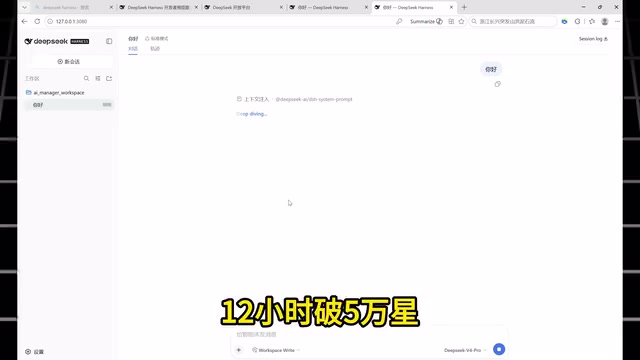
However, hype aside, many developers report encountering obstacles when actually getting started: tedious environment configuration, dependency installation errors, and inability to open the app after launch are common issues. This article combines hands-on experience shared by the community to provide a complete installation and configuration guide for DeepSeek Harness, helping you quickly get through the first step.
Step 1: Obtain a DeepSeek API Key
DeepSeek Harness is essentially a runtime framework that calls upon LLM capabilities, so you must first prepare a working API Key before use.
An API Key (Application Programming Interface Key) is an authentication credential used to establish an authorized connection between a client application and cloud-based model services. When the Harness framework makes a request, the API Key is included in the HTTP request header, allowing the server to verify the caller's identity and handle billing. LLM APIs typically use a per-token billing model — a token is the smallest unit of text processed by the model, and in Chinese contexts, one character usually corresponds to 1-2 tokens.
Step-by-Step Instructions
- Open the DeepSeek official website and log in to your account;
- Go to the account top-up page and add some credit. First-time users can choose the minimum tier, which is sufficient for testing — no need to top up excessively;
- Navigate to the "API Key" management page and click "Create API Key";
- Give the key any name you like (e.g., "harness-test") and click create;
- Copy the system-generated key in full and save it securely — you'll need it during configuration.
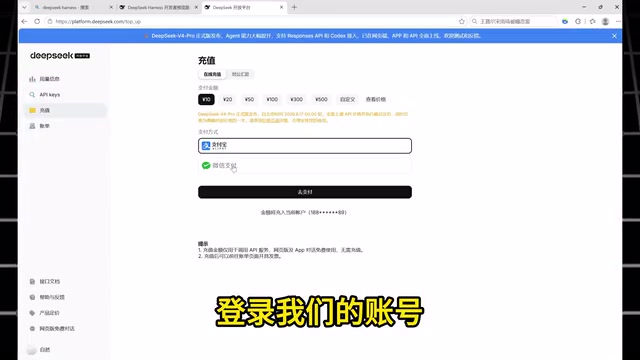
Security Reminder: API Keys are sensitive credentials — never expose them or commit them to public code repositories. Store them in a local password manager or as environment variables to prevent unauthorized usage due to accidental exposure. Once a key is leaked, anyone can use your credits for model calls, and you might not notice until your balance is depleted.
Step 2: One-Click Installation of DeepSeek Harness
For users unfamiliar with command-line tools and environment configuration, manually setting up Node.js and JavaScript runtime environments is often the biggest hurdle.
Node.js is a JavaScript runtime environment built on Chrome's V8 engine that allows JavaScript code to run on the server side outside of browsers. Many modern AI application frameworks choose Node.js as their runtime because its non-blocking I/O model is particularly well-suited for handling large volumes of concurrent API requests, and its npm (Node Package Manager) ecosystem contains over 2 million open-source packages for rapid integration of various functional modules. Node version compatibility is a common pain point — different projects may require different Node versions, and developers typically use nvm (Node Version Manager) to manage multiple versions simultaneously.
Several integrated installation tools have emerged in the community that automate complex environment configuration.
Installing with an Integrated Tool
Using an integrated installation tool like "BaoMiao AI Manager" as an example, the installation process is roughly as follows:
- After opening the tool, click "Redemption Code" in the upper right corner and enter a code to claim free acceleration membership;
- Click the "Global Acceleration" feature on the left side for one-click acceleration;
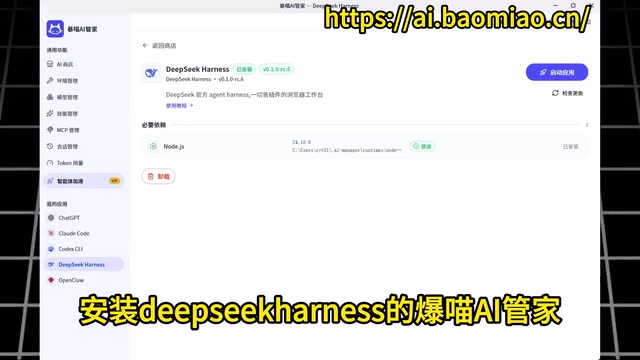
- Go to the "AI Store," find the DeepSeek Harness entry, and click "One-Click Download";
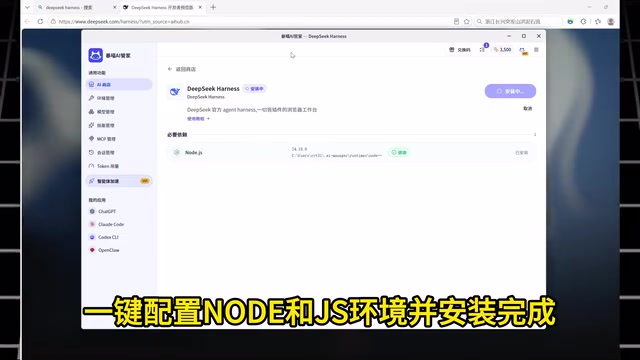
- The tool will automatically configure the Node and JS environment and complete the framework installation.
The Most Common Cause of Installation Failure
The installation process must be performed with acceleration enabled. This is the most easily overlooked step and the leading cause of failures. Since Harness needs to pull Node dependency packages and related components from overseas sources during installation, poor network connectivity can directly cause download interruptions, missing dependencies, and the interface failing to open after launch.
Node.js project dependencies are downloaded by default from the official npmjs.com registry, which is hosted overseas. A medium-sized Node project may contain hundreds or even thousands of dependency packages (including direct and transitive dependencies), with total downloads reaching hundreds of MB. Under unstable network conditions, the interruption of any single package download can cause the entire dependency tree installation to fail, manifesting as ETIMEDOUT, ECONNRESET, and similar errors. Besides using acceleration tools, technical users can also resolve network issues by configuring domestic mirror sources (such as the Taobao npm mirror) or setting HTTP_PROXY environment variables.
For developers with some technical background, you can also choose to manually clone the code from the official GitHub repository and install dependencies via npm or pnpm, though you'll need to handle Node version compatibility and network proxy configuration yourself. pnpm's advantage over npm lies in using hard links and content-addressable storage to save disk space and speed up the installation process. The core value of integrated tools is lowering the barrier to entry for non-technical users.
Step 3: Launch the Application and Configure the Model
After installation is complete, the final stage is launching and configuring — connecting your API Key to the framework to start using it.
Configuration Process
- Click "Launch Application" in the installation tool, and the system will automatically redirect to the DeepSeek Harness main interface;
- Go to the "Settings" page and find the "Model" option;
- Click "Edit DeepSeek" and paste the API Key you copied in Step 1 into the corresponding input field;
- Click "Save" to complete the model connection;
- Return to the main screen, and you can officially start using DeepSeek Harness.
Once configured, the framework can call the DeepSeek model through your API Key to execute various Agent tasks. Credits consumed will be deducted from the account you topped up in Step 1. During the testing phase, keep an eye on usage to avoid unexpected charges.
Usage Tips and Important Notes
The explosive popularity of DeepSeek Harness demonstrates that the developer community has strong, genuine demand for open-source Agent toolchains. However, as users, it's important to maintain rational judgment:
- Prioritize official channels: While the third-party integrated installation tools mentioned in this article lower the barrier, they involve redemption codes, acceleration memberships, and other elements. Users who prioritize security and control should refer to DeepSeek's official documentation for manual deployment to avoid introducing unnecessary third-party dependencies.
- Control API call costs: Agent frameworks typically make multiple rounds of model calls, and token consumption can be far higher than in ordinary conversation scenarios. During initial testing, top up small amounts and observe actual usage. Unlike regular chat, Agent frameworks execute tasks using ReAct (Reasoning + Acting) or similar loop mechanisms — for example, a task like "research a market and generate a report" might require multiple "think-act-observe" cycles, each being a complete model call. Total token consumption can be 5-20 times that of a single conversation. It's recommended to set maximum loop count limits and per-task token caps in the framework as cost-control safety valves.
- Understand the framework's capability boundaries: A framework's value ultimately depends on what problems it can solve. Successful installation is just the starting point — what's truly worth investing time in is exploring its actual performance in scenarios like task automation, tool invocation, and multi-step reasoning.
Overall, DeepSeek Harness represents an important attempt by domestic LLMs in the Agent direction. Developers who want a quick experience can follow the three-step process above to get up and running smoothly; for deeper application exploration, you'll need to continuously validate its real capabilities and applicable scenarios through actual use.
Related articles

Chain of Thought Isn't Just for AI: How Humans Can Use CoT to Improve Thinking Quality
Chain of Thought isn't just a prompt trick for large models. Starting from a Hacker News discussion, this article analyzes why CoT works for human thinking too, breaks down actionable ways to transfer it, and highlights the key differences between human CoT and machine CoT.
Cloudflare Teams Up with OpenAI: Closi…
Cloudflare Teams Up with OpenAI: Closing the Loop from Vulnerability Discovery to Defense with AI
Cloudflare uses OpenAI Daybreak to investigate security vulnerabilities and generate reviewable remediation plans, while developers use Codex to boost coding efficiency and quality.

Orca Multi-Agent Orchestration in Practice: A Guide to Parallel Collaboration with Claude and Codex
Orca is Stable AI's free open-source agent workbench supporting 34 agents like Claude Code and Codex in parallel. Learn its Git worktree isolation, multi-model orchestration, and mobile management.