DeepSeek Harness Mobile Edition Goes Viral as Open Source, Hits 15K Stars

DeepSeek Harness launches a mobile version that runs Agents locally and remotely monitors computer tasks.
The open-source project DeepSeek Harness gained about 15K stars on GitHub in a short time, and its mobile version has drawn attention. The mobile app is not a simple shrink of the desktop interface but a complete mobile Agent runtime solution: it executes tasks like looking up information and writing documents locally and can remotely control a computer or server too. It has a built-in Linux environment—no Root or Termux needed—matches desktop usage logic, has a clean interface, and supports landscape and tablet modes. During remote tasks, a floating window shows progress, making the phone a control terminal. First use requires permissions and a DeepSeek account login, and the material also inconsistently uses the name DeepSync Harness. Overall, it pushes "running AI projects on a phone" from geek toy toward usable tool.
From Desktop to Phone: An "Office Move" for the AI Agent Runtime Environment
On GitHub, an open-source project called DeepSeekAd Harness has recently surged in popularity—according to a Bilibili creator, it racked up 15K stars in a short period. That number isn't small in today's open-source ecosystem, especially for a project positioned as "infrastructure," which suggests it has struck a real need. And this time, the focus of discussion is that it has finally made its way onto phones.
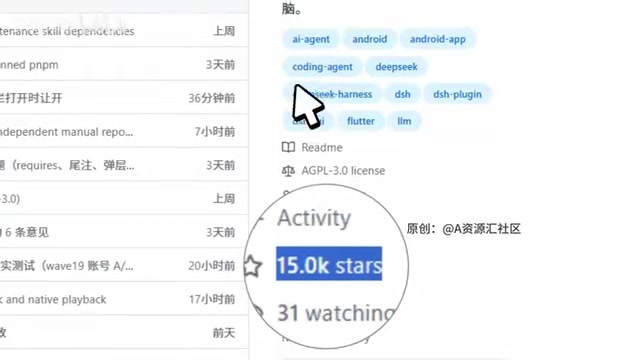
Based on the description in the original material, the mobile version of DeepSeek Harness isn't simply a shrunken desktop interface crammed onto a screen—it provides a complete mobile Agent runtime solution: it supports executing tasks locally on the phone as well as remotely controlling a computer or server to keep working. This "local + remote" dual mode is what sets it apart from ordinary AI chat apps.
What the Mobile Version Can Do: Look Up Information, Write Documents, Run Agents
According to the creator's demo, after installing DeepSeek Harness on a phone, users can run operations directly on the device and have the AI help look up information, write documents, and execute various tasks. The software has a built-in Linux environment and can connect to DeepSeek Harness without Root or Termux—a big plus for Android users, as it removes the barrier of fiddling with a command-line environment.
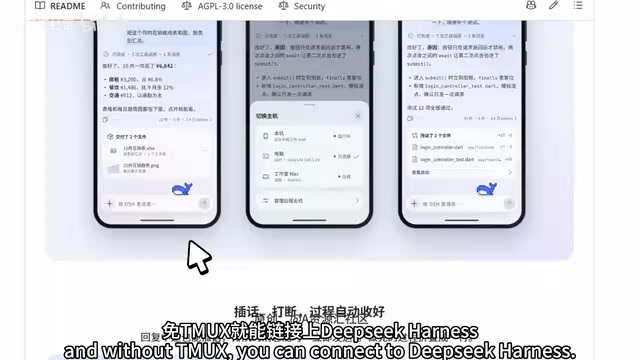
The usage logic is essentially the same as the desktop version of DeepSeek Harness: create a new conversation, execute instructions, and have the phone help look up content or run tasks. In other words, habits built on desktop can carry over to mobile, keeping the learning curve very low. As for the interface, the material repeatedly mentions it is "clean and tidy" and "attractive," and it supports landscape and tablet modes, showing that mobile adaptation was done seriously rather than as a rushed port.
Termux is a well-known terminal emulator and Linux environment app on Android. Users can install toolchains such as Python, Node.js, and Git through its package manager, enabling them to run plenty of software on their phones that was originally meant for desktops or servers. It is widely used for mobile development and AI project deployment, but the barrier to entry is not low: users must manually configure mirror sources, resolve dependency conflicts, and some features depend on specific permissions. The emphasis on "no Termux required" in this article means DeepSeek Harness ships with its own Linux runtime environment, so users don't need to install and configure terminal tools like Termux themselves—they can simply open the app and start using it, lowering the barrier for running Agents on mobile from "fiddling with the environment" to "click and go."
Root refers to superuser permissions on the Android system. After gaining Root, users can modify system partitions and install apps that require high privileges, but the cost is losing the official warranty, increasing security risks, and the process varies by device model and can easily brick the phone. Many tools that require low-level system capabilities (such as certain automation scripts and virtual environments) demand Root. "No Root required" in this article means DeepSeek Harness can run its built-in Linux environment on an ordinary, unmodified Android phone without users having to risk obtaining the highest system privileges—one of the key reasons it is friendly to ordinary users.
Remote Control and Floating Window: The Phone Becomes the Agent's Remote
Another noteworthy feature of the mobile version is remote host control. When you run tasks on a server or computer, a small floating window pops up in the top-right corner of the phone, giving you a visual view of task execution. This design solves a real pain point: when an Agent runs a long task, you can't stay glued to the computer, but you need to know the progress and status at any time. The floating window frees "supervising" from the desk.
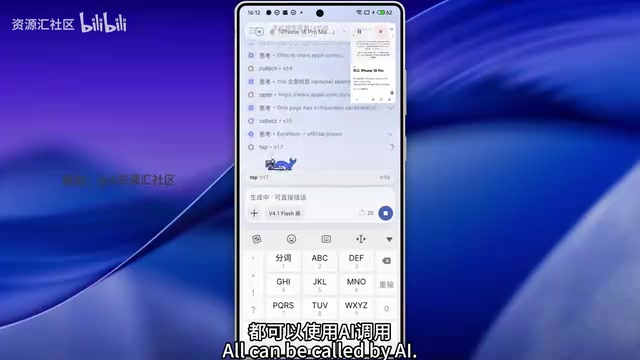
From a product perspective, this effectively positions the phone as a control terminal in the Agent ecosystem rather than just an execution terminal. Lightweight tasks run locally, heavy tasks are controlled remotely, and both share a single conversational interaction—the logic is self-consistent.
Floating window (overlay window) is an interface capability provided by the Android system that allows an app to display a small window on top of other apps, so users can view or interact with it while browsing other content. Implementing a floating window requires requesting the "display over other apps" permission. In Agent scenarios, the value of the floating window lies in "always visible": the task runs continuously on a remote server, and the phone displays logs, progress, or status summaries in real time through the floating window, so users don't need to switch back to the main app repeatedly. Compared with notification bar pushes, this offers higher information density and more direct interaction, and it is a common product technique for monitoring long-running tasks on mobile.
Getting Started: Permissions and Account Login
There are two preparation steps before actual use. On first launch, the software requires granting certain permissions, which is standard practice for apps with a built-in Linux environment; in addition, users need to log in to a DeepSeek account, and the material also shows the login screen.
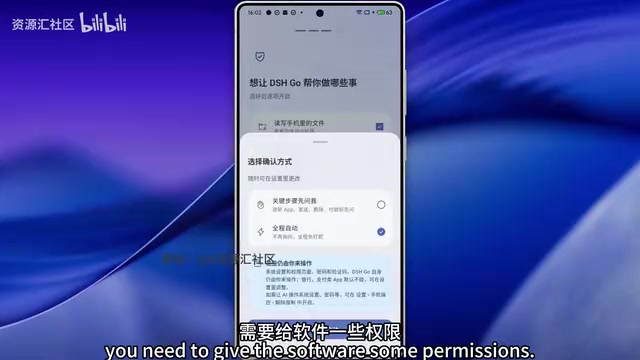
It should be noted that the original material uses both "DeepSeek Harness" and "DeepSync Harness" inconsistently for the project name. This article follows DeepSeek Harness, the name more widely known for the GitHub project; please refer to the official repository and the actual installation package for the exact naming.
Why This Project Is Worth Watching
The viral success of the DeepSeek Harness mobile version reflects a trend that is taking shape: the runtime environment for AI Agents is spreading outward from the single desktop scenario. As a portable device, the phone is naturally suited to play two roles—"initiating tasks" and "monitoring tasks"—while remote control capability compensates for shortcomings in compute power and persistence.
For users who want to run Agents on their phones, this project offers a low-barrier entry point—no Root, no Termux, a friendly interface, and one-click switching to the official web version. It may not suit everyone, but it does push "running AI projects on a phone" one step closer from geek toy to usable tool. How far it can go will depend on the pace of subsequent iterations and the community ecosystem.
AI Agent refers to an intelligent program that can autonomously perceive its environment, call tools, and complete goals step by step, as opposed to a chatbot that only handles single-turn Q&A. A complete Agent usually needs three things: model reasoning capability, an executable command runtime environment (such as a file system, browser, and code interpreter), and task orchestration and state management mechanisms. This is why the "runtime environment" becomes a key bottleneck for Agent deployment—the model can run in the cloud, but tool calls and long-task execution often require a persistent local or remote sandbox. What DeepSeek Harness essentially provides is exactly such a harness (the word originally means "harness," and in software it is extended to mean a shell framework that wraps the model and provides it with tools and runtime support), connecting model capabilities with real file, command, and network operations; the mobile version brings this shell to a portable device.
One-line Summary
DeepSeek Harness launches a mobile version that supports running Agents locally and remotely monitoring computer tasks.
Paragraph Summary
The open-source project DeepSeek Harness gained about 15K stars on GitHub in a short time, and its mobile version has drawn attention. The mobile app is not a simple shrink of the desktop interface but provides a complete mobile Agent runtime solution: it can execute tasks such as looking up information and writing documents locally, and can also remotely control a computer or server to keep working. The software has a built-in Linux environment and can connect without Root or Termux; its usage logic matches the desktop version, the interface is clean, and it supports landscape and tablet modes. When tasks run remotely, a floating window pops up in the top-right corner of the phone to visualize progress, making the phone a control terminal for Agents. First-time use requires granting permissions and logging in to a DeepSeek account, and the material also inconsistently uses the name DeepSync Harness. Overall, it pushes "running AI projects on a phone" from geek toy toward usable tool.
Related articles

Prompt Engineering for Beginners: From Writing Prompts to Engineering Thinking
Starting from the essence and four functions of prompts, this article systematically explains the six-step process, four success criteria, learning value, and practical limitations of prompt engineering to help you build a complete understanding.

Anthropic Launches Nasdaq IPO: AI Giant's Listing and Risk Disclosures
Anthropic officially launches its Nasdaq IPO under ticker ANT, with market valuation expected to potentially exceed SpaceX's record. The prospectus devotes nearly 100 pages to AI risks, while first-half revenue grew over 14x but net losses widened sharply, reigniting the AI bubble debate.

Rust cURL Clone Uses 4,832 unsafe Blocks—Is the Memory Safety Myth Broken?
A Rust cURL clone uses 4,832 unsafe keywords, challenging Rust's memory safety narrative. We analyze what unsafe really means, compare Fil-C, and examine rewrite motives.