DeepSeek Harness rc.2 Hands-On: Multi-Agent Collaboration and Parallel Search

DeepSeek Harness rc.2 tested: multi-agent, Git review, and parallel search shine, but access is desktop-centric.
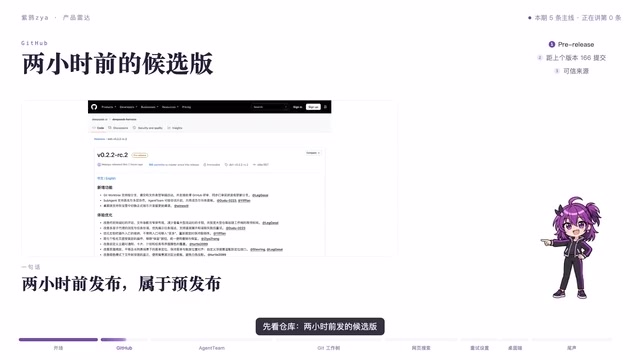
Bilibili creator Ziya hands-on tested the DeepSeek Harness rc.2 pre-release, which accumulated 166 commits since the last version, focusing on multi-agent collaboration, Git workflow integration, and parallel search. Testing showed one primary agent can lead three sub-agents sharing a task panel with statuses labeled directly in the list, but the team panel is desktop-only with no CLI entry. Git workflow ran through three commands—creating a worktree, editing files, committing—and the review page supports switching by branch, commit, and file type, close to a real code review. Parallel web search took 5.2 seconds for 10 requests versus about 34 seconds serially—over 6x faster. Settings and stable/dev channel switching are also desktop-only. Conclusion: developers who frequently open PRs and are willing to work on desktop should give it a try; chat-focused or CLI-dependent users can wait; pre-release should not be used in production.
The rc.2 release candidate of DeepSeek Harness drew considerable attention from developers after its launch. In the first episode of "Product Radar," Bilibili creator Ziya didn't just recite the changelog—he got hands-on and tested several key features directly. This pre-release version has accumulated 166 commits since the last release, with a focus on multi-agent collaboration, Git workflow integration, and parallel search capabilities. Below, we break down the real-world value and limits of this update based on his hands-on experience.
Multi-Agent Teams: Clear Structure, Limited Access
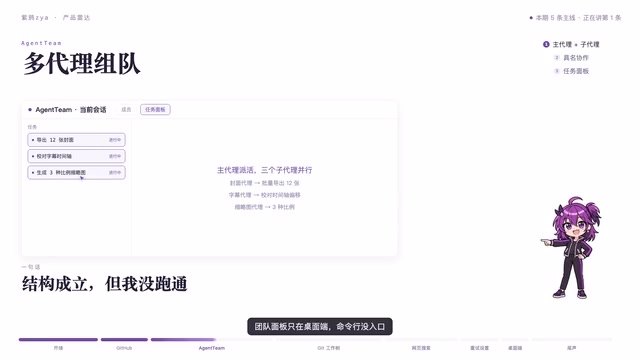
The most talked-about feature of this update is multi-agent collaboration. In testing, a primary agent could lead three sub-agents working together, sharing a task panel on the left sidebar, with task statuses labeled directly in the list—progress at a glance. This design makes breaking down and tracking complex tasks more intuitive, with no need to switch between multiple windows.
However, the team panel is currently only available on desktop, with no command-line entry point. The creator also only verified usability at the structural level; deeper collaboration effectiveness still needs testing across more scenarios. For developers accustomed to the command line, this feature is currently something you can "see but can't touch."
Multi-Agent collaboration refers to an architectural pattern in which an orchestrator agent breaks a complex task into subtasks, dispatches them to multiple sub-agents for parallel or sequential execution, and then aggregates the results. Compared with a single agent, its advantages lie in task decomposability, context isolation, and parallelizable subtasks—making it better suited to long-chain, multi-source complex scenarios. Common implementations include master-slave (orchestrator schedules, sub-agents execute) and peer-to-peer (agents negotiate among themselves). DeepSeekAd Harness adopts the master-slave structure, with a primary agent leading three sub-agents; the shared task panel is essentially a lightweight observability mechanism that lets developers directly see the state transitions of each subtask without relying on log inspection. Note that the benefits of multi-agent setups depend heavily on the quality of task decomposition and the efficiency of context passing between sub-agents—structural usability does not equal ideal collaboration.
Git Workflow: Three Commands Run a Real Review
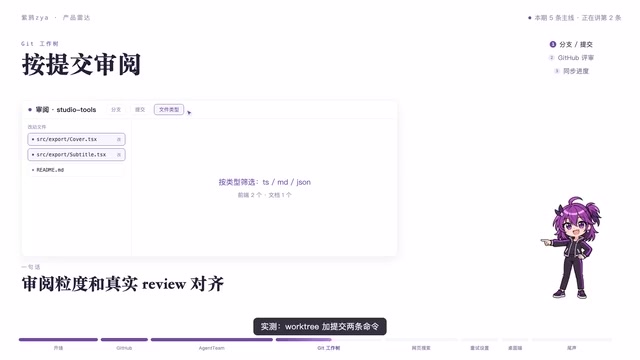
The Git worktree feature is another practical update. The creator tested three commands in a demo repository—creating a new worktree, modifying files, and committing—and the flow ran smoothly. More noteworthy is the review page, where the top can switch between branch, commit, and file type—granularity closer to a real code review scenario.
For developers who open PRs daily and switch branches frequently, this review experience reduces the cost of jumping between web pages and local tools. It consolidates code review context into a single interface, and filtering by commit or file type offers more flexibility than a simple diff view—closer to actual workflows.
Git Worktree is a mechanism available since Git 2.5 that allows multiple working directories to be checked out simultaneously under the same repository, each pointing to a different branch while sharing the same .git object store. Compared with the traditional "copy the repo" or "stash and switch branches" approach, worktrees avoid the disk and sync overhead of duplicate clones, and let you develop another branch in parallel without interrupting your current workspace. This is precisely why it's valuable in agent scenarios: an agent can modify files and commit changes in an isolated worktree without interfering with the main workspace the user is editing. The phrase "creating a new worktree" in the video corresponds to commands like git worktree add.
Web Search: Parallel Requests Deliver Order-of-Magnitude Gains
The web search benchmarks are impressive: 10 requests in parallel took 5.2 seconds, versus roughly 34 seconds serially—a gap of more than 6x. The point isn't the speed of a single search, but the throughput improvement from the parallel architecture. When a task requires querying multiple information sources simultaneously, parallel requests can significantly compress wait times.
This improvement is especially critical for agent tasks that depend on real-time information. In multi-agent collaboration scenarios, sub-agents may fire off search requests simultaneously, and parallel capability directly determines the overall task's response efficiency. The creator didn't delve into the underlying scheduling implementation, but based on the test results, parallelization is the most perceptible performance change in this update.
The difference between parallel and serial requests stems from the waiting characteristics of network I/O. With serial execution, total time is roughly the sum of each request's latency; with parallel execution, if requests are independent and the server doesn't rate-limit, total time approaches the latency of the slowest request. The 5.2 seconds versus 34 seconds for 10 requests in the article is a direct illustration of this model. In engineering, concurrency is typically implemented with async I/O, coroutines, or thread pools, combined with connection pool reuse, timeout control, and failure retries to ensure stability. Note that higher parallelism isn't always better: target sites may have rate limits, and excessive concurrency can trigger throttling or even bans, so real products usually need concurrency caps and backoff strategies.
Channel Switching and Settings: Desktop-First, Command Line Missing
Emphasis settings are only available on desktop, with no command-line toggle. The same goes for switching between stable and development channels. This means developers who prefer command-line workflows will be limited in version management and settings adjustments, needing to switch to desktop to complete them.
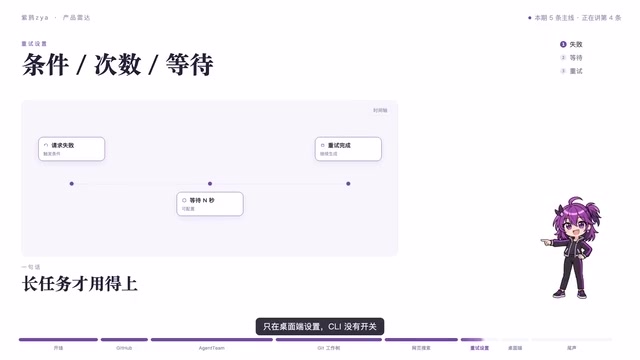
This "desktop-first" strategy isn't unusual in the pre-release stage, but for developers who rely heavily on the command line, the sense of fragmentation is real. The creator also noted that this version is better suited for people who "open PRs and write code every day" to try out, while chat-only users can wait.
Who Should Upgrade, Who Should Wait
Based on hands-on testing, the value of rc.2 centers on the multi-agent collaboration structure, the convenience of Git review, and the performance gains from parallel search. If you write code daily, handle PRs frequently, and are willing to work on desktop, this pre-release is worth a try. But if your use case is primarily conversational, or you rely heavily on command-line entry points, you can hold off for now.
It must be emphasized that pre-release versions should not be used in production. The iteration volume of 166 commits indicates substantial changes, and the stability of a pre-release needs more real-world validation. At the end of the video, the creator also solicited viewer suggestions for the next project to review, showing that this kind of hands-on testing is ongoing.
Related articles

RePlan-VLA: Progress-Aware Replanning Breakthrough for Long-Horizon Robotic Manipulation
The RePlan-VLA framework converts VLA models' short-horizon capabilities into reliable long-horizon execution through progress-aware adaptive replanning, improving success rates by 21.9% and 10.4% on RoboCasa365 and CALVIN, and validating real-world deployment on a Franka Research 3 robot.

Geometric Bridge Flow Matching: A New Breakthrough in Blind Rigid Motion Correction
Geometric bridge flow matching enables blind rigid motion correction in head CBCT, achieving 37.1 dB PSNR and 0.27 mm RPE on simulated data in ~9.1 minutes, outperforming existing methods.

Google Releases Gemini 4 Hydrogen: 2.5x Faster Without Sacrificing Intelligence
Google releases the lightweight Gemini 4 Hydrogen: 2.5x faster task completion, AA Intelligence Index of 54 beating its flagship sibling, 7.3s single-step on Agent Arena faster than Claude and GPT rivals, four thinking levels with pay-as-you-need pricing, now available across AI Studio and more.