DeepSeek Launches Harness Desktop Client for macOS and Windows

DeepSeek launches Harness desktop client for macOS/Windows, signaling expansion from model provider to product ecosystem.
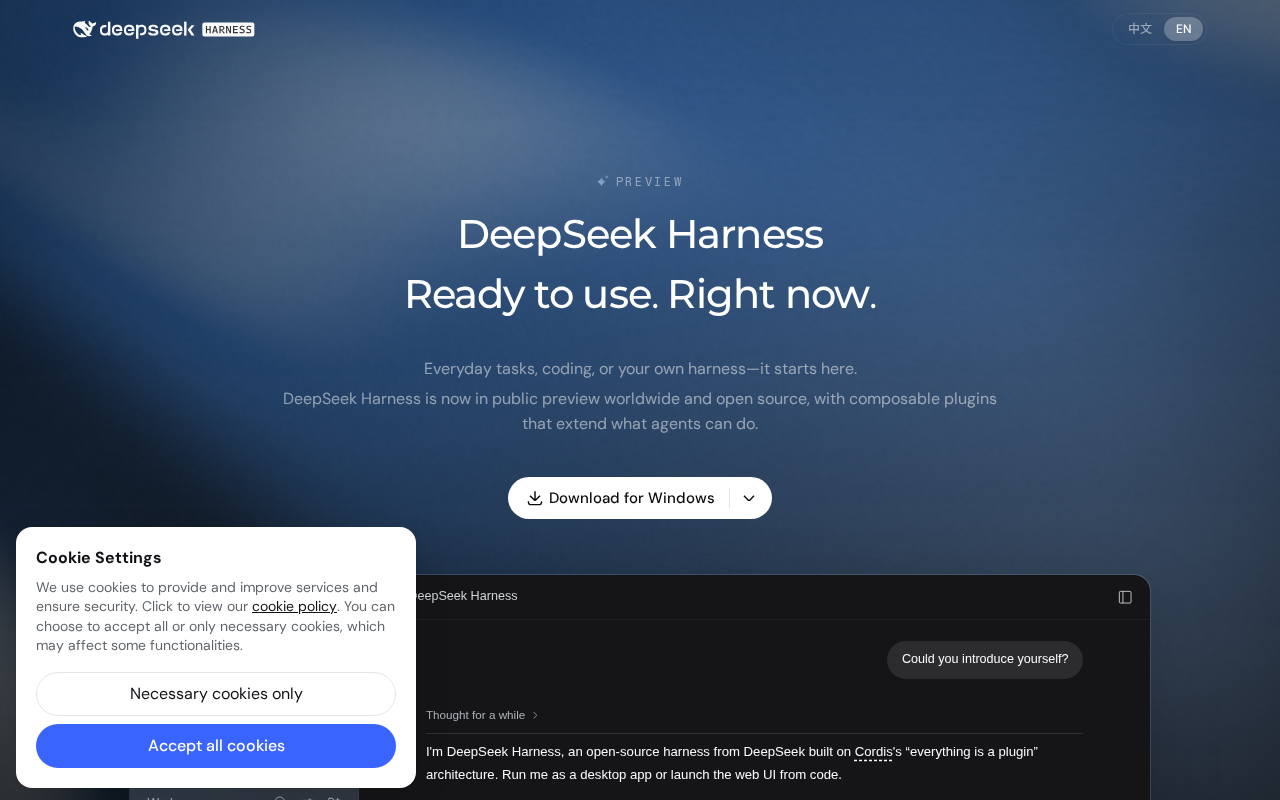
DeepSeek has launched Harness, a native desktop client for macOS and Windows, which quickly trended on Hacker News. Compared to the web interface, a desktop client offers system-level shortcuts, local file integration, and more stable session management. The name "Harness" hints at ambitions beyond chat — potentially supporting code tasks and agentic workflows. The Hacker News community responded cautiously, with discussion centering on open-source status, data privacy, local model support, and cross-platform consistency. The launch reflects a broader industry shift from competing on model strength to competing on product usability, though full feature details await official disclosure and real-world testing.
DeepSeek Harness Desktop Client Emerges
DeepSeekAd recently launched a desktop client called Harness for macOS and Windows on its official website. The release quickly climbed to the front page of Hacker News, earning 237 upvotes and sparking 119 comments. For developers and power users who have long relied on the web interface or API to access DeepSeek's models, this is a significant signal: DeepSeek is evolving from a pure model provider into a broader product ecosystem that covers end-to-end use cases.
It's worth noting that official information remains relatively sparse — the page currently focuses on the product entry point and platform support. This article draws on the official page and community discussions to outline Harness's positioning and potential value, while being upfront about what remains unclear.
What Is Harness, and What Problem Does It Solve?
Based on its name and positioning, Harness appears designed to wrap DeepSeek's model capabilities inside a native desktop application. For many users, browser-based chat interfaces have obvious limitations: unwieldy window management, limited local file integration, no system-level shortcut access, and inadequate support for long sessions and code editing workflows.
That's precisely where a desktop client adds value. Native applications typically offer smoother interaction, system-level keyboard shortcuts, local file read/write access, and more reliable session management. For those who use large language models as daily productivity tools, the ability to summon the assistant instantly often matters more than marginal improvements in raw model performance.
The Imagination Space for Developers
In engineering contexts, the word "harness" often refers to a test framework or mounting scaffold — a naming choice that suggests the app may be more than just a chat window. It could be designed as a container for code tasks, Agent workflows, or multi-step pipelines. While official feature details haven't been fully disclosed, the broader industry trend is clear: AI desktop clients are increasingly integrating local codebase understanding, tool-calling, and automated execution. If Harness follows this direction, it will directly compete with today's leading AI coding and Agent desktop tools.
Agentic Workflow is one of the key differentiators among AI desktop tools today. Unlike single-turn Q&A, Agent mode allows models to autonomously plan multi-step tasks: calling external tools (such as search, code execution, or file I/O), dynamically adjusting the path based on intermediate results, and working through complex goals. Representative products include Cursor (an AI editor with deep codebase integration), Claude's Computer Use, and open-source frameworks like AutoGen. The core capability in these tools is the Function Calling / Tool Use mechanism — the model doesn't just generate text; it triggers local or remote actions. If Harness moves in this direction, it will need to address engineering challenges around permission management, sandbox security, and task interruptibility — precisely the technical details the community is most eager to see disclosed.
Community Reaction: Optimism Tempered by Caution
The 119 comments on Hacker News reflect a typical technical community response — genuine enthusiasm for DeepSeek's ability to deliver high-performance models at competitive cost, alongside a wait-and-see attitude toward a newly launched desktop client.
Discussions tend to focus on several recurring themes: whether the client is open source, how it handles data privacy and local processing, whether it supports custom API keys or locally deployed models, and whether the cross-platform experience is consistent. These are exactly the dimensions developers care about most when evaluating AI desktop tools. DeepSeek built its reputation through open model weights and competitive pricing, and the community naturally applies the same standard to its client software.
The question of "whether the client supports custom API keys or local models" reflects the developer community's deep sensitivity to data sovereignty. Many enterprise users and independent developers prefer to keep sensitive code or business data on-premises, running DeepSeek's open-source weights (such as quantized versions of DeepSeek-R1 or DeepSeek-V3) locally via tools like Ollama or LM Studio — bypassing cloud APIs entirely. If Harness only supports official cloud inference without allowing local model integration, this segment of users may simply continue with open-source alternatives like Open WebUI. DeepSeek previously earned developer trust by opening its model weights; whether its client product maintains that same openness will be a key measure of Harness's credibility in the community.
Why This Move Is Worth Watching
DeepSeek's launch of a desktop client reflects a broader shift in how LLM vendors compete — moving from "whose model is stronger" to "whose product is more usable." API access and web interfaces alone are no longer sufficient to drive meaningful user retention. A desktop client is a critical step in building a direct relationship with users and embedding the tool into their daily habits.
From a macro perspective, this aligns with the industry-wide trend of productizing model capabilities. As underlying model performance converges, differentiation increasingly comes down to interaction design, workflow integration, and ecosystem openness. Whether Harness can deliver convincingly on those dimensions will determine if it becomes a lasting pillar of the DeepSeek ecosystem — or a passing experiment.
Closing Thoughts: A Beginning That Still Needs Proving
Harness is still in its early stages. Official disclosures are limited, and the real-world experience, feature boundaries, and degree of openness have yet to be validated. For interested users, the best approach is to download and try it firsthand — paying close attention to how it handles local integration, session management, and privacy.
If DeepSeek can carry its model-layer cost-performance advantage smoothly into the desktop product experience, Harness has a genuine shot at becoming a worthwhile addition to the developer's toolkit. But until more details are made public, maintaining measured expectations and letting hands-on testing speak for itself remains the most sensible stance.
Related articles

Chain of Thought Isn't Just for AI: How Humans Can Use CoT to Improve Thinking Quality
Chain of Thought isn't just a prompt trick for large models. Starting from a Hacker News discussion, this article analyzes why CoT works for human thinking too, breaks down actionable ways to transfer it, and highlights the key differences between human CoT and machine CoT.
Cloudflare Teams Up with OpenAI: Closi…
Cloudflare Teams Up with OpenAI: Closing the Loop from Vulnerability Discovery to Defense with AI
Cloudflare uses OpenAI Daybreak to investigate security vulnerabilities and generate reviewable remediation plans, while developers use Codex to boost coding efficiency and quality.

Orca Multi-Agent Orchestration in Practice: A Guide to Parallel Collaboration with Claude and Codex
Orca is Stable AI's free open-source agent workbench supporting 34 agents like Claude Code and Codex in parallel. Learn its Git worktree isolation, multi-model orchestration, and mobile management.