DeepSeek R1 + BrowserUse: A Free Open-Source Browser Automation Setup Tutorial

BrowserUse + DeepSeek R1 delivers free, local browser automation rivaling OpenAI's $200/mo Operator.
This article explains how to combine the open-source browser automation framework BrowserUse (89% accuracy) with the open-source reasoning model DeepSeek R1 to build a free, locally-run intelligent browser automation system as an alternative to OpenAI's $200/month Operator. BrowserUse offers full page awareness, real browser connection, and self-correction, while DeepSeek R1 brings Chain of Thought reasoning. The article provides a complete setup tutorial using Ollama and compares the open-source solution's advantages in cost, privacy, and flexibility.
The open-source community has recently welcomed two heavyweight projects in quick succession: the browser automation framework BrowserUse and the reasoning model DeepSeek R1. Combining these two gives you a completely free, locally-run intelligent browser automation tool — capable enough to rival OpenAI's Operator service, which costs $200 per month.
This article will walk you through the technical advantages of this combination and provide step-by-step installation and deployment instructions from scratch.
BrowserUse: An Open-Source Browser Automation Framework with 89% Accuracy
BrowserUse is an open-source browser automation tool capable of handling virtually any web-based task. It comes with a web-based UI and achieved an 89% accuracy rate on the WebAgent accuracy benchmark, outperforming traditional web automation agents.
The WebAgent benchmark is a standardized test suite that evaluates AI agents' ability to execute tasks in real web environments, typically including scenarios like form filling, information retrieval, and multi-step navigation. An 89% accuracy rate means BrowserUse correctly completes the target operation in nearly nine out of ten test tasks — a leading result in the browser automation space. Traditional web automation tools (like Selenium and Puppeteer) rely on pre-written scripts and fixed DOM selectors that break whenever page structure changes. In contrast, LLM-based automation agents can understand page semantics and dynamically adapt to layout changes across different websites.
Compared to other solutions on the market, BrowserUse stands out in several ways:
- Full Page Awareness: Can recognize content across the entire webpage, not limited to the currently visible screen area. Full Page Awareness means the AI agent can parse the entire DOM tree and content structure of a webpage, rather than relying solely on elements visible within the current viewport. Many screenshot-based browser automation solutions can only "see" what's displayed on screen and need to scroll repeatedly to gather complete information. BrowserUse directly accesses the page's HTML structure and Accessibility Tree, obtaining all text, links, buttons, and other element information in one pass, dramatically improving task execution efficiency and accuracy.
- Real Browser Connection: Connects directly to your active browser, eliminating the hassle of repeated logins
- Self-Correction: Can dynamically adjust when encountering errors during execution
- Broad Model Compatibility: Supports any large language model — Llama 3.3, DeepSeekAd V3, local models all work
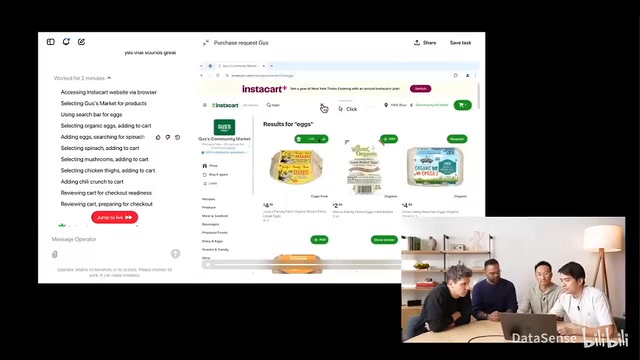
For comparison, OpenAI's simultaneously released Operator offers similar functionality but is locked behind a $200/month Pro subscription plan. OpenAI Operator runs in an isolated sandbox browser environment, meaning it cannot access login states, cookies, bookmarks, or extensions saved in the user's local browser. Every time it executes a task, Operator needs to log into each website from scratch, not only adding extra steps but potentially triggering security verification mechanisms (such as two-factor authentication, CAPTCHAs, etc.). In contrast, BrowserUse is not only completely free but can also connect directly to the user's active browser instance, reuse existing login sessions, and integrate into your own applications to build true automation workflows.
DeepSeek R1: An Open-Source Reasoning Model That Surpasses GPT-4o
DeepSeek R1, released by the DeepSeek team, is an open-source large language model that surpasses GPT-4o and Claude 3.5 Sonnet and other closed-source models on virtually all mainstream benchmarks. As a reasoning model, R1's distinguishing feature is that it engages in deep thinking before executing actions and generating responses.
The core difference between a Reasoning Model and a standard large language model lies in the "thinking process." A standard LLM receives input and directly generates output, while a reasoning model performs multi-step internal reasoning before outputting its final answer — a process commonly called Chain of Thought (CoT). DeepSeek R1 acquired this capability through reinforcement learning training. The model first decomposes complex problems into sub-problems, verifies the logic of each step incrementally, and then synthesizes a conclusion. This mechanism is particularly important in browser automation scenarios that require multi-step decision-making: the agent needs to determine which button to click, what content to enter in which input field, and how to navigate between multiple pages — each step requiring context-based reasoning.
When R1 works in tandem with BrowserUse, this reasoning capability delivers noticeable improvements. For example: when asked to search for flights, R1 leverages its deep analysis capability to find the lowest price of approximately $1,200 from New York to Moscow on platforms like trip.com — a price you might not find even after spending a long time manually searching on Google Flights.
R1 offers multiple distilled versions ranging from 1.5B to 671B parameters. Knowledge Distillation is a model compression technique whose core idea is to train a small "student model" using the outputs of a large "teacher model," allowing the small model to retain most capabilities while dramatically reducing parameter count and computational requirements. The full version of DeepSeek R1 has 671B (671 billion) parameters with a Mixture of Experts (MoE) architecture, requiring hundreds of GB of VRAM to run. The distilled 14B and 32B versions are trained on base models like Qwen and Llama respectively, "compressing" R1's reasoning capabilities to a scale that consumer-grade hardware can handle. The 14B version requires approximately 10-12GB of VRAM or 16GB of system memory, while the 32B version needs about 20-24GB of VRAM or 32GB of system memory. Regular users can choose the 14B or 32B version to run locally based on their hardware — no API costs whatsoever.
BrowserUse + DeepSeek R1: Complete Installation and Deployment Tutorial
Step 1: Environment Preparation
Before starting, make sure the following tools are installed on your system:
- Git: For cloning code repositories
- Python: Programming language runtime
- UV: Python package management and environment variable setup tool. UV is a next-generation Python package manager developed by the Astral team (who also created the Ruff code linter), written in Rust and 10-100x faster than traditional pip. UV can not only manage Python package installation but also create and manage virtual environments, handle dependency locking, and even manage Python versions themselves. In this tutorial, UV is primarily used to quickly create isolated virtual environments, ensuring project dependencies don't conflict with other Python projects on your system.
- Playwright: Browser automation engine. Playwright is an open-source browser automation framework developed by Microsoft that supports Chromium, Firefox, and WebKit browser engines. Compared to earlier Selenium, Playwright offers more modern API design, better auto-wait mechanisms, and stronger network interception capabilities. BrowserUse relies on Playwright under the hood to execute actual browser operations (like clicking, typing, navigating), while the LLM handles understanding task intent and generating operation instructions. This architecture separates "understanding" from "execution," allowing the upper-layer AI agent to flexibly switch between different language models while the underlying browser control remains stable and reliable.
- VS Code (optional): Code editor
Step 2: Install BrowserUse WebUI
First, go to the BrowserUse WebUI GitHub repository and clone the project locally:
git clone <repository-link>
cd browser-use-webui
Create and activate a Python virtual environment:
# Create environment
uv venv

# Windows activation
.venv\\Scripts\\activate

# Linux/macOS activation
source .venv/bin/activate
Install dependencies in the virtual environment:
pip install browser-use
playwright install
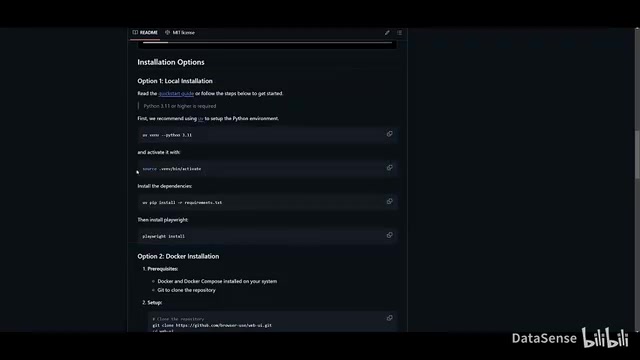
Launch the WebUI:
python webui.py
After launching, it will start a local service. Open your browser to access the BrowserUse interface.
Step 3: Install DeepSeek R1 Locally with Ollama
For running DeepSeek R1 locally, Ollama is the recommended tool for model management. Ollama is an open-source tool designed specifically for running large language models locally, packaging model downloading, quantization, deployment, and API serving into minimalist command-line operations. Internally, Ollama uses llama.cpp as its inference engine, supports GGUF-format quantized models, and runs efficiently on both CPU and GPU. Once installed, Ollama launches a locally-hosted service compatible with the OpenAI API format (default port 11434), meaning any application that supports the OpenAI API — including BrowserUse — can seamlessly switch to local models simply by pointing the API address to localhost.
Specific installation steps:
- Go to the Ollama website to download the installer, available for Windows, macOS, and Linux
- Open the DeepSeek R1 model page and choose a distilled version suitable for your computer's specs
- Run the installation command in terminal:
# 14B version, suitable for mid-range computers (16GB RAM or more)
ollama run deepseek-r1:14b

# 32B version, requires higher specs (32GB RAM or more)
ollama run deepseek-r1:32b
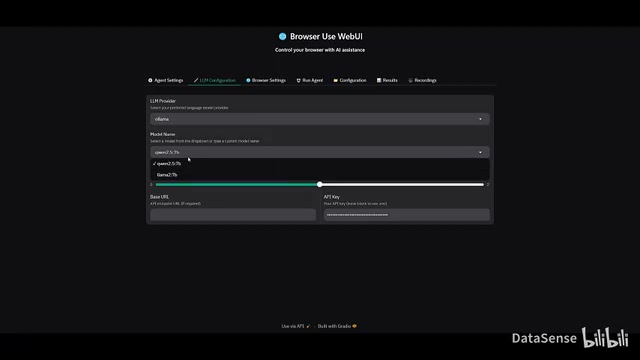
Once the model download is complete, go back to the BrowserUse WebUI agent settings page and select the DeepSeek R1 model you just installed. You can also enter a DeepSeek online API Key in the API settings, but local deployment is more flexible and incurs no additional costs. Through Ollama's quantization technology, the model's memory footprint can be further reduced, enabling smooth operation on an even wider range of hardware configurations.
Real-World Testing: Flight Search and Web Operation Demos
In actual testing, DeepSeek R1 + BrowserUse performed quite well:
Simple Task Test: Having the agent search for "OpenAI" on Google — from inputting the instruction to completing the search and clicking the target link — the entire process took about 20 seconds.
Complex Task Test: Searching for the cheapest flight from New York to Moscow. R1 engaged Chain of Thought reasoning, first analyzing the query requirements, then systematically comparing prices across multiple platforms, ultimately finding an optimal price of approximately $1,200. The Chain of Thought reasoning process is visible — you can see the model's "thinking content" before each operation step in the BrowserUse interface, including why it chose to visit a particular website, why it clicked a specific button, and its understanding and judgment of the current page information. This transparency not only aids debugging but also gives users greater confidence in the automation results.
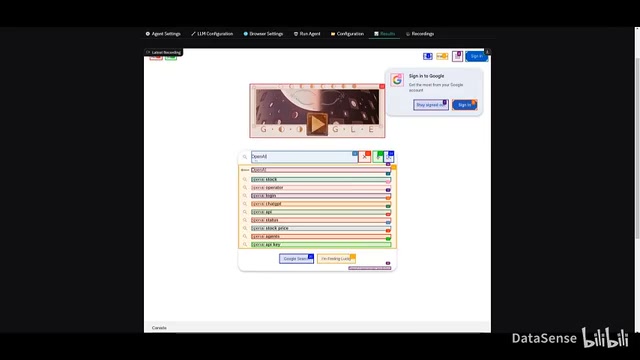
Because R1 has reasoning capabilities, the agent thinks through what to do before executing each step, which ensures the accuracy and reliability of the final results.
Open-Source Solution vs OpenAI Operator: Detailed Comparison
| Dimension | BrowserUse + DeepSeek R1 | OpenAI Operator |
|---|---|---|
| Cost | Completely free | $200/month |
| Open Source | ✅ | ❌ |
| Local Execution | ✅ | ❌ |
| Model Choice | Supports any LLM | OpenAI models only |
| Page Awareness | Full page | Visible area only |
| Browser Integration | Connects to real browser | Isolated sandbox |
| App Integration | Embeddable in your apps | Limited |
| Data Privacy | Data stays local | Data passes through OpenAI servers |
From cost and flexibility to feature coverage, the open-source solution has clear advantages across every dimension. Data privacy deserves special mention: local execution means your browsing data, login credentials, and operation records never leave your computer — particularly important for enterprise users handling sensitive business information. For individual developers and small teams, BrowserUse + DeepSeek R1 is an exceptionally cost-effective choice.
Conclusion: Building an Intelligent Browser Automation System at Zero Cost
The open-source community is rapidly catching up with and even surpassing commercial closed-source products. DeepSeek R1 matches GPT-4o in reasoning capability, and BrowserUse provides a mature browser automation framework. Combined, they mean anyone can build a powerful intelligent automation system on their own computer without spending a cent on subscription fees.
If you have workflow automation needs, give this solution a try. Whether it's data collection, price monitoring, content publishing, or routine repetitive web operations, it can save you enormous amounts of time and effort. As open-source model capabilities continue to improve and community ecosystems grow, these localized AI automation solutions will become the tool of choice for an increasing number of developers and teams.
Related articles
 Tutorials
ChatGPT Plus Subscription Guide: Are GPT-5.5, image-2, and Codex Worth the Upgrade?
A detailed look at ChatGPT Plus features — GPT-5.5, image-2, and Codex — with a Plus vs Pro comparison and a complete step-by-step subscription guide for users outside the US.
 Tutorials
Harness AI Engineering in Practice: Using Claude Code to Master Enterprise-Level E-Commerce Development
Deep dive into Harness AI Engineering: master enterprise e-commerce development with Claude Code using the Rules, Skills, Wiki, and Changes framework.
 Tutorials
Cursor + Codex Dual-IDE Collaboration: A Practical Methodology for Open-Source Project Customization
A complete methodology for open-source project customization based on real-world experience, detailing the Cursor+Codex dual-IDE workflow, seven-stage process, MVP validation, and AI source code reading techniques.