DeepSeek TUI: A Terminal AI Coding Agent with Million-Token Context, Ready to Use with One Command

DeepSeek TUI: a terminal-native AI coding agent with million-token context, ready in one command
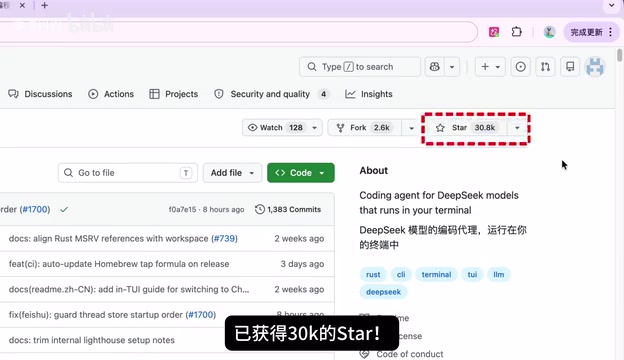
DeepSeek TUI is a terminal-native AI coding agent that integrates the DeepSeek V4 Pro model into the terminal environment, featuring one-command launch, streaming output, and a million-token ultra-large context window. Compared to Electron-based GUI tools, it has minimal resource usage and fast response times, making it especially suitable for remote server development, code generation, and code review. The project has earned over 30K stars on GitHub.
Ditch the Bloated GUI — Your Terminal AI Coding Assistant Has Arrived
The terminal is one of the most essential tools in a developer's daily workflow. If you could invoke a powerful AI model directly from the terminal for coding assistance, your productivity would naturally level up. DeepSeekAd TUI does exactly that — it brings the DeepSeek V4 Pro model straight into your terminal, so you never have to leave the command line to access powerful AI coding capabilities.
TUI stands for Terminal User Interface, an interaction paradigm that sits between pure CLI and graphical GUI. TUI applications render GUI-like layouts within the terminal environment using characters — windows, menus, scrollbars, and other elements are all present, while retaining the lightweight efficiency of terminal applications. Classic TUI applications include the Vim editor and the htop system monitoring tool. In recent years, with the maturation of TUI frameworks like Ratatui in the Rust ecosystem, TUI applications have experienced a renaissance — and DeepSeek TUI is a product of this trend.
This project has already garnered over 30K stars on GitHub, demonstrating strong community recognition. Let's take a closer look at what makes this terminal-native AI coding agent stand out.
One Command to Launch — DeepSeek TUI Works Out of the Box
Compared to traditional AI coding tools, DeepSeek TUI's installation and startup process is remarkably simple. Once installed, just type deepseek in your terminal and you're up and running.
The initial configuration is equally smooth — just three steps:
- Select language: Enter the corresponding number, e.g.,
4for Chinese - Configure API Key: Get your API Key from the DeepSeek website and enter it
- Start chatting: Configuration complete, start talking to AI directly in the terminal

No tedious environment setup, no wrestling with complex dependency installations — truly out-of-the-box ready. For developers who live in the terminal, this experience hits the sweet spot.
Terminal-Native Experience: Fast Response, Low Latency
Once configured, DeepSeek TUI directly invokes the DeepSeek V4 Pro model from within the terminal. After hands-on usage, several aspects are worth highlighting.
Near-Zero Latency Response Speed
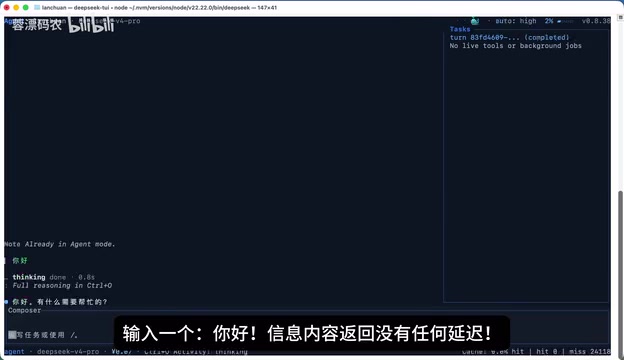
Type a simple "hello" and the response appears almost instantly — no perceptible waiting time. This is related to the lightweight architecture of terminal-native applications. Compared to browser-based or Electron GUI applications, terminal apps have minimal resource overhead, allowing computing resources to be concentrated on AI inference.
Speaking of Electron, it's currently one of the most popular frameworks for building cross-platform desktop applications — VS Code, Slack, Discord, and other well-known apps are all built on it. But Electron's essence is packaging a complete Chromium browser engine into the application, meaning every Electron app ships with its own browser kernel. A simple Electron app typically consumes 150-300MB of memory upon launch, and complex applications can easily exceed 1GB when opening large projects. In contrast, TUI applications typically require only a few MB of memory. This orders-of-magnitude difference is the fundamental reason terminal-native solutions excel in response speed.
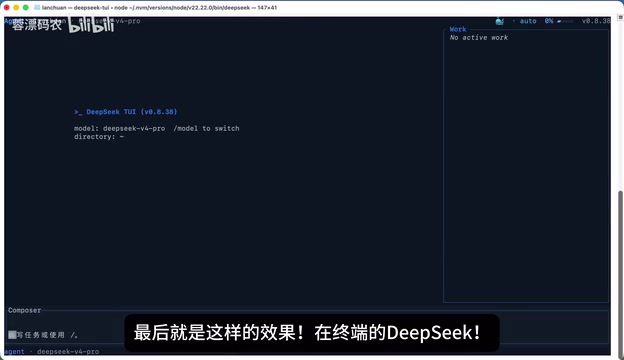
Context Information at a Glance
The terminal interface lets you check current context information at any time, clearly showing what the AI "remembers." This feature is particularly useful during multi-turn conversations or complex coding tasks — you can precisely control the conversation state without guessing whether the AI still remembers what was discussed earlier.
Streaming Output — AI Reasoning Process Fully Transparent
The AI's reasoning process is displayed in real-time via streaming, letting you see how the model thinks step by step. Streaming is a response mode for large language model APIs: the model pushes each generated token (or small batch of tokens) to the client immediately via HTTP Server-Sent Events (SSE) protocol, achieving a character-by-character real-time display effect. In contrast, non-streaming mode requires the model to generate the complete answer before returning it all at once, forcing users to wait for the entire inference process to finish.
The advantages of streaming output go beyond reducing perceived latency — even if total generation time is the same, users begin reading as soon as the first token appears, dramatically reducing the psychological sense of waiting. It also allows users to detect directional errors during generation and interrupt to retry, saving both token consumption and time. For coding scenarios, developers can review the AI's reasoning in real-time as code is generated, judging whether it correctly understands the requirements. This transparency builds confidence and makes it easier to refine prompts with precision.
Million-Token Context Window: Understand Large Project Codebases in One Pass
This is DeepSeek TUI's most hardcore feature. It supports a 1-million token ultra-large context window — but what does this capacity actually mean?
First, let's understand the concept of tokens. In large language models, a token is the smallest unit of text processing, but one token doesn't equal one character or one word. For English, one token corresponds to roughly 4 characters or 0.75 words; for Chinese, one character is typically encoded as 1-2 tokens. The context window refers to the maximum number of tokens a model can process simultaneously in a single inference pass, directly determining how much information the model can "see."
With 1 million tokens as an example, that's approximately 750,000 English words or 500,000-700,000 Chinese characters, translating to roughly 20,000-50,000 lines of code (depending on code density and programming language). For comparison, early GPT-3.5 supported only 4K tokens of context, GPT-4 extended this to 128K, and a 1-million token context window represents the current state-of-the-art. The technical challenge of expanding context windows lies in the fact that the computational complexity of the self-attention mechanism in Transformer architecture scales quadratically with sequence length, requiring optimization techniques such as sparse attention, linear attention, or chunked processing to achieve million-level context support.
No More Manual Splitting for Large Codebases
Traditional AI coding tools are limited by context length — when encountering large projects, you have to manually split code and feed it to the model in batches. But with 1 million tokens of context capacity, you can load the core code of a medium-to-large project in a single pass. This enables the AI to:
- Understand project architecture holistically: No longer seeing just code snippets, but grasping the overall design philosophy
- Track cross-file dependencies: Accurately analyze function call chains and inter-module dependencies
- Provide more reliable refactoring suggestions: Offer optimization proposals based on a global perspective, rather than treating symptoms in isolation
Not Just a Chat Tool, But a Terminal Coding Agent
DeepSeek TUI's positioning isn't that of a simple AI chat box — it's a terminal-native AI coding agent. It's worth distinguishing the fundamental difference between an AI coding agent and traditional AI chat tools.
Traditional AI chat tools (like the ChatGPT web interface) are essentially Q&A systems — users ask questions, AI answers, and interaction stays at the text level. An AI coding agent, however, possesses a "perceive-decide-execute" closed-loop capability: it not only understands natural language instructions but can directly manipulate the file system, execute Shell commands, read project structures, run test cases, and autonomously adjust its next actions based on execution results. The core of this agent paradigm lies in tool calling (Tool Use / Function Calling) capability — the model can proactively invoke predefined tool functions during reasoning, such as reading file contents, searching codebases, and executing terminal commands. Current representative AI coding agents in the industry include Cursor, Claude Code, Aider, and others — all attempting to elevate AI from an "advisor" role to a "collaborator" role. As a terminal-native agent, DeepSeek TUI has a natural advantage in deep integration with the Shell environment, embedding deeply into developers' terminal workflows to provide substantive help in coding, debugging, code review, and other tasks.
Best Use Cases for DeepSeek TUI
Given its features, the following scenarios are particularly well-suited:
-
Remote server development: After SSHing into a server, you have AI assistance right in the terminal without installing any GUI tools. This is especially important for developers who regularly work on remote servers. SSH (Secure Shell) is the standard protocol for connecting to remote servers, and remote servers typically run in headless mode without a graphical interface — all GUI-based AI coding tools, whether IDE plugins or standalone desktop applications, cannot run directly on the server. While VS Code's Remote SSH extension offers a solution, it requires installing a VS Code Server component on the server side, has certain requirements for server resources and network conditions, and delivers noticeably degraded experiences on high-latency networks. Terminal-native AI tools have none of these limitations — as long as you can SSH into the server, you can use it directly without additional X11 forwarding or remote desktop protocols. This is an enormous convenience for DevOps engineers, backend developers, and data engineers.
-
Rapid code generation: Quickly generate code snippets, automation scripts, or configuration files from the command line
-
Code review and debugging: Paste code into the terminal and let AI help identify potential issues and performance bottlenecks
-
Project documentation generation: Leveraging the million-token context, read an entire project's codebase at once and automatically generate technical documentation
Conclusion: An AI Coding Solution Worth Trying for Terminal Developers
DeepSeek TUI represents a clear direction for AI coding tools — returning to the terminal, returning to efficiency. A minimalist installation process, smooth user experience, and million-token-level context capabilities — these three elements together constitute a truly practical terminal AI coding solution.
If you spend most of your day in the terminal, DeepSeek TUI is worth a few minutes of your time. The 30K stars on GitHub didn't come from nowhere — when AI truly integrates into your most familiar working environment, the productivity gains are immediate and tangible.
Related articles
 Product Reviews
The Programmer's Desk Setup Guide: Building a Workspace That Feels Like Home
Discover how programmers build productive, comfortable workspaces. From multi-monitor setups to ergonomic design, explore the desk philosophy that drives focus and flow.
 Product Reviews
Qoder vs Cursor Real-World Comparison: Which $20/Month AI IDE Is Better?
Hands-on comparison of Qoder vs Cursor AI IDEs: Agent autonomy, human interaction count, and architecture decisions. Qoder needed only 2 interactions vs Cursor's 8.
 Product Reviews
Cursor Cloud Agent Demo: Eliminating Bottlenecks Across the Entire Software Development Lifecycle
Deep analysis of Cursor's Cloud Agent demo showing how cloud VMs, automated test artifacts, and a full-chain control plane systematically eliminate human bottlenecks across the software development lifecycle.