DeepSeek V4.1 Flash Coding Test: Blazing Speed, Full Apps From a Single Prompt

DeepSeek V4.1 Flash goes live with major speed gains and one-sentence app generation capabilities.
DeepSeek officially launched V4.1 Flash, automatically upgrading all models on the platform. Bilibili creator Xiao Liu's hands-on tests focused on frontend and app generation: response speed now approaches real-time reading pace, and a single sentence can produce a 3D building scene with automatic door logic, a semantically color-matched student management page, and a fully functional desktop logistics system with multiple business modules. Additional tests generated a Markdown journal app with calendar view and a prompt manager tool (completed in two rounds). The creator recommends pairing it with DeepSeek Harness over Claude Code, though this reflects a single-source opinion. Complex backend and algorithmic tasks remain untested.
DeepSeek V4.1 Flash Is Now Live
DeepSeekAd has officially released V4.1, and users who previously accessed the V4 Pro model will be automatically switched to V4.1 Flash. In other words, every model available on the official website has been upgraded to this new version under the hood.
Based on hands-on testing by Bilibili creator Xiao Liu, the most immediately noticeable change in V4.1 Flash is speed — in his own words, it's "absurdly fast," with output that nearly keeps pace with natural reading speed. For developers who write code frequently, this kind of responsiveness often has more practical value than any benchmark number.
Worth noting: the creator repeatedly emphasized using the tool alongside DeepSeek Harness, calling its optimization for DeepSeek models "a completely different experience" and even drawing a direct comparison with Claude Code — arguing that Harness is more purpose-built for DeepSeek. This is a single-source personal opinion and should be taken as such.
Generating a 3D Scene and Static Pages From One Sentence
The first test case involved generating a 3D building scene — similar to something you might see on Bilibili — from a single sentence. The result was surprisingly polished: not only did the visuals look decent, but the model automatically added open/close logic to the automatic doors. Walk toward them and they open; step back and they close. There was some frame rate stuttering, but the overall interaction was impressively complete.

The second case was generating a static student management system page — also from one sentence. One clear improvement stood out here: a significantly higher tolerance for appropriate color choices. Historically, large models generating frontend pages would default to generic purple or pink gradient themes. V4.1 Flash instead matches the color palette to the semantic context of the request — for a student management system, it chose a clean, business-oriented style rather than a garish gradient template. This kind of "scene-aware" aesthetic judgment is a meaningful practical improvement.
"Single-sentence generation" in the LLM space typically refers to zero-shot or single-turn prompting — the user provides no structured requirements document, no example code, and no multi-turn clarification. The model must infer the complete feature set, technology choices, and code implementation from one natural language instruction. This places extremely high demands on intent understanding and code planning: the model must independently decide which rendering framework to use, how to organize the file structure, and which edge cases to handle — all without any constraints being specified. 3D scene generation typically relies on WebGL wrapper libraries like Three.js or Babylon.js, and implementing collision detection and door control logic requires additional state machine or event listener code. The fact that the model "automatically added open/close logic" is not a trivial detail — it's a meaningful signal of the model's ability to proactively fill in missing functionality.
Desktop Applications: From Logistics Systems to Full Interactions
The cases that truly revealed the model's depth were the desktop application generations. The creator asked it to build a desktop logistics management system — again, from a single sentence.
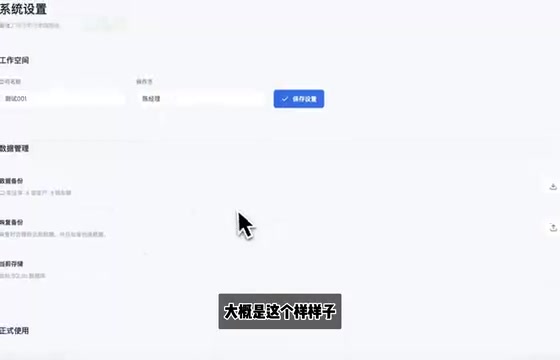
This was not a webpage but a standalone desktop application. It covered multiple modules: creating waybills, chart rendering, vehicle dispatch, warehouse management, customer management, and financial overviews. The creator specifically praised the settings functionality — users can configure the system name and have changes save and take effect in real time, a level of detail that exceeded what you'd expect from a one-sentence prompt.
For a complex application generated from a single instruction to successfully organize multiple business modules while remaining fully interactive is a genuine sign of progress in structured code generation and functional planning — not just UI scaffolding.
The difficulty of generating a "standalone desktop application" is generally higher than generating a webpage, because it involves choosing a runtime environment. The mainstream cross-platform desktop frameworks today include Electron (Chromium + Node.js), Tauri (system WebView + Rust backend), and native GUI frameworks like PyQt or Tkinter. These frameworks differ significantly in packaging methods, file I/O permission models, and UI component libraries. The model must select a working tech stack and generate a complete project structure without being told which one to use — not just produce an HTML file. This is why "generate a desktop app from one sentence" is a stronger test of engineering planning ability than "generate a webpage from one sentence": it evaluates whether the model understands the full software delivery pipeline, not just interface rendering.
Practical Tools: A Journal App and a Prompt Manager
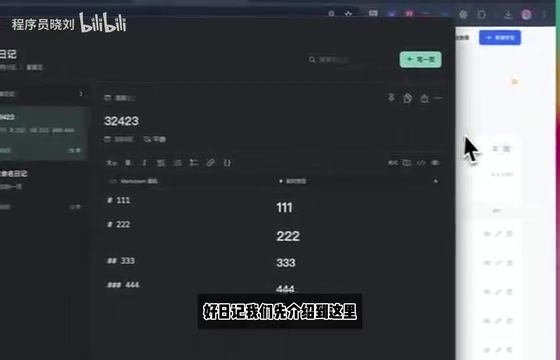
The next two cases were smaller tools closer to everyday needs. The first was a Markdown journal application for daily diary entries.
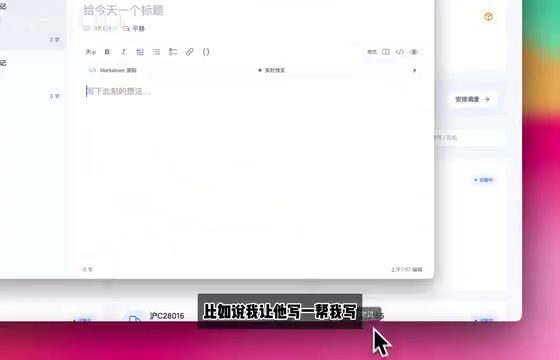
Beyond the basic generation, this app also included clipboard functionality, a calendar view, and multi-theme color switching — all without any follow-up edits. For a lightweight personal tool, that level of out-of-the-box completeness is quite impressive.
The second tool came from a real pain point the creator experienced himself — having to rewrite the same prompts repeatedly. He asked the model to build a "prompt vault manager" supporting prompt creation, category-based organization, and new category creation. This case took approximately two rounds of conversation to complete (the first attempt didn't succeed), but the final result was satisfying. This is a useful reminder: complex requests may not nail it on the first try, but the model's multi-turn iteration capability is sufficient to converge quickly on a usable result.
Summary: A Dual Upgrade in Speed and Capability
Taken together, these test cases send a fairly clear signal about DeepSeek V4.1 Flash:
- Speed is significantly improved, with responses fast enough to approach real-time reading pace;
- Single-sentence generation is more capable, handling everything from 3D scenes and static pages to full desktop applications;
- Aesthetics and color judgment have improved, moving away from one-size-fits-all gradient schemes;
- Detail completeness is high, with small features like automatic door logic and real-time settings persistence handled without prompting.
To be fair: all of these tests came from a single creator's personal experience, and the sample was heavily weighted toward frontend and application generation tasks — with no coverage of complex algorithms, backend architecture, or long-chain engineering workflows. The model's performance on those more demanding tasks still awaits broader independent evaluation. For everyday developers, V4.1 Flash paired with the Harness tool is genuinely worth trying.
DeepSeek Harness is an AI coding assistant designed specifically for the DeepSeek model family, positioned similarly to Claude Code or GitHub Copilot Workspace, but with dedicated optimization for DeepSeek's model architecture and output format. Claude Code is Anthropic's command-line AI coding assistant, capable of reading and writing files, executing commands, and completing multi-step programming tasks directly in the terminal — well known for its strong context management and tool-calling capabilities. The core difference between the two lies in model-tool coupling: general-purpose tools must account for output format differences across various models, while purpose-built tools can deeply optimize for a specific model's token output patterns, stop tokens, and structured code blocks. In theory, this reduces parsing errors and improves the stability of code injection — which is the technical reason behind the creator's claim that Harness is "a completely different experience" when used with DeepSeek.
Related articles

Chain of Thought Isn't Just for AI: How Humans Can Use CoT to Improve Thinking Quality
Chain of Thought isn't just a prompt trick for large models. Starting from a Hacker News discussion, this article analyzes why CoT works for human thinking too, breaks down actionable ways to transfer it, and highlights the key differences between human CoT and machine CoT.
Cloudflare Teams Up with OpenAI: Closi…
Cloudflare Teams Up with OpenAI: Closing the Loop from Vulnerability Discovery to Defense with AI
Cloudflare uses OpenAI Daybreak to investigate security vulnerabilities and generate reviewable remediation plans, while developers use Codex to boost coding efficiency and quality.

Orca Multi-Agent Orchestration in Practice: A Guide to Parallel Collaboration with Claude and Codex
Orca is Stable AI's free open-source agent workbench supporting 34 agents like Claude Code and Codex in parallel. Learn its Git worktree isolation, multi-model orchestration, and mobile management.