DeepSeek V4 + Claude Code for UI Automation Testing: 11 Test Cases for Just $0.08

DeepSeek V4 Pro writes UI automation tests at just 5 cents per case in 16 minutes.
Using DeepSeek V4 Pro with Claude Code and Playwright, the author wrote UI automation tests for a note-taking app from scratch. 11 test cases were generated in 12 minutes and refactored into Page Object pattern in 4 minutes, costing only ¥0.57 ($0.08) total — about 5 cents per case. AI performs well for standard form tests but still needs human oversight for architectural decisions. A recommended workflow combines AI-generated first drafts with manual review and optimization.
What Does It Really Cost to Write UI Automation Tests with a Chinese LLM?
DeepSeekAd V4 Pro recently launched with extremely competitive pricing, and many developers and test engineers are wondering: what's the actual cost of using a domestic large model for UI automation testing? Is it just marketing hype, or can it really work in production?
This article is based on a real project — the note-taking app Memo — using DeepSeek V4 Pro with Claude Code and Playwright CLI to write UI automation tests from scratch, with a complete record of the results and costs.
Environment Setup and Tool Configuration
Core Tool Chain
The tech stack for this experiment is straightforward:
- AI Agent Programming Tool: Claude Code (CC)
- Model: DeepSeek V4 Pro (switched via CC Switch plugin)
- Test Framework: Pytest + Playwright CLI
- Application Under Test: Memo note-taking app (running locally at localhost:5230)
Claude Code is Anthropic's command-line AI programming assistant that can directly read project files, execute commands, and write/modify code in the terminal. Unlike traditional IDE plugins, Claude Code runs in Agent mode with autonomous planning, execution, and verification capabilities. CC Switch is a community-developed configuration tool that allows users to swap Claude Code's underlying model from the default Claude series to other API-compatible models (such as DeepSeek, GPT-4o, etc.), essentially by modifying the API endpoint and model parameters. This flexibility lets developers retain Claude Code's powerful Agent framework and tool-calling capabilities while choosing models with better cost-efficiency or task-specific performance.
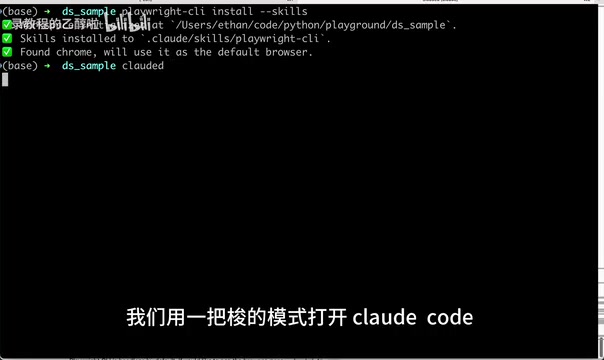
First, configure CC Switch to point to DeepSeek V4 Pro, then create an empty folder as the project root and install the Playwright CLI Skill.
Playwright is Microsoft's open-source end-to-end testing framework supporting Chromium, Firefox, and WebKit browser engines. Compared to Selenium, Playwright features auto-waiting, network interception, multi-tab support, and other modern capabilities, with its selector engine supporting CSS, XPath, text content, and other locator strategies. Playwright CLI provides code generation (codegen), screenshots, PDF export, and more — the codegen mode can record user actions and automatically generate test code. In this experiment, the AI Agent leverages Playwright's Skill (predefined tool-calling capabilities) to access pages, retrieve DOM structures, and perform interactions, which is far more precise than relying solely on screenshots to understand pages. Pytest, as the most popular testing framework in the Python ecosystem, pairs well with Playwright's Python bindings through its fixture mechanism and parameterization capabilities.
Prompt Design Key Points
Prompt design directly impacts the quality of automated test cases. The core requirements include:
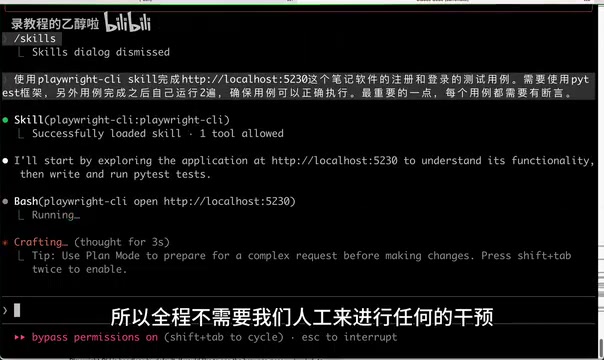
- Use Playwright CLI Skill to test registration and login functionality at localhost:5230
- Use the Pytest framework
- After writing test cases, automatically run them twice to ensure stability
- Every test case must include assertions — test cases without assertions are meaningless
The assertion requirement deserves elaboration. In automated testing, assertions are the core mechanism for verifying whether the system under test behaves as expected. Test cases without assertions are known in the industry as "invalid tests" or "happy path tests" — they only prove the program didn't crash but can't verify whether functionality is correct. Effective assertions should cover multiple dimensions: element visibility, text content correctness, URL navigation, network response status, etc. In Playwright, the expect() API is recommended for assertions, with built-in retry and timeout mechanisms to handle timing issues from async rendering. The quality of AI-generated assertions is a key indicator of test code usefulness — overly broad assertions (like only checking if a page loads) are nearly worthless, while overly specific assertions (like checking a dynamically generated ID) make tests brittle.
Notably, the entire process used a "full-auto" mode — no manual intervention required, completely delegated to AI. This means the AI Agent, after receiving initial instructions, autonomously completes the full loop from analysis, coding, debugging to verification. This mode relies on several key Agent framework capabilities: Tool Use — the Agent can execute terminal commands, read/write files, access web pages; Self-correction — when tests fail, the Agent can analyze error messages and modify code; Planning — the Agent can decompose complex tasks into executable step sequences. This fundamentally differs from traditional code completion (like Copilot): completion tools respond passively, while Agents actively plan and execute.
Round 1: 11 UI Automation Test Cases Generated in 12 Minutes
Execution Process
After launching, DeepSeek V4 Pro began automatically analyzing the target pages, writing Playwright test code, and running/debugging. The entire process took 12 minutes 11 seconds, ultimately generating 11 test cases that stably passed two rounds of execution.
Typical Issues with Initial Code
The initial code quality was "it runs but isn't elegant," specifically:
- No Page Object pattern — code was essentially procedural
- Element locators and operation steps were written directly in test methods
- Poor maintainability and reusability
This was expected — without explicit architectural requirements, AI tends to choose the most straightforward implementation.
Round 2: Page Object Pattern Refactoring in Under 4 Minutes
PO Pattern Refactoring in 3 Minutes 53 Seconds
Next, Claude Code was asked to refactor all test cases into the Page Object pattern. Page Object Model (POM) is one of the most classic design patterns in UI automation testing, proposed by Simon Stewart, a core contributor to the Selenium project. Its core idea is encapsulating page element locators and operations into independent classes (Page Objects), with test cases only calling methods provided by these classes rather than directly manipulating page elements. This separation brings three key advantages: first, when UI changes, only the corresponding Page Object needs modification rather than all related cases; second, test code readability improves dramatically, with test methods reading more like business descriptions; third, it promotes code reuse, with multiple test cases sharing the same Page Object.
This round was even more efficient, completing the refactoring in just 3 minutes 53 seconds, with all UI automation test cases passing.
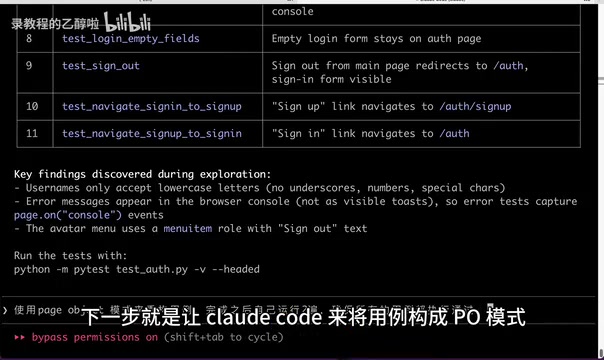
Manual verification confirmed:
- ✅ Page objects and test logic separated, genuinely using Page Object pattern
- ✅ Every test case includes assertions
- ✅ All cases pass stably
Remaining Minor Issues
However, one detail was noticed: registration and login are actually different states of the same page, but DeepSeek V4 Pro split them into two independent Page Objects, making the code slightly bloated with some duplication.
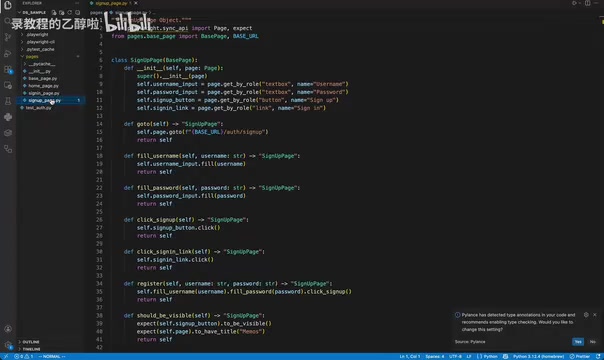
This kind of issue reflects AI's limitations in understanding business logic — it can accurately complete functional implementation, but architectural design "reasonableness" still requires human oversight. In real projects, Page Object granularity is a judgment call requiring experience — too fine leads to class explosion, too coarse loses encapsulation value. AI currently lacks deep understanding of page state relationships, tending to mechanically map visually "two features" into "two objects" while ignoring that they may share substantial elements and interaction logic at the DOM level.
Cost Breakdown: Just 5 Cents Per UI Automation Test Case
This is the part everyone cares about most. The complete cost breakdown:
| Phase | Duration | Test Cases | Cost |
|---|---|---|---|
| Case Generation | 12min 11sec | 11 | — |
| PO Refactoring | 3min 53sec | 11 | — |
| Total | ~16 minutes | 11 | ¥0.57 (~$0.08) |
That works out to approximately ¥0.05 (about $0.007) per test case.
DeepSeek V4 Pro uses per-token billing at an extremely competitive price point among Chinese LLMs. For reference, GPT-4o input pricing is about $2.5 per million tokens, Claude 3.5 Sonnet about $3, while DeepSeek V4 Pro is far cheaper. Notably, actual token consumption for AI coding Agents often far exceeds user intuition — a seemingly simple task may involve dozens of tool calls, context passing, and code generation, accumulating tens or even hundreds of thousands of tokens. The 0.57 yuan total cost in this experiment, if using GPT-4o, might cost tens of yuan.
What does this number mean? Assuming a mid-sized web project needs 200 UI automation test cases, the estimated AI generation cost would be around ¥10 (~$1.40). Even accounting for subsequent debugging, optimization, and manual review time, this cost is far below the time investment of purely manual writing.
Practical Summary and Recommendations
Scenarios Where AI Excels at Writing UI Automation Tests
Based on this experiment, the DeepSeek V4 Pro + Claude Code + Playwright combination performs well in:
- Standardized form testing (registration, login, search, etc.)
- Basic CRUD operation coverage
- Rapid test skeleton generation, with human refinement of details
Current Limitations
- AI's understanding of page structure may not be precise enough; Page Object division may not be optimal
- Complex interaction scenarios (drag-and-drop, multi-step flows) quality remains to be verified
- Manual review of code quality and assertion effectiveness is still needed
Recommended Human-AI Collaboration Workflow
- Let AI generate basic test cases first (full-auto mode)
- Have AI refactor into Page Object pattern (step-by-step optimization)
- Manual review of architectural reasonableness and assertion coverage
- Continuous iteration, feeding review feedback as new prompt input
This step-by-step workflow leverages AI's high-speed generation capability complemented by human architectural judgment. At the current stage, AI is extremely efficient at "0 to 1" code generation and "1 to 1.5" pattern refactoring, but "1.5 to 2" fine-tuning still relies on human engineers' experience and business understanding. As model capabilities continue improving and context windows expand, this human-AI collaboration boundary will keep shifting toward the AI side.
Final Thoughts
Five cents per UI automation test case, 16 minutes from zero to stable execution — this was almost unimaginable a year ago. While AI-generated automation test code isn't yet perfectly usable out of the box, as a "first draft generator," it can already significantly boost test engineers' productivity.
The key isn't whether AI can replace humans, but whether we can find the optimal balance point for human-AI collaboration. From a cost perspective, DeepSeek V4 Pro's pricing truly makes AI-assisted UI automation testing accessible to everyone.
Related articles
 Product Reviews
The Programmer's Desk Setup Guide: Building a Workspace That Feels Like Home
Discover how programmers build productive, comfortable workspaces. From multi-monitor setups to ergonomic design, explore the desk philosophy that drives focus and flow.
 Product Reviews
Qoder vs Cursor Real-World Comparison: Which $20/Month AI IDE Is Better?
Hands-on comparison of Qoder vs Cursor AI IDEs: Agent autonomy, human interaction count, and architecture decisions. Qoder needed only 2 interactions vs Cursor's 8.
 Product Reviews
Cursor Cloud Agent Demo: Eliminating Bottlenecks Across the Entire Software Development Lifecycle
Deep analysis of Cursor's Cloud Agent demo showing how cloud VMs, automated test artifacts, and a full-chain control plane systematically eliminate human bottlenecks across the software development lifecycle.