DeepSeek V4 Pro Real-World Test: 7 Projects Reveal Its True Coding Ability and Value
DeepSeek V4 Pro: strong backend, weak frontend, and 180x cheaper than Claude in real-world coding tests.
A hands-on test of DeepSeek V4 Pro across 7 real projects reveals a mixed picture: backend and full-stack engineering are solid, but frontend output is rigid and far behind Claude. As a text-only model lacking visual understanding, V4 Pro can't self-check UI quality. The standout finding is cost — all 7 projects cost under $1, roughly 1/180th of Claude's price. Best used as a cost-effective prototyping tool before switching to premium models for production.
The Long-Awaited DeepSeek V4 Pro — How Does It Actually Perform?
DeepSeekAd quietly released the official version of its V4 Pro model, a release that had countless developers on the edge of their seats. According to a comprehensive real-world test by a Bilibili creator who spent 300 RMB testing it across 7 real projects, the results were surprising — summed up in one line: "Waited months for this, and this is what we got."
On paper, V4 Pro's specs are impressive: 1 million context window, 384K max output, enhanced Agent capabilities, and native support for the Responses API, allowing direct integration with command-line tools like Codex. The context window refers to the total amount of text a large language model can "see" and "remember" in a single session. A 1-million-token context means the model can process roughly 750,000 English words or about 500,000 Chinese characters at once — equivalent to reading over a dozen books in one go. Previously, mainstream models topped out at 128K to 200K tokens, making 1 million an order-of-magnitude leap. The 384K max output means the model can generate approximately 280,000 English words in a single response, which is critical for producing complete code projects, lengthy reports, and similar use cases. Together, these two parameters give V4 Pro the theoretical capability to handle large codebases and long-running development tasks.
The Responses API is OpenAI's next-generation API interface standard, introduced in 2025 to replace the older Chat Completions API. It natively supports tool use, file search, code execution, and other Agent capabilities, allowing models to proactively perform actions during a conversation rather than simply returning text. Codex CLI is OpenAI's open-source command-line AI coding assistant — developers can describe requirements in natural language directly in the terminal, and the AI will automatically read project files, write code, execute commands, and verify results. DeepSeek V4 Pro's compatibility with the Responses API means it can plug directly into this ecosystem, enabling a complete autonomous coding workflow.
The most eye-catching number is its terminal coding benchmark score — V4 Pro achieved 87.9, while the current global leader Claude (Sonnet series) scored 88.0, a gap of just 0.1 points. These benchmarks typically refer to standardized coding tests like SWE-bench, which pulls real bug-fix tasks from open-source GitHub projects and requires the AI to locate issues within a full codebase and submit correct patches. While 87.9 and 88.0 are statistically almost indistinguishable, as this hands-on test reveals, there's often a significant gap between benchmark scores and real-world development experience. Benchmark tasks typically have well-defined boundaries and limited scope, whereas real projects involve aesthetic judgment, multi-file coordination, user experience, and other dimensions that standardized tests simply can't capture.
But benchmarks are benchmarks — real-world performance is the only true measure of a model. This test connected V4 Pro directly to the Codex CLI tool to execute tasks. Since V4 Pro is a text-only model that cannot view website output via screenshots, it's worth explaining the key difference between text-only and multimodal models: text-only models can only process and generate text, with no ability to understand images, screenshots, or any visual information. Multimodal models (like the Claude Sonnet series, GPT-4o, etc.) can process both text and image inputs simultaneously. In AI coding scenarios, multimodal models can take screenshots of generated web pages, spot layout misalignment or color clashes, and self-correct — while text-only models have zero perception of whether something "looks good" or "is aligned."
To compensate for this limitation, the tester built a custom Playwright-based harness for V4 Pro. Playwright is an open-source browser automation framework developed by Microsoft, supporting Chromium, Firefox, and WebKit. It can simulate real user actions — clicking buttons, filling forms, taking screenshots, and more. This harness essentially served as "substitute eyes for the AI": automatically opening generated web pages, checking whether page elements rendered correctly, verifying interactive functionality, then feeding the results back to the AI as text. It's a clever engineering workaround, but obviously less direct and efficient than a multimodal model's native visual understanding. The tester then used Cursor to run multiple Codex commands in parallel, kicking off all 7 projects simultaneously. Everything finished in about an hour.
Frontend Coding: A Clear Gap Behind Top Models Like Claude
Frontend capability was where the most issues surfaced in this test.
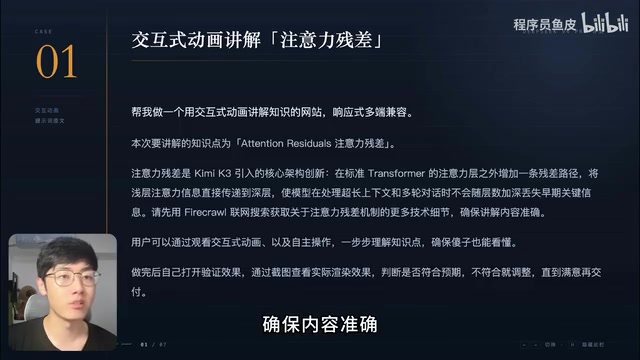
Interactive Animated Educational Website
The first project asked the AI to search the web for technical details to ensure accuracy, then build an interactive animated educational website. V4 Pro's results were disappointing: animations were simplistic and lazy, text inside animation blocks overflowed their containers, the diagram showing core mechanisms had incorrectly connected lines and visibly misaligned nodes, and the interactive demo section had virtually no interactivity at all.
For comparison, given the same prompt, Kimi K2 delivered smooth animations with solid aesthetics and accurate node-to-line positioning. Claude Sonnet 4.5 went even further — floating light particles in the background, self-added quiz questions, essentially producing a systematic knowledge-sharing website. V4 Pro clearly fell behind.
3D Animation and Simulation Game
The second project, a 3D knowledge website, saw V4 Pro perform "adequately" — tech-themed color scheme, particle effects, and 3D rotation/zoom all worked without obvious misalignment or lag, but it was notably simpler than what Kimi and Claude produced.
The third project was a bamboo dragonfly simulation web game, testing frontend skills, physics engine implementation, and sound synthesis simultaneously. The frontend UI was mediocre, and the sound synthesis was a total miss — what should have been a "whirring" propeller sound came out as a monotonous "buzzing." Interestingly, the V4 Flash version running the same prompt produced structure and sound much closer to expectations, slightly outperforming the Pro version.

Backend and Full-Stack Engineering: A Pleasant Surprise
If frontend was V4 Pro's weakness, backend engineering was where it earned some real praise.
Web-Based PPT Generator
The fourth project had the AI build an interactive PPT generation tool, testing both coding and content generation abilities. The overall layout was reasonable, but there was a glaring bug — the so-called "real-time output" wasn't actually real-time; it generated everything first, then streamed the output. The final PPT quality was questionable too, with all text crammed on the left and massive whitespace on the right. Claude's version, by comparison, looked like a polished product.
Online Raffle System
The fifth project tested engineering rigor: no duplicate winners, and prize quotas must never be exceeded. V4 Pro's frontend styling was rough, but the functionality worked perfectly — creating events, configuring quotas, QR code sign-ups, and winner lookups all functioned correctly. After verification by other AI models, the backend logic had no issues with duplicate winners or quota overflows. The only hard flaw was the ugly frontend.
Isaac-Style Roguelike Game
The sixth project replicated the core gameplay of the classic roguelike The Binding of Isaac, with all graphical assets drawn entirely in code. This test was the most effective at differentiating model capabilities.
Roguelike is a game genre characterized by randomly generated levels, permadeath (restart upon death), and rich item combinations. It originated from the 1980 classic game Rogue. The Binding of Isaac is one of the most iconic titles in this genre, released by Edmund McMillen in 2011. Players control a character exploring randomly generated basement rooms, collecting items that stack to enhance abilities, while fighting various monsters and bosses. Replicating this type of game with AI is extremely challenging, as it involves random map generation algorithms, physics collision detection, complex numerical balancing systems, multi-layered boss AI behavior trees, item effect stacking calculations, and many other technical dimensions — making it an ideal test for comprehensive AI coding ability.
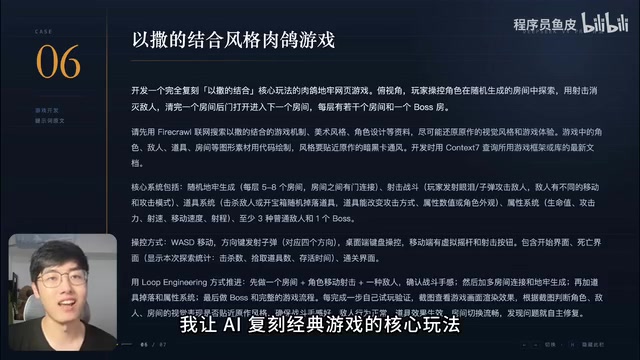
Remarkably, V4 Pro's game — titled "Basement: Corridor of Tears" — was actually playable. Monsters had an authentic feel, and the stat system, treasure chest mechanics, and boss fights were all present with moderate difficulty. However, the game only had one floor, far from a finished product. Claude's version was nearly indistinguishable from the original, with highly faithful boss mechanics — the gap remained clear.
Long-Running Tasks: It Works, But Takes Its Own Path
The final project cranked the difficulty to maximum: clone the VS Code open-source codebase and build a web-based AI coding tool that replicates Cursor's core experience.
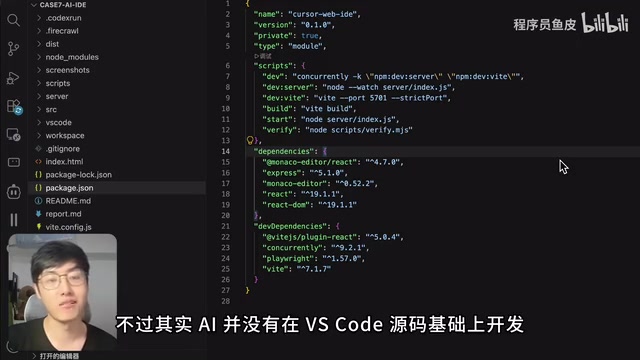
V4 Pro's output was far from the real Cursor, but the overall layout was reasonable. The editor could open and edit files, with code suggestions and syntax highlighting. The AI chat mode could execute commands, call tools, and autonomously write code — even developing a playable Sokoban (box-pushing) game. This demonstrated that V4 Pro has solid long-running task execution capabilities.
However, a crucial detail: the AI didn't actually build on top of VS Code's source code. Instead, it started from scratch with its own frontend application (likely a cost-optimization decision). Claude's version, in contrast, faithfully preserved VS Code's essence — syntax highlighting, minimap, management panels, and all — a devastating display of superiority.
Honest Impressions and AI Coding Model Selection Advice
Across all 7 projects, several clear conclusions emerge:
- Frontend coding ability fell far short of expectations: Rigid and mechanical, with a clear gap behind Claude.
- Backend coding ability is solid: Full-stack projects could be completed end-to-end with working business logic.
- The critical weakness is lack of visual understanding: As a text-only model, it can't take screenshots to check its own output after generating a page, meaning layout and color issues go undetected — a major handicap for AI coding.
- The gap between Pro and Flash versions is negligible: The tester personally considers them in the same tier.
The most jaw-dropping finding was the cost efficiency: all 7 projects cost roughly 5 RMB (less than $1), with a cache hit rate of 99%. The key to this lies in DeepSeek's aggressive KV Cache (key-value cache) strategy: when multiple requests share large amounts of overlapping context (such as the same system prompts or the same code files), the server caches these computation results, and subsequent requests only need to pay for newly added content. Cached token prices are typically 1/10 or even less of the normal rate. In Codex-style Agent workflows, the AI repeatedly reads the same project files, resulting in extremely high cache hit rates. This explains why 7 projects cost only 5 RMB — the vast majority of input tokens hit the cache. Running a similar set of 7 tasks with Claude previously cost over 900 RMB — roughly a 180x difference.
How Should You Choose?
Based on this test, here's the practical advice:
- If you're just getting started with AI coding, or working on everyday utilities, internal tools, quick prototypes, or any task that doesn't require polished frontend work, DeepSeek is perfectly fine and will save you a ton of money.
- If you're building a user-facing product, consider using DeepSeek first to run a demo, refine your prompts, define features, and validate the business flow — then switch to a Claude-tier model for production development. This approach saves money without sacrificing quality.
It's important to note that this is just one test and doesn't represent a universal rule. But at least in this hands-on evaluation, DeepSeek V4 Pro's performance "fell far short of expectations." It's more like an incredibly cost-effective "rough draft" tool than a model that can stand on its own for production-grade work. Would you switch to it as your primary model?
Related articles

Fifty Years Studying Power: Robert Caro's Writing and Insights on Power
Robert Caro reflects on 50 years studying power: Lyndon Johnson's persuasion and leverage, Robert Moses's transformation from idealist to ruthless builder, the dilemmas of large-scale construction, and his methods of compressing themes and solitary focus in biography writing.

Can a $20,000 Robot Do Your Chores? The Test Results Are Surprising
A YouTube test video shows how a $20,000 robot responds to commands like washing dishes, turning off lights, taking out trash, and feeding the dog. This article analyzes its real capability boundaries, the state of voice interaction technology, and how far household robots are from mainstream adoption.
The Complete Guide to Running AI Models Locally: Inference Engines and Tool Stack Explained
A systematic breakdown of the complete local LLM tool stack: from PyTorch and GGML compute libraries to llama.cpp, vLLM, SGLang inference engines and Ollama, LM Studio wrapper layers, with benchmark data on performance differences and selection logic.