DeepSeek V4 Vision Model + Harness Workflow Practical Guide
Practical guide to building AI Agent visual workflows with DeepSeek V4 Flash and Harness Presets.
This guide walks through building visual AI Agent workflows using DeepSeek V4 Flash's multimodal capabilities and DeepSeek Harness V0.1.1's Agent Preset system. It covers the MoE architecture behind V4 Flash, the powerful Preset customization mechanism, and demonstrates three practical workflows: front-end web development, HTML-based PPT creation, and fully automated video generation using HyperFrames.
Introduction: When Agents Gain the Power of Sight
On the evolutionary path of AI Agents, the addition of visual capabilities marks a critical turning point. Traditional Agents can only "code blind," but once paired with a vision model, an Agent can "see as it builds" — observing rendered results, comparing against design intent, and iterating on improvements, dramatically boosting development efficiency.
The visual capabilities of multimodal models are typically implemented through a Vision Encoder, with common approaches including pre-trained vision models such as ViT (Vision Transformer) or SigLIP. An image is first divided into fixed-size patches, converted by the vision encoder into a set of visual tokens, then projected through a mapping layer into the same embedding space as text tokens. Finally, these visual tokens are fed into the language model alongside text tokens for joint reasoning. The key challenge in this process lies in the quality of vision-language alignment: the model must understand spatial relationships, text content, color palettes, and layout logic within images, and translate that understanding into accurate text descriptions or code modification suggestions. In Agent scenarios, visual capabilities allow the model to "see" the actual rendered result of the code it generates, compare it against the intended design, and form a complete perception-reasoning-action loop — this is the technical essence of the shift from "coding blind" to "seeing as it builds."
According to hands-on testing shared by Bilibili creator Jiutian, DeepSeekAd's latest V4 Flash multimodal model paired with DeepSeek Harness (DSH) V0.1.1's newly added native vision capabilities can already produce front-end pages with distinctive style and strong aesthetic quality, smoothly interactive HTML-based PPTs, and even near-commercial-grade promotional videos from a single prompt. This article provides a systematic walkthrough of how to set up and use this complete workflow.
DeepSeek V4 Flash: Balancing Performance and Efficiency
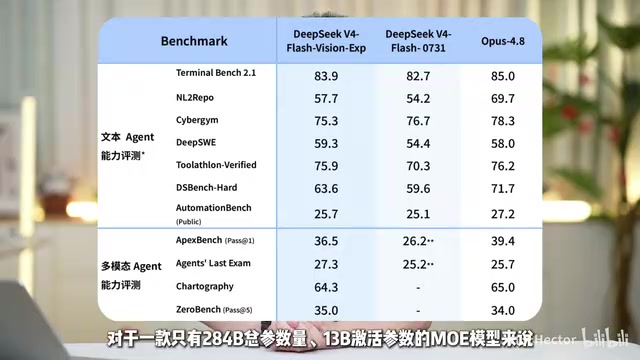
Based on officially published benchmark scores, the DeepSeek V4 Flash multimodal model's overall performance is on par with Opus 4.8. Notably, this is an MoE (Mixture of Experts) model with only 284B total parameters, activating approximately a 13x ratio of parameters.
MoE Architecture: The Sparse Activation Strategy That Punches Above Its Weight
MoE (Mixture of Experts) is one of the most important architectural innovations in large models in recent years. Traditional dense models activate all parameters during inference, making computation cost proportional to parameter count. MoE models, however, replace the feed-forward network layers with multiple parallel "expert" sub-networks, with a Gating Network dynamically selecting a small number of experts to participate in each inference pass. Taking DeepSeek V4 Flash as an example, only approximately a 13x ratio of the 284B total parameters is activated, meaning the actual computational load during inference is far less than that of a 284B dense model.
This sparse activation strategy allows the model to maintain a massive knowledge capacity while significantly reducing inference latency and computational consumption. DeepSeek has deep expertise in MoE, with their early DeepSeekMoE paper introducing innovations such as fine-grained expert segmentation and shared expert isolation, resulting in lower knowledge redundancy and higher specialization among experts. These technical foundations are key to V4 Flash achieving top-tier performance at a relatively low activation cost.
The advantage of MoE lies in activating only a subset of expert networks during inference, maintaining large parameter capacity while keeping actual computational costs far below that of a dense model of equivalent scale — which also explains why the model demonstrates "very fast overall response speed and excellent understanding of image details" in real-world testing.
Quick Start: Upgrading to V0.1.1
The fastest way to experience the V4 multimodal model is to call it directly from the latest version of DeepSeek Harness. DSH officially added support for the V4 multimodal model in V0.1.1, along with the Files document storage system feature. The upgrade process is straightforward:
- Open the command line and run the upgrade command
- Confirm the version number using the
versioncommand - Launch DeepSeek Harness and open the web interface
- Switch to the V4 Flash vision model in the model selector in the lower right corner
At this point, you can include images in the chat to test its multimodal understanding capabilities.
Agent Presets: DSH's Most Powerful Hidden Feature
What truly makes this workflow powerful is DeepSeek Harness's Agent Preset feature. It's been called DSH's "most powerful hidden feature."
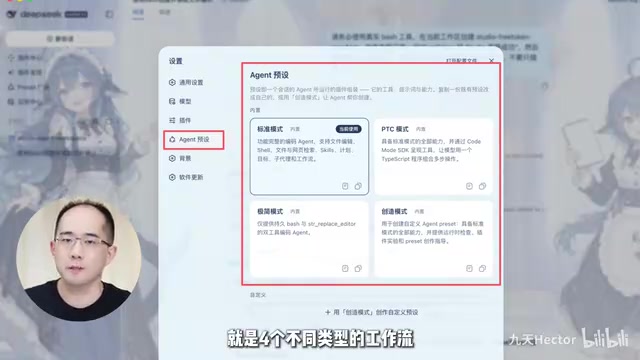
What Is an Agent Preset?
From a technical perspective, an Agent Preset is an assembly blueprint for Agent runtime — similar to a custom Agent, but fundamentally more complex. It includes not only custom prompts, Skills, and tool invocation permissions, but also customizable context compression methods, background task execution strategies, sub-Agent capabilities, and Workflow capabilities.
From an industry perspective, this mechanism is analogous to Agent Templates in LangChain or Agent Profiles in AutoGen, but DSH's Presets go deeper in terms of customization. Context compression methods determine how an Agent manages its limited context window during long conversations — common strategies include summary compression, sliding windows, and importance-based selective retention, which is crucial for complex development tasks spanning dozens of interaction turns. Background task execution strategies involve asynchronous task scheduling, allowing the Agent to continue processing other steps while waiting for time-consuming operations (such as code rendering or file generation), avoiding efficiency bottlenecks from serial waiting. Sub-Agent capabilities mean a master Agent can dispatch multiple specialized sub-Agents to collaborate, forming an orchestration pattern similar to multi-role collaboration — for example, one responsible for code writing, one for visual review, and one for copywriting. Workflow capabilities then chain these steps into a reproducible pipeline, ensuring consistent quality standards across every execution.
In other words, an Agent Preset is a tool that enables highly flexible DIY custom Agents, with its end-to-end configurable design allowing users to deeply customize Agent behavior for specific scenarios, rather than being limited to superficial customization like modifying prompts. When DeepSeek V4 Pro was released, the official team stated that model performance evaluations were conducted using DSH's minimal mode (which is itself a Preset). Users can view the complete definitions in "Settings - Agent Presets" — these texts are highly complex and specify every aspect of Agent functionality in that mode.
Three Core Workflow Presets
This hands-on guide revolves around three custom Presets:
- Front-end UI Agent: Beautiful front-end interactive design
- AI PPT Agent: HTML-based interactive PPT creation
- AI Video Agent: Fully automated video generation
The entire assembly process involves prompt design, Skills and Plugin installation, and system configuration changes — it's fairly complex.
One-Click Installation: Scripts and Studio Desktop Client
To lower the setup barrier, the creator provided complete installation scripts in both MacOS and Windows versions — just double-click to install (DeepSeek Harness must be pre-installed).
If you use the team's self-developed open-source DeepSeek Harness Studio desktop client, the installation process is even simpler. The desktop client has been fully upgraded to support the latest official version, allowing you to directly select the V4 multimodal model for conversations. Its Agent Preset marketplace offers six Agent Presets — including the Web development, AI PPT, and AI video generation ones needed here — installable with a single online click. Additionally, Studio has added features like one-click integration with local open-source models, further expanding usage flexibility.
Hands-On Demo: Three Workflow Results
Front-End Web Development
Taking a personal resume website as an example: enter a new conversation, select front-end development mode, and input a professional prompt. During the creation process, the Agent will ask decision-making questions — this is part of the Preset's normal workflow.
Note that since the current Agent doesn't have an image generation model configured, some visual elements will be replaced with simpler SVG images. The entire development process takes about half an hour, and aside from missing background images that would require an additional image generation model, the overall completeness is very high.
AI PPT Creation
The process is similar: select "DSH Motion Effects Demo Director" and input the PPT content you want to create.
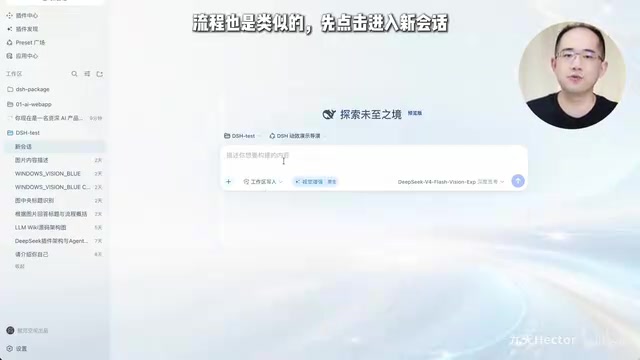
The system defaults to a template with four modes and eight pages, but also supports completely redesigning effects or starting from scratch. The resulting HTML-based PPT features smooth interactions, complete information, and multiple style options. Compared to traditional PowerPoint files, HTML-based PPTs natively support responsive layouts and complex CSS animations, can be shared directly via browser, and eliminate concerns about missing fonts or version compatibility.
AI Fully Automated Video Generation
This is an Agent Preset for video generation based on HyperFrames. Select "AI Video Director," input your creative requirements, and the video creation workflow begins.
HyperFrames: The Code-as-Video Creative Paradigm
HyperFrames is a technical approach that renders HTML/CSS/JavaScript animations as video frame sequences. Its core idea is to use browser rendering engines (typically based on headless browsers like Puppeteer or Playwright) to capture HTML page animation states frame by frame, then composite the frame sequences into standard video files. Unlike traditional video generation models (such as Sora or Runway Gen-3) that generate pixels directly through diffusion models, HyperFrames' output is deterministic — the same set of HTML code renders completely identical results in any environment, offering exceptional reproducibility and editability. Developers can precisely control the layout, animation curves, text content, and color schemes of every frame, and post-production modifications require only code adjustments rather than regenerating the entire video. This "code-as-video" paradigm is particularly suited for promotional videos, data visualization animations, and product demo videos that demand high information density and consistent style, filling the gap in precise control that AI-generated video currently lacks.
DSH acts as both video director and coding Agent, using HyperFrames to write, preview, and render a complete reproducible HTML animation video project — a "one HTML, one video" creative approach. The entire process also takes about half an hour; providing more detailed information and reference images in your prompt will help generate videos with richer details.
Conclusion and Reflections
This workflow based on the DeepSeek V4 Flash multimodal model and Harness demonstrates the current maturity of AI Agents in real-world production scenarios. The introduction of visual capabilities moves Agents from "coding blind" to "seeing as they build," while the Agent Preset mechanism pushes Agent configurability to new heights — from prompts to context compression, sub-Agents, and full-pipeline Workflow customization.
For developers, the greatest value lies not in the demo effect of "generate with one prompt," but in this reproducible, manageable, and extensible workflow paradigm. When model capabilities, Agent frameworks, and preset mechanisms come together, individual developers can accomplish front-end development, PPT creation, and even video production tasks at minimal cost — tasks that previously required team collaboration. From a broader industry perspective, this three-layer architecture of "model + Agent framework + preset ecosystem" is becoming the standard paradigm for AI toolchains: the underlying model provides core reasoning capabilities, the middle Agent framework handles tool invocation and task orchestration, and the top-layer preset ecosystem packages professional knowledge and best practices into shareable, reusable configuration bundles. As community-contributed Presets continue to accumulate, this system has the potential to evolve from a developer tool into a general-purpose productivity platform for a much wider user base.
Key Takeaways
Related articles

Chain of Thought Isn't Just for AI: How Humans Can Use CoT to Improve Thinking Quality
Chain of Thought isn't just a prompt trick for large models. Starting from a Hacker News discussion, this article analyzes why CoT works for human thinking too, breaks down actionable ways to transfer it, and highlights the key differences between human CoT and machine CoT.
Cloudflare Teams Up with OpenAI: Closi…
Cloudflare Teams Up with OpenAI: Closing the Loop from Vulnerability Discovery to Defense with AI
Cloudflare uses OpenAI Daybreak to investigate security vulnerabilities and generate reviewable remediation plans, while developers use Codex to boost coding efficiency and quality.

Orca Multi-Agent Orchestration in Practice: A Guide to Parallel Collaboration with Claude and Codex
Orca is Stable AI's free open-source agent workbench supporting 34 agents like Claude Code and Codex in parallel. Learn its Git worktree isolation, multi-model orchestration, and mobile management.