DeepSeek V4 vs GLM-5.1 vs GPT 5.5 Real-World Coding Test: Which One Wins in Actual Project Development?

Real project test shows GLM-5.1 outperforms DeepSeek V4 Pro and GPT 5.5 in stability and first-pass rate.
A Bilibili creator tested GLM-5.1, DeepSeek V4 Pro, and GPT 5.5 using SAR-BASE, a browser extension with 7,000 users maintained for nearly a year. The task was implementing multi-language subtitle export. GLM-5.1 passed all requirements on the first attempt with clear task decomposition. DeepSeek V4 Pro and GPT 5.5 handled core functionality but had UI styling flaws, with GPT 5.5 also being slower. In 3D page generation, GLM-5.1 scored highest. The article emphasizes that first-pass rate matters more than benchmarks.
Beyond Benchmarks: Real Projects Are the True Test of AI Coding
DeepSeekAd V4 and GPT 5.5 were released almost simultaneously, both boasting impressive benchmark scores and coding capabilities. But anyone who's done real development knows that benchmarks are one thing, and real project development is another. High scores on standardized tests don't necessarily translate to smooth performance in complex engineering scenarios.
Common benchmarks in AI coding include HumanEval, MBPP, and SWE-bench. HumanEval primarily evaluates a model's ability to generate standalone functions, typically self-contained algorithmic problems. SWE-bench goes further, requiring models to fix issues in real GitHub repositories. But even SWE-bench operates in a standardized testing environment, which still differs significantly from what developers face daily—understanding business context, maintaining code consistency, handling UI interaction details, and ensuring no regression bugs are introduced. This is why models that score high on benchmarks don't always perform equally well in real projects.
To verify the real coding capabilities of these three models, Bilibili content creator A Chao used his browser extension SAR-BASE—which he's maintained for nearly a year with over 7,000 active users—as the test project. He also included a 3D page generation test, conducting a hardcore head-to-head comparison of GLM-5.1, DeepSeek V4 Pro, and GPT 5.5.
Test Environment and Task Design
Project Background
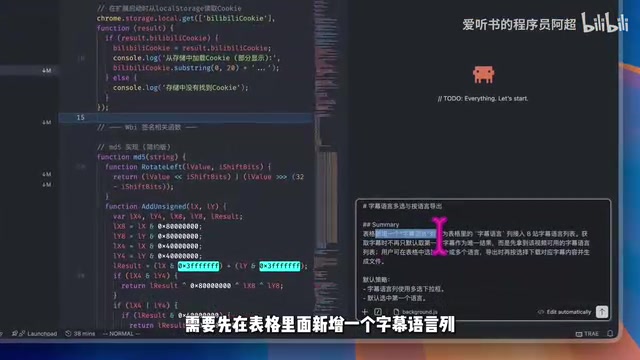
SAR-BASE is a browser extension for batch downloading video subtitles to use as AI knowledge base materials. It has a long-standing user pain point: videos clearly have subtitles in multiple languages, but the extension only supports exporting Chinese subtitles. The core task for this test was to have the three models solve this multi-language subtitle export problem.
Browser extension development involves multiple technical layers: Manifest configuration files define permissions and resources, Content Scripts inject into target page DOMs, Background Service Workers handle backend logic, and Popup/Options pages provide user interaction interfaces. Different components communicate through the Chrome Message API. This architecture means modifying a single feature often requires coordination across multiple files while respecting browser security sandbox restrictions. For AI coding assistants, understanding this layered architecture and making modifications without breaking existing message communication chains is a considerably challenging task.
Test Design
Specific development tasks included:
- Adding a subtitle language column to the table
- Integrating the relevant subtitle language retrieval API
- Implementing multi-language subtitle selection and export
- Critical requirement: new features must not break existing functionality
For tooling, GLM-5.1 and DeepSeek V4 Pro were both tested through the Cloud Code plugin in VS Code, while GPT 5.5 used the Codex plugin (for a more native experience). All three received exactly the same prompts and requirement descriptions to ensure fair comparison.
Cloud Code is a VS Code AI coding plugin that supports multiple model backends, allowing developers to switch between different models within the same interface for code generation, refactoring, and debugging. Codex is OpenAI's dedicated coding agent plugin for the GPT series, operating in an asynchronous task mode—developers submit requirements, and Codex independently completes code modifications in a cloud sandbox environment, returning results as a Pull Request. This architectural difference directly impacts the development experience: Cloud Code is more like real-time conversational programming, while Codex is more like delegating work to a remote developer. This partly explains why GPT 5.5 took longer to complete tasks.
Real-World Coding Capability Comparison
GLM-5.1: First-Pass Success, Best Development Experience
GLM-5.1's performance can be described as "textbook-level." It first presented a clear To-Do list, breaking the entire task into multiple steps, then executed them sequentially. Developers could clearly see what each step was doing, with the entire reasoning chain being highly transparent.
In software engineering, task decomposition (Work Breakdown Structure) is a fundamental project management practice. When an AI coding assistant outputs a clear To-Do list before executing a complex task, it's actually doing two things: first, showing developers whether its understanding of the requirements is correct, providing a window for human verification; second, establishing a structured roadmap for its own execution process, reducing the probability of missing feature points. This "plan first, execute second" pattern is similar to Chain-of-Thought reasoning applied in engineering scenarios, and is particularly important for complex tasks involving multi-file modifications.
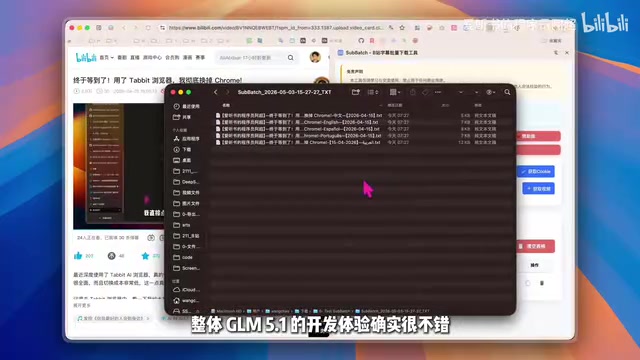
Test results:
- ✅ Subtitle language column displays correctly
- ✅ Subtitle retrieval successful, Chinese, English, and other language options complete
- ✅ Multi-language select-all export function works
- ✅ No existing functionality broken
Completed in one pass, all features implemented correctly, zero issues. This is extremely rare in complex real-project iterations.
DeepSeek V4 Pro: Core Functionality OK, UI Details Need Polish
After switching to DeepSeek V4 Pro, an obvious difference immediately appeared: it didn't provide a To-Do list, leaving developers unable to clearly understand what it was doing or how many steps it planned to take. This creates uncertainty in actual development collaboration.

Test results:
- ✅ Subtitle language column displays correctly
- ✅ Subtitle retrieval successful
- ✅ Exported subtitle content is correct
- ⚠️ Dropdown styling issue: Only 3 of 5 languages visible, with no scroll capability
Core functionality works perfectly fine, but UI details need additional adjustment. For a production product with 7,000 users, styling issues like these don't affect core logic but directly impact user experience.
GPT 5.5: Clear Logic but Slower Development Speed
GPT 5.5 was tested through the Codex plugin. Its overall reasoning chain was relatively clear, and feature points were listed comprehensively. However, there was one significant issue—it took approximately 15 minutes to complete the code modifications, noticeably slower than the other two.
Test results:
- ✅ Subtitle language column displays correctly
- ✅ Subtitle retrieval successful
- ✅ Exported subtitle content is correct
- ⚠️ Dropdown styling also has issues: Obscured by other elements
Overall logic was fine, but similar to DeepSeek V4 Pro, styling details required a second round of adjustments.
Dropdown obscuration, text overlap, and other CSS styling issues are common weaknesses of AI coding assistants. There's a deeper reason behind this: during training, large models primarily learn the logical structure and semantic relationships of code, while CSS visual presentation is highly context-dependent—the same CSS code can produce completely different visual results depending on the DOM structure, parent element overflow settings, and z-index stacking contexts. Models struggle to infer the final visual rendering result from code text alone. This is why in real projects, logical functionality often passes on the first try, but styling details frequently need secondary adjustments.
3D Page Generation Capability Comparison
Beyond real project development, the test also included a frontend 3D generation task: using the same prompt to generate a runnable single HTML page—a 3D Smart City Monitoring Dashboard.
Implementing a 3D smart city monitoring dashboard in a single HTML file typically relies on WebGL frameworks like Three.js or Babylon.js. This type of task tests model capabilities across multiple dimensions: 3D geometric modeling (building and vehicle mesh generation), material and lighting setup, animation systems (vehicle movement paths), camera controls (drag interaction), and data visualization panel overlays. Performance overhead mainly comes from the number of Draw Calls in the GPU rendering pipeline, geometry face counts, and real-time shadow calculations.

GLM-5.1 Scores 9.8
- Excellent building modeling and dynamic vehicle effects
- Drag interaction is extremely smooth and fluid
- Highest overall completeness
DeepSeek V4 Scores 9.0
- 3D scene is basically complete
- Vehicle movement speed is too fast, not natural enough
- Text overlap in the lower-left real-time events area
- Drag fluidity inferior to GLM-5.1
GPT 5.5 Scores 9.5
- Relatively high overall completeness
- But noticeable computer lag during runtime, high performance overhead
- Drag interaction not smooth enough
The lag caused by GPT 5.5's generated page is likely because the model didn't optimize geometries through Mesh Merging or didn't properly control the computation load in the render loop. This reflects a common lack of performance awareness in current large models during code generation—they can write functionally correct code, but not necessarily efficient code.
Overall Assessment: Which AI Coding Assistant Is Worth Choosing?
| Dimension | GLM-5.1 | DeepSeek V4 Pro | GPT 5.5 |
|---|---|---|---|
| Real Project Development | ⭐⭐⭐⭐⭐ First-pass success | ⭐⭐⭐⭐ Styling flaws | ⭐⭐⭐⭐ Styling flaws |
| Task Decomposition Transparency | Clear To-Do list | No explicit breakdown | Relatively clear |
| Development Speed | Fast | Fast | Slower (~15 minutes) |
| 3D Generation Capability | 9.8 | 9.0 | 9.5 |
| Existing Feature Protection | Not broken | Not broken | Not broken |
Based on this real-world test, GLM-5.1 delivered the most stable performance across both real project development and 3D generation, completing everything in one pass with no issues requiring secondary fixes. GPT 5.5's overall capability is also strong—arguably going "toe-to-toe" with GLM-5.1—but still has room for improvement in development speed and performance optimization. DeepSeek V4 Pro's fundamental capabilities are solid, but detail handling needs further refinement.
In actual development workflows, the importance of "First Pass Yield" far exceeds what it appears on the surface. Every code fix means additional context-switching costs: developers need to re-read AI-generated code, locate the problem, describe the fix requirement, and verify the fix result. Research shows that programmers need an average of 15-25 minutes to return to their previous focus state after being interrupted. Therefore, a model with a 90% first-pass rate may deliver far greater actual productivity than a model with a 70% first-pass rate but higher benchmark scores.
You might not have noticed, but this is only a test in a specific scenario—different project types and requirement complexity levels might lead to different conclusions. But at least in real complex project iteration—the scenario closest to developers' daily work—this test provides a valuable reference. For developers currently choosing an AI coding assistant, stability and first-pass rate may be more worth paying attention to than benchmark scores.
Related articles
 Product Reviews
The Programmer's Desk Setup Guide: Building a Workspace That Feels Like Home
Discover how programmers build productive, comfortable workspaces. From multi-monitor setups to ergonomic design, explore the desk philosophy that drives focus and flow.
 Product Reviews
Qoder vs Cursor Real-World Comparison: Which $20/Month AI IDE Is Better?
Hands-on comparison of Qoder vs Cursor AI IDEs: Agent autonomy, human interaction count, and architecture decisions. Qoder needed only 2 interactions vs Cursor's 8.
 Product Reviews
Cursor Cloud Agent Demo: Eliminating Bottlenecks Across the Entire Software Development Lifecycle
Deep analysis of Cursor's Cloud Agent demo showing how cloud VMs, automated test artifacts, and a full-chain control plane systematically eliminate human bottlenecks across the software development lifecycle.