Delta: A Multiplayer AI Coding Environment from the Zed Team

Delta is the Zed team's multiplayer AI coding environment that fills the collaboration gap before Git commits.
Delta is a multiplayer collaboration platform built by the Zed editor team, designed specifically for AI coding agent workflows. It provides a lightweight space for discussion and iteration before committing to Git: multiple developers can chat with the same AI agent simultaneously, view each other's changes in real time, or conduct async code reviews with less friction than a traditional PR. All operations happen in work trees that sync across machines in real time, with DeltaDB tracking every change and enabling rewind to any historical point. Login requires a GitHub account, and each collaborator covers their own AI inference costs independently.
What is Delta?
Delta is a multiplayer collaboration environment built for AI coding agents. "Multiplayer" here doesn't mean gaming with AI — it means multiple developers can collaborate on the same codebase, with or without real-time presence, using coding agents as their shared interface, without constantly relying on version control.
In traditional collaboration workflows, even something as simple as asking a senior engineer to review your code requires a full cycle of commit, push, pull, and sometimes a Pull Request. Delta's core idea is to provide a centralized space where multiple people can simultaneously chat with the same AI agent, request code changes from different angles, and only commit once the discussion has settled — moving into higher-level version control collaboration from there. In other words, Delta isn't trying to replace Git; it's filling the gap in the "discussion and iteration" phase.
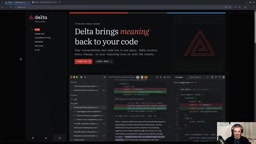
Worth noting: Delta is built by the same team behind Zed — a well-regarded editor often mentioned by developers migrating from Vim — which lends considerable credibility to Delta's technical foundation.
Transparency note: The original video was sponsored by Delta, though the author states the review is honest and unbiased.
Installation and Login
Installing Delta is straightforward. Head to the official website, click the download button, select your OS (Linux x64 in the demo), extract the archive, and run ./install.sh from the terminal.
On first launch, you'll need to log in — and GitHub is the only supported login method. After authorizing, you'll choose an LLM provider. There are three options:
- Use Zed's official inference service (subscription required, with a free tier)
- Connect an existing subscription, such as ChatGPT
- Enter an API key directly, supporting standard API tokens or services like OpenCode
Once logged in, you're greeted by a clean, minimal welcome screen — nothing flashy.
Solo Mode: Using Delta as a Standard AI Coding Tool
Delta works perfectly well as a solo AI coding assistant. Start by selecting a local folder via "add project to thread" — note that the folder must be a Git repository.
The demo uses a simple Flask to-do application. Once the project is loaded, you can open a new thread and start chatting with the agent — for example, asking it to "tell me about this project." The bottom-right corner lets you switch models and reasoning levels, whether using Zed's Opus series or your own connected ChatGPT account. Messages are sent with Ctrl+Enter.
The layout features a project and thread list on the left, with project files on the right — click any file to preview it with solid syntax highlighting. One particularly useful detail is the inline comment feature: if you're not happy with a specific piece of code, right-click to add a comment directly on that line, describe what you want (e.g., "change SQL syntax to lowercase"), and the AI understands exactly what to target.
Core Mechanism: Work Trees and Sync
Understanding how Delta's collaboration works comes down to its file structure. All operations happen inside a work tree on your system — not your original project directory. Using "reveal in file manager" reveals that files actually live at project-dir/.delta/work-trees/.
The significance of this design: these work trees sync in real time across machines. When you edit a file locally in your regular editor, the corresponding file on a collaborator's machine updates immediately — whether they're viewing it through Delta or browsing it directly.
Work trees are a native Git concept referring to the actual filesystem directory associated with a repository. Git natively supports creating multiple parallel work trees for the same repo via git worktree add, each checking out a different branch without interference. Delta borrows and extends this mechanism: it maintains independent work trees under .delta/work-trees/ for each collaboration session, isolating the AI agent's changes from the user's main workspace. A sync layer then propagates updates across machines in real time. This is fundamentally different from operating directly in your local main directory — the agent's experimental changes don't pollute your workspace, and only reviewed, confirmed changes are committed into the official Git history.
Multiplayer Collaboration: Real-Time and Async Modes
To enable true multiplayer collaboration, you invite others to join your session. Click the share button in the top right — you can either invite specific people by email or generate a link that anyone can use to join.
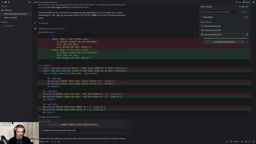
One important caveat: even with the link, invitees must have a Delta account and complete GitHub login before they can join — simply opening the link isn't enough. Since GitHub prohibits free accounts from having duplicates (creating a second account risks a ban), the author brought in a friend, Johannes, for the collaboration demo, with both recording their screens separately.
The process involves adding the other person as a GitHub collaborator on the repository, then inviting them to the Delta session. Once both parties are in, everything is real-time: whatever one person types in Delta is instantly visible to the other; all AI responses and code changes are seen by everyone simultaneously, with a clear diff view for review.
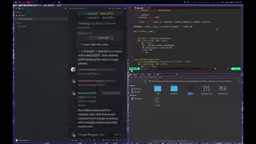
Async collaboration is often more practical in real-world scenarios. After making changes, a collaborator doesn't need to push to GitHub or create a PR — they simply initiate a review flow directly in the chat. The other party can then inspect the changes, approve them, and merge them back into the main conversation. This is essentially a "forked conversation" — one person proposes changes, the other can request adjustments or approve directly, and the AI automatically summarizes what changed.
Delta's async review flow is conceptually similar to a GitHub Pull Request, but with finer granularity and far less friction. A traditional PR requires a full push, branch creation, and CI pipeline trigger — suited for delivering completed features. Delta's "forked conversation" mechanism targets changes still in the exploratory phase: collaborators can propose localized adjustments within the same chat context, and the other party can approve or request revisions while retaining the full AI conversation history — all without leaving the current workflow. This "conversation as code review" design is especially well-suited for pair programming or quick mentorship between senior and junior engineers.
DeltaDB: A Rewindable Timeline
Under the hood, Delta uses a system called DeltaDB to track all changes. This enables an interesting capability — rewinding time. You can select any past message and execute "revert conversation to here," undoing everything that happened after that point. Importantly, this reversion also affects the code itself — for example, SQL statements previously changed to lowercase will revert back to uppercase.
DeltaDB's timeline rewind is functionally similar to Git's reset --hard, but operates on "conversation nodes" rather than commit hashes. This means it simultaneously rolls back two layers of state: the AI's conversational context (the model no longer "remembers" the reverted interactions) and the corresponding filesystem changes. This dual-layer rollback is extremely useful when debugging erroneous changes made by an AI agent — if the agent went down the wrong path and modified multiple files in sequence, there's no need to manually undo each one. Just revert to the branching point. Note that this rollback doesn't write into Git history, so it won't generate extra revert commits — the entire exploratory process remains transparent to the main repository's log.
Pricing and Use Cases
One easily overlooked detail about billing: your connected AI quota only covers your own messages. Collaborators joining your session don't consume your tokens — each participant is responsible for their own model inference costs.
All things considered, Delta provides a genuinely capable environment for "agentic engineering on a shared codebase" — whether you're two or four people, working in real time side by side or asynchronously through a review flow. It fills the gap in traditional Git workflows where lightweight discussion and iteration have always been underserved. For teams looking to collaboratively leverage AI agents in development, it's well worth trying — and its origins in the Zed team offer reasonable assurance of engineering quality.
Related articles

AI Discovers New Consensus Protocol A-greement: Is Distributed Systems Research Being Rewritten?
AI agent framework AI-greement autonomously discovers the new consensus protocol A-greement, reducing latency by up to 33.3% in geo-replicated state machine replication and using Lean formal verification to uncover vulnerabilities in existing protocols. The research stresses that human experts remain indispensable, marking a new era of human-AI collaboration in consensus research.

Multimodal Embodied Agents: PAPAV, a Unified Capability Framework from Computer Use to Robot Use
The paper proposes the PAPAV unified capability framework, comparing multimodal agents from computer use to robot use across perception, anticipation, planning, execution, and verification, revealing missing evaluation of anticipation and verification in 64 benchmarks.

PhysiCalWorld: A New Approach to In-Context Physical Calibration for World Models
PhysiCalWorld proposes an in-context physical calibration method that extracts physics descriptor tokens from interaction clips, enabling world models to adapt to new scenes' physical properties without fine-tuning and significantly improving prediction accuracy and planning success rates.