DeNotch: Hide the MacBook Notch and Tame the Menu Bar
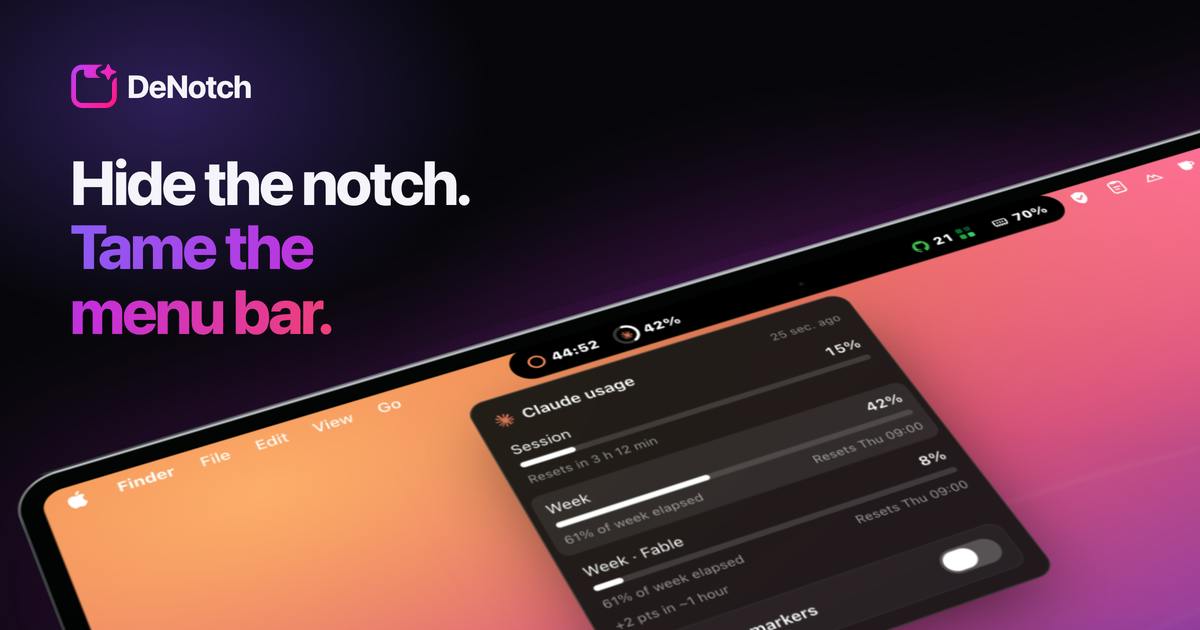
DeNotch hides the MacBook notch with a black bar and integrates menu bar management with capsule widgets.
DeNotch is a software tool for the MacBook notch display. Its core idea is to overlay a black horizontal bar over the notch so the gap visually disappears, without modifying wallpaper files, and it's compatible with dynamic and Aerial wallpapers. It also serves as a menu bar manager with collapse-and-hide, free arrangement, and conditional display. A capsule area next to the notch shows live widgets like CPU, battery, network, timer, now playing, GitHub notifications, and AI usage limits. Currently in free beta, it requires macOS 26 or later, with long-term pricing unannounced.
Title
DeNotch: Hide the MacBook Notch and Tame the Menu Bar
Meta Description
DeNotch is a Mac menu bar organizer that hides the MacBook notch with a black bar, supports dynamic and Aerial wallpapers without modifying files; it also offers icon collapsing, conditional display, and live widgets next to the notch. Free during beta, requires macOS 26 or later.
Article Content
The MacBook's notch display has been controversial since its debut—it cuts into the horizontal space of the menu bar while offering no interactive functionality. A new tool called DeNotch, spotted on Product Hunt, aims to turn this "eyesore" gap into a useful information panel through a software solution.
Covering the Notch with a Black Bar, Not Modifying Wallpapers
DeNotch's core approach is straightforward: overlay a black horizontal bar over the notch position so the gap visually disappears. This black bar works with any wallpaper, including dynamic wallpapers and Aerial aerial wallpapers, and the developers emphasize that it does not modify the user's wallpaper files—a bonus for users who care about system cleanliness.
Strictly speaking, this is a "visual trick" rather than a hardware-level solution. But in practice, once the black bar blends with the notch, the available menu bar space is visually reintegrated, and the notch is no longer an abrupt physical gap.
The macOS notch is a screen-top recess design Apple introduced starting with the 2021 MacBook Pro, housing the front camera and ambient light sensor. At the software level, the system uses APIs like
safeAreaInsetsto inform apps of the available area, but the menu bar itself is still split by the notch. Third-party tools typically use floating windows (settingNSWindow'slevelto.statusBaror higher) to cover the notch area, then simulate blending throughNSVisualEffectViewor solid-color layers—this is the technical basis for what DeNotch calls a "visual trick."Aerial wallpapers are a popular third-party dynamic wallpaper solution on macOS that ports Apple TV's aerial videos to the Mac and loops them on the screen saver or desktop. Because the content changes dynamically, the overlay must remain transparent or pure black to avoid conflicting with the image—this is why DeNotch emphasizes "Aerial compatibility."
Menu Bar Organization: Show Icons on Demand
Beyond covering the notch, DeNotch also plays the role of a menu bar manager. It offers several organization methods:
- Collapse and hide: tuck less-used icons behind a
⌄symbol to reduce menu bar clutter; - Free arrangement: allow users to drag icons to their preferred positions;
- Conditional display: show apps only in specific states, such as showing the VPN icon only when connected.
The third point is a fairly practical design. macOS's native menu bar management is limited, and third-party tools like Bartender have long dominated this niche market. DeNotch's differentiation lies in bundling menu bar organization with notch hiding in a single tool.
macOS menu bar icons (menu bar extras) are created by each app via
NSStatusItem. The system itself only supports drag-to-reorder while holding ⌘, with no official collapsing or conditional display API. As a result, third-party managers generally adopt a combination approach: "simulating clicks via the Accessibility API + hiding native icons + drawing a custom status bar." They first enumerate menu bar windows viaCGWindowListCopyWindowInfo, then send click events to target icons to collapse them, and finally redraw the icons in a self-built status bar window. Such approaches depend on system accessibility permissions and may break with each major macOS update due to changes in window layering or APIs—stability is a shared challenge for these tools.
Capsule Widgets Next to the Notch
DeNotch places a "capsule" area next to the notch for displaying live widgets. The officially listed widgets include CPU usage, battery, network status, timer, now-playing media, GitHub notifications, and AI usage limits.
Among these, the "AI usage limits" widget is worth noting—it suggests that a significant portion of the tool's target users are developers or creators who heavily use AI services. Placing system monitoring data like CPU and network alongside AI service usage in the same visual area is a combination that fits today's workflows.
Additionally, the official description mentions that a cat can be placed in the capsule. This is a nice little easter egg that doesn't affect functional judgment, but shows the developers aren't taking the product's tone too seriously.
"AI usage limits" typically refers to quota monitoring for API accounts such as OpenAI and Anthropic, e.g., token consumption, remaining credits, or rate limits. Such data is generally obtained through usage query interfaces provided by service providers and requires users to configure API keys or OAuth authorization. Juxtaposing these metrics with system monitoring like CPU and network reflects that, with the spread of AI-assisted programming (e.g., Cursor, Claude Code), developers' need for real-time visibility into "compute costs" is moving from backend dashboards to a persistent desktop area.
Pricing and Requirements
DeNotch is currently in beta and offered free, requiring macOS 26 or later. This system version threshold is relatively high, meaning it will forgo some users still on older macOS versions.
According to Product Hunt data, the product received 66 votes, ranking 17th, with only 1 comment. The small numbers indicate it's still in an early exposure phase.
Highlights and Potential Limitations
Combining notch hiding and menu bar management is DeNotch's product logic: users don't need to install two tools for two related needs. This approach makes sense, but it also raises an issue—menu bar managers are a mature and highly competitive category, with tools like Bartender and Ice having already established user habits. Whether DeNotch can leverage the added value of "notch hiding" to drive user migration remains to be seen, depending on its post-beta pricing strategy and stability.
The only explicitly stated information is "free during beta"; whether and how it will charge afterward is not yet specified. For users planning to rely on a menu bar management tool long-term, this is a risk worth weighing. Additionally, the macOS 26 requirement limits its scope of applicability.
One-line Summary
DeNotch hides the MacBook notch with a black bar and integrates menu bar management with capsule widgets.
Paragraph Summary
DeNotch is a software tool for the MacBook notch display. Its core idea is to overlay a black horizontal bar over the notch position so the gap visually disappears, without modifying the user's wallpaper files, and it's compatible with dynamic and Aerial wallpapers. It also serves as a menu bar manager, supporting collapse-and-hide, free arrangement, and conditional display (e.g., VPN appearing only when connected). A capsule area next to the notch can display live widgets such as CPU, battery, network, timer, now playing, GitHub notifications, and AI usage limits. The product is currently in beta, free, and requires macOS 26 or later, with long-term pricing not yet announced. Its differentiation lies in bundling notch hiding with menu bar management, but it must overcome the user-habit barriers of mature competitors like Bartender and Ice.
Related articles

Hero or Luck? Technical Reflections Sparked by an Arizona Grandfather Finding a Missing Toddler in the Desert
An Arizona grandfather finding a missing toddler in the desert hits Hacker News. This article analyzes emergency search, drone thermal imaging, child location devices, and community collaboration, exploring the boundaries of technology and human effort in extreme environments, while noting the material's limitations.

Run Agentic Coding on Mac with One Command: The Localcode Open-Source Tool
Localcode is an open-source agentic coding tool for Mac that launches with a single command. This article examines its local, open-source, minimal-install positioning, who it suits, and the information gaps to consider before adoption.

Lean Formalization of Masullo Manuscript: Progress Map Sparks Discussion
A public progress map for a Lean formalization project of Alessandro Masullo's manuscript sparks Hacker News discussion on formalization costs, collaboration, and AI-assisted proving.