Deploy an AI Subtitle Translation Platform with Docker: Supports GPT, DeepSeek, and 20+ Models

Open-source subtitle translation platform supporting 20+ LLMs and traditional APIs, deployable via Docker with bilingual export.
A Bilibili creator has open-sourced a self-hosted subtitle translation platform offering three engine types: free Google Translate, 20+ LLMs (GPT/DeepSeek), and traditional APIs (Tencent/Baidu/Youdao). Users can upload subtitle files, translate with one click, monitor real-time progress, edit lines individually, and export bilingual subtitles. Deployed via Docker Compose on port 5200, LLM translation offers superior quality but is slower due to line-by-line API calls. Mainland China VPS users should use SiliconFlow or local Ollama models to avoid network issues.
Subtitle translation is a constant need in video production and cross-language content distribution, yet most available tools either deliver mediocre translation quality or make it difficult to integrate custom large language models. A Bilibili creator has open-sourced a self-hosted subtitle translation platform centered around a streamlined workflow: upload a subtitle file, select an engine, translate with one click, and export bilingual subtitles — all while supporting 20+ LLMs and traditional translation APIs including GPT, DeepSeek, Tencent, and Baidu. This article covers the platform's core features and Docker deployment steps for anyone looking to build their own translation tool.
Three Translation Engine Types: LLMs, Traditional APIs, and Free Google Translate
The project organizes its translation engines into three categories, covering everything from free options to high-quality solutions.
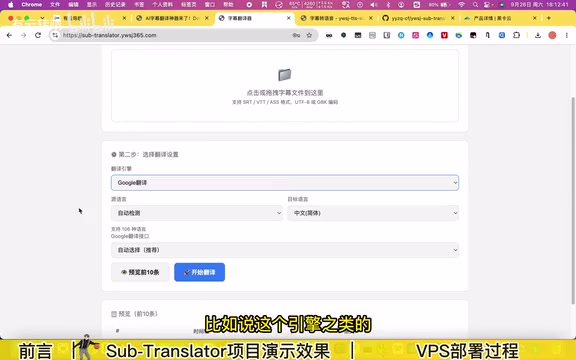
The first is Google Translate, which is free by default — no API configuration required, ready to use out of the box. It's ideal for scenarios where speed matters more than translation quality. In testing, the Google Translate engine completed an entire subtitle file line by line at a noticeably fast pace.
The second type is large language models, which the author recommends most highly. The platform supports a wide range of mainstream LLMs, including GPT and DeepSeekAd, as well as various models accessed through aggregator platforms like SiliconFlow. The setup process is straightforward: paste your API Key, click "Fetch Model List," select a specific model from the dropdown (e.g., DeepSeek V3), test the connection, and save.
The third type is traditional translation APIs, including Tencent Translate, Baidu Translate, and Youdao Translate, each requiring separate API configuration.
The author notes clearly that LLM-based translation produces noticeably better quality than traditional translation engines, at the cost of speed — the platform sends each subtitle line individually to the API and automatically fills the returned result back into the corresponding position.
SiliconFlow is a representative example of LLM aggregator platforms (API aggregators). It wraps multiple model providers' interfaces into a single OpenAI-compatible endpoint, allowing users to call DeepSeek, Qwen, GLM, and other domestic models on demand with a single API Key, billed by actual token usage. The value of such platforms is that developers don't need to register and manage separate keys for each model provider. Because the servers are hosted domestically in China, access from domestic VPS instances is stable and requires no VPN. For latency-sensitive, line-by-line API call scenarios like subtitle translation, using a domestically accessible aggregator platform significantly reduces the risk of network timeouts.
Full Workflow: From Upload and Translation to Online Editing and Bilingual Export
The platform's interface breaks the process into clear steps that minimize the learning curve.
Step one: upload your subtitle file. Step two: configure translation settings, including the engine, source language, and target language. Google Translate is the default, but you can switch to any configured LLM or traditional API.
During translation, a real-time progress indicator shows exactly which line is currently being processed — especially useful when handling subtitles for long videos.
The platform's online editing capability is particularly noteworthy. After translation, you can edit any line individually: if a translation is unsatisfactory, you can modify the source text to trigger a re-translation of just that line, or directly edit the already-translated result. This integrated "translate + proofread" design fits real-world editing workflows far better than simple bulk translation.
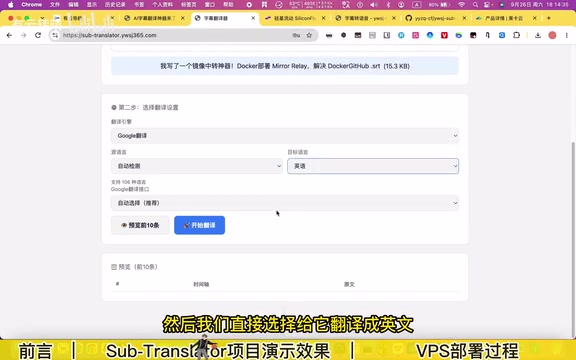
Export options include multiple formats: the default exports translation-only subtitles (e.g., English only), or you can choose bilingual subtitles with the option to set either the original or translated text on top. The exported bilingual subtitles can be imported directly into video editing software.
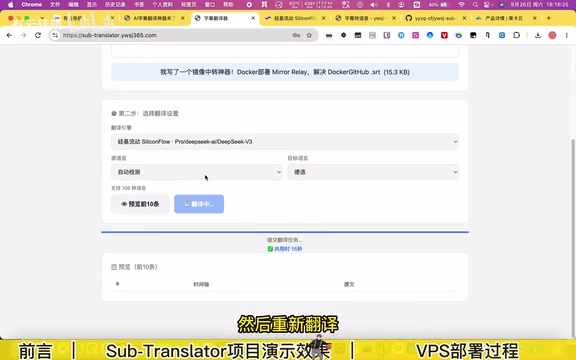
In the demo, the author translated Chinese subtitles into English using Google Translate, then used DeepSeek V3 to translate subtitles into German — verifying that different engines can be switched within the same platform.
One-Click Docker Deployment: Complete Steps from Server to Access
The project is packaged as a multi-platform image and can be deployed via Docker on different devices. The core steps are as follows:
Prerequisites
- A server: Since the platform needs to access various AI models, the author recommends a Hong Kong or other overseas server; the demo uses a US-based node.
- The project's GitHub URL: Visit the repository for details and to star the project.
- A domain name (optional): Bind one if needed.
- Docker environment: Can be set up using a one-click installation script.
Deployment Steps
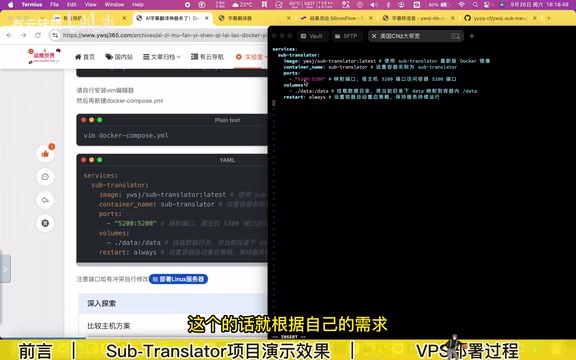
- Create a new Compose file, enter edit mode, and paste the Compose configuration;
- The port
5200on the left side can be changed as needed; leave everything else as default; - Save and exit, then run the command to start the container — this pulls and launches the image;
- Access the platform at
server-IP:5200, complete the initialization screen by setting a username and password, and deployment is done.
Once initialized, configure an LLM if you have one; otherwise set up a traditional translation API, or use the default free Google Translate. For domain binding, refer to the author's previous domain tutorial.
Notes for Mainland China VPS Deployment
The author specifically warns that the project runs normally on China mainland VPS instances, but with network restrictions. On domestic servers, it's recommended to use APIs accessible within China — such as domestic LLMs on aggregator platforms like SiliconFlow, or locally deployed Ollama models — all of which work fine. Services that rely on overseas networks may experience connection issues. This explains why the demo prioritizes overseas servers.
Ollama is an open-source local LLM runtime framework that supports running mainstream open-source models like Llama, Qwen, and Mistral on standard CPUs or consumer-grade GPUs, exposing a local HTTP interface compatible with the OpenAI format (default port 11434). The core advantage of combining Ollama with this project is fully offline operation, zero API costs, and freedom from network restrictions — whether on a mainland China server or a local machine, subtitle translation requests won't fail due to connection issues as long as the local Ollama address is reachable. The trade-off is that local inference speed is limited by hardware performance, and translation will be noticeably slower than cloud APIs when VRAM or RAM is insufficient.
Docker Compose is Docker's official multi-container orchestration tool. It uses a YAML-format compose.yml file to declare all service images, port mappings, environment variables, and mounted volumes, then completes image pulling, network creation, and container startup with a single docker compose up -d command. Compared to manually running docker run with numerous parameters, Compose files can be version-controlled, rebuilt at any time, and easily migrated between servers. For this project, modifying the port number in the Compose file (e.g., changing 5200 to another value) is the only parameter that needs adjustment — everything else can remain at default for a successful deployment.
Use Cases and Limitations
This tool has a clear target audience: video creators and users who need to process subtitles in bulk, providing a self-hostable subtitle translation platform that supports custom LLM integration and manual proofreading. The author's previously released subtitle generation project (which converts audio/video to subtitles) pairs with this one to form a complete "transcription → translation" pipeline.
Based on the public demo, its strengths lie in flexible engine selection, bilingual export support, and online editing. Its limitations include LLM translation speed being constrained by line-by-line API calls, and overseas model usage requiring appropriate server network environments. For users already working with DeepSeek, GPT, or similar APIs, using their own quota for high-quality subtitle translation is a cost-controllable, private solution.
Related articles

Felix Rieseberg Personal Homepage
Felix Rieseberg's personal homepage sparks attention on Hacker News. This article covers the Slack engineer's technical background, the rise and fall of nativefier, and the value of a developer homepage as a tech calling card.

@ai-sdk/vue 3.0.306 Patch Release Syncs with [email protected] Update
@ai-sdk/vue 3.0.306 released, synced with [email protected]. A routine patch release for the Vercel AI SDK ecosystem with no public API changes; the Vue adapter layer stays version-aligned with the core package.

Gemini 4 Argon API Launches: The Era of Million-Token Output Begins
Google launches Gemini 4 Argon with sparse MoE architecture, up to 1M output tokens, and a 68.90% Vals Index score, available across API, AI Studio, and the Gemini app.