Deploying Dify: A Hands-On Guide to Building AI Agents and Workflows from Scratch

Deploy Dify 1.8.0 with just two steps: rename .env and run one Docker command.
Dify is an AI application development platform supporting five app types: Chatbot, Agent, Text Generation, Workflow, and Chatflow. Version 1.8.0 dramatically simplifies deployment — just rename `.env.example` to `.env` and run `docker compose up -d` to launch all services. The full image set is around 5–6 GB, and switching to a domestic mirror source speeds things up significantly. Workflow handles general task automation while Chatflow is optimized for multi-turn conversations. Beginners are advised to start with basic app types before progressing to node-based orchestration.
What Is Dify?
Dify is an AI application development platform whose core value lies in enabling developers to build AI applications quickly. Compared to the previously popular Coze, Dify supports a richer set of application types. While Coze primarily offers two formats — Agent and AI applications with a built-in UI — Dify supports five application types: Chatbot, Agent, Text Generation (all beginner-friendly), plus Workflow and Chatflow as advanced modes.
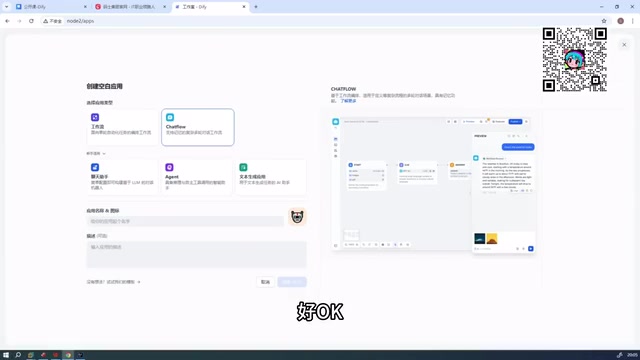
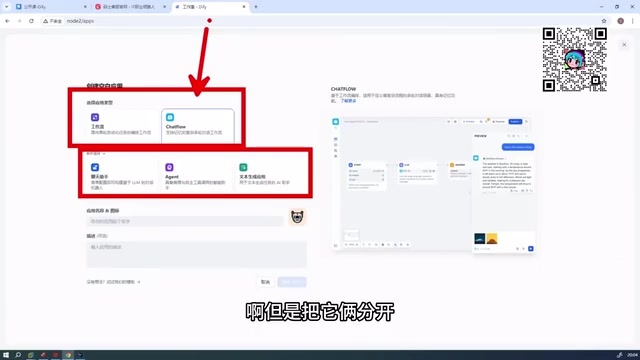
It's worth clarifying the relationship between Workflow and Chatflow. Both fundamentally belong to the workflow category, but Dify separates them based on use case differences. Simply put, Chatflow is oriented toward conversational flow orchestration, while Workflow is better suited for general-purpose task automation. This distinction will directly influence your technical decisions when building applications.
Workflow, in the context of AI application development, refers to chaining multiple processing steps together as a node graph, where data flows between nodes according to predefined logic and produces a final output. Each node can represent an independent operation such as an LLM call, conditional branching, code execution, or knowledge base retrieval. Compared to calling a single large model directly, workflows can handle complex tasks requiring multi-step reasoning, multi-source data integration, or business logic branching. Chatflow is the conversational-enhanced version of Workflow — in addition to node orchestration, it supports multi-turn conversation memory, user input collection, and other dialogue management features, making it ideal for building context-aware intelligent customer service agents or Q&A assistants. The fundamental distinction between the two is whether conversation state needs to be maintained.
Why Choose Dify Over Similar Foreign Tools
When selecting tools for enterprise-level AI application development, platforms like Dify, Coze, RAGFlow, and N8N each have their own positioning. Based on practical experience from domestic teams, Dify stands out in terms of feature completeness and user-friendliness. Compared to similar foreign platforms, these Chinese-developed tools have matured significantly in both functionality and ease of use.
To be objective, such recommendations carry personal bias from hands-on experience. Dify's main advantages include: out-of-the-box local deployment capability, good adaptation for Chinese-language scenarios, and a visual workflow orchestration interface. For teams looking to rapidly validate AI application ideas, platforms like this can significantly lower the development barrier.
Deploying the New Version of Dify
This guide is based on Dify version 1.8.0. Compared to older versions, the new deployment process has been greatly simplified, eliminating the need for tedious environment configuration steps.
Extracting and Configuring the Environment
First, extract the downloaded Dify archive, then use the command line to cd into the Dify directory. The key step is navigating into the docker subdirectory — there you'll find a file named .env.example, which needs to be renamed to .env.
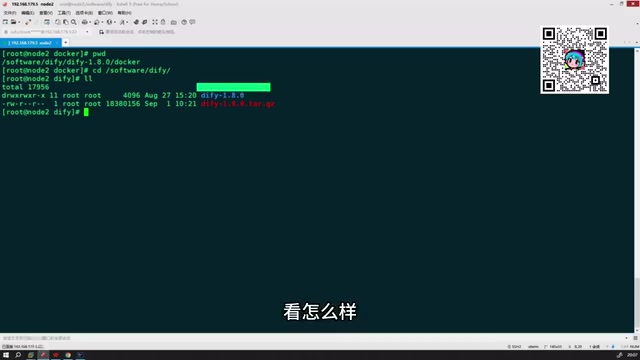
This step represents an important difference between old and new versions. In older versions, you had to perform extensive additional environment variable configuration before starting; in version 1.8.0, the .env file comes pre-configured with all the required environment variables and requires virtually no modifications. This dramatically reduces the chance of running into issues for first-time users.
Starting the Containers
Once configured, run docker compose up -d inside the docker directory to bring up all Dify services with a single command. The full image set is approximately 5–6 GB, so 10 GB of disk space is more than sufficient.
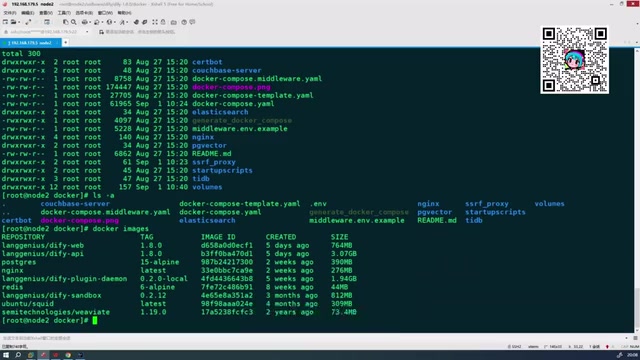
The new version shows a notable improvement in download speed — after switching to a domestic mirror source, all images can be pulled and services started in a short time. More importantly, the new version fixes many bugs present in older versions, offering overall better stability — though a few minor issues may still come up in practice.
Docker Compose is Docker's official multi-container orchestration tool, allowing you to define, start, and manage multiple interdependent container services through a single YAML configuration file. Dify uses this architecture because it is composed of multiple microservices — typically including a Web frontend, API service, Worker async task processor, database (PostgreSQL), cache (Redis), and a vector database (Weaviate or Qdrant). The
-dflag indocker compose up -dstands for detached mode, meaning all containers run in the background without occupying the current terminal session. Accessing Docker Hub directly from mainland China can be slow; configuring a domestic mirror accelerator (such as those provided by Alibaba Cloud or Tencent Cloud) can multiply pull speeds significantly.
Accessing the Dify Dashboard and Creating Applications
Once the services are running, navigate to your deployment node's address to access the login screen. The new version's interface layout is consistent with older versions, featuring core modules at the top: Explore, Studio, Knowledge Base, and Tools.
Studio is the primary area for day-to-day use. Click "Create Blank App" here to see all five application types Dify supports. One UI improvement in the new version: beginner-level application types are collapsed by default, with Workflow and Chatflow prominently featured to guide users toward more professional application-building paths.
Setup Recommendations and Things to Watch Out For
For users new to Dify, a gradual learning path is recommended: start with beginner-level applications (such as Chatbot or Text Generation) to get familiar with the platform's basic interactions and understand foundational concepts like prompt engineering and model configuration. Then progress to Workflow and Chatflow to learn advanced skills like node orchestration, knowledge base integration, and Agent capability integration.
On the deployment side, remember two key actions: rename the .env file, and run docker compose up -d. Get these two steps right, and deploying the new version of Dify will be almost obstacle-free. If image downloads are slow, switching to a domestic mirror source is the most effective solution.
As a mature AI application development platform, Dify's value lies in integrating model invocation, knowledge bases, Agents, and workflows into a unified interface — enabling even non-expert developers to build usable AI products. Mastering deployment is just the starting point; real skill growth comes from iterative building and tuning within concrete business scenarios.
Related articles

Felix Rieseberg Personal Homepage
Felix Rieseberg's personal homepage sparks attention on Hacker News. This article covers the Slack engineer's technical background, the rise and fall of nativefier, and the value of a developer homepage as a tech calling card.

@ai-sdk/vue 3.0.306 Patch Release Syncs with [email protected] Update
@ai-sdk/vue 3.0.306 released, synced with [email protected]. A routine patch release for the Vercel AI SDK ecosystem with no public API changes; the Vue adapter layer stays version-aligned with the core package.

Gemini 4 Argon API Launches: The Era of Million-Token Output Begins
Google launches Gemini 4 Argon with sparse MoE architecture, up to 1M output tokens, and a 68.90% Vals Index score, available across API, AI Studio, and the Gemini app.