Deskcord.chat: Turn Discord Into Your Customer Support Workstation

Deskcord turns Discord threads into a customer support workstation for small teams with zero migration cost.
Deskcord.chat is a lightweight support tool for indie developers and small teams that bridges a website chat widget with Discord — every visitor conversation automatically becomes a dedicated thread in your Discord server. It offers 5-minute setup, unlimited seats, and unlimited domains, standing in sharp contrast to the per-seat pricing of Intercom and Zendesk. Rather than chasing feature completeness, it focuses on one specific scenario: letting teams that already live in Discord handle customer conversations without ever switching to a separate dashboard. Its limitations are equally clear — deep Discord dependency means exposure to platform stability and compliance risks, making it a poor fit for larger teams needing complex ticket workflows or multi-channel integration.
Is Using Discord for Customer Support Actually a Good Idea?
For many indie developers and small teams, customer support tooling has always been a bit of an awkward problem. Mature products like Intercom, Zendesk, and Crisp are powerful, but their subscription pricing isn't exactly startup-friendly — and they're often so bloated that you end up using less than half of what you're paying for. Deskcord.chat has a clear angle: since so many developers and founders already live inside Discord every day, why not bring the customer support system directly into Discord?
The tool recently launched on Product Hunt, earning 69 upvotes and 11 comments to land at #9 for the day. It was built by indie maker Maxime Bertonnier and is categorized under Messaging, SaaS, and Bots.
The Core Mechanic: Every Conversation Becomes a Discord Thread
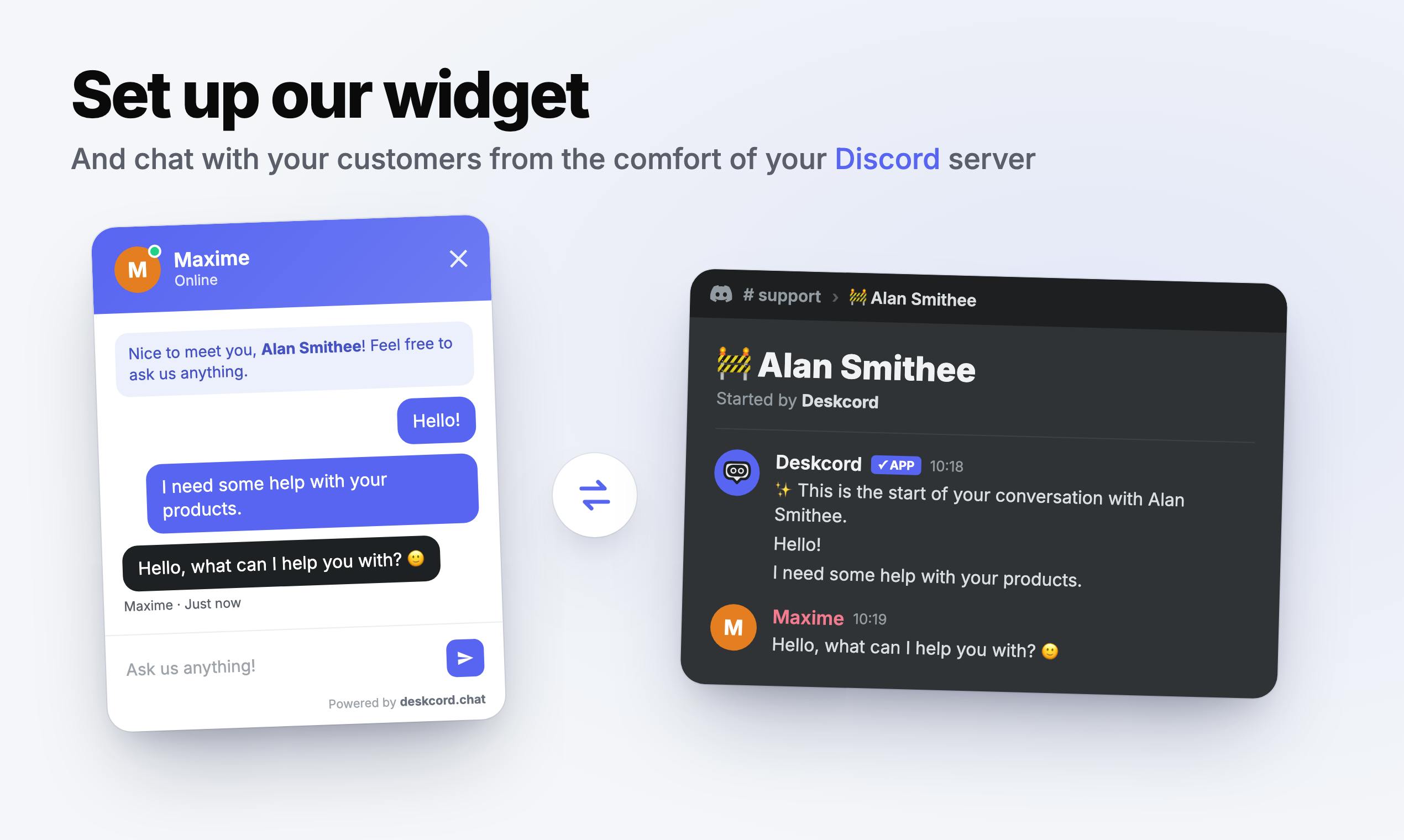
Deskcord's logic is refreshingly simple: you embed a chat widget on your website, visitors use it to reach out, and every conversation automatically becomes a separate thread inside your Discord server.
This means you never have to switch to another support dashboard — all customer communication funnels into the Discord workflow you already know. For small teams that already use Discord as their communication hub, that "zero migration cost" experience is genuinely compelling. Customer messages and internal team discussions live in the same environment, which makes for faster responses and better context continuity.
The official claim is that embedding takes just 5 minutes, emphasizing an extremely low barrier to entry. For solo founders without dedicated ops staff who just want something up and running fast, this "works out of the box" positioning hits a real pain point.
Discord's Thread feature was originally designed to spin up independent sub-conversations within a channel, keeping multiple topics from getting tangled together. Each thread has its own message history, members can be notified or join voluntarily, and threads can be archived once resolved. Deskcord leverages this native structure by mapping each visitor's support session to a thread — naturally achieving conversation isolation and history tracking without building any external database. It also means the team can @mention teammates, paste screenshots, and discuss resolution steps right inside the thread, collapsing collaboration and response into one place. Traditional support tools typically require bouncing between a "ticket view" and some internal communication channel.
Pricing Strategy: Unlimited Seats, Unlimited Domains
Deskcord makes a clear differentiating bet on its business model: unlimited seats and unlimited domains.
This stands in sharp contrast to the per-seat pricing that traditional support tools use. Intercom, Zendesk, and their peers tend to get expensive fast as team size and usage grow — which is exactly the headache small teams dread most. Deskcord explicitly positions itself as "an alternative to the giants," targeting users who find mainstream tools bloated and overpriced.
For indie projects on a tight budget, not having to pay extra every time you add a team member or a new site removes a real psychological and financial burden.
The "per-seat billing" model in traditional support SaaS traces back to the call center era — each seat corresponded to a login account and a concurrent line, with costs directly tied to headcount. Intercom's base plans typically start at tens of dollars per month, and it's not unusual to see monthly bills climb past several hundred dollars once you stack on feature modules and seats. Zendesk's Suite plans are similarly seat-based, with the entry tier running around $55 per seat per month. For a two- or three-person startup that only needs basic live chat, you're often forced to pay for an entire bloated feature matrix. Deskcord sidesteps this pricing logic entirely — and it can do so because it offloads storage, notifications, and member management to Discord as infrastructure. With marginal costs that low, the "unlimited seats" promise is actually commercially sustainable.
Who It's For — and Who It Isn't
Deskcord's target user is clearly defined: indie developers and small teams. Its strengths are being lightweight, affordable, and deeply integrated with Discord.
But it's worth being clear-eyed about its limits. Tying your support workflow to Discord is both an advantage and a constraint — if your team isn't Discord-centric, or if your customers are more comfortable with email and ticketing systems, the value proposition weakens considerably. Discord is also a third-party platform, and its stability, compliance posture, and data management capabilities don't match those of a dedicated support SaaS. For mid-to-large teams that need complex ticket routing, SLA management, or multi-channel integration, mature tools are still the better fit.
In other words, Deskcord isn't trying to replace all of Intercom's functionality. It's serving a niche that mainstream products have largely overlooked: founders who are still small, budget-constrained, and already living inside Discord.
The Survival Logic of Small, Focused Tools
Deskcord represents a pattern that's become increasingly common among indie developer products in recent years: don't chase breadth, find a specific scenario, and solve it with the least friction possible. It doesn't try to reinvent support software — it cleverly borrows Discord, an already-mature community and collaboration platform, and turns Discord's native "chat widget + thread management" capabilities directly into a support workflow.
This strategy of "parasitizing" an established platform lets a one-person team ship something genuinely usable, fast. Whether it has long-term staying power depends on whether it can keep iterating on feature depth, customer data exports, and data ownership — and whether it can avoid being trivially copied. But as a lightweight support solution aimed at small teams, its positioning and execution are both sharp.
Building on top of established platforms — often called a Platform-dependent or Integration-first strategy — is a common way for indie developers to keep R&D costs under control. Similar examples include project management tools built on Notion, automation bots built for Slack, and the many vertical SaaS products built on top of Stripe or Shopify's ecosystems. The core risk of this approach is platform dependency: if Discord changes its API policy, restricts bot permissions, or modifies how threads work, core product functionality could take a direct hit. Reddit's decision to dramatically raise API fees in 2023 — which killed off a wave of third-party clients — is the canonical warning story here. The long-term sustainability of this path often comes down to whether the developer can build up independent user data assets and switching costs that exist outside the platform ecosystem.
Related articles

Chain of Thought Isn't Just for AI: How Humans Can Use CoT to Improve Thinking Quality
Chain of Thought isn't just a prompt trick for large models. Starting from a Hacker News discussion, this article analyzes why CoT works for human thinking too, breaks down actionable ways to transfer it, and highlights the key differences between human CoT and machine CoT.
Cloudflare Teams Up with OpenAI: Closi…
Cloudflare Teams Up with OpenAI: Closing the Loop from Vulnerability Discovery to Defense with AI
Cloudflare uses OpenAI Daybreak to investigate security vulnerabilities and generate reviewable remediation plans, while developers use Codex to boost coding efficiency and quality.

Orca Multi-Agent Orchestration in Practice: A Guide to Parallel Collaboration with Claude and Codex
Orca is Stable AI's free open-source agent workbench supporting 34 agents like Claude Code and Codex in parallel. Learn its Git worktree isolation, multi-model orchestration, and mobile management.