Desktop Commander MCP: Letting AI Agents Safely Take Over Your Desktop

Desktop Commander MCP solves local AI agent integration with a standardized MCP middle layer and secure sandbox execution.
Running AI agents on local files and system commands has long relied on fragile glue code that crashes the moment context is lost. Desktop Commander MCP takes a decoupled middle-layer approach: built on Anthropic's MCP standard, it consolidates routing and state management into a purpose-built component so developers stop reinventing the wheel. Since agents executing system commands carry high privileges, the tool constrains their execution scope within a strictly isolated sandbox — granting capability while preventing runaway behavior. It demonstrates what local agent integration should look like: standardized protocols replacing ad-hoc scripts, with sandboxing to contain security risk.
When AI Agents Need to Operate on Local Systems, Where Does It Break Down?
Letting AI agents read files and execute system commands sounds straightforward — but the real pain points are consistently underestimated. According to the open-source project Desktop Commander MCP, introduced in a YouTube Shorts video, the core tension is this: nobody wants to debug 500 lines of glue code just to let an agent read a single file.
The bigger headache is the lack of observability throughout the process — you're forced to manually track what the agent is doing, and the moment context is lost, the entire script crashes. This kind of problem shows up repeatedly in local agent workflows and is exactly the trap you fall into when rolling your own integration.
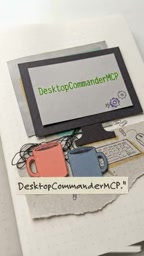
Why Not Just Build It Yourself?
"Why not just write it myself?" — that's the most natural reaction to any new tool. But building your own integration means owning every edge case: routing logic, error recovery, context management. The video's answer is blunt — one context drop and the script crashes. That fragility is the unavoidable cost of homegrown solutions.
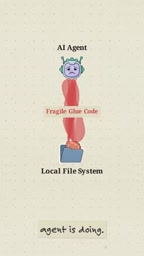
Desktop Commander MCP's Approach: A Decoupled Middle Layer
Desktop Commander MCP positions itself as a decoupled middle layer. Rather than forcing integration logic into the agent itself, it specifically handles the complex routing in local agent workflows — so developers don't have to reinvent the wheel.
This architectural thinking aligns with the original design intent of MCP (Model Context Protocol): use a standardized protocol layer to decouple the "agent" from the "local resources it needs to operate on." The agent simply issues requests according to the protocol, while the middle layer handles routing, execution, and state management. This way, the complexity of context management and command dispatching is consolidated into a purpose-built component, rather than scattered across a pile of ad-hoc scripts.
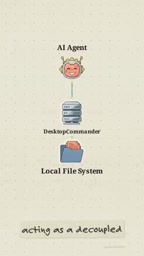
More Than Just Fewer Lines of Code
Offloading routing and integration logic to a mature middle layer saves more than those 500 lines of glue code — more importantly, it reduces maintenance burden and surface area for bugs. For developers looking to quickly build local agent workflows, this means focusing energy on business logic rather than repeatedly wrestling with low-level file I/O and command execution details.
MCP (Model Context Protocol) is an open protocol standard introduced by Anthropic in late 2024, designed to define a unified interface for interactions between AI models and external tools or data sources. Before MCP, every AI application that needed to access a local filesystem, database, or third-party service required developers to write custom integration code — non-standardized and difficult to reuse. MCP standardizes this process: tool providers implement an MCP Server, while the AI model (or its host application) acts as an MCP Client, communicating through a normalized message format. This design allows a single MCP Server to be called by any MCP-compatible AI client. Desktop Commander MCP is one concrete implementation of such a server, dedicated specifically to desktop and local system operations.
High Privileges Mean High Risk: A Security Sandbox Is Non-Negotiable
An agent capable of executing system commands inherently carries high privileges — and with that comes serious security concerns. The video makes this explicit: you need a tightly restricted virtual cage for the agent.
Desktop Commander MCP's answer is to execute system commands safely within an isolated environment. In other words, the agent does have the ability to operate on the system, but those capabilities are constrained within a controlled sandbox. This is a question any tool that lets AI take over a desktop must directly answer: how do you grant capability while preventing runaway behavior from causing real damage?
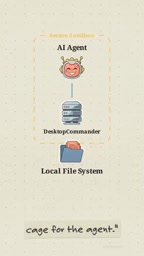
Balancing Capability and Constraint
Letting an AI agent control the desktop is fundamentally about finding the right balance between capability and constraint. Too little permission and the tool is useless; too much and the risk spirals out of control. The value of an isolated sandbox is precisely this: provide sufficient operational capability to the outside, while locking the execution scope within a safe boundary on the inside. This is also a dimension worth prioritizing when evaluating any local agent tool.
A sandbox is a security mechanism that restricts program execution to an isolated environment, preventing the sandboxed process from directly accessing sensitive resources on the host system or performing unauthorized operations. In the context of local AI agents, sandboxing can be implemented through OS-level process permission restrictions (such as Linux seccomp/namespace isolation), containerization (such as Docker), or application-layer path whitelists and command blacklists. Different approaches involve trade-offs between isolation strength and ease of use — container-based solutions offer thorough isolation but higher deployment costs, while application-layer whitelists are more flexible but depend heavily on implementation quality. When evaluating tools like Desktop Commander MCP, understanding exactly which sandboxing mechanism is used is the key to determining whether its security boundaries are trustworthy.
Conclusion
As a quick recommendation for an open-source AI tool, Desktop Commander MCP demonstrates what local agent integration should look like: replace fragile homegrown glue code with a standardized MCP middle layer, and contain the security risks of high-privilege execution within an isolated sandbox. For developers exploring local AI agent workflows, this is an open-source direction worth keeping an eye on.
One caveat: the information in this article is sourced from a short-form video introduction. For specific implementation details, performance characteristics, and the actual strength of sandbox isolation, it's worth consulting the project's GitHub repository documentation before making your own assessment.
Related articles

Felix Rieseberg Personal Homepage
Felix Rieseberg's personal homepage sparks attention on Hacker News. This article covers the Slack engineer's technical background, the rise and fall of nativefier, and the value of a developer homepage as a tech calling card.

@ai-sdk/vue 3.0.306 Patch Release Syncs with [email protected] Update
@ai-sdk/vue 3.0.306 released, synced with [email protected]. A routine patch release for the Vercel AI SDK ecosystem with no public API changes; the Vue adapter layer stays version-aligned with the core package.

Gemini 4 Argon API Launches: The Era of Million-Token Output Begins
Google launches Gemini 4 Argon with sparse MoE architecture, up to 1M output tokens, and a 68.90% Vals Index score, available across API, AI Studio, and the Gemini app.