Devin, Cursor, and Codex Cloud: A Deep Dive into Cloud Agent Architecture

Cloud agent architecture breakdown: agents run outside sandboxes, communicating with in-sandbox tools via Pub/Sub for secure isolation and real-time interaction.
Based on an architecture diagram, this article dissects the underlying logic of cloud agent platforms like Devin, Cursor Cloud, and Codex Cloud. Core designs include: GitHub App organization-level authorization with 1-hour installation tokens in sandboxes; independent Docker container sandboxes per session running code, dev servers, browsers, Code Server, and LSP; Agent Loop outside the sandbox communicating via Pub/Sub tool and result queues; and frontend WebSocket direct connections for real-time IDE and browser views. It also contrasts with Lovable and notes that V1 is manageable but scaling poses challenges.
Cloud agents are reshaping how developers work. Platforms like Devin, Cursor Cloud, and Codex Cloud let you direct an AI engineer to complete coding tasks right from your browser—but have you ever wondered how they actually work under the hood? A YouTube tech creator broke down the design logic of these systems with a complete architecture diagram, covering everything from GitHub authorization to sandbox isolation, and the communication mechanisms between the agent and the sandbox.
What Exactly Is a Cloud Agent
According to the video's analysis, cloud agents are essentially an advanced form of Lovable. Lovable offers React templates and limited frontend deployment capabilities, while Devin, Cursor Cloud, and Codex Cloud are designed for any repository, any tech stack, and can even handle backend projects.
Their shared characteristic is this: users don't need to manage any VMs or backend infrastructure. The platform handles the agent runtime environment for you, and all you need to do is interact through the UI. The video creator defines this as a "Cloud Agent"—you can either run the agent locally via CLI or throw it onto a cloud VM.
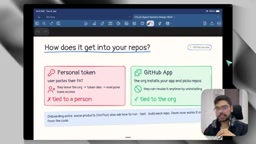
GitHub Integration: Why You Must Use a GitHub App Instead of a PAT
The first step in building a cloud agent platform is solving the GitHub authorization problem. Users need to grant the agent access to their repositories so it can clone code, commit changes, and open PRs.
The video compares two approaches in detail: Personal Access Token (PAT) and GitHub App. The problem with PATs is that they're tied to individual accounts—if the employee who created the token leaves the company, the entire organization's agent connection breaks and needs to be reconfigured. This is fatal in multi-person collaboration scenarios.
A GitHub App is an organization-level solution. The entire organization installs the app and selects which repositories to authorize, without depending on any individual account. When creating a GitHub App, the platform provides a callback URL, and all events are pushed to this URL, from which the backend stores repository access information.
This isn't an optional choice—it's a baseline requirement for production environments.
PAT (Personal Access Token) is a personal access credential provided by GitHub that users can manually generate in settings, granting read/write access to specific repositories or the entire account. PATs are tightly bound to the individual account that created them, with customizable expiration periods, but they essentially represent that user's identity. In cloud agent scenarios, if the platform requires users to provide a PAT to access repositories, then once that user leaves, their account is disabled, or the token is accidentally revoked, all automated processes depending on that token will be interrupted. More critically, PATs typically have overly broad permission scopes (such as full repo access), making it difficult to fine-tune access to individual repositories, and they lack organization-level auditing and revocation mechanisms—an unacceptable risk in multi-member, multi-repository enterprise environments.
GitHub App is GitHub's official solution designed for organization-level integrations. It doesn't belong to any individual account but exists as an independent entity that can be installed by organization owners who select which repositories to authorize. GitHub Apps sign JWTs with a private key, then exchange them for short-lived installation tokens to perform operations, with permission granularity precise down to individual repositories and specific APIs. When an employee leaves, the organization's GitHub App installation is unaffected, and the agent service remains available. Additionally, GitHub Apps support webhook event push, allowing the platform to sense repository installations, changes, and other events in real time for automated management. Therefore, for cloud agent platforms serving teams and enterprises, GitHub App is the only authorization method that meets production-grade security and stability requirements.
Installation Flow and Token Management
The user's installation path is straightforward: click the "Connect GitHub" button, select repositories, authorize, done. The backend receives the GitHub App creation event through the callback URL, writes the relevant information to the database, and gains repository access.
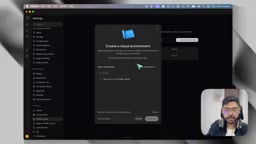
Next comes an easily overlooked but crucial detail: what token is used inside the sandbox to clone repositories?
The answer is an installation token, not the GitHub App's private key. The private key never enters the sandbox environment—because any user who logs into the sandbox can read environment variables through the terminal. If the private key leaks, departed employees could still maintain access to repositories.
The specific approach is: the backend holds the private key generated by the GitHub App, uses it to sign a JWT, then exchanges it for an installation token. This token is valid for only one hour and only applies to specified repositories. The sandbox uses this temporary token to complete clones and other Git operations, and it auto-refreshes after an hour. This is the current best practice.
JWT (JSON Web Token) is an open standard (RFC 7519) token format used to securely transmit claims between parties. In the GitHub App authentication flow, the backend uses the app's private key to sign the JWT, which contains information such as the issuer (App ID), issuance time, and expiration time. GitHub verifies the signature upon receiving the JWT, confirming the request comes from a legitimate app. JWTs typically have very short validity periods (no more than 10 minutes) and are used only for the step of exchanging for an installation token—they are never used directly for repository operations.
Installation Token is a temporary access token obtained through JWT exchange after a GitHub App is installed on a specific organization or user account. Its core characteristics are: strictly limited to a 1-hour validity period, permission scope limited only to the repositories authorized by that installation, and further reducible to specific API permissions (such as read-only or write). In cloud agent architecture, the backend manages the private key and JWT signing, while the sandbox environment only receives the installation token. Even if the sandbox is compromised by a malicious user, the leaked token can only access limited repositories and automatically expires after one hour. This layered token design achieves minimal permission exposure and is widely recognized as the industry's best practice.
Task Execution: One Sandbox Per Session
When you assign a task to the agent, the platform spins up a brand-new sandbox environment for that session. Most platforms use Docker containers, while some allocate full VMs.
According to the video creator's demonstration, in Codex Cloud, each chat thread corresponds to an independent Docker container. This container is responsible for cloning the repository, injecting tokens, and running the agent. The environment is brand new and completely isolated from previous sessions.
While the agent is running, you can see its operations in the UI, but the actual execution happens on a cloud VM, not on your local machine.
Core Architecture: The Agent Runs Outside the Sandbox
This is the most counterintuitive aspect of the entire system design: the Agent Loop does not run inside the sandbox.
The overall architecture consists of four key components: frontend, backend, agent, and sandbox. The frontend connects to the backend via WebSocket. After the user submits a task, the backend does two things simultaneously—creates the sandbox and sends the task to the agent. The agent and sandbox are separate.
The agent is essentially an LLM plus a toolset. It operates the sandbox through tool calls rather than running directly inside it. This separation design decouples the agent's lifecycle from the sandbox's lifecycle.
What runs inside the sandbox includes: code and dependencies (npm install, pip install, etc.), development server, browser (streamed to the frontend as video via WebSocket), Code Server (VS Code in the browser), and LSP (Language Server Protocol, providing type definitions and go-to-definition functionality).
LSP (Language Server Protocol) is an open protocol led by Microsoft for standardizing communication between code editors and language servers. Language servers provide intelligent features like code completion, go-to-definition, error diagnostics, and refactoring, while editors only need to implement an LSP client to support any language. In cloud agent sandboxes, the LSP service runs inside the container, providing real-time code intelligence to Code Server (VS Code in the browser). When the agent modifies files through tools, LSP re-analyzes the code and updates diagnostic information, ensuring the code state seen by both the agent and the user remains consistent. Including LSP in the sandbox toolset means the agent can not only execute commands but also gain code understanding nearly equivalent to local development, making it more reliable in complex refactoring, type checking, and similar tasks.
Pub/Sub Communication: The Bridge Between Agent and Sandbox
The agent is outside the sandbox, the tools are inside the sandbox—how do they communicate?
The video's solution is a Pub/Sub mechanism with a tool queue and a result queue. The agent publishes tool call requests to the queue, the sandbox subscribes to this queue and executes them one by one, then pushes execution results back to the result queue, from which the agent retrieves feedback.
This Pub/Sub has three subscribers: the sandbox (executing tool calls), the backend (displaying agent operations to the frontend), and the database (persisting operation records).
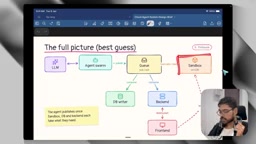
In addition to getting agent status through the backend, the frontend also connects directly to the sandbox via WebSocket. This direct channel serves two purposes: viewing the code editing interface in Code Server, and watching the real-time display of the browser running inside the sandbox.
Pub/Sub (Publish/Subscribe) is a messaging pattern where senders (publishers) send messages to topics or queues, and receivers (subscribers) asynchronously receive messages by subscribing, without either party needing to know the other exists. In cloud agent architecture, the tool call queue and result queue form a bidirectional Pub/Sub channel. The agent, as a publisher, writes tool call requests (such as "execute bash command ls -la") to the tool queue, and the sandbox, as a subscriber, consumes these requests and executes them, then writes execution results to the result queue, which the agent then reads as a subscriber. This asynchronous decoupling brings multiple benefits: the agent and sandbox can scale and tolerate faults independently, the message queue naturally provides buffering and retry capabilities, and multiple subscribers (backend, database) can process the same message in parallel for frontend display and history records without interfering with the main execution flow.
Tool Ecosystem: From Bash to Browser
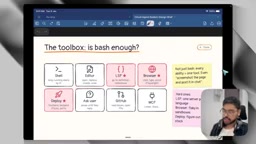
The tools the agent can invoke go far beyond bash shell. The toolset listed in the video includes:
- Bash tool: Execute shell commands, create, delete, edit, and read files
- Code editor: Standalone file editing tool independent of bash
- Code Server: Full VS Code experience in the browser
- LSP: Provides code type hints and go-to-definition
- Browser: Runs in the sandbox, with display streamed to the frontend
- GitHub connection: Performs Git operations
- Ask User: The agent asks the user questions when uncertain
- Deployment tool: Deploys applications to platforms like fly.io
- MCP Server: Optional extension tools
For developers wanting to build a V1 version, the video recommends prioritizing the bash tool, code editor/Code Server, GitHub connection, and ask user tool. Browser and deployment features can be iterated on later—integrating a browser into a Docker container is quite complex.
The Essential Difference from Lovable
Lovable and cloud agents share similar foundational patterns, but the complexity gap is significant. Lovable is limited to React frontend templates, deployed to static CDNs, without a complete file system or IDE experience. Users can only chat on the left and see a preview on the right.
Cloud agents are designed for any repository and tech stack, support backend project deployment, provide a true VS Code experience (rather than a custom-built UI), and integrate a large number of tools including LSP and browser. This isn't a difference in quantity—it's a qualitative leap in capability boundaries.
The video creator also mentions that "always alive" type agents like CrockBot, OpenAI Dots, and Muse Agent have different architectures—they feature persistent personalities and continuous operation characteristics that deserve separate discussion.
The Difficulty Divide Between Building and Scaling
The video's conclusion is pragmatic: building a V1 version of a cloud agent platform following this architecture isn't very difficult—it could even serve as an interview project or practice challenge. The real challenge lies in scaling—when concurrent session counts, repository numbers, and tool call frequencies rise, sandbox scheduling, queue throughput, token refreshing, and cost control all become bottlenecks.
The core idea of this architecture can be condensed into one sentence: the agent is outside the sandbox, the tools are inside the sandbox, the two are decoupled through a message queue, and the frontend connects directly to the sandbox via WebSocket for real-time views. Once you understand this, the black box of cloud agents is opened.
One-line Summary
Cloud agent architecture breakdown: the agent runs outside the sandbox, communicating with in-sandbox tools via Pub/Sub for secure isolation and real-time interaction.
Paragraph Summary
Based on an architecture diagram, this article takes a deep dive into the underlying operational logic of cloud agent platforms like Devin, Cursor Cloud, and Codex Cloud. Core design elements include: using GitHub Apps rather than PATs for organization-level authorization, with sandboxes using only 1-hour installation tokens; each session spinning up an independent Docker container sandbox running code, a development server, browser, Code Server, and LSP; the Agent Loop running outside the sandbox, communicating with it through a Pub/Sub mechanism of tool queues and result queues for lifecycle decoupling; and the frontend connecting directly to the sandbox via WebSocket for real-time IDE and browser views. The article also contrasts the essential differences from Lovable, noting that building a V1 version is manageable in difficulty, but scaling faces challenges in scheduling, throughput, and token refreshing.
Related articles

How Big Can Stars Really Get? The Physical Limits of the Largest Stars
Red supergiants are the largest stars by volume, with radii up to 2,000 times the Sun, engulfing the inner solar system. But there is no precise upper limit on stellar size—models predict up to 15,000 solar radii. The most massive blue stars are far smaller than red supergiants—biggest and heaviest are two different things.

Apple HomeView Smart Display Full Feature Breakdown: Wall-Mount or Desktop, $299
Apple launches HomeView, a $299 smart display with wall-mount and desktop options, 12MP camera for facial recognition, smart home control, music playback, and recipe step-by-step cooking. Full breakdown of watch faces, apps, privacy, and cooking integration.

Where Did the Promised New Studio Go? Craft Computing Answers After Five Years
Craft Computing's host responds to viewer questions: the new studio promised five years ago was shelved as construction costs soared from $30,000 to $75,000, and was replaced by a 168-square-foot garage conversion.