DevWorkflow 5.0: From Idea to Launch with the AI Five-Step Method
DevWorkflow 5.0 uses five commands and a five-step process to reduce the room for your AI coding partner to act on its own to zero.
DevWorkflow is a Claude Code plugin. Version 5.0 is a complete rewrite that works with any language and tech stack, supports major code platforms such as GitHub, Azure DevOps, and GitLab, and is aimed at individual developers and small teams. Its core principle: the project advances issue by issue, with every issue going through a fixed five-step process; every decision is asked of the user first, the agent only proposes options, and unconfirmed content is never written to any file. The article uses a barbershop online booking website as an example, walking through kickoff initialization, change for breaking down requirements, issue next to go through steps like architect and scaffold, and release plus deploy production to go live, emphasizing that its value lies in reducing the room for AI to act on its own to zero.
Why You Need an AI Coding Partner That "Doesn't Act on Its Own"
When you let AI write code, what's the scariest thing that can happen? It takes the initiative to add tables and fields you never mentioned; the docs say A but the code does B; tests aren't written and it merges straight into the main branch. Almost every programmer who has tried AI-assisted development has run into these pain points.
DevWorkflow is a Claude Code plugin built specifically to solve these problems. Version 5.0 is a complete rewrite that works with any language and any tech stack, supports GitHub, Azure DevOps, GitLab, Bitbucket, Gitea, and Forgejo, and is aimed at individual developers and small teams.
Its core logic comes down to just two principles:
- Work on the project one issue at a time, with every issue going through the same five-step process.
- Ask you before every decision—the agent proposes options and you choose; anything you haven't answered won't get a single word written into a file.
Installation and Initialization: Two Commands to Keep the Decisions in Your Hands
Installation takes just two commands. Let's walk through the whole thing from scratch with a complete example: building an online booking website (Bucket) for a barbershop, where customers pick a barber and a time slot on the web page, and staff manage bookings in the back office.
The first command is kickoff, which asks you round after round: what the project is about, what the goals are, who the users are, how big the scope is, whether to support phones or computers, what technologies the team knows, whether there's a legacy system to reference, and what language to use for code comments, documentation, UI text, and issues (each can be different).
Then it asks about the code platform, and whether the repo should be public or private. It also checks your account plan, and if the plan can't enforce branch rules, it explains clearly what that means and then lets you decide whether to upgrade. Once you've answered, it creates the local and remote repositories, pushes the project brief and version number as the first commit, then sets up the full set of labels on the platform (issue type, size, risk level) and manual approval rules.
At this point you state your first feature request: change will first point out that the project hasn't been set up yet, and that the first issue must be setting up the project. Once that's done, come back to this feature.
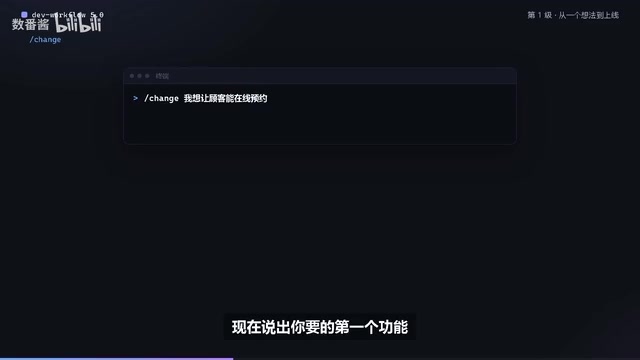
Claude Code plugin refers to an extension mechanism that runs on top of Anthropic's official command-line coding assistant, Claude Code. Claude Code itself provides conversational code editing, command execution, and tool-calling capabilities, while plugins allow third parties to register custom commands, workflow rules, sub-agents, and approval-interception logic, thereby changing the agent's default behavior. DevWorkflow uses exactly this mechanism to hard-code the "ask the user before every decision" constraint as plugin-layer process control rather than relying on prompt constraints—which is why it's more controllable than pure prompt-based solutions.
Setting Up the Project: 13 Steps, Each One a Multiple-Choice Question
Run issue next, and it first asks one question: who approves the PRs that need manual approval during this run? Then it enters the architect step, where setting up the project takes a full 13 steps: metrics, components, technology selection, build tools and task runner, code structure, deployment target, data migration, how each component runs, static checks, tests, AI review and risk rules, dependency updates, and finally platform settings and secrets.
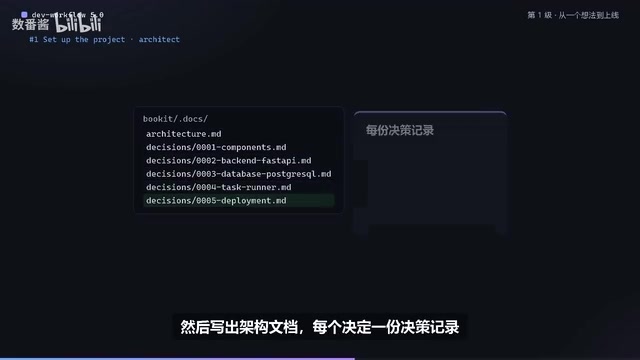
Every step is a multiple-choice question, with the trade-offs spelled out in the options. For example, when choosing a task runner, the options tell you that make requires a separate install on Windows; when creating a new database, the options list the region, specs, and approximate monthly cost. When you're done, it checks the entire architecture for contradictions and gaps on its own, then writes the architecture document, with a decision record for each decision—what options were considered, why this one was chosen, what the trade-offs are, and when it should be reconsidered.
Next comes the scaffold step. It generates the project using each component's official setup generator (latest version) and pins every version number; it installs the task runner, git hooks, CI jobs for every check and test, and automatic deployment to staging. Things outside the repository—such as branch rules, platform apps, cloud resources, and secrets—are listed for you first, and only acted on after you confirm. Anything that costs money comes with the price told to you upfront.
Decision record (ADR, Architecture Decision Record) is a lightweight documentation practice: every time an important technical decision is made, a short record is kept stating the context, the alternatives considered, the final choice and rationale, and the conditions under which the decision should be revisited. ADRs are typically committed to the repository alongside the code, forming a traceable decision history. Their value is that months later, whether it's the original author or a new team member, everyone can know "why it was chosen this way back then" rather than just "what it looks like now," and it's easier to locate old decisions that need to be overturned when conditions change.
Breaking Down Requirements: Turning Features into Acceptable Issues
With the project set up, state the online booking requirement again. change breaks down the user-facing features into a table: each issue's type, size, dependencies, and which step is expected to start producing changes. You can merge and split further until you confirm. Each issue has goals, in-scope, out-of-scope, and acceptance criteria—the acceptance criteria spell out what counts as done, and the tests that follow are written against them. Then run issue next.
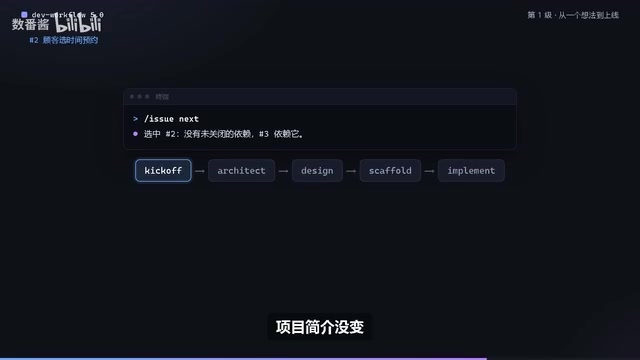
The five steps are completed in order. If the project brief hasn't changed, ticoff leaves a "no changes in this step" comment; if the architecture hasn't changed either, it leaves the same note. The next step, the design step, first asks about content: which fields are required, how to validate them, what error messages to show, then renders each screen as an image using circles, and you confirm them one by one. In the implement step, the main agent first writes the plan in an issue comment, then a fresh development sub-agent works through it one unit of work at a time. Each acceptance criterion has a test, and a streamlined code review and security review run before the PR is opened. Once the PR is open, every AI review comment must be addressed—this is high risk—and it only merges after you approve. Merging isn't the end either—deployment to staging, migrations completed, and smoke tests passing are all required before the issue is considered done.
Acceptance criteria are the objective basis for judging whether an issue is complete, usually written as explicit, checkable conditions, for example "a customer can select a barber and see their available time slots" and "when no time is selected, the submit button is disabled and a prompt is shown." They turn vague requirements into verifiable assertions, so tests can be written directly against them, and reviewers can check against them to judge whether the work is really done. The accompanying "in-scope/out-of-scope" clearly defines the boundaries of the change, preventing scope creep.
Releasing to Production: The Version Number Is Calculated from Merged PR Titles
When you're ready to release, run release. It calculates the next version from merged PR titles (0.1.0 in the example), tags it via a release PR, then runs deploy production and goes live after confirmation.
One idea, five commands, from kickoff to launch, with every decision made by you. The value of this process isn't in how many lines of code the AI writes for you—it's in reducing the room for "acting on its own" to zero. The agent only runs on the tracks you've laid down, and at every fork in the road it stops and waits for you to choose. For individual developers and small teams, this may be the most controllable way to get AI involved in a complete project today. Next episode: the requirements start changing—and that's the normal state of real projects.
Semantic versioning (SemVer) specifies that version numbers take the form major.minor.patch: incompatible breaking changes bump the major version, backward-compatible new features bump the minor version, and backward-compatible bug fixes bump the patch version. When a team adopts the "Conventional Commits" convention, PR titles carry prefixes like feat:, fix:, feat!:, and tools can use this to automatically derive the next version number, avoiding human error. The release PR serves to gather release materials such as version number changes and changelogs in one place for review and merge, ensuring that the main branch state matches the release contents exactly when tagging.
One-line Summary
DevWorkflow 5.0 uses five commands and a five-step process to reduce the room for your AI coding partner to act on its own to zero.
Paragraph Summary
DevWorkflow is a Claude Code plugin. Version 5.0 is a complete rewrite that works with any language and tech stack, supports major code platforms such as GitHub, Azure DevOps, and GitLab, and is aimed at individual developers and small teams. Its core principle: the project advances issue by issue, with every issue going through a fixed five-step process; every decision is asked of the user first, the agent only proposes options, and unconfirmed content is never written to any file. The article uses a barbershop online booking website as an example, walking through kickoff initialization, change for breaking down requirements, issue next to go through steps like architect and scaffold, and release plus deploy production to go live, emphasizing that its value lies in reducing the room for AI to act on its own to zero.
Related articles

How Do Hermes Agent's .md Files Work? A Breakdown of the Core Mechanism
Explaining Hermes Agent's .hermes directory mechanism: user.md stores personal info, memory.md records details worth remembering, soul.md defines the Agent's personality. Learn how these pure Markdown files keep the Agent consistent across sessions.

UN "Killer Robot" Talks Stall Again: Why Autonomous Weapons Regulation Is Hard to Break Through
UN Geneva talks on autonomous weapons ("killer robots") ended a week of consultations with little progress; delegates only agreed to "begin discussing options." This article analyzes the definitional disputes, conflicting security demands, and limits of multilateral mechanisms behind the stalemate.

Upload2Shell: A Deep Dive into File Upload Vulnerabilities
An in-depth analysis of Upload2Shell (CVE-2026-125396): how file upload flaws escalate into remote command execution, covering type validation bypass, storage and execution permissions, and defenses like server-side validation and directory permission configuration.