Dify 1.8.0 in Practice: A Complete Guide to Building Enterprise-Grade AI Workflows with Zero Code

A complete guide to deploying Dify 1.8.0 and building enterprise-grade AI workflows with zero code.
This guide covers the full Dify 1.8.0 workflow: three-step Docker deployment, a comparison of its five application types (chat assistant, Agent, text generation, Workflow, Chatflow), and the stateless vs. stateful distinction between Workflow and Chatflow. It also explores RAG, chunking strategies, and prompt engineering to help you build usable enterprise AI apps quickly.
What Is Dify? An Underrated Chinese AI Application Platform
If you're still struggling with how to quickly turn large-model capabilities into real products, Dify may be one of the most worthwhile tools to get started with right now. Simply put, Dify is a low-code/no-code AI application development platform that lets developers—and even non-technical staff—rapidly build AI applications based on large language models through a visual interface.
The rise of low-code/no-code platforms stems from the structural tension between the urgent need for enterprise digital transformation and the insufficient supply of professional developers. Traditionally, integrating large language model (LLM) capabilities into business systems required developers to master a whole tech stack—API calls, prompt engineering, vector database operations, streaming output handling, and more. Platforms like Dify abstract this underlying complexity into visual components, enabling non-technical roles such as product managers and business analysts to participate in the design and iteration of AI applications. In essence, this is a "democratization" of AI engineering capabilities.
This trend has a profound industry backdrop: Gartner once predicted that by 2026, low-code development tools would account for more than 75% of new application development activity. At the AI application layer, this trend is even more pronounced—the openness of large-model APIs has brought the cost of acquiring capabilities close to zero, and the real competitive barrier has shifted from "can you call the model" to "can you quickly build a usable application." Dify's emergence fills precisely this engineering gap between model capability and business product.
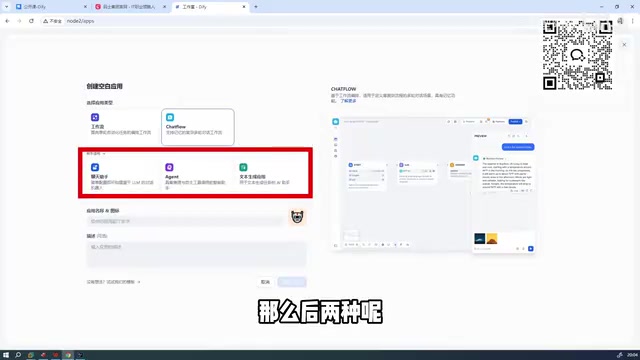
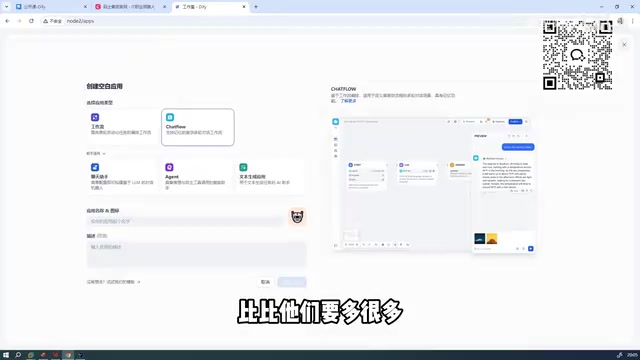
Currently, Dify supports five application types: chat assistants, Agents, text generation, Workflow, and Chatflow. The latter two both essentially belong to the workflow category, differing only in emphasis—Chatflow is better suited for conversational interaction scenarios, while Workflow targets automated task orchestration.
The Agent application type deserves special mention. Agents are built on the ReAct (Reasoning + Acting) or Function Calling paradigms. The ReAct paradigm was jointly proposed by researchers from Google and Princeton University in 2022, in a paper titled ReAct: Synergizing Reasoning and Acting in Language Models. Its core insight is that pure reasoning (Chain-of-Thought) tends to produce hallucinations, while pure action lacks planning ability—but interweaving the two, by having the model explicitly output its thought process before each action, significantly improves the completion rate of complex tasks. Function Calling is the engineering implementation OpenAI introduced in 2023, standardizing tool invocation as structured JSON Schema descriptions so that models can trigger external APIs more reliably. The core capability of an Agent is enabling the LLM to autonomously plan task steps, invoke external tools, and dynamically adjust its next action based on tool return results, forming a "think → act → observe" loop. This differs fundamentally from the traditional single-turn Q&A model: an Agent can perform multiple rounds of LLM reasoning and tool calls within a single user request until the goal is achieved. Typical tools include search engines, code executors, database queries, HTTP requests, and more. Dify manages these capabilities uniformly through a standardized Tool interface, making it possible to build AI assistants with autonomous decision-making abilities.
The core difference between the two lies in their state management mechanisms. A Workflow is essentially a Directed Acyclic Graph (DAG) execution engine—the DAG is a core data structure in the workflow orchestration field, widely adopted by mainstream systems such as Apache Airflow and Prefect. A DAG's defining characteristic is that nodes have only unidirectional dependencies with no cyclic paths, which guarantees deterministic and terminable task execution. In Dify's Workflow, each processing node (LLM call, code execution, conditional branch, etc.) is a vertex of the DAG, the data flow between nodes forms directed edges, and the system executes them in topological order. As a result, each trigger is a stateless independent task, suitable for automation scenarios such as document processing, data extraction, and batch generation. Chatflow, building on Workflow, introduces persistent management of conversation history context—each round's output becomes the input context for the next round, forming a stateful conversation chain. The distinction between stateful and stateless originates from distributed systems design philosophy: stateless services handle each request independently and scale horizontally with ease, whereas stateful services must maintain session context, which increases design complexity but is indispensable for interactive applications. Therefore, Chatflow is better suited for customer service and Q&A applications that require multi-turn interaction and contextual understanding. Understanding this distinction is key to choosing the right application type.
Worth noting, Dify's workflow orchestration capabilities also include a built-in error handling and retry mechanism: when a node fails to execute, the system can automatically retry or fall back to a degraded branch according to preset policies—crucial in production environments. Compared with manually writing exception-handling logic, visual workflows internalize these engineering details into configuration options, further lowering the barrier to building robust AI applications.
In enterprise-grade tool selection, Dify is considered the best overall Chinese solution, ranking ahead of Coze; compared with tools like RAGflow and n8n, Dify offers greater maturity in domestic deployment and a more developed ecosystem.
China's AI application development platform market has already formed a differentiated competitive landscape: Coze (ByteDance) focuses on its Bot ecosystem and plugin marketplace, leveraging the Doubao model for strong consumer-facing traffic advantages; RAGflow specializes in fine-grained control of enterprise-grade RAG pipelines, offering unique advantages in scenarios with extremely high demands on document parsing quality; n8n is a European open-source automation workflow tool that leans more toward general SaaS integration than AI-native scenarios. Dify's advantage lies in simultaneously covering the three core AI application paradigms—RAG, Agent, and workflow orchestration—while maintaining an active open-source ecosystem (over 80,000 GitHub stars) with industry-leading richness in community plugins and model integrations.
From a technical architecture perspective, Dify's multi-paradigm coverage is no accident—its backend is built on the Python ecosystem (Flask/Celery), its frontend uses Next.js, and its overall architecture is designed with extensibility firmly in mind. Developers can build with low-code through the interface, or embed application capabilities into existing systems via Dify's REST API, achieving a "platform-as-a-service" integration model. This is precisely one of the important reasons for its broad recognition in the B2B market.
Why Do Chinese Tools Feel More "Intuitive"?
One phenomenon worth noting is that Dify surpasses many comparable foreign products in both feature coverage and ease of use. This reflects a shift in AI application-layer competition—from "can it be done" to "is it easy to use."
The "intuitiveness" of Chinese tools is also reflected in localization: priority support for Chinese Embedding models (such as the BGE and M3E series), out-of-the-box integration with mainstream domestic model APIs (Baidu Ernie, Alibaba Tongyi, Zhipu GLM, etc.), and comprehensive Chinese-language community documentation all constitute substantive advantages for domestic users. This depth of localization is often a moat that comparable foreign tools struggle to catch up with in the short term.
It's worth mentioning that the BGE (BAAI General Embedding) series of models, released by the Beijing Academy of Artificial Intelligence, performs significantly better than general English Embedding models on Chinese semantic understanding tasks. Its core advantage lies in large-scale pretraining on Chinese corpora and optimization of the semantic distribution of the vector space through Contrastive Learning, so that semantically similar text sits closer in high-dimensional vector space. Dify's native support for the BGE series means that, all else being equal, the retrieval recall quality for Chinese knowledge bases can improve by 10%–30% compared with using OpenAI Embedding models—a substantive gap not to be ignored in enterprise Chinese document Q&A scenarios.
For most enterprises, a platform that enables fast building, fast iteration, and team collaboration often delivers more practical value than the ability to fine-tune underlying models.
Dify 1.8.0 Deployment in Practice: A Full Record of the Pitfalls
This tutorial is based on the latest Dify 1.8.0 version, which greatly simplifies the deployment process compared to older versions and significantly improves beginner-friendliness. Below is the complete Docker deployment procedure.
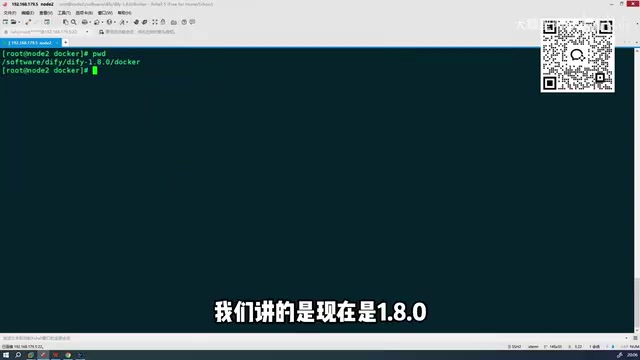
Complete Deployment in Three Docker Steps
Step 1: Extract the project files
After downloading the Dify source package, cd into the Dify directory and complete the extraction.
Step 2: Configure environment variables
Enter the docker directory, find the .env.example file, and rename it to .env. This step is the core of the entire deployment process—this file contains all the environment variables required for the services to run.
Compared with older versions, 1.8.0 can run directly with almost no additional adjustments after renaming, greatly lowering the barrier for beginners.
The design of the .env file follows the config externalization principle of the "Twelve-Factor App" methodology: all environment-related configuration (database connection strings, API keys, service ports, etc.) is stripped out of the code and injected via environment variables, so the same codebase can run seamlessly across development, testing, and production environments while avoiding committing sensitive information to the code repository. This is a standard practice in modern cloud-native application deployment. The Twelve-Factor App was originally proposed by Heroku engineers and has become an industry standard for SaaS application architecture design; its core idea is to thoroughly decouple an application's build, configuration, and runtime environment through a set of conventions, paving the way for containerized and cloud-native deployment.
Step 3: Start the services
Run the following command to bring up the entire Dify service:
docker compose up -d
Dify uses Docker Compose for multi-container orchestration deployment. Docker Compose is Docker's official tool for defining and running multi-container applications, describing the entire application's service topology, network configuration, and storage volumes through a single YAML configuration file. Built on top of the Docker Engine container runtime, it creates an isolated bridge network so that service containers can discover and communicate with each other while remaining isolated from the host network.
The design philosophy of Docker Compose embodies the core ideas of microservice architecture: decomposing a complex system into independent, single-responsibility service units, where each container runs only one process and services communicate through standardized interfaces. This architecture allows each component to be independently scaled, upgraded, and replaced, while container isolation avoids dependency conflicts—precisely the underlying reason Dify can uniformly manage heterogeneous tech stacks like PostgreSQL, Redis, and Weaviate and achieve "one-click launch."
Dify's complete service stack typically includes the following containers:
- Frontend web service and backend API service: handle user requests
- Worker asynchronous task queue: based on the Celery framework, with Redis serving as the message broker, decoupling time-consuming tasks (such as document vectorization and long-text generation) from the main request chain to avoid API timeouts. Celery works by having the main process serialize tasks and push them to the Redis message queue, from which Worker processes pull and execute tasks. This producer-consumer model ensures that operations potentially taking several minutes do not block the user's HTTP request, significantly improving the system's concurrent processing capability. Celery also supports advanced features such as task priorities, scheduled tasks (Beat), and task chains (Chain), providing a solid engineering foundation for Dify's workflow scheduling.
- PostgreSQL relational database: stores application metadata
- Redis cache and message queue: supports Celery asynchronous task scheduling
- Weaviate or another vector database: supports RAG retrieval
- Nginx reverse proxy: unified entry-point traffic routing, SSL termination, and static resource caching—a standard practice for production deployment
The docker compose up -d command brings up all dependent services at once and runs them in the background; the -d flag stands for detached (background daemon) mode. The .env file centrally manages the connection configurations, keys, and other sensitive information between services, and is the configuration core of the entire system.
Image Size and Download Speed
The Docker image corresponding to version 1.8.0 totals about 5–6 GB, which is entirely acceptable for the vast majority of deployment environments.
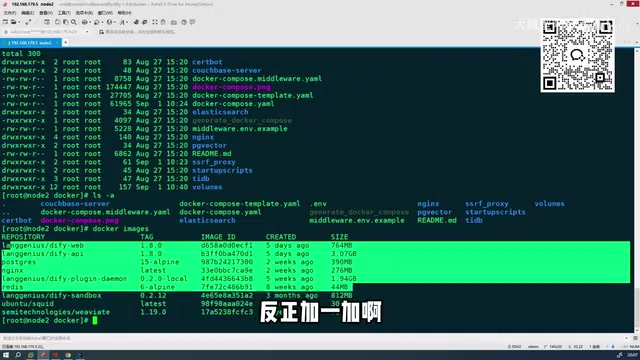
The reasonableness of the image size can be understood from its composition: Dify's complete service stack covers the Python runtime (backend API and Worker), the Node.js runtime (frontend build artifacts), PostgreSQL, Redis data volumes, and the pre-configured Weaviate vector database image. Each component image is built on official base images, and a total of 5–6 GB is lightweight for a multi-service orchestration scenario. Moreover, Docker's layered image mechanism means that when upgrading to a later version, unchanged layers are reused directly from local cache, making the cost of incremental updates far lower than the initial pull. Docker's image layering mechanism is implemented based on a Union File System (such as OverlayFS): each Dockerfile instruction generates a read-only layer, multiple layers stack to form the final image, and the container adds a writable layer on top at runtime. This design allows the same base layer (such as the Python 3.11 base image) to be shared across multiple images on the same host, greatly saving disk space and network bandwidth.
Because the image source was switched, the new version's pull speed is noticeably faster than before, typically completing the download and startup within a few minutes. In addition, 1.8.0 fixes several known bugs from older versions, providing improved overall stability—though a few minor issues remain, so be mindful during actual use.
After Deployment: Where to Start Building AI Applications
Once the services start, access the Dify login page via the deployment node address. After logging in, you'll see the following core modules:
- Explore: browse community templates and example applications
- Studio: the core development area for creating and managing AI applications
- Knowledge: manage document data used for RAG retrieval
- Tools: configure external tools and plugins
Among these, the Knowledge module is built on RAG (Retrieval-Augmented Generation) technology. RAG was formally proposed by Meta AI in the 2020 paper Retrieval-Augmented Generation for Knowledge-Intensive NLP Tasks, and has since become the de facto standard architecture for enterprise knowledge-base AI applications. Its core idea is: when asking a large language model a question, first retrieve document fragments relevant to the question from an external knowledge base, then feed these fragments as context into the model along with the question. This allows the model to answer based on the enterprise's private data, effectively addressing the LLM's knowledge cutoff date and hallucination problems.
The essence of RAG is combining "parametric knowledge" (encoded in the model's weights, solidified after training) with "non-parametric knowledge" (stored in an externally retrievable document library and updatable in real time). This design means that updating knowledge no longer relies on expensive model retraining—you simply add or update documents in the knowledge base. For enterprise scenarios that require frequent synchronization of the latest policies, product information, and internal documents, this is a decisive engineering advantage. By contrast, the other approach to giving a model private knowledge—Fine-tuning—requires preparing high-quality labeled datasets, paying tens to hundreds of dollars in training costs, and retraining every time knowledge is updated, with cycles lasting several days. Its flexibility is far inferior to RAG's "plug-and-play" approach.
In terms of technical implementation, a complete RAG pipeline involves several key stages:
- Document chunking: the strategy directly affects retrieval precision; common methods include fixed-length chunking, semantic paragraph chunking, and hierarchical chunking
- Embedding vectorization: an Embedding model (such as OpenAI text-embedding-3 or the Chinese-oriented BGE series) converts text chunks into high-dimensional dense vectors that capture semantic information, which are stored in a vector database (such as Weaviate, Qdrant, Milvus, Chroma, etc.). Vector databases are optimized for the storage and approximate nearest neighbor (ANN) search of high-dimensional vectors, with mainstream indexing algorithms including HNSW (Hierarchical Navigable Small World graphs) and IVF (Inverted File Index). HNSW builds a multi-layer graph structure—sparse at the top, dense at the bottom—navigating quickly from the top layer to the target region during retrieval, with time complexity close to O(log n). Its retrieval speed is extremely fast but memory usage during index building is high. IVF divides the vector space into several clusters and searches only within the k nearest clusters during retrieval, offering higher memory efficiency and suiting billion-scale ultra-large datasets. Dify integrates Weaviate by default (using HNSW indexing) while also supporting Qdrant, Milvus, Chroma, PGVector, and other vector storage backends, letting users choose flexibly based on data scale and deployment environment.
- Semantic retrieval: retrieval uses algorithms such as cosine similarity for approximate nearest neighbor (ANN) search rather than traditional keyword matching, enabling the knowledge base to understand queries that are semantically similar but worded differently
- Hybrid retrieval and reranking: production environments usually combine vector semantic search with BM25 keyword search in a hybrid retrieval strategy, then use a Reranker model to fine-rank candidate results, improving final recall quality. BM25 is a classic algorithm in information retrieval, an improved version based on term frequency–inverse document frequency (TF-IDF), excelling at precise keyword matching. It complements vector semantic search—the former captures exact vocabulary, the latter understands semantic intent. The hybrid retrieval (Hybrid Search) strategy that fuses the two typically achieves 15%–25% higher recall than a single retrieval method in production.
Worth noting, the choice of chunking strategy often has a greater impact on the final result than the capability differences between models themselves. Fixed-length chunking (e.g., 512 tokens per chunk) is simple to implement but may split semantic units; semantic paragraph chunking preserves complete semantics based on punctuation and paragraph markers but produces chunks of uneven size; hierarchical chunking retains dual indexing at both the summary and detail levels, performing better in complex scenarios requiring multi-granularity recall. Dify's Knowledge module includes multiple built-in chunking strategies for users to choose from—an important production-oriented engineering consideration.
The optimization space of this complete pipeline is precisely the core competitiveness of tools like RAGflow that focus on RAG scenarios.
Studio is the key entry point. To build your first AI application, simply click "Create Blank App," choose an application type, and get started.
Recommended Learning Path: From Simple to Complex
For beginners, it's advisable to start with relatively simple application types such as chat assistants and text generation to become familiar with the platform's basic interaction logic and configuration methods, then gradually move on to more complex node-orchestration scenarios like Workflow and Chatflow. This step-by-step approach effectively avoids being discouraged by tedious configuration options right from the start.
After mastering basic application building, it's recommended to dive deeper into the following three advanced directions: Prompt template engineering (understanding the layered design of system prompts and user input), RAG retrieval tuning (end-to-end optimization from chunking strategies to hybrid retrieval parameters), and workflow node orchestration (including the integrated design of conditional branches, variable passing, and error handling). The combination of these three capabilities essentially determines the practical usability ceiling of a Dify application in production.
Prompt template engineering deserves separate elaboration: the layered design of System Prompt and User Message derives from the message role system (system/user/assistant) of OpenAI's Chat Completions API. The System Prompt is injected as a global instruction, defining the model's role, behavioral boundaries, and output format—its quality directly determines the application's baseline capability ceiling—while user input serves as the dynamic variable for each conversation round. Mastering how to design robust System Prompts—including role setting, output format constraints, exception-handling instructions, and the reasonable combination of Few-shot examples—is the key leap in moving a Dify application from "usable" to "easy to use." The theoretical foundation of Few-shot Learning was systematized in the GPT-3 paper Language Models are Few-Shot Learners: by embedding a small number of "input-output" example pairs in the prompt, the model infers the task pattern through In-Context Learning, adapting to new tasks without modifying model weights. In System Prompt design, well-chosen Few-shot examples can significantly improve the consistency of output format and the handling of boundary conditions, especially excelling in scenarios such as structured data extraction and style-specific text generation—typically, 2–5 carefully designed example pairs can bring considerable improvement.
Conclusion: Is Dify Worth the Investment?
Dify 1.8.0 delivers substantive improvements in deployment convenience, download speed, and runtime stability. Combined with visual application-building capabilities, it is one of the more efficient choices for building AI workflows today.
For enterprises and individual developers, Dify's core value lies in dramatically lowering the barrier to deploying AI applications—you don't need to be a large-model expert to build a usable AI application prototype in a matter of hours. Of course, the tool is only the starting point; the real skill lies in how to reasonably decompose business requirements into workflow nodes, how to tune RAG retrieval strategies, and how to design sensible Prompt templates. These are also directions worth continued study once you've deeply mastered Dify.
From a broader perspective, Dify's value lies not only in the tool itself but in the shift in AI application development paradigm it represents: compressing AI projects that once required weeks of engineering into hours of prototype validation, making "fast trial-and-error, fast iteration" the new norm for AI deployment. In an era where large-model capabilities are becoming commoditized, whoever can more quickly turn model capabilities into valuable business applications holds the true competitive advantage—and Dify is a powerful accelerator for this transformation process.
This "commoditization of model capabilities" trend has profound economic logic: when GPT-4-level reasoning capabilities can be obtained via API on a pay-per-token basis, the technical barrier of the model itself rapidly thins, and the focus of competition inevitably shifts upstream to the data flywheel (private data accumulation and RAG knowledge base construction) and downstream to the application experience (workflow design and product interaction). What Dify covers is precisely the middle layer of this value chain—the one with the highest engineering barriers yet the most easily unlocked by low-code tools. This is perhaps the fundamental reason it stands out among the many AI tools.
Key Takeaways
Related articles

Vibe Coding Full-Stack in Practice: AI Programming from Beginner to Enterprise Deployment
From Cursor to Claude Code, this Bilibili AI programming course uses four progressive projects to cover full-stack development, open-source secondary development, and team collaboration. The article analyzes the shock to frontend roles, the efficiency shift from 50 people to 5, and the methodology required for enterprise-grade projects.

David Blaine's Global Quest for Real Magic: From South Africa to Japan and India
David Blaine travels to South Africa, Japan, and India in his Do Not Attempt special, documenting Spinning drivers, black mamba rescuers, iaijutsu masters, and ascetics—exploring the boundary between magic and real human极限 challenges.

Is a Touchscreen MacBook Coming? Vergecast Reveals Apple Executive's Response
Vergecast podcast reveals a conversation between a reporter and Apple executive John Ternus about a touchscreen MacBook and Apple Pencil support. Ternus says iPad is the best device for a stylus, while the reporter bets MacBook will eventually support Apple Pencil.