Dify Beginner's Guide: Five Application Types and Workflow Building in Practice

Dify is a visual AI app platform covering five application types and full workflow orchestration, lowering the barrier to production AI.
Dify is an open-source AI application development platform that encapsulates prompt management, model switching, tool calling, and workflow orchestration into a visual interface — enabling developers to build production-grade apps without constructing model pipelines from scratch. It supports five application types: Chat Assistant, Text Generation, Agent, Chatflow, and Workflow, covering everything from simple conversations to complex multi-step automation. Deployment options include the official cloud platform or self-hosted Docker; model integration supports cloud APIs like DeepSeek and Qwen as well as local open-source models via Ollama. Finished applications can be distributed via public link, website embed, or REST API.
What Is Dify?
Dify is an open-source AI application development platform designed to help both developers and non-technical users quickly build and deploy production-grade AI applications — without having to construct model call chains from scratch. Whether you need an internal enterprise knowledge base Q&A system, automated text generation, or complex multi-step agent workflows, Dify provides a visual orchestration interface that dramatically lowers the barrier to shipping AI applications.
Compared to calling large model APIs directly, Dify's core value lies in encapsulating engineering details — prompt management, model switching, tool calling, and workflow orchestration — into a graphical interface, so developers can focus on business logic itself. For teams looking to quickly validate AI use cases internally, it's an extremely practical choice.

Dify Deployment: Local Docker or Cloud?
Local Docker Deployment vs. Official Cloud Platform
Dify offers two primary usage modes: the official hosted cloud platform, or self-hosted deployment via Docker. For personal learning and feature exploration, the cloud version is more than sufficient; but for production or enterprise-internal scenarios, local deployment offers greater control.
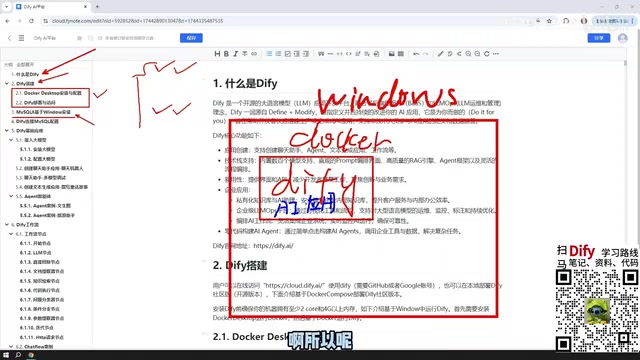
For local deployment, a Windows + Docker setup is recommended. After installing Docker Desktop, pull the official Dify image and follow the documentation to complete the setup — the process is relatively straightforward for Windows users. A key advantage of local deployment is that Dify containers can directly access MySQL, Redis, and other services running on the host machine, with no need for additional intranet tunneling. In contrast, using the cloud version to read a local database requires exposing your local services to the public internet, introducing additional security and configuration overhead.
Database Configuration
Some AI applications need to read and write structured data, making MySQL 8 a necessary companion installation. MySQL can be installed natively on Windows, run inside a Docker container, or hosted in a virtual machine — Dify's Docker networking defaults allow communication with the host machine and VMs on the same subnet, so all three approaches work.
Dify's Five Application Types Explained
The clearest entry point for understanding Dify's product structure is the five application types it supports. These cover the vast majority of AI application scenarios, and choosing the right type is the first step toward building a high-quality application.
Chat Assistant
The most basic application form — essentially a conversational interface with a system prompt. Well-suited for customer service bots, FAQ answering, personal assistants, and similar scenarios. Configuration is simple, the learning curve is minimal, and it makes an ideal first project for getting started with Dify.
Text Generation Application
Designed for bulk content production scenarios such as article writing, report generation, and email template filling. The key difference from the Chat Assistant lies in the interaction model: text generation is closer to a "fill in parameters → one-shot output" flow, rather than a multi-turn conversation.
Agent
The Agent is the most capable standalone application type of the five. Its defining feature is the ability to call external tools — such as web scraping, code execution, database queries, API calls, and more — and dynamically adjust its next action based on the tool's return values, ultimately completing the user's instruction. This "perceive-decide-act" loop allows Agents to handle complex tasks that require multi-step reasoning and access to external information.
The underlying implementation of an Agent is typically based on the ReAct (Reasoning + Acting) framework: at each step, the model first outputs its "reasoning process," then decides which tool to call and what parameters to pass. After receiving the tool's output, it continues reasoning until it determines the task is complete. This loop mechanism enables Agents to handle multi-hop reasoning problems, but also introduces uncertainty — the model may make an incorrect judgment at a given step, causing the entire task to fail. As a result, Agent applications typically require carefully designed system prompts and tool descriptions to reduce the likelihood of model errors. Dify's Agent supports configuring a maximum number of iterations to prevent the model from entering an infinite loop and consuming excessive tokens.
Chatflow
Chatflow is a visual orchestration approach based on node connections, with support for multi-turn conversations. Users can continue providing input while the flow is executing, making it ideal for scenarios requiring contextual memory — such as multi-turn interactive customer service or guided form filling.
Workflow
Workflow also uses node-based visual orchestration, but unlike Chatflow, it is single-trigger and linearly executed. It accepts an input, processes it through nodes in sequence, and outputs a result. This suits data processing pipelines, batch content generation, and other scenarios that don't require multi-turn interaction.

Dify's Workflow Node System
The core building blocks of a workflow are "nodes," where each node represents an independent processing unit. Dify provides node types covering mainstream scenarios. Commonly used ones include:
- LLM Node: Calls a large model for text generation or reasoning
- Knowledge Retrieval Node: Retrieves relevant document chunks from a vector database (RAG)
- Code Node: Executes custom Python/JavaScript logic
- HTTP Request Node: Calls external APIs
- Conditional Branch Node: Routes to different processing paths based on variable values
- Database Node: Reads from and writes to relational databases like MySQL
- Variable Aggregator Node: Merges output results from multiple parallel branches
Nodes pass variables to one another via connections, forming a directed acyclic graph (DAG) across the entire workflow. Mastering how to combine nodes is the key skill for building production-grade Dify applications.
A directed acyclic graph (DAG) is the core data structure of a workflow engine. It ensures there are no circular dependencies in the process, and each node is triggered only after all its predecessor nodes have finished executing. Dify's node variable passing follows this model: the output of an upstream node can be used as an input parameter for a downstream node, referenced via the {{nodeName.outputField}} syntax. The Knowledge Retrieval (RAG) node is a particularly notable type — it converts the user's query into a vector, performs similarity search against a pre-built document vector store, and returns the most relevant text chunks, which are then passed to an LLM node to synthesize a final answer. This is the canonical implementation of Retrieval-Augmented Generation (RAG) and the core technical foundation for enterprise knowledge base Q&A scenarios.
Large Model Integration Strategies
All Dify applications depend on an underlying large model, so the choice and integration method of the model directly affects application quality and cost.
Prioritize Cloud-Based Paid Models
For most scenarios, it's recommended to integrate cloud API services such as DeepSeekAd, Qwen (Tongyi Qianwen), or ERNIE Bot (Wenxin Yiyan). Taking DeepSeek as an example, a ¥10 top-up can sustain a considerable period of development and testing — based on real-world usage feedback, less than ¥1 is consumed after extended use, making it extremely cost-effective. Alibaba Cloud's Qwen and Baidu's ERNIE also offer millions of free tokens for newly registered users, more than enough to complete early-stage development validation.
When to Use Local Models
Dify also supports integrating locally deployed open-source models via Ollama. This path is suitable for teams with strict data privacy requirements or sufficient compute resources. If you have a large-parameter version of the DeepSeek open-source model deployed locally (such as the 671B quantized version), it's entirely feasible to build enterprise-grade applications with Dify. However, for most individual users, locally run models are constrained by hardware, resulting in smaller parameter counts and noticeably weaker performance compared to cloud-based models.

Ollama is a lightweight local large model runtime that supports one-click pulling and running of mainstream open-source models such as Llama, Mistral, and DeepSeek on macOS, Linux, and Windows. It exposes an OpenAI-compatible HTTP interface. Dify can integrate Ollama as a model provider simply by configuring its local address — no code changes required. The primary bottleneck for local models is VRAM: a 7B parameter model requires approximately 14GB of VRAM at FP16 precision, or around 4–5GB after Q4 quantization. Consumer-grade GPUs can barely handle this, but inference speed and quality both fall noticeably short of equivalent cloud-based models.
Publishing and Distributing Dify Applications
Applications built in Dify aren't limited to internal use within the platform. Dify provides three primary distribution methods:
- Publish as a public web site: Generate a publicly accessible link; combined with an intranet tunneling tool, external users can access it directly.
- Embed in an existing website: Integrate the AI application into an existing product page via iframe or web component.
- API access: Expose the application's capabilities as a standard REST API for integration with backend services or other systems.
These three distribution methods cover the full spectrum from personal demos to enterprise integration, making Dify more than just a "demo tool" — it's an AI application platform that can genuinely go into production.
Summary
Dify's value lies in consolidating the most tedious parts of AI application engineering — prompt version management, model switching, tool orchestration, and workflow debugging — into a single visual platform, allowing teams to focus their energy on business logic and user experience. From chat assistants to complex workflows, from local Docker deployment to cloud model integration, Dify offers a relatively complete path to shipping AI applications. For teams looking to drive AI adoption within their organizations, Dify is a platform worth evaluating as a top priority.
Related articles

Cursor AI in Practice: Weighing Efficiency Gains Against Costs in an AI IDE
An in-depth look at Cursor AI IDE's interface layout, four modes (Agent/Plan/Debug/Ask), model selection, and Git context integration, with hands-on demos weighing subscription costs against going direct to Claude.

Free Landing Page Design Rules Library: A Practical Guide for Claude Code and Cursor
A free landing page design skill for Claude Code and Cursor: MIT licensed, nearly 9,000 stars, asks about offer/audience/action before planning 12 sections with hard font and spacing constraints.

Cursor Keeps Writing Wrong Code? The Problem May Be Context, Not Prompts
Cursor keeps writing wrong code? The problem may be context, not prompts. Learn how to supply relevant files, full error messages, and expected results, plus a plan-first, small-step, test-driven workflow to reduce AI coding errors—while remembering code review remains the developer's job.