Dify Enterprise System Integration in Practice: Building a Project Management AI Copilot with Workflows
How to use Dify workflows to integrate enterprise systems into an AI copilot via interface capture and orchestration.
This article uses a project management system integration case to explain how to leverage the Dify low-code platform for enterprise AI integration—covering interface traffic capture, login authentication, Token extraction, business queries, and formatted output—demonstrating a reusable paradigm for connecting internal systems to intelligent applications.
Enterprise-Grade AI Integration Is Simpler Than You Think
Many people believe that connecting large language models to enterprise internal information systems is a high-barrier task requiring complex custom development. But in reality, with low-code AI application orchestration platforms like Dify, we can rapidly integrate existing enterprise business systems into intelligent applications through visual workflows.
Low-code platforms aren't a new concept—as far back as the 2010s, platforms like OutSystems and Mendix were already attempting to lower the barrier to application development. But low-code platforms in the AI era are fundamentally different: they no longer merely encapsulate UI components and database operations. Instead, they package AI-native capabilities—such as the reasoning power of large language models, vector retrieval, and multi-step Agent orchestration—into visual nodes as well, allowing "AI logic" and "business logic" to be seamlessly connected on the same canvas.
The underlying driving force behind this leap is that institutions like OpenAI and Anthropic have opened up large model capabilities in the form of standardized APIs, making a single call to GPT-4 technically equivalent to a single call to a weather query API—both are HTTP requests, and both return structured data. OpenAI released GPT-3 and opened API access in 2020, marking the official entry of large model capabilities into the era of "servicization." Subsequently, Anthropic's Claude and Google's Gemini were opened up as APIs one after another, and domestic players such as Baidu's Ernie, Alibaba's Tongyi, and Zhipu's GLM followed suit, forming a large-model ecosystem centered on standardized HTTP interfaces. The profound significance of this trend lies in the fact that it reduces AI reasoning capabilities—which originally required tens of millions of dollars in training costs and massive computing infrastructure—into a network call that takes tens of milliseconds, enabling any developer with basic programming skills to integrate the world's top intelligent reasoning engines into their own business systems. It is precisely this trend of "API-ification of AI capabilities" that allows the new generation of AI infrastructure represented by Dify to handle intelligent reasoning and business logic uniformly on the same orchestration canvas—which is precisely its core value.
What is Dify? Dify is an open-source large language model (LLM) application development platform, born in 2023, currently with tens of thousands of stars on GitHub. Its core philosophy is "making AI application development as simple as building with blocks." The platform comes with a built-in visual workflow orchestrator, a RAG (Retrieval-Augmented Generation) knowledge base engine, multiple Agent construction modes, and native support for dozens of LLMs including OpenAI, Anthropic, and mainstream domestic large models.
RAG (Retrieval-Augmented Generation) was formally proposed by Facebook AI Research in 2020. Its core idea is to combine two modules—"retrieval" and "generation": when a user asks a question, the system first retrieves the most relevant document fragments from an external knowledge base (usually stored in a vector database, such as the open-source Qdrant or Milvus), and then feeds these fragments as context into the large language model to guide it toward generating accurate answers. This architecture effectively addresses the problems of a large model's knowledge cutoff date and hallucination, allowing enterprise private documents and internal knowledge bases to become "real-time knowledge sources" for large models—enabling the construction of vertical-domain intelligent Q&A systems without costly fine-tuning. Agents are based on the ReAct framework (Reasoning and Acting) proposed by Princeton University in 2023—where the model alternates between reasoning and acting, observing environmental feedback after each action, and iterating in a loop until the task is complete. This enables large models to autonomously invoke tools such as database queries, API calls, and code execution to handle complex business goals that require multi-step planning.
For enterprise scenarios, Dify's greatest value lies in its ability to encapsulate capabilities such as HTTP requests, code execution, variable passing, conditional branching, and database queries into draggable nodes, driven by a directed acyclic graph (DAG) workflow engine—the "acyclic" property of the DAG guarantees that the execution order can be uniquely determined by topological sorting, naturally supporting parallel node execution and clear data lineage tracking. Developers can quickly orchestrate complete business processes without writing large amounts of glue code, which makes Dify one of the most popular middle-layer platforms for enterprise AI implementation today.
This article uses a case study of integrating a "project management stakeholder management system" to break down how to use Dify to build an intelligent copilot that can automatically log in, query data, and format output. The core of the entire process does not lie in technical difficulty, but in—whether you have mastered the interface information of the target system.
Step One: Capture System Interfaces and Understand the Data Pathways
The prerequisite for integrating enterprise systems is figuring out which interfaces are called by the various functions within the system. The most straightforward and practical method: directly use browser developer tools to capture interface traffic.
The Principle and Significance of Interface Traffic Capture Modern web applications generally adopt a front-end/back-end separated architecture—the page (front end) fetches data from the server (back end) via HTTP/HTTPS requests, and then renders it into the interface that users see. This architectural pattern became widely popular in the 2010s with the rise of front-end frameworks such as React, Vue, and Angular, completely replacing the earlier development model of "server-side rendering with full-page refreshes." The large-scale adoption of front-end/back-end separation also relies on a key premise: the standardization of interface styles. REST (Representational State Transfer) was proposed by Roy Fielding in his 2000 doctoral dissertation. It is not a protocol but rather a set of architectural constraint styles—resources are identified by URLs, operation semantics are expressed by HTTP methods, and states are conveyed through standard response codes. The prevalence of RESTful APIs means that whether it's a project management system, a CRM, or an ERP, as long as they follow the REST style, the way to "read" their interfaces is essentially the same. This is why mastering the DevTools traffic capture method allows you to handle the vast majority of enterprise internal systems—because they all speak the same "language." The Network panel of the browser's built-in developer tools (DevTools) can capture and display the complete information of these requests in real time: including the request URL, HTTP method (GET/POST/PUT, etc.), request headers (Headers), request body (Request Body), and the server's return result (Response). By capturing traffic, we are essentially "reading" the communication language between the front end and the back end. Once we master the patterns of these interfaces, any tool capable of making HTTP requests—including Dify—can simulate these operations to achieve automated invocation. This is why "interface traffic capture" is the first and most critical step in enterprise system integration.
It's worth mentioning that the "S" in HTTPS stands for TLS (Transport Layer Security) encryption, which means that intermediate network nodes cannot directly eavesdrop on request content—but browser DevTools work at the application layer after TLS decryption, so they can see the plaintext data. This characteristic is reasonable: developers need to debug the network requests of their own applications, and DevTools is only visible to the current user session in the local browser, so it does not constitute a security vulnerability.
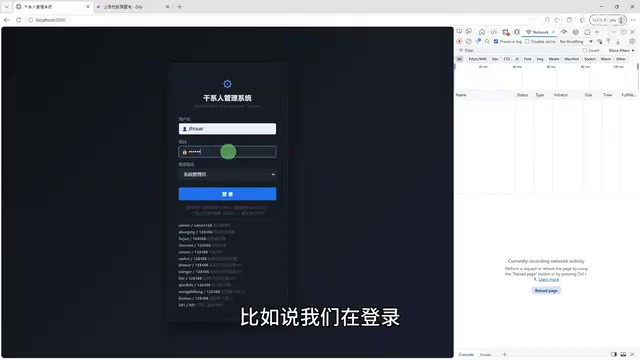
Specific steps: After opening the target system page, don't rush to log in. Press F12 to open the developer tools, switch to the "Network" tab, and check the "Preserve log" option. This step is crucial, as it ensures that request records are not lost during page navigation.
Then perform the login operation. At this point, the login request can be captured in the network panel—including the request method (POST), the request URL, and the required parameters. Similarly, when clicking functions like "Query Announcements," the corresponding query interface can also be captured.
The case study focuses on two types of interfaces: the login interface and the announcement query interface. Once you master the request methods and data structures of these two interfaces, the subsequent workflow orchestration in Dify will fall into place naturally.
Step Two: Orchestrate the Workflow in Dify
With the interface information in hand, you can enter Dify to build the workflow. The overall approach is clear and representative:
Login → Extract Token → Query Data → Format → Output Table
Why Is This Chain Universal? The reason this five-step chain applies to "almost all enterprise internal systems requiring authentication" lies in the fact that the authentication standards of modern enterprise information systems have become highly convergent. The vast majority of systems use a Token mechanism to manage identity verification: when a user logs in for the first time, they submit credentials; after the server verifies them, it issues a time-limited Token (common formats include JWT—JSON Web Token). All subsequent business requests must carry this Token in the HTTP request header (usually in the form of
Authorization: Bearer <token>), and the server uses this to determine the requester's identity and permissions.JWT was formally standardized by the IETF in RFC 7519 in 2015. Its structure consists of three parts: the Header (declaring the signature algorithm, such as HS256 or RS256), the Payload (carrying claim information such as user ID, role, and expiration time
exp), and the Signature (cryptographically signing the first two parts to prevent content tampering). The three segments are each Base64URL-encoded and joined with periods to form a token string in the form ofxxxxx.yyyyy.zzzzz. This design has an important engineering value: the server can confirm the legitimacy of the Token by verifying the signature without querying the database.The traditional Session mechanism requires storing session state for each logged-in user in the server's memory or database. When user volume surges or the system needs to scale horizontally (deploying multiple servers), cross-server Session synchronization becomes a bottleneck; whereas the "stateless" nature of JWT allows any server to independently verify tokens, which naturally fits microservices and containerized deployment architectures. HS256 uses symmetric keys (the server keeps the key itself, using the same key for signing and verification), suitable for monolithic services; RS256 uses asymmetric key pairs (private key for signing, public key for verification), suitable for microservice scenarios where verification capabilities need to be distributed to multiple independent services—this distinction is especially critical when designing enterprise internal SSO (Single Sign-On) systems. Once you understand this mechanism, you can understand why "login → extract Token → query with Token" is the standard paradigm for enterprise system integration, and you can flexibly transfer this process to different business systems such as CRM, OA, and ERP.
This chain applies to almost all enterprise internal systems requiring authentication.
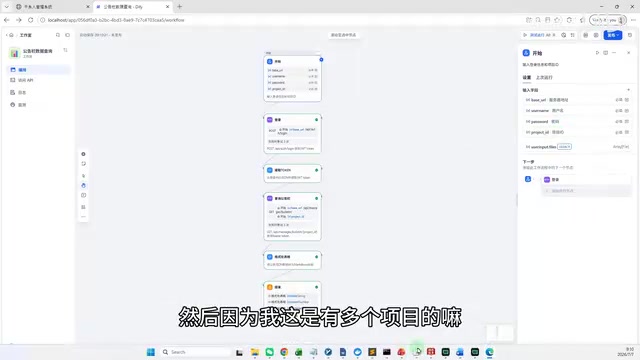
Start Node: Receiving Input Parameters
The first node in the workflow is the "Start Node," responsible for receiving the username and password entered by the user. Since the system manages multiple projects, a project identifier must also be passed in (P5 project was selected in the demonstration).
Login Node: Completing Authentication with a POST Request
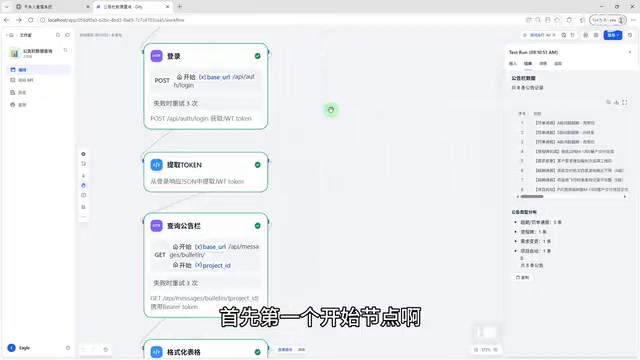
The second node is the "Login Node." According to the traffic capture results, the login interface uses the POST method. In Dify's HTTP request node, select the POST method, fill in the login URL and request parameters, and pass the return result to the next node.
The Essential Difference Between GET and POST The HTTP protocol defines multiple request methods, among which GET and POST are the two most common in enterprise systems. The GET method is semantically used to "retrieve resources." Parameters are appended to the URL (such as
?page=1&size=20), and the request contains no request body, making it naturally suitable for data query operations. Results can be cached by browsers and proxy servers and are idempotent (multiple requests yield the same result). The POST method is semantically used to "submit data." Parameters are transmitted in the request body (Body) and are not exposed in the URL, making it suitable for transmitting sensitive information (such as passwords) or larger volumes of data; POST requests are not idempotent, and repeated submissions may produce side effects (such as creating duplicate records). The HTTP specification's conventions on method semantics come from RFC 7231. Following these semantics is not only a specification requirement but also directly affects the system's caching strategy, security, and maintainability.It's worth noting that there is a deeper security implication behind this method selection: URLs are fully recorded by browser history, server access logs, enterprise network devices (firewalls, proxies), and even CDN nodes. If a password appears in the URL as a GET parameter, anyone able to read these logs can directly obtain the plaintext credentials—this is precisely the fundamental reason why login interfaces almost universally use POST, rather than merely a matter of convention. In Dify's HTTP node, correctly selecting the request method is the prerequisite for successful configuration—if the method is chosen incorrectly, the server will return an error response (usually 405 Method Not Allowed) even if the URL and parameters are completely correct.
Token Extraction Node: A Code Node to Process the Authentication Credential
After a successful login, the system returns response data containing the Token. Here, Dify's code execution node is used to write a short script to extract the Token from the return result. This node ultimately outputs three variables: token, username, and permission scope (scope), serving as authentication credentials for subsequent queries.
The Capability Boundaries of Dify's Code Node Dify's code execution node supports both Python and JavaScript, running in a sandbox environment—a so-called sandbox is an isolated code execution environment that restricts access to dangerous operations such as the file system, network, and system calls, in order to prevent user-submitted code from damaging the host server. Sandbox technology already has mature implementations in the cloud computing field, from Google's gVisor to AWS Lambda's Firecracker microVMs; the core idea in all cases is the "principle of least privilege"—granting code the minimum runtime permissions needed to complete its task, and rejecting all unnecessary system calls. Under this constraint, Dify's code node has basic capabilities such as string processing, JSON parsing, regular expression matching, and mathematical calculations, capable of meeting the vast majority of data extraction and transformation needs. For tasks like extracting fields from an HTTP response, only a few lines of code are usually needed: parse the JSON string passed in from the upstream node with
json.loads(), then retrieve values layer by layer by key name. The input variables of the code node come from the outputs of upstream nodes, and the variables it produces can be referenced by any downstream node, forming a smooth directed acyclic graph (DAG) style data flow—this execution engine driven by topological sorting ensures that each node starts only after all its upstream dependencies are complete, naturally preventing data races and timing errors. This design philosophy—"configuring simple logic, coding complex logic"—is precisely the differentiated positioning Dify has found between "pure drag-and-drop tools" and "pure code frameworks," allowing users of different technical backgrounds to find an operational level that suits them.
Step Three: Query Business Data and Format the Output
Once the Token is obtained, business data queries can be performed.
Query Node: Fetching Announcement Data with a GET Request
The announcement query interface in the case study uses the GET method. According to the traffic capture results, configure a GET request node in Dify, fill in the query URL, and carry the Token in the request header to obtain the raw announcement data.

Formatting Node: Converting Raw Data into Usable Information
What the interface directly returns is often a raw JSON structure, which is not suitable for direct display. In the case study, a short piece of code is used to parse and organize the returned fields, converting them into a structured table form.
JSON Data Structure and Parsing JSON (JavaScript Object Notation) was popularized by Douglas Crockford around 2001, and was formally standardized by ECMA as the ECMA-404 standard in 2013. Before this, XML was the mainstream format for enterprise API data exchange—the Web Services system composed of SOAP (Simple Object Access Protocol) and WSDL (Web Services Description Language) dominated the enterprise integration field in the early 2000s. However, XML's verbose tag structure (each field needs to be wrapped in opening and closing tags) made it costly to parse and large in transmission size, becoming increasingly unable to meet lightweight demands after the rise of the mobile internet. JSON quickly replaced it with the advantages of being lightweight, readable, and naturally compatible with JavaScript, becoming the de facto standard data format for current RESTful APIs.
JSON organizes data in the form of key-value pairs and supports six data types: strings, numbers, booleans, null, arrays, and objects, supporting nested structures of arbitrary depth. A typical announcement query return might look like:
{"code":0, "data":{"list":[{"id":1, "title":"Project Kickoff Meeting", "author":"Zhang San", "date":"2024-01-15"}], "total":42}}. Field names in raw JSON are often English abbreviations or camelCase, and the field order may not conform to business display requirements. The job of the formatting node is to transform this "machine-friendly" raw data into a "human-friendly" structure—extracting the required fields, renaming them to Chinese titles, unifying date formats (such as converting the ISO 8601 format2024-01-15to "January 15, 2024"), and filtering out irrelevant fields—ultimately outputting a standardized data structure that can be directly rendered as a table. This step may seem simple, but it is a key link in determining the final user experience, and is a concrete embodiment of "data cleaning" thinking in AI workflows.It's worth noting that JSON itself does not carry "intent" information about data types—the same string
"2024-01-15", the code needs to know it's a date rather than ordinary text to format it correctly. This "semantic gap" problem gave rise to the JSON Schema specification, which allows developers to define structural constraints and field types for JSON data, thereby performing automatic validation when receiving data and reducing runtime errors caused by abnormal data formats—in enterprise-grade integration scenarios, adding JSON Schema validation can often substantially improve the robustness of workflows.
Output Node: Generating a Downloadable Data Table
The final step is the output node, where the workflow presents the query results in the form of "table + count + summary." After running, users can directly view a clearly formatted data table and can also download it as a CSV file. It's worth noting that the table's content is completely consistent with the system's native interface, only differing in presentation—this precisely validates the accuracy of the integration.
Key Takeaway: Interface Information Is What Matters
Having gone through the entire case study, we can draw an important conclusion:
Enterprise-grade AI applications are not as complex as everyone imagines, but the key lies in—you must figure out the interfaces of the target system.
Dify's visual orchestration capabilities encapsulate capabilities such as HTTP requests, code execution, variable passing, and result output into draggable nodes, greatly lowering the development barrier. What actually requires effort, instead, is the upfront analysis of the target system's interfaces:
- Authentication method: What method does login use? How is the Token obtained and passed?
- Request method: Does each function correspond to GET or POST?
- Data structure: How are the returned fields parsed and mapped into business-usable information?
Common Challenges in Enterprise System Integration and How to Address Them In actual enterprise environments, interface integration may also encounter several typical obstacles:
① Cross-Origin Restrictions (CORS)—For same-origin security reasons (Same-Origin Policy), browsers block web pages from directly making requests to servers on different domains. This policy was established by the W3C, with the original intention of preventing malicious web pages from reading a user's sensitive data on other websites (such as bank account information), and it is one of the cornerstones of the browser security model. CORS (Cross-Origin Resource Sharing) is a browser-level restriction and a common obstacle during front-end debugging. But Dify, as a server-side (back-end) HTTP request initiator, completely bypasses the browser's CORS restrictions, naturally avoiding this problem—this is also an important engineering advantage of migrating requests from "front-end initiation" to "server-side orchestration."
② Dynamically Encrypted Parameters—Some systems (especially financial and government systems) apply MD5/SHA signatures or AES/RSA encryption to request parameters. The parameters are visible in the captured traffic but cannot be directly reused; the same encryption logic needs to be reproduced in Dify's code node. Such systems usually attach a timestamp and a nonce (random number) to the request, which participate in the signature calculation along with the key, making the signature value different for each request and effectively preventing replay attacks—an attack method in which an attacker intercepts a legitimate request and resends it verbatim to forge an operation.
③ Token Expiration—JWTs usually have a relatively short validity period (such as 2 hours). Long-running workflows need to add a Token validity check node, automatically renewing via the Refresh Token mechanism before expiration to avoid process interruption due to authentication failure. In Dify, a conditional branch node can be used to determine the difference between the current time and the Token issuance time, and trigger a re-login sub-process if it exceeds a threshold. Refresh Tokens usually have a longer validity period (such as 30 days) and are securely stored on the server side, used to silently exchange for a new token after the Access Token expires, without requiring the user to re-enter the password—this dual-token mechanism strikes a good balance between security (a short-lived Access Token reduces leakage risk) and user experience (a long-lived Refresh Token avoids frequent logins).
④ Rate Limiting—Enterprise systems may set a cap on the number of requests per unit of time (such as no more than 10 requests per second), and exceeding the limit will trigger a 429 Too Many Requests response. Call intervals and retry logic need to be reasonably designed in the workflow. Common engineering solutions include exponential backoff—where the wait time doubles with each retry—and the token bucket algorithm to control request rates. The token bucket algorithm adds tokens to the bucket at a fixed rate, each request consumes one token, and requests wait when the bucket is empty. This mechanism both allows short-term burst traffic (multiple requests can be issued consecutively when the bucket is full) and limits the average request rate to the set threshold overall, making it more flexible and efficient than a simple "one request every N milliseconds."
These challenges all have corresponding engineering solutions, and the core methodology remains unchanged: understand the interface, reproduce the request, and handle exceptions.
As long as you thoroughly understand these interface details, the remaining work in Dify is almost like "building with blocks."
Summary
The value of this case study lies not in how profound the technology is, but in the fact that it provides a reusable enterprise system integration paradigm:
Interface Traffic Capture → Login Authentication → Extract Credentials → Business Query → Data Formatting → Result Output
Whether it's a project management system, CRM, OA, or other internal business platform, as long as you can obtain the interface information, you can quickly build a dedicated intelligent copilot through Dify workflows. For developers and teams looking to advance enterprise AI implementation, this is undoubtedly a pragmatic and efficient practical path.
Related articles

Vibe Coding Full-Stack in Practice: AI Programming from Beginner to Enterprise Deployment
From Cursor to Claude Code, this Bilibili AI programming course uses four progressive projects to cover full-stack development, open-source secondary development, and team collaboration. The article analyzes the shock to frontend roles, the efficiency shift from 50 people to 5, and the methodology required for enterprise-grade projects.

David Blaine's Global Quest for Real Magic: From South Africa to Japan and India
David Blaine travels to South Africa, Japan, and India in his Do Not Attempt special, documenting Spinning drivers, black mamba rescuers, iaijutsu masters, and ascetics—exploring the boundary between magic and real human极限 challenges.

Is a Touchscreen MacBook Coming? Vergecast Reveals Apple Executive's Response
Vergecast podcast reveals a conversation between a reporter and Apple executive John Ternus about a touchscreen MacBook and Apple Pencil support. Ternus says iPad is the best device for a stylus, while the reporter bets MacBook will eventually support Apple Pencil.