Dify from Zero to One: A Complete Tutorial for Building 20+ AI Applications

A complete hands-on guide to building 20+ AI apps with Dify, from deployment to publishing.
Dify is a visual, modular AI application platform that abstracts away the complexity of LLM integration for both developers and non-technical users. It supports Docker, source code, and hosted deployment options, and offers five application types: chatbot, text generation, Agent, Chatflow, and Workflow. Workflows are composed of combinable nodes for orchestrating complex AI tasks. The guide recommends low-cost online models like DeepSeek over weak local alternatives, and finished apps can be published via public links, website embedding, or API.
What Is Dify: A Low-Barrier AI Application Building Platform
Dify is fundamentally an AI application development platform. Its core value lies in enabling both developers and non-technical users to build AI applications quickly with a relatively low technical barrier. Whether you're working on enterprise-scale scenarios or personal use cases, Dify gets the job done. Compared to writing code from scratch to interface with LLM APIs, Dify wraps complex engineering details into a visual interface, dramatically shortening the distance from idea to finished product.
The platform's defining characteristic is its visual + modular approach. You don't need to deeply understand the underlying call logic to combine capabilities like chat, text generation, tool invocation, and workflow orchestration. This article is based on a systematic tutorial series from a Bilibili creator, covering Dify's deployment methods, core functional modules, and real-world application scenarios — helping beginners build a clear learning path.
Three Deployment Options: Choose What Fits
Dify offers three main deployment paths, suited to different needs:
Docker-based deployment (recommended for production): The tutorial uses Docker on Windows to deploy Dify. The advantage here is that your local MySQL and other services can be called directly by Dify. For production environments, deploying to your own machine or internal company network offers greater flexibility and control.
Source code deployment: Ideal for developers who need deep customization and want to make changes at the code level.
Official online version: If you'd rather skip the setup hassle, you can use Dify's hosted online version directly. The online and self-hosted versions are functionally nearly identical — the key difference is that if your AI application needs to access a local database or local environment, you'll need an intranet tunneling tool to expose your machine's IP to the public internet so the online version can make those calls.
Flexible Database Configuration
The tutorial dedicates a section to installing MySQL 8 on Windows, because the AI applications you'll build often need to read data from a database.
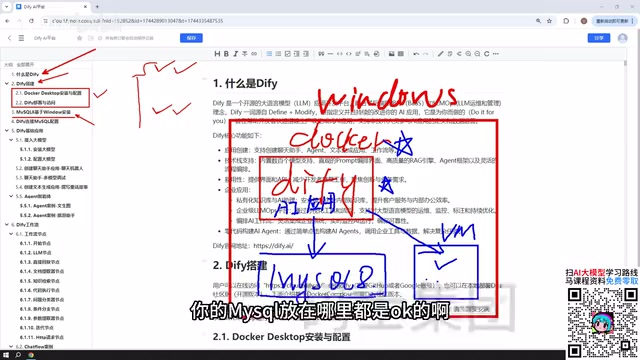
Worth noting: the location of your MySQL instance is actually quite flexible. It can run on your local Windows machine, be deployed via Docker, or sit inside a VMware virtual machine. Once Docker is set up, Dify's network can communicate normally with MySQL on the Windows host as well as services running inside virtual machines. In other words, where you put the database doesn't affect Dify's ability to call it — giving you a lot of deployment freedom.
Dify's Five Core Application Types
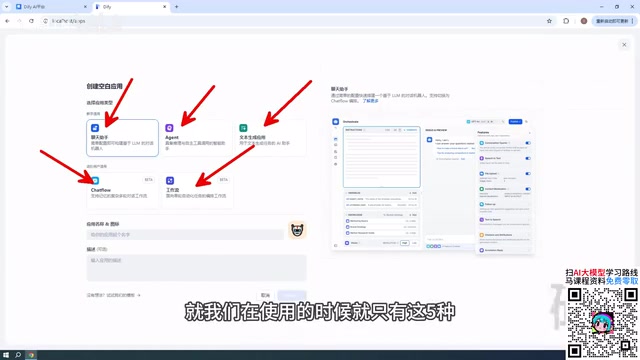
When you open Dify and create an application, you'll see five main application forms. These are also the backbone of the entire tutorial.
Basic Applications: Chatbot, Text Generation, and Agent
Chatbot is the simplest form — essentially a conversational interface with an AI model.
Text Generation is for one-shot content production: writing articles, generating documents, crafting stories, and similar tasks.
Agent is the most capable of the three. The key difference from the others is that an Agent can invoke tools to complete user instructions. For example, you might ask it to scrape a web page and then analyze its content — multi-step, multi-tool tasks are exactly where Agents shine.
The core mechanism behind an Agent is typically called ReAct (Reasoning + Acting) or tool use/function calling. Rather than giving a direct answer to a user's instruction, the LLM first "reasons" about which external tools are needed, then "acts" by calling those tools to retrieve results, and finally synthesizes those results into a response. This reasoning-action loop can repeat multiple times until the task is complete. Common tools include web search, code interpreters, database queries, and API requests. An Agent's capability ceiling depends on what tools it can call and how well the underlying model follows instructions — which is why the tutorial recommends prioritizing larger, more capable paid online models over small local models.
Advanced Applications: Chatflow and Workflow
Workflows represent the most important advanced capability in Dify, and they come in two flavors:
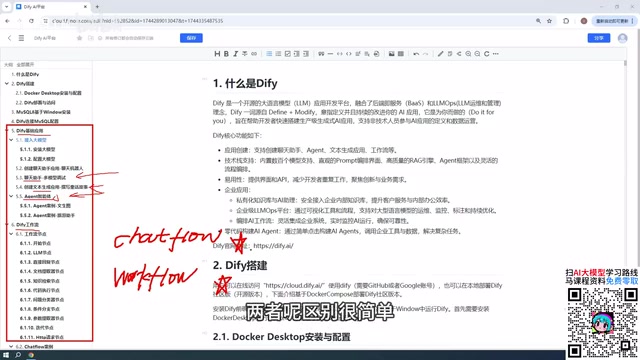
Chatflow supports multi-turn conversational interaction with the workflow.
Workflow is one-shot — you provide input and it delivers output directly, with no ongoing conversation.
The distinction is that simple: one emphasizes interactive dialogue, the other emphasizes single-task output. You choose based on what your use case requires.
From a technical standpoint, the workflow concept originates from enterprise software's "process automation" philosophy and has been adapted for AI application development alongside the rise of LLMs. In Dify's context, a workflow is essentially a directed acyclic graph (DAG): each node represents an independent operation (such as calling an LLM, executing code, or querying a database), and the connections between nodes define data flow and execution order. This design allows complex AI tasks to be broken down into clear, debuggable steps rather than being stuffed into a single opaque prompt. Chatflow additionally maintains conversation history context, so each user input can influence the behavior of subsequent nodes — making it better suited for scenarios that require memory and follow-up questions. Workflow, by contrast, executes independently each time and is better suited for batch processing, report generation, and other linear "input → process → output" tasks.
Understanding Workflow Nodes: The Building Blocks of Your App
Whether you're building a Chatflow or a Workflow, the concept of nodes is fundamental. A node is a functional module that makes up a workflow. You chain these modules together in logical order to form a complete pipeline.
The tutorial covers the most commonly used node types in Dify, which together cover the majority of functionality available on the platform. Learning nodes is the key to mastering workflows, because truly complex, powerful AI applications are almost always built through the orchestration of multiple nodes. Dozens of accompanying case studies help illustrate the specific usage of each node type.
A Critical First Step: Connecting a Large Language Model
Since every application interacts with an LLM, connecting a model is your first step. The tutorial's recommendations are worth paying attention to:
Prioritize paid online LLMs. Recommended options include DeepSeekAd, ChatGPT, as well as services like Baidu ERNIE Bot and Alibaba Qwen that offer free token allowances. These free tiers typically run into the millions of tokens — more than enough for day-to-day learning.

On the topic of cost, the tutorial specifically puts beginners at ease: domestic Chinese models like DeepSeek are extremely affordable. The creator showed their own usage records — after topping up ¥10, they used it for a long time without even spending ¥1. The costs are that low.
Avoid prioritizing local models. While Dify supports connecting to locally deployed models via Ollama, local models tend to have fewer parameters and weaker performance. That said, if your machine is powerful enough — or if you're running an enterprise-grade cluster capable of running DeepSeek's open-source large-parameter models (the largest version is 400+ GB after download) — then locally or cluster-deployed LLMs can perform excellently and are absolutely viable for building enterprise-grade applications.
Publishing Your App: From Internal Use to Public Launch
Applications built in Dify aren't limited to local use. The platform provides multiple publishing options:
- Publish as a public web page: Generate a link accessible to anyone on the internet (local deployments require an intranet tunneling tool).
- Embed into your own website: Integrate the application into a site you're developing.
- Call via API: Supports API access (including Python API) for integration into other systems and programmatic usage.
This flexible publishing mechanism means Dify-built applications can actually land in real business scenarios — not just sit as demos.
Intranet tunneling is a critical technical step when publishing a locally deployed Dify instance externally. Devices on home or office networks are typically behind NAT (Network Address Translation) and lack a public IP, making them inaccessible to outside users. Tunneling tools such as frp, ngrok, and Cloudflare Tunnel solve this by establishing a persistent tunnel between your local machine and a public server, forwarding traffic from a public domain or port to a specified port on your machine — making your local Dify app publicly accessible. A security note: any publicly exposed service should have authentication configured to prevent API abuse and unexpected costs. If you're only using Dify within a corporate intranet, no tunneling is needed — simply access it via the local area network IP.
Summary: A Clear Learning Path for Dify
The tutorial follows a coherent arc: understanding what Dify is, completing Docker deployment and database configuration, mastering the five application types (chatbot, text generation, Agent, Chatflow, Workflow) and workflow nodes, and finally learning to connect LLMs and publish applications. For anyone looking to systematically get started with AI application development, this is a practical route worth following. Working through the many real-world case studies step by step effectively lowers the learning curve and helps you avoid common pitfalls.
Related articles

Chain of Thought Isn't Just for AI: How Humans Can Use CoT to Improve Thinking Quality
Chain of Thought isn't just a prompt trick for large models. Starting from a Hacker News discussion, this article analyzes why CoT works for human thinking too, breaks down actionable ways to transfer it, and highlights the key differences between human CoT and machine CoT.
Cloudflare Teams Up with OpenAI: Closi…
Cloudflare Teams Up with OpenAI: Closing the Loop from Vulnerability Discovery to Defense with AI
Cloudflare uses OpenAI Daybreak to investigate security vulnerabilities and generate reviewable remediation plans, while developers use Codex to boost coding efficiency and quality.

Orca Multi-Agent Orchestration in Practice: A Guide to Parallel Collaboration with Claude and Codex
Orca is Stable AI's free open-source agent workbench supporting 34 agents like Claude Code and Codex in parallel. Learn its Git worktree isolation, multi-model orchestration, and mobile management.