Dify in Practice: Three Ways to Build an AI Literacy Teaching Assistant Chatbot
Three Dify paths for creating an AI literacy teaching assistant, from manual nodes to natural language programming.
Based on a training video by Bilibili creator Peter Sun Dasheng, this article introduces three ways to create an AI literacy teaching assistant chatbot using Dify. It explains why Dify was chosen (local deployment plus SSO for data security and access control), then covers hand-building a Chatflow with a System Prompt and Knowledge Retrieval node, AI-assisted workflow generation requiring manual checks, and Agent mode for pure conversational creation. The three approaches coexist depending on user needs and skill level, and the article stresses that what remains is AI fundamentals and requirement breakdown ability.
In the field of AI application development, how to help teachers and students quickly understand and apply AI literacy is a topic many education teams are exploring. In a recent training session for a teaching team in Hangzhou, Bilibili creator Peter Sun Dasheng demonstrated three paths for creating an AI literacy teaching assistant chatbot using the Dify platform — from building nodes entirely by hand, to AI-assisted workflow generation, to creating an Agent through pure natural language conversation. These three approaches correspond to users with different technical backgrounds, and they also reflect how agent-building tools are evolving from "visual orchestration" toward "natural language programming."
Why Choose Dify: Control and Security Are Core Advantages
At the start of the training, Peter mentioned an industry backdrop: ByteDance recently took down its Coze platform (referred to in the original as the "COS platform"), a piece of news that sparked considerable discussion in the agent workflow-building community. Faced with the question "the platform is gone, should the training continue?" his boss offered a key judgment — "What we're building is capability, not a platform."
This statement captures Dify's positioning in this training. Peter's team uses the locally deployed version of Dify, deployed on servers inside the school, with all data and security under control, and integrated with single sign-on (SSO) so that only internal teachers and students can log in and use it. Compared with public cloud products such as Doubao, the access control and data security brought by this private deployment are precisely the differentiating factors that education scenarios value most.
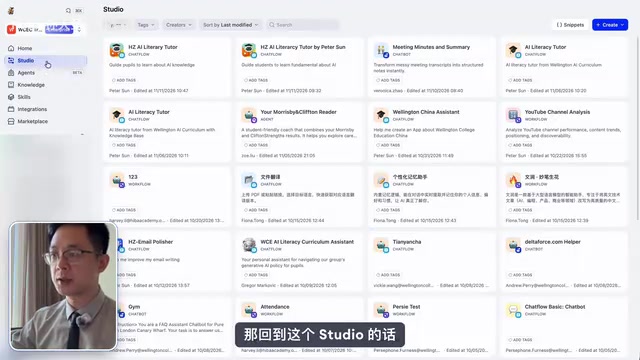
Dify's workspace has built-in model configuration, so users do not need to pay much attention to underlying model parameters. The interface is divided into modules such as Home (list of existing chatbots), Studio (orchestration area), Agent (conversational agent), Knowledge (knowledge base), Skill Integration, and Marketplace (template marketplace). The knowledge base feature allows school documents to serve as supplementary information for the large model — enterprise-level support that general-purpose chat models cannot provide.
Approach 1: Hand-Building a Chatflow, Controlling Every Node from Scratch
Clicking Create in Studio offers three creation methods: start from blank, use a template, or import a file. The training demonstration chose to create a Chatflow from blank, named it "AI Literacy Tutor," and added an icon and description. The system generates three nodes by default: user input, large model, and result output.
But the default configuration is just a generic chatbot, lacking specificity. Peter compared the Agent to a new employee — you must give it a job description (System Prompt), otherwise it will only speak in generalities. He copied a preset AI Tutor Prompt from Notion and pasted it into the System field, containing instructions such as "You are a friendly AI literacy mentor, helping teachers and students understand AI" and "Answer in the learner's language." After completing this step, a basic chatbot was already usable, and the Q&A effect could be tested via Preview.
Adding a Knowledge Base: Making Answers Based on School Materials
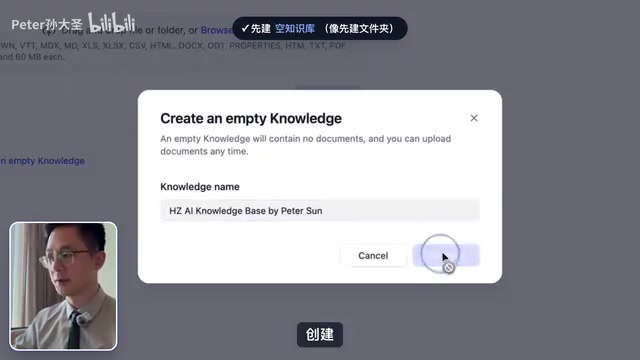
The basic chatbot's knowledge source is limited to the large model itself. To make it cite internal school materials, a Knowledge Retrieval node needs to be introduced. Peter first went to the Knowledge module to create a blank knowledge base folder, uploaded PDF files, changed the default Vector Search to Hybrid Search in the retrieval settings, then saved and processed the documents, waiting for the system to finish chunking and indexing.
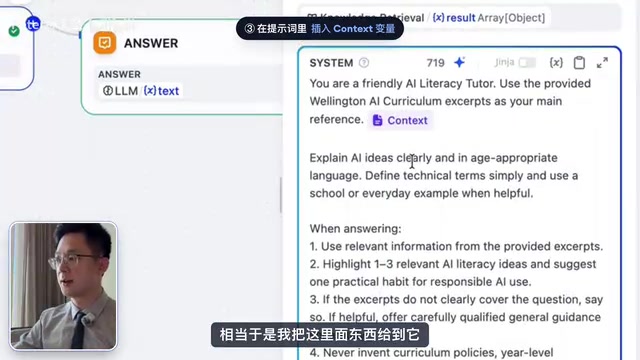
Back in Studio, he inserted a Knowledge Retrieval node between the Start node and the LLM node, selected the newly created knowledge base, then updated the System Prompt to explicitly require "using the provided knowledge base content as the main reference," and added the Context variable to the prompt. This way, before answering, the model first retrieves from the knowledge base and provides citation sources in its answer.
Hybrid Search combines vector search and keyword search. Vector search is based on semantic similarity and can understand that "AI literacy" and "artificial intelligence competency" are similar concepts, but it may miss proper nouns; keyword search is based on literal matching and is more sensitive to precise terminology and abbreviations, but cannot handle synonymous expressions. Hybrid search fuses and ranks the results of both, ensuring semantic recall while improving the hit rate for proper nouns. In education scenarios, school documents often contain course codes and specific terminology, and hybrid search can significantly improve retrieval quality and reduce cases of "answering off-topic."
Publishing and Permission Management
After configuration is complete, click Publish to publish to the internal server. In Access Point, you can choose the sharing scope: specified members, all members within the platform, external authenticated users (such as students logging in with email), or "anyone with the link" — Peter specifically warned that the last option carries privacy risks and should be used with caution. In addition, Features allows you to enable experience optimizations such as conversation openers, suggested questions, and sensitive word filtering. The Logs feature can monitor the number of users and conversation records, facilitating teaching management.
System Prompt is the preset instruction a large language model receives before a conversation begins, used to define the AI's role, tone, answer boundaries, and behavioral guidelines. It differs from what the user inputs each turn; instead, it acts as "background setting" that continuously influences the model's output style. In this example, the System Prompt tells the model "You are a friendly AI literacy mentor," equivalent to providing a new employee with a job description. Without a System Prompt, the model can only rely on general training data to answer, and is prone to deviating from the professionalism and approachability required in education scenarios. A well-designed System Prompt can also constrain the model from answering irrelevant questions and reduce hallucination risk.
Approach 2: AI-Assisted Workflow Generation, Building Nodes with One Sentence
If manually dragging nodes feels too tedious, you can use the quick generation feature in Studio. Enter a natural language description like "build an ai literacy teacher system with knowledge database" and click Generate; the system will automatically generate four nodes including knowledge base retrieval. But Peter emphasized that after generation, you still need to manually check whether the knowledge base is correctly mounted and whether the Context variable is connected to the prompt — AI assistance lowers the barrier to building, but key configurations still require human confirmation.
Context variable is the key mechanism in a workflow for passing retrieval results. The document fragments retrieved from the knowledge base by the Knowledge Retrieval node need to be passed to the LLM node as a variable so the model can generate answers based on that content. If the Context variable is not correctly connected to the prompt, the model will not be able to "see" the retrieval results, and the knowledge base becomes useless. This is also the core reason why manual checking is necessary after AI-assisted generation — automatically generated node connections may miss variable bindings, causing answers to not cite school materials. Understanding variable passing logic is the foundation for judging whether a workflow actually works.
Approach 3: Agent Mode, Creating a Black-Box Agent Through Pure Conversation
Dify's newly launched Agent feature provides a third path. After creating a blank Agent, the left side of the interface is the configuration area and the right side is a chat box, with the prompt "Build your agent by chatting." Peter switched the model to version 5.4 (the original mentions that 5.4 has stronger token capabilities), then directly pasted the previously prepared Prompt into the conversation, and the Agent began building automatically.
In this mode, users cannot see the internal nodes — it is essentially a black box, and only the final result is visible. On site, Peter also tried uploading a PDF as a knowledge base file and asked the Agent to read information from a certain website as supplementary material; the Agent handled both automatically, and after confirmation, clicking Apply generated it. The whole process is more intuitive for novice users, but the cost is losing fine-grained control over each node.
How to Choose Among the Three Approaches: Coexistence, Not Replacement
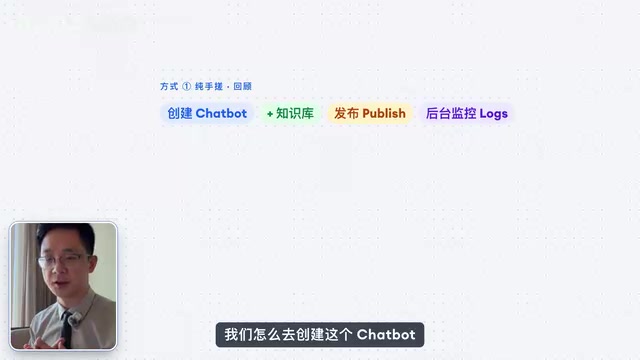
In his summary, Peter did not give a single answer. Hand-building suits users who need to deeply understand the logic of each step, AI-assisted generation suits colleagues who want to get started quickly, and Agent conversation mode is friendliest to users with zero foundation. The three approaches can coexist, depending on the user's current needs and skill level.
From a broader perspective, the direction of Dify's capability evolution is worth noting: from initially emphasizing localized, visual Agent orchestration to now supporting direct Agent generation through natural language, tools are lowering the barrier to AI application development. But as the opening line of the training implied — tools will change, platforms will be taken down, and what truly remains is users' understanding of AI fundamentals and their ability to break down requirements into executable processes. At a time when token costs are increasingly a consideration, those who understand the underlying logic can achieve higher output with less input, which is perhaps more important than learning any specific tool.
This article is based on a training video by Bilibili creator Peter Sun Dasheng; the views and data all come from the original content.
Token is the basic unit by which large language models process text. One Chinese character roughly corresponds to 1-2 tokens, and one English word roughly corresponds to 1-3 tokens. A model's context window and billing are both measured in tokens. In Agent mode, conversation history, system prompts, and knowledge base retrieval results all consume tokens, and the longer the conversation, the higher the cost. Understanding the token mechanism helps optimize prompt length and control the number of retrieved fragments, thereby balancing effectiveness and cost. For large-scale teacher and student use in education scenarios, token costs directly affect sustainability — this is also the technical basis for the idea that "those who understand the underlying logic can achieve higher output with less input."
One-line Summary
Three Dify paths for creating an AI literacy teaching assistant, from manual nodes to natural language programming.
Paragraph Summary
Based on a training video by Bilibili creator Peter Sun Dasheng, this article introduces three ways to create an AI literacy teaching assistant chatbot using the Dify platform. It first explains why Dify was chosen: local deployment plus SSO single sign-on meets the data security and access control needs of education scenarios. Approach 1 is hand-building a Chatflow, requiring configuration of a System Prompt and insertion of a Knowledge Retrieval node so answers are based on the school knowledge base with citations; publishing and permission management are also covered. Approach 2 is AI-assisted workflow generation, creating nodes with one sentence but requiring manual checks of key configurations. Approach 3 is Agent mode, creating a black-box agent through pure conversation, friendly to novices but losing node-level control. The three approaches coexist, depending on user needs and skill level. The article concludes by emphasizing that tools will change, and what remains is AI fundamentals and the ability to break down requirements.
Related articles

One Settings File Leaks a Thousand Keys: The Security Blind Spot in AI Coding Tools
Over 100,000 Claude Code settings files exposed on GitHub, 1,122 with real high-privilege keys. How a convenience feature bypasses version control, plus Anthropic's new models, evaluation credibility crisis, and local backlash against data centers.

Claude Fable 5.2 Review and AI Agent Memory Mechanisms Explained
An in-depth review of Claude Fable 5.2's coding vs. general-task performance, analysis of the redacted-data controversy in the AI-accelerating-AI report, and a breakdown of Agent Memory's layered memory and dreaming mechanisms.

48 AI Agents Discover a Maya Pyramid in 72 Hours: A Google Engineer's LIDAR Archaeology Experiment
A Google engineer used 48 AI agents to scan NASA LIDAR data, flagging an unrecorded Maya pyramid structure in 72 hours. We break down how multi-agent remote-sensing archaeology works, the false-positive risk, and how AI and human experts divide verification.