Dify Workflow in Practice: How AI Product Managers Build Business Processes with Low-Code
A practical guide for AI PMs on building business workflows in Dify, from core concepts to a jewelry quoting case study.
This article systematically covers Dify workflow concepts and hands-on methodology for AI product managers. Workflows sit between LLMs and agents — a low-code editor trading flexibility for stable, controllable outputs. Dify uses a three-layer abstraction: nodes (like Agent tools), sub-workflows (like skills), and macro workflows. A "buying cola" intro case reveals workflow fragility with hard rules and shows how an LLM node fixes natural language parsing. The advanced jewelry customization quoting case breaks down layered cost calculation across BOM, process costs, and DFM review. Key advice: demo-level is enough, use if-else for hard rules, and only introduce LLM nodes when rules fall short.
Workflows are becoming an unavoidable skill for AI product managers. They sit between large language models and agents — essentially a low-code editor viewed through a product lens. This article is based on a hands-on AI product manager course on Bilibili, systematically covering the core concepts and node structure of Dify workflows, and walking through how a real-world jewelry customization quoting scenario gets broken down into a workflow.
The Boundaries Between Workflows, Agents, and LLMs
Many people struggle to distinguish between workflows, agents, and large language models. As the course puts it: workflows are more like a low-code editor aimed at product managers, while agents are relatively flexible "LLM + tools" runners.
The fundamental relationship between the three can be understood this way — whether it's a large language model or an agent, the underlying logic is "input + output" with a function in between. What makes workflows distinctive is that the middle process is edited by humans: stable input, stable output, with manually orchestrated rules in between. This also explains why workflows are often described as "the more human effort goes in, the more intelligence comes out" — they're rigid, but the tradeoff is predictable, stable results.
This stability is precisely what suits business scenarios like supply chain management. The course repeatedly emphasizes that supply chain processes depend on stable outputs, so wherever you can use hard if-else rules, don't casually replace them with LLM nodes — doing so makes outputs less reliable.
Dify Installation and Deployment Options
Dify is one of the more common open-source workflow tools on the market. Similar products include the workflow templates in Coze and n8n. It offers two deployment options:
- Cloud SaaS version: Free, fully featured, just register on the official website
- Local community edition: Requires Docker deployment; there's also an enterprise version for businesses
The course offers a very practical recommendation: Windows users are advised against wrestling with a local Docker installation, as the barrier is relatively high (earlier versions required enabling WSL). If you really want a local deployment but can't get it working, you can have an agent help you install Docker and pull the image. For most learners, using the cloud version is the simplest option — it has all the same features.
Docker is a containerization technology that packages an application and all its dependencies into a standalone "container" that can run on any system with a single command, no manual environment configuration needed. For Dify's local deployment, Docker bundles Dify's backend services, database, vector storage, and other components together, letting you launch the entire stack with one command (
docker-compose up). WSL (Windows Subsystem for Linux) is Windows' built-in Linux compatibility layer; earlier versions of Docker Desktop on Windows required WSL to run, which is why the course recommends Windows users go with the cloud version — local deployment involves enabling WSL, installing Docker, pulling images, and several other steps that present a high barrier for product managers without a development background. n8n is another open-source workflow automation tool; the main difference from Dify is that n8n leans more toward system integration and automated triggers (similar to Zapier), while Dify's workflows place greater emphasis on deep integration with large models and building conversational applications.
The Three-Layer Abstract Structure of Workflows
Understanding workflows comes down to grasping their layered structure.
The node layer is the most fundamental unit. Start, user input, HTTP request, conditional branch, LLM, human intervention — each is an independent node. Take the HTTP request node as an example: normally you'd write code for this, but in Dify you can drag in a pre-configured template from the backend and set it up in low-code form.
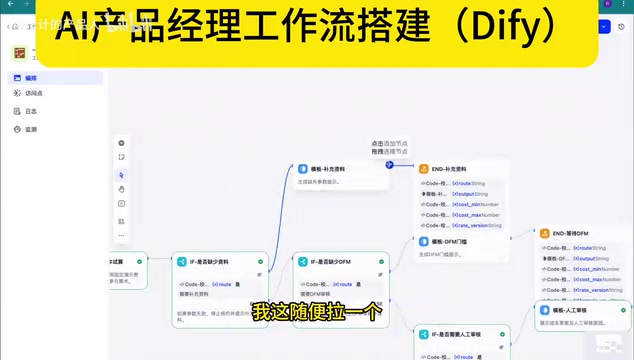
The sub-workflow layer is an aggregation of nodes. For example, the entire chain of "human intervention → conditional branch → call LLM → upstream conditional branch" forms one sub-workflow. The entire chain must be closed-loop, ultimately connecting to an output node.
The macro workflow layer is an overall aggregation of multiple sub-workflows.
The course draws a clever parallel: compared to an Agent, a single node in a workflow corresponds to a tool in an Agent, while a sub-workflow is analogous to a skill — just more complex to invoke. This analogy helps clarify the correspondence between workflows and agents at the abstraction level.
One thing worth noting: the more complex the functionality, the more chain segments need to be edited, and nodes grow exponentially. A conditional branch leading to an LLM, followed by another conditional branch, can easily spawn an unlimited number of nodes. Human intervention nodes typically serve as a fallback strategy — every workflow should have a fallback rule designed in.
From Buying Cola to Price Calculation: Breaking Down the Introductory Case
The course uses an extremely relatable example to explain the three-layer logic of workflows: going to a convenience store to buy cola.
The user says "I want to buy three bottles of cola," and what the shopkeeper mentally does breaks down into a workflow: input layer (user request) → rules layer (maintain a price list + calculate total based on quantity) → output layer (tell the customer how much they owe).
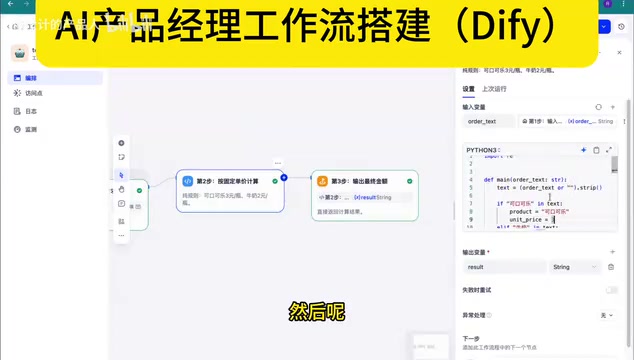
In the actual demo, "I'm buying two bottles of milk" outputs "two bottles of milk equals four yuan" because the price list has milk at two yuan each. This layer is implemented with a code node — the logic is simply quantity multiplied by unit price.
The most valuable part of this case is how it reveals the fragility of workflows. When the user inputs "I'm buying three Coca-Colas," the system returns "couldn't understand the quantity" — because the rule is written with the unit "bottles" (瓶), but the user said "个" (pieces/units), so the hard rule can't parse it.
The fix is to introduce an LLM node for semantic parsing. Add a large model node, and whether the user says "three bottles," "three units," or "three cases," the model can parse it (it can even convert "three cases" into 36 bottles), outputting a stable JSON to pass downstream. This is where a workflow's flexibility comes from: it's inherently rigid, but when combined with a language model for natural language parsing, the whole system can become quite flexible. When chains get long enough that if-else enumeration becomes impossible, you can also let the language model decide which path to take.
Jewelry Customization Quoting: A Real-World Complex Workflow
The core case study in the course is an enterprise-level "one-click custom auto-quote" requirement — users submit customization requests and the system automatically generates a quote.
This scenario requires distinguishing between two types of businesses: if a supplier provides a direct product price list, the intermediate calculation is straightforward — the LLM parses and adds up; but for a B2C manufacturing company, three variables come into play: material costs, process costs, and additional customization requirements.
The quoting conditions a user inputs include: material type and weight, quantity ordered, surface finish, quality tier, rush order status, and more. There's a key product-thinking insight here: these inputs can't be directly entered by users in real production — the frontend workflow needs to connect to a backend system (like an OMS) first to retrieve data and wrap it in an abstraction layer.
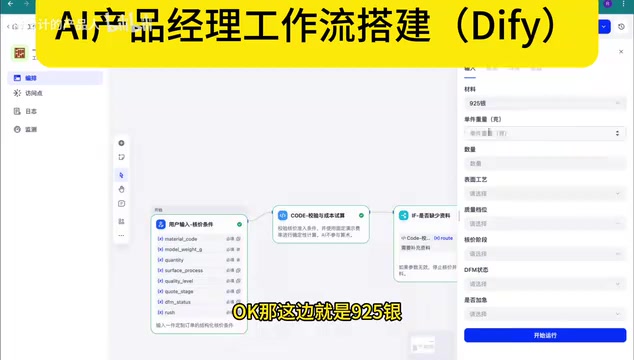
The entire workflow calculates costs in layers:
- BOM cost: Material × weight × quantity. Silver prices require importing a file (price catalog), similar to a knowledge base lookup. For demos, virtual/simulated data works fine — even hardcoding is acceptable; actual development will connect to a web search to fetch current material prices. Loss rates also need to be considered, but they're not user inputs — they're added mid-process by product category.
- Process cost: Standard process routes are hard-coded in the backend; surface finish (electroplating/matte/polishing) is user-customized. Quality tiers are 70/80/90 points, essentially corresponding to the processing time per worker per step.
- DFM review (Design for Manufacturability): This is a two-stage quoting mechanism. The first pass gives an initial estimate; after the user completes information and a human evaluation is done, a precise quote is issued.
In the final case, an order with complete data that has passed DFM evaluation produces a very precise result like "cost range: 1,478 yuan"; orders that haven't been evaluated produce a noticeably wider cost range. Rush orders trigger a handoff to a human, routing them through the non-standard production scheduling process.
Can this workflow be reused when switching product categories? The course gives a clear answer: the BOM materials section can be reused, but process routes cannot — different materials and product categories have different processing workflows, leading to differences in cost rules. So different product categories require building separate workflows.
DFM (Design for Manufacturability) is a standard phase in manufacturing where a product's design is evaluated for whether it can be efficiently and cost-effectively produced. In jewelry customization scenarios, typical DFM review questions include: is the open-work structure too fragile, does the number of solder joints exceed what the process can handle, do certain process combinations conflict with each other? The product significance of incorporating DFM into a workflow is that it transforms what would otherwise require manual engineer intervention in a secondary evaluation into a process-managed node — the first quote is an initial estimate based on user input, and only after DFM review (human or automated) is a precise quote issued. This "two-stage quoting" mechanism reduces the risk of mispricing due to incomplete information, while also providing a more reliable cost baseline for production scheduling. BOM (Bill of Materials) is a structured list in manufacturing that describes which raw materials, components, and quantities make up a product — it's the data foundation for cost calculation in the workflow.
When to Use a Workflow vs. an LLM Node
The Q&A section of the course clarifies several frequently asked questions that are especially useful for product managers.
LLM node vs. Code node — how do you choose? If the upstream is returning structured data from a backend API, use a code node directly — no need for an LLM to parse user intent. LLM nodes are typically only used in two situations: first, parsing pure natural language input (e.g., converting production notes to JSON); second, when upstream output is ambiguous and there are too many downstream branches to handle with simple if-else logic, letting the model make the routing decision.
The principle of judge-first, then process: If the company has hard rules, use rule-based judgment; only add an LLM node when there are no clear rules. Hard-coded logic is more reliable than LLM output.
Do you always need to build a workflow? It depends on whether the use case involves replacing human labor with AI at scale. High-repetition tasks like sending emails are good candidates for workflow automation. On the engineering side, whether to use hard-coded logic or a workflow depends on how frequently the process changes — during validation and testing, workflows offer agility; once an algorithm has been gray-released and the optimal path confirmed, it's often converted to backend hard-coded logic and baked into the system.
"Gray release" (or canary release) is a common strategy for rolling out new features in internet products — the new version is pushed to a small subset of users (e.g., 5% of traffic), data is collected to compare new and old approaches, and once validated, coverage is gradually expanded to 100%. The course mentions that algorithm teams use data generated from workflow cases for gray releases. The underlying logic is: the workflow phase acts as rapid prototype validation, using a low-cost approach to run through the business logic; once a particular decision path is confirmed as optimal through gray release comparison, engineers solidify it into backend hard code for better performance, stronger stability, and lower marginal cost. This also explains why a product manager's workflow demo doesn't need to connect to a real API — its core value is validating whether the process logic is correct, not replacing the final production-grade implementation.
Practical Advice for AI Product Managers
For product managers working on AI projects, the course's requirements are refreshingly pragmatic: aim for demo quality — no need to connect real APIs; just use demo data to run through the inputs and outputs and get correct results.
Processwise: start by writing a PRD to map out the specific flow, then break the flow into nodes. For three or more parallel branches, write multiple condition checks (add more cases within a single conditional node). Page prototypes can be generated as HTML interactions using code or Codex — simulate the data, and keep the core focus on the backend logic of the workflow.
This demo is primarily shown to backend engineers or algorithm teams: showing it to backend engineers demonstrates the process logic (which they may convert to hard code); showing it to algorithm teams usually means providing a dataset (including bad cases, normal cases, and neutral cases) — the algorithm team will typically produce a workflow adapted to that dataset based on around 20 cases, then run a gray release comparison.
One long-term takeaway: product managers should identify which nodes are reusable (e.g., the auto-quoting node should be reused across multiple workflows where possible), but avoid making any single workflow chain too long — the longer the chain, the more likely it is to break down.
Related articles

A DeepSeek Researcher's Confession: The AI He Trained Is About to Replace Him
DeepSeek V4.1 kernel engineer Liu Shengyu admits the AI he trained will surpass his own skills within a year—yet he keeps pushing forward. Here's why.
n8n Automation in Practice: How AI Workflows Help SMBs Cut Costs and Boost Efficiency
Learn how SMBs use n8n and AI tools to automate multi-platform messaging, AI customer service replies, and bulk exam data entry — real-world workflows for cutting costs.

DeepSeek Harness Hands-On: Build Your Own Coding Agent for Free
DeepSeek Harness hits 190K GitHub stars as a free Claude Code alternative. This hands-on review covers installation, plugin models, full traceability, and driving Claude Code as a subprocess.