Dify Workflow Tutorial: From Local Deployment to AI Application in Practice

Dify tutorial covering deployment, environment setup, five application types, workflow nodes, model integration, and publishing.
This article introduces Dify's core value and usage path as a low-code AI application development platform. The tutorial recommends deploying Dify locally on Windows via Docker, and installing MySQL 8 on the host to support application data. Dify offers five application types: Chatbot, Text Generation, Agent, Chatflow, and Workflow, where Agent supports tool calling, and Chatflow vs. Workflow differs in whether continuous conversation is supported. Workflow nodes are the core of advanced usage. For model integration, prioritize paid APIs like DeepSeek for extremely low costs; local models can be integrated via Ollama but are limited by computing power. Applications can be published via public sites, embedding, or APIs, and local deployment publishing to the public internet requires intranet penetration.
Why Choose Dify as Your AI Application Development Platform
In the field of AI application development, how to quickly turn large model capabilities into usable products has always been a core challenge for developers. Dify, as an open-source low-code AI application development platform, is becoming a popular answer to this problem.
According to the Bilibili creator in this tutorial, Dify is essentially an AI platform through which you can quickly and conveniently build AI applications ranging from personal to enterprise level. Compared to directly calling large model APIs, Dify provides a visual orchestration interface, knowledge base management, tool calling, and a complete capability system, significantly lowering the barrier to AI application development.
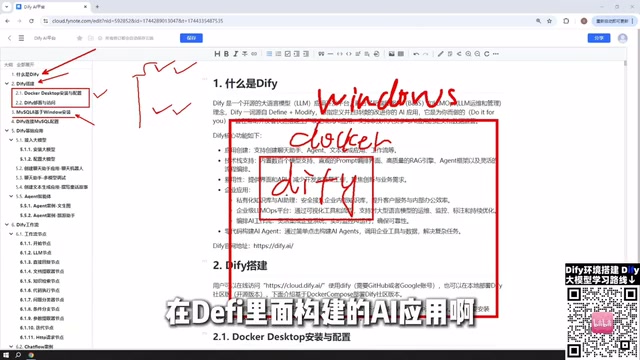
Dify offers flexible deployment options. The tutorial mentions three alternatives: local deployment via Windows Docker, source code deployment, and directly using the official online version. The creator specifically recommends local Docker deployment because it allows Dify to directly access the host machine's database and other environmental resources; while the online version would need intranet penetration tools to expose the local IP to the public internet if it needs to access local resources, resulting in higher configuration costs.
Low-code AI application development platforms are tools that enable developers to build AI applications with little to no coding through visual interfaces and preset components. These platforms typically encapsulate underlying capabilities such as large model invocation, prompt management, context orchestration, and knowledge base retrieval, abstracting complex technical details into draggable nodes or form configurations. Their core value lies in lowering development barriers, shortening the cycle from idea to product, while retaining extensibility for professional developers to perform deep customization. Dify is a representative open-source project in this space, allowing users to complete the entire process from model integration to application publishing in a browser, and supporting community edition self-hosting, balancing ease of use with data controllability.
Intranet penetration is a technical means of exposing services inside a local network to the public internet, commonly used in scenarios where a local development environment needs to be accessed externally. Its principle is to establish a tunnel through a relay server with a public IP, forwarding public requests to the internal host. Common tools include frp, ngrok, ZeroTier, etc. In the context of local Dify deployment, if you want to publish your built application to the public internet, you need intranet penetration; otherwise, external users cannot directly access the service running in the local Docker container.
Pre-deployment Environment Preparation: Docker and MySQL
Local Dify deployment requires setting up the foundational environment first. The tutorial's approach is to install Docker on Windows to deploy Dify, while also installing MySQL 8 as the data storage for subsequent AI applications.
The reason MySQL is installed on the Windows host rather than in a Docker container is that AI applications built in Dify need to read and write database data. Installing MySQL on the Windows node allows Dify's network in Docker to communicate directly with Windows MySQL, and also with MySQL in a VMware virtual machine on Windows, making the deployment location quite flexible. Of course, MySQL can also be deployed based on Docker; which approach to choose depends on your actual environment.
After the environment is ready, you also need to configure the MySQL connection in Dify to ensure that subsequent AI applications can properly read data from the database and interact with it. Although this configuration is not complex, the correctness of the connection parameters directly affects whether the application can run.
Docker is a lightweight containerization technology that allows developers to package applications and their dependencies into standardized images and run them consistently in any environment that supports Docker. Unlike virtual machines, Docker containers share the host operating system kernel, resulting in faster startup and lower resource usage. In Dify's deployment, Docker is responsible for running Dify's core services (such as API, Worker, Web frontend) as well as possibly used middleware (such as Redis, Weaviate, and other vector databases). Through Docker Compose orchestration, users can launch the entire service suite with a single command, greatly simplifying the deployment process. It should be noted that the network inside the container is isolated from the host network by default, so if MySQL is installed on the host machine, the Dify container needs to access it through the host's IP or special network configuration, which is why the tutorial emphasizes the correctness of connection parameters.
Dify's Five Core Application Types
When creating applications in Dify, the platform provides five application types. Understanding their differences is a prerequisite for choosing the right solution.
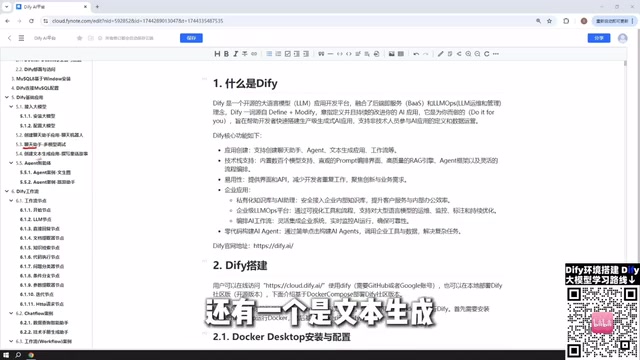
Chatbot is the most basic type, essentially conversing with an AI model, suitable for building customer service bots, Q&A systems, and similar scenarios. Text Generation applications focus on content creation, capable of generating articles, documents, novels, stories, etc. The creator emphasizes that these three basic application types will be accompanied by practical cases in the tutorials, demonstrating step by step how to operate.
Agent differs from Chatbot and Text Generation in its core capability of tool calling. An Agent can autonomously call external tools to complete user instructions, such as first scraping web content and then performing data analysis; this kind of multi-step task is exactly where Agents excel.
The remaining two are workflow-type applications: Chatflow and Workflow. The difference between the two can be summarized in one sentence: Chatflow supports continuous conversation with the workflow, while Workflow only performs one-time input and output. Although it sounds simple, actually building them requires understanding the role of each node and the connection logic.
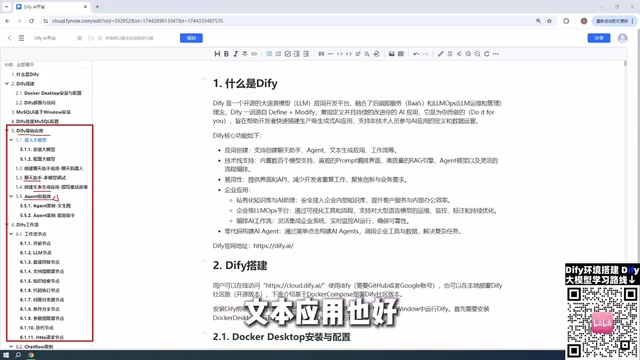
Agent differs fundamentally from ordinary chatbots in its "autonomous decision-making + tool calling" capability. In Dify, an Agent can be configured with multiple external tools (such as search engines, weather APIs, code executors, custom HTTP interfaces, etc.), and automatically plan which tools to call and in what order based on user instructions, ultimately integrating the results to reply to the user. This capability relies on large model Function Calling or the ReAct reasoning framework. In contrast, chatbots can only reply based on conversation history and the knowledge base, unable to proactively interact with external systems. Therefore, Agents are more suitable for complex scenarios requiring multi-step operations and dynamic acquisition of real-time data, such as "check tomorrow's weather in Beijing and recommend an outfit" or "scrape a webpage and summarize the key points."
Chatflow and Workflow are two forms of workflows in Dify. Workflow is a one-way input-to-output process, suitable for one-time tasks such as batch document summarization or data cleaning; Chatflow adds conversation memory and loop interaction capabilities on top of Workflow, allowing users to input multiple times during process execution, with the system continuing based on context. Simply put: Workflow is like an automated assembly line that runs to completion once started; Chatflow is like a process assistant capable of multi-turn conversations, adjusting subsequent steps based on user feedback. Which type to choose depends on whether the application requires continuous human-machine interaction.
Workflow Nodes: The Core of Dify Advanced Usage
Workflow is the most powerful functional module in Dify, and nodes are the basic building blocks of a workflow. Each node represents a functional module, and multiple nodes connected in series form a complete AI processing pipeline.
The tutorial mentions that the official Dify nodes cover almost all usage scenarios. Common nodes include large model invocation, conditional judgment, code execution, knowledge base retrieval, HTTP requests, etc. The creator plans to provide detailed cases for each commonly used node to help learners understand data flow and parameter configuration between nodes.
The entire course is expected to include over a dozen node cases in the workflow section, plus complete project cases for Chatflow and Workflow, covering various application scenarios from simple to complex. This "node explanation + hands-on practice" structure provides a clear path for developers who want to go from beginner to expert.
Large Model Integration: Weighing Paid Models vs. Local Models
Building AI applications inevitably involves large model integration. The creator gives clear advice: prioritize paid model APIs over locally deployed small models.
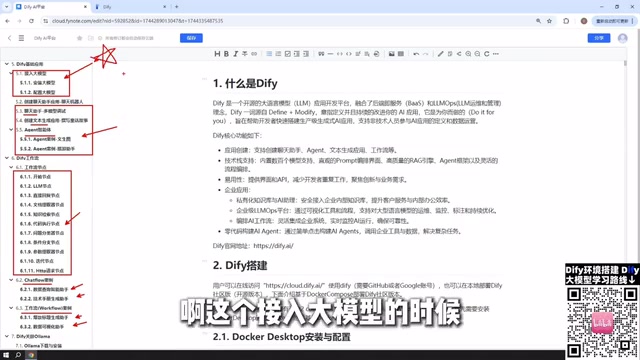
Specifically, DeepSeekAd and ChatGPT are the recommended paid model options. The creator used their own experience as an example — recharging 10 yuan and using it for a long time without even spending 1 yuan, with costs far lower than many people expect. If you want a free solution, Baidu ERNIE Bot and Alibaba Tongyi Qianwen offer millions of free tokens upon registration, which is completely sufficient for learning and testing.
Regarding local models, although Dify supports integrating locally deployed models through Ollama, the creator admits that locally runnable models typically have smaller parameter counts, making it difficult to meet production requirements. Of course, if an enterprise has cluster-level computing resources capable of running super-large parameter models like DeepSeek's open-source models (download sizes can reach hundreds of GB), then locally deployed models can also achieve good results, and this path remains viable for enterprise users.
Ollama is an open-source tool designed specifically for running large language models locally, simplifying model download, loading, and inference service deployment. Users can run open-source models like Llama, Qwen, DeepSeek on their personal computers through Ollama, and provide services externally through an OpenAI-compatible API interface. Dify supports directly integrating Ollama as a model provider to call local models. However, local model performance is limited by hardware resources: consumer-grade GPUs can typically only run 7B~14B parameter models smoothly, while larger parameter models require multiple cards or clusters. Therefore, the tutorial recommends prioritizing paid APIs unless the enterprise has sufficient computing infrastructure. For learning and testing, Ollama is a good zero-cost starting point for exploring model capabilities.
Application Publishing: From Local to Online
Applications built with Dify are not limited to use within the platform. The tutorial concludes by introducing several publishing methods: publishing the application as a public site with a shareable link, embedding it into your own website, or providing it through API interfaces for other systems to call.
These publishing methods give Dify applications the ability to serve external users. However, it should be noted that if using local deployment, publishing applications to the public internet also requires intranet penetration tools. For internal enterprise use cases, local deployment plus LAN access may already be sufficient.
In summary, this tutorial's content structure covers the complete chain from environment setup, model integration, application building, to publishing and going live. For developers who want to systematically master Dify, the course path starts with basic applications, gradually progresses to workflows and node orchestration, and ultimately achieves the delivery of complete AI applications.
One-line Summary
Dify tutorial covers the full chain of deployment, environment preparation, five application types, workflow nodes, model integration, and publishing.
Paragraph Summary
This article introduces Dify's core value and usage path as a low-code AI application development platform. The tutorial recommends deploying Dify locally on Windows via Docker, and installing MySQL 8 on the host to support application data reading and writing. Dify offers five application types: Chatbot, Text Generation, Agent, Chatflow, and Workflow, where Agent supports tool calling, and the difference between Chatflow and Workflow lies in whether continuous conversation is supported. Workflow nodes are the core of advanced usage, with official nodes covering most scenarios. For model integration, it is recommended to prioritize paid APIs like DeepSeek, which have extremely low costs; local models can be integrated through Ollama, but performance is limited by computing power. Applications can be published through public sites, embedding, or APIs, and publishing locally deployed applications to the public internet requires intranet penetration.
Related articles

Felix Rieseberg Personal Homepage
Felix Rieseberg's personal homepage sparks attention on Hacker News. This article covers the Slack engineer's technical background, the rise and fall of nativefier, and the value of a developer homepage as a tech calling card.

@ai-sdk/vue 3.0.306 Patch Release Syncs with [email protected] Update
@ai-sdk/vue 3.0.306 released, synced with [email protected]. A routine patch release for the Vercel AI SDK ecosystem with no public API changes; the Vue adapter layer stays version-aligned with the core package.

Gemini 4 Argon API Launches: The Era of Million-Token Output Begins
Google launches Gemini 4 Argon with sparse MoE architecture, up to 1M output tokens, and a 68.90% Vals Index score, available across API, AI Studio, and the Gemini app.