Dissecting Cursor's 10K-Star Plugin Repository: Install into Claude Code with One Command

Cursor's plugin spec is minimalist and cross-client compatible—the same Skill file runs in both Cursor and Claude Code.
The article dissects the spec design and cross-client compatibility of Cursor's official plugin repository. The manifest plugin.json requires only one field, name; seven component types auto-load from folders rather than being registered individually, and this minimalist design sustains a 10K-star repository. The minClientVersion field manages plugin distribution for both Cursor and another client, hinting at multi-client ambitions. Hands-on tests show a Claude Code marketplace.json hidden in the repo lets one command install the Origin Apps plugin into Claude Code at very low token cost—but only this one plugin is compatible, not full interop. More importantly, the same Skill description file is recognized by both Cursor and Claude Code, proving the Skill format is cross-client universal. The official validator strictly rejects extra fields with line numbers, and all 100 manifests pass, forming a machine-enforced quality gate. The author compares Cursor's official spec-setting with DeepSeek's community wild growth and concludes the formats are converging.
Cursor's official plugin repository has racked up over 10,000 stars on GitHub, but you may not know that its plugin spec was never designed to serve only Cursor from day one. Bilibili creator "1024 Engineering Notes" recently did a deep dive, not only installing a Cursor plugin into Claude Code but also verifying the compatibility of the same Skill file across two clients.
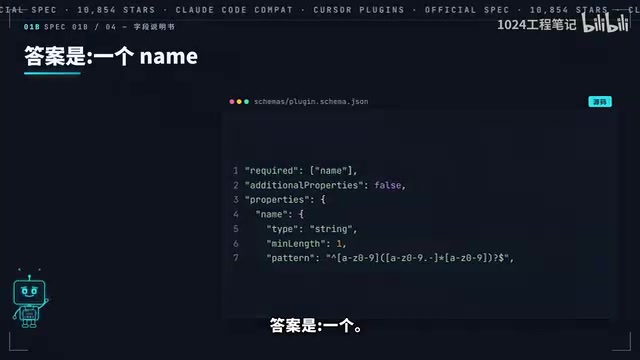
Minimalist plugin manifest design: one field to get listed
The core of this spec is a manifest file called plugin.json. The creator calls it the "field manual"—to make a plugin that can be listed, the only required field is name. Version, author, icon, and license are all optional. Create a folder, drop in a JSON file, write one line name, and it's a valid plugin.
name can't be arbitrary: it must start with a lowercase letter, and may only contain hyphens and dots in between. This constraint is so simple it borders on casual, but it's precisely this minimalist design that gives a 10K-star repository its lightweight foundation.
Of course, a name alone doesn't do any work. A manifest can mount seven types of components: commands, agents, skills, rules, hooks, MCP services, and variables. But the creator flags an easily overlooked detail—components don't need to be registered one by one in the manifest. Files in the agents folder are automatically loaded as agents, files in the skills folder are automatically loaded as skills, and writing paths in the manifest is only needed in specific scenarios.
The official plugin Thermos (branch review) has only two folders listed in its manifest and not a single line of code. Pocket Strait, which distributes large tasks to cloud agents to run in parallel, is also built entirely from plain description files. Most of the plugins spawned by that 200-line field manual look like this.
plugin.jsonis the plugin system's manifest file, analogous to npm'spackage.jsonor a VS Code extension'spackage.json. Its job is to declare to the host client "what this plugin is called, what capabilities it includes, and which client versions it supports." The manifest itself doesn't execute business logic—it only declares; the actual functionality is carried by the component directories (such asskills/,agents/) that the manifest points to. Precisely because the manifest is only responsible for "indexing" rather than "implementation," the spec can be minimalist—complexity is pushed down into each component's own file format, while the manifest layer keeps only the minimum necessary information. This layered design is also one reason the plugin ecosystem can expand quickly: developers only need to understand how to write their own type of component, without first digesting the entire metadata spec.
A hidden client distribution field: foreshadowing multi-client compatibility
There's an easily missed field in the spec: minClientVersion. The creator points out that this field governs "who this plugin is distributed to." Two clients are visible in the field—Cursor and Grogbot (note: as in the original, possibly referring to GitHub Copilot or a similar client).
A single manifest manages distribution to two clients at once, and can even set never for one to hide it entirely. From this the creator concludes: this spec was never intended to serve only Cursor from day one.
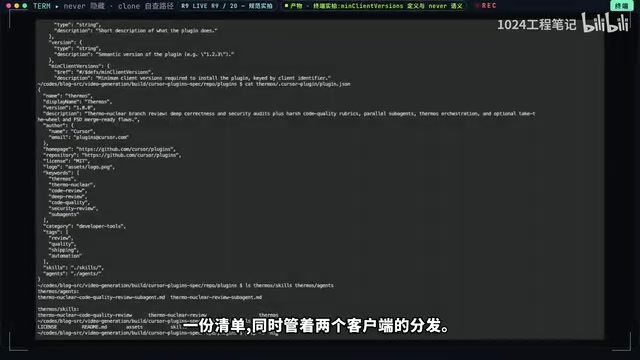
Hands-on: installing a Cursor plugin into Claude Code with one command
At the repository root there's a .claude-plugin folder containing marketplace.json—this is the manifest format for the Claude Code plugin marketplace. A competitor's marketplace manifest sits inside Cursor's official repository, so the creator ran a live test.
First a version check command to confirm the local Claude Code supports marketplace installation. Then register the cloned repository as a marketplace, run claude plugin install with the format "plugin-name@marketplace-name." After hitting enter, the screen shows a successful installation output—"not a single character changed."
What gets installed is Origin Apps, a set of skills written by the official team that teaches agents to migrate GitHub apps to the Origin platform. Using the /details command to inspect: two skills idle at roughly zero tokens, and each skill invocation costs under 20 tokens. For comparison, writing your own system prompt runs into thousands of tokens.
But the creator draws a clear boundary: this compatibility manifest contains only one plugin, Origin Apps—the other 16 official plugins and 50+ third-party ones don't make it in. "It's not full interop; it's a door, not a bridge." To use all 17 official plugins, you still need to install Cursor itself.
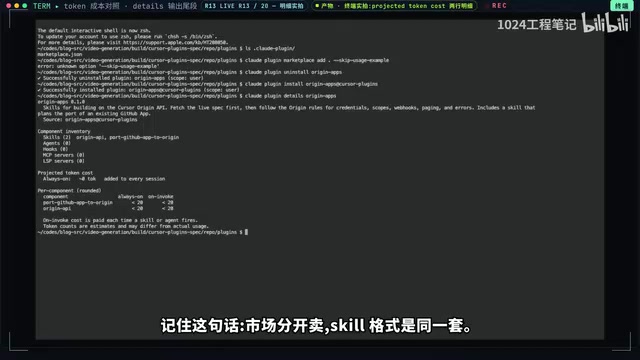
marketplace.jsonis Claude Code's plugin marketplace manifest, functioning like an "app store index file": it lists which plugins exist in that marketplace and each plugin's source address and metadata. When you runclaude plugin install plugin-name@marketplace-name, Claude Code first reads themarketplace.jsonof the registered marketplace, finds the corresponding entry by name, then fetches the plugin content and places it in the local plugin directory. The "register marketplace" step is essentially adding a Git repository or local path to the client's marketplace list, after which the install command has something to look up. This also explains why amarketplace.jsonin the Cursor repository can be recognized by Claude Code—the key to compatibility isn't the code, but that both sides follow the same "marketplace index + manifest" convention.
Skill format is universal: one file, both sides accept it
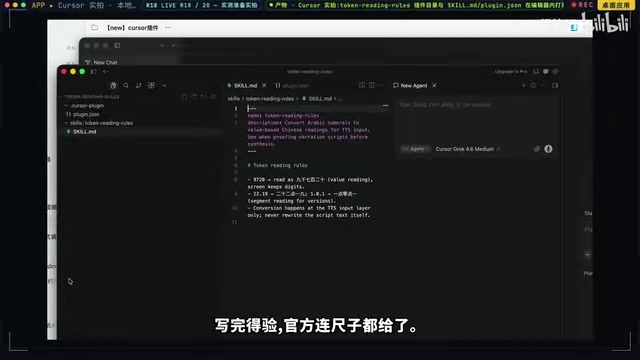
Using the official scaffold create-plugin, the creator built a proofreading plugin called "Token Reading Rules" in ten minutes, governing how numbers are read in voiceover scripts. Two files in total: a manifest JSON in the .cursor-plugin folder and a description file in the skills folder, with name required and the other 12 of 13 fields optional. The description file is 9 lines, writing in the rules for reading numbers as values.
The official convention specifies a local directory .cursor/plugins/local; the scaffold docs state that dropping files there takes effect without installing Cursor itself. The creator's hands-on test confirmed: open the local directory, and both files are recognized directly.
The more critical verification comes next. He copied the same description file verbatim into Claude Code's Skill folder, opened a new drawing (chat) session and asked it "Do you have Token Reading Rules?" The answer: "Yes." The same file—on one side a Cursor plugin component, on the other a Claude Code Skill—both accept it.
Skill is a component type in this kind of plugin system, typically a Markdown description file that describes in natural language "in what scenarios, follow what rules to do things," loaded on demand by the agent when needed. Its key characteristic is progressive disclosure: a Skill file normally retains only very brief metadata (name, trigger conditions), and only injects its body into context when invoked, so its idle token overhead is near zero. This contrasts sharply with the "dump everything at once" approach of system prompts. And precisely because a Skill is essentially "plain text + agreed format" and doesn't depend on any particular client's API, it naturally lends itself to cross-client reuse—the same Markdown, which Cursor reads as a plugin component and Claude Code reads as a Skill, with identical content.
Official validation tool: extra fields are strictly forbidden
The creator validated his own manifest with the official field manual and passed on the first try. He deliberately inserted a field not in the spec and was immediately rejected, with the error even indicating the line number. The manual is explicit: extra fields are strictly forbidden.
This is the official quality gate—misspell a field by one letter and the marketplace shuts you out, no human review required. The creator scanned all 100 manifests in the repository with the same yardstick: 100 out of 100 passed, zero exceptions.
Schema validation refers to using a predefined field spec to check whether a JSON file conforms to the convention: which fields are required, which are optional, what the types are, and whether extra fields are allowed. Strict mode (
additionalProperties: false) rejects any field outside the spec, which is the technical source of "extra fields are strictly forbidden." The benefit of this approach is moving quality control forward to the submission stage—a misspelled field name or an extra key is caught by machines locally or at the CI stage with a line number, no manual review needed. The cost is that when the spec evolves, the Schema must be updated in sync, or valid old plugins may be misjudged. For a plugin marketplace, machine validation is a prerequisite for scaling: human review of 10,000 plugins is unrealistic, but Schema can scan all of them in seconds.
Comparing two paths: official spec-setting vs. community wild growth
The creator compares Cursor's and DeepSeekAd's plugin ecosystems: DeepSeek relies on the community's 4,000 plugins to filter themselves, while Cursor lets you directly install its 17 official plugins. The quality-control methods also differ—one relies on hands-on reviews, the other on machine validation of manifests. On component specs, DeepSeek has four types and Cursor seven, but the Skill format is universal across both. The onboarding speed is on the order of one command for both.
The creator's conclusion: use both. Cursor uses Claude's format for compatibility, and Claude's ecosystem is growing its own plugin marketplace format—they're converging. Those who learn to write this "field manual" first will win on both sides.
For developers who want to try it themselves, both install commands and the proofreading plugin's two files are in the creator's pinned comment—copy and run. Next episode, he plans to analyze how the official Thermos handles code review.
Related articles

WorkBuddy Full Guide: How an AI Coworker Takes Over Workplace Automation
What is WorkBuddy? This article analyzes the core capabilities of this full-scenario AI agent: autonomous execution with deliverable results, local file processing, multi-agent parallelism, and workplace automation workflows, helping you judge its essential difference from ordinary AI chat tools.

The Truth About AI Agents: A Hundred Lines of Code + an LLM, Deconstructing the Agent's Underlying Logic
AI agents aren't a new AI species—just a language model plus tools, a loop, and a goal. Here's the underlying logic: how 100 lines of Python hit a 75% fix rate, why the harness beats the model, and Gartner's "agent washing."

AI Agent Deployment: Three Things Developers Should Do
AI Agent deployment doesn't require rushing into multi-agent systems. This article outlines an actionable deployment path and engineering acceptance thresholds for developers, covering human baselines, bounded single-agent scope, and a controlled code-modification loop.